AI Summary




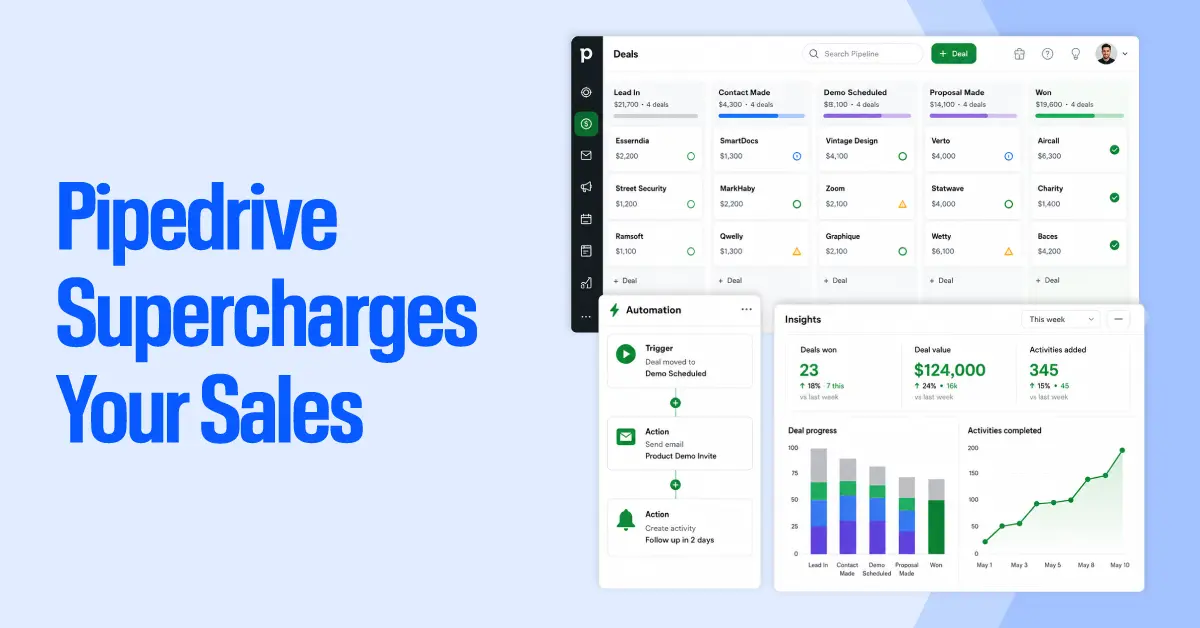
Pipedrive supercharges your sales process in 2026 by helping sales teams manage pipelines, automate follow-ups, track deals, and focus on the activities that actually move revenue forward. For B2B sales teams, agencies, consultancies, and growing SMBs, the challenge is not just storing CRM data. It keeps reps organized, improves sales productivity, and ensures no opportunity falls through the cracks.
Built around activity-based selling, Pipedrive turns everyday sales actions into a clear, repeatable process. Its visual sales pipeline, automation tools, email tracking, lead management, AI insights, and reporting dashboards give teams better pipeline visibility and more control over every deal.
What Is Activity-Based Selling, and Why Is Pipedrive Built Around It?
Activity-based selling is a sales methodology that focuses reps on controllable daily actions rather than only measuring lagging outcomes such as quota, closed revenue, or win rates. A sales rep cannot fully control whether a deal closes, but they can control whether they make the call, send the follow-up, book the demo, update the deal stage, or complete the next sales activity.
This is why Pipedrive is built around activity-based selling. Instead of acting as a passive CRM database, Pipedrive helps B2B sales teams turn every deal into a clear sequence of next actions. Activity reminders, visual pipeline stages, follow-up cadences, automation, and deal tracking all reinforce the same behavior: know what needs to happen next and do it on time.
For sales managers, this makes performance easier to measure and coach. Rather than asking why a deal has not closed, teams can ask which activity is missing, delayed, or overdue. In longer B2B sales cycles, that shift gives reps more control, improves pipeline visibility, and helps prevent high-value opportunities from stalling.
1. Visual Pipeline Management: See Every Deal at Every Stage
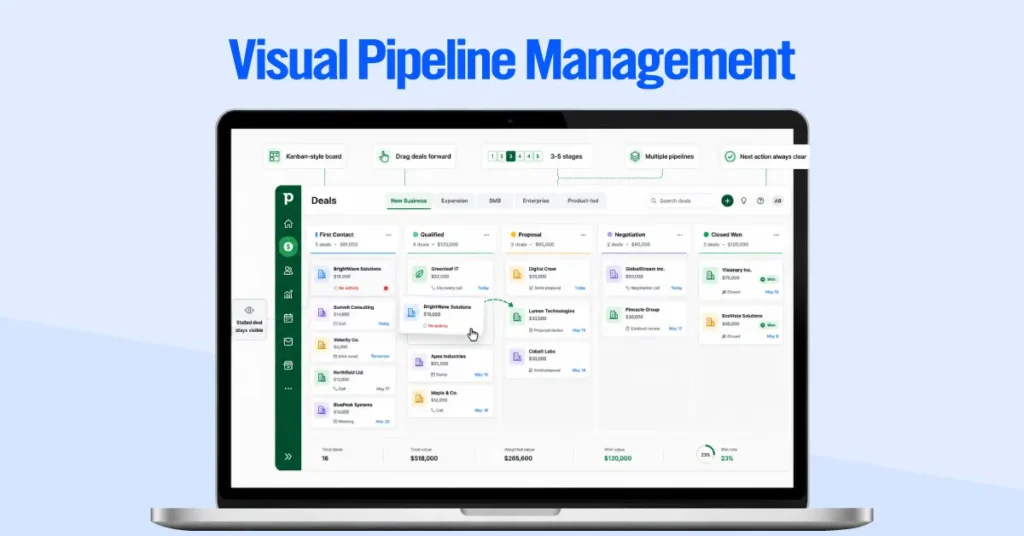
Pipedrive’s pipeline view is a Kanban-style board. Every active deal appears as a card and moves left to right through your defined deal stages from first contact through to closed-won.
The mechanics are intentionally simple: you define stages that reflect your actual sales process (not a generic CRM template), assign deals to each stage, and drag them forward as progress happens. Nothing disappears into a list or gets buried behind a filter. When a deal stalls or regresses, it stays visible.
Pipedrive supports multiple pipelines for teams running parallel motions: new business versus expansion, SMB versus enterprise, product-led versus sales-led. Each pipeline has its own stage configuration, keeping metrics clean across segments.
In our client implementations, we typically configure 3-5 stages. It is enough to capture meaningful handoffs without adding administrative overhead that slows reps down. The outcome is accountability without micromanagement. When the pipeline is this transparent, the next action on every deal is never in question.
2. Deal Rotting Alerts: Stop Losing Deals to Inaction
Deal Rotting is one of Pipedrive’s most operationally distinct features. Here’s how it works: you set an inactivity threshold for each pipeline stage, for example, seven days in “Proposal Sent” with no logged activity. When a deal crosses that threshold, its card color shifts to yellow as a warning, red once it’s significantly overdue.
It helps significantly because most lost deals die from negligence rather than a hard no. For example:
- A follow-up that got delayed.
- A rep who assumed the prospect would circle back.
- A deal that silently aged out while appearing active on the board.
Deal Rotting turns inaction into a visible, urgent signal before the opportunity has actually gone cold. For clients who implement it with properly calibrated thresholds, we consistently see 15–20% recovery on deals that would otherwise have been quietly lost to follow-up failure.
No other major CRM uses the term “Deal Rotting” as a named feature. That’s not a branding quirk, it’s a signal of how Pipedrive frames stalled deals: as a process problem, not a prospect problem.
3. Workflow Automation: Trigger Actions Without Manual Work
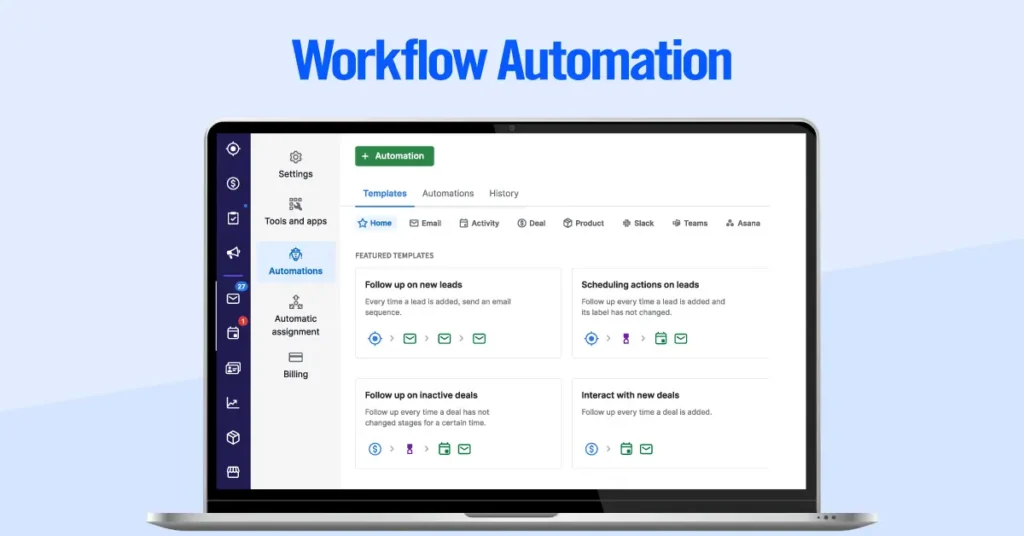
Pipedrive’s native workflow automation uses trigger-action logic: when something happens in your pipeline, Pipedrive automatically runs the next step.
For example, when a deal moves to “Proposal Sent,” Pipedrive can send a follow-up email, create a task, and notify the deal owner.
Common triggers include deal updates, new contacts, activity changes, field updates, and date-based events. Actions include creating tasks, updating records, sending emails, adding notes, or moving deals.
This is Pipedrive’s built-in automation builder, not Zapier or a third-party integration. Zapier can extend the system, but most repetitive sales tasks can be handled inside Pipedrive.
Examples we configure for clients:
- New contact added → assign to the right rep
- Deal reaches “Demo Scheduled” → send a confirmation email
- Deal sits untouched → create a follow-up task
- Deal closes won → start onboarding steps
Pipedrive currently includes Automations on Growth plans and higher. For most SMB sales teams, the value is simple: fewer missed follow-ups, cleaner handoffs, and less manual CRM admin.
4. AI Sales Assistant: Deal Health Scores Across Your Entire Pipeline
Pipedrive’s AI Sales Assistant is a built-in CRM feature, not a third-party add-on. It uses your Pipedrive data to help reps understand which deals need attention and what to do next.
The assistant can review deal, contact, and activity data, answer pipeline questions, summarize information, and surface context-aware recommendations. Pipedrive also uses AI to support win-probability insights, next-best-action suggestions, and pipeline notifications.
The practical value is prioritization. Reps do not need to manually scan every open deal to decide where to focus. The assistant helps point them toward the deals, risks, and actions that matter most.
One important note: availability depends on Pipedrive’s current AI rollout and plan limits. Sales Assistant is listed as a beta feature for select users, while AI notifications are available on Premium and higher plans.
5. Smart Contact Data: Auto-Enrich Every Lead at the Point of Entry
Smart Contact Data automatically pulls publicly available information such as LinkedIn profiles, job titles, company size, industry, social profiles, and populates contact records the moment a new lead enters your pipeline.
The process requires no manual action: add a contact with a name and email, and Pipedrive queries public data sources to enrich the record with everything available. The result is a fully populated profile that gives reps context before first outreach — what the contact does, where they work, the organization’s size, and relevant professionaLeadBoosterl background.
The downstream effect compounds across the team. When every contact record is complete from day one, reporting is cleaner, segmentation is more accurate, and reps invest zero time in data hygiene before they can have a productive first conversation.
Manual vs. Automated Sales Workflow
| Task | Manual Approach | Pipedrive Solution | Time Saved/Week |
| Follow-up reminders | Spreadsheet + calendar alerts | Activity reminders auto-set at deal creation | ~2 hrs |
| Lead enrichment | Manual LinkedIn search per contact | Smart Contact Data auto-fills on import | ~3 hrs |
| Deal health check | Weekly manager pipeline review | AI Sales Assistant scores deals daily | ~1 hr |
| Email tracking | No open/click visibility | Built-in open and click notifications | ~1 hr |
| Reporting | Manual Excel exports | Live dashboards updated in real time | ~2 hrs |
Across a five-person team, that’s roughly 45 hours recovered per week. These numbers come from before/after documentation with our own implementation clients.
6. Email Sync and Tracking: Know the Moment a Lead Engages
Pipedrive’s email sync connects your inbox to the CRM so sales conversations stay tied to the right contact, lead, or deal.
It supports major providers like Gmail and Outlook. Once connected, reps can send and receive emails in Pipedrive, sync selected folders, and keep deal records up to date without manually copying messages.
The stronger layer is email tracking. For emails sent from Pipedrive, reps can see opens, link clicks, and tracking alerts. That helps them follow up when a prospect is actively engaging, not days after interest has cooled.
Pipedrive also supports email templates, sequences, scheduled follow-up steps, and automated emails through workflows. Together, these tools make outreach more consistent and reduce manual follow-up work.
7. LeadBooster: Capture and Qualify Leads Around the Clock
LeadBooster is Pipedrive’s lead generation add-on. 4 tools designed to capture and qualify leads from your website before they bounce, even when your sales team is offline.
The four components:
- Chatbot — a customizable, no-code bot that engages visitors, asks qualifying questions, and routes leads into your Pipedrive pipeline based on their answers
- Live Chat — for real-time conversations when a rep is available to take over from the bot
- Web Forms — embeddable forms that push submissions directly into Pipedrive as new deals or contacts, with zero manual import
- Prospector — an outbound prospecting database that lets reps search by industry, company size, role, and location, then add contacts to the pipeline with one click
Available as a paid add-on on top of any base plan, priced per account rather than per user.
8. Revenue Forecasting: Probability-Weighted Revenue, Not Wishful Thinking
Pipedrive’s revenue forecasting helps teams replace manual end-of-month spreadsheets with a live view of expected pipeline revenue.
Each deal can carry a probability based on its stage or its own deal-level probability. Pipedrive uses that probability, along with the deal value and expected close date, to show a weighted revenue forecast.
This gives managers a more realistic number than the total value of every open deal. It shows which deals are likely to close, when they may close, and which need attention.
Forecasting is useful for sales managers, finance teams, and reps. Managers get clearer monthly planning. Finance gets data-backed projections. Reps get more accountability around close dates and deal movement.
Availability depends on the current Pipedrive plan. The forecast view and some forecast reports are available in Growth plans, while deal revenue forecast reports are available in Premium plans and higher.
9. Reporting and Dashboards: Coach on Activity, Not Just Outcomes
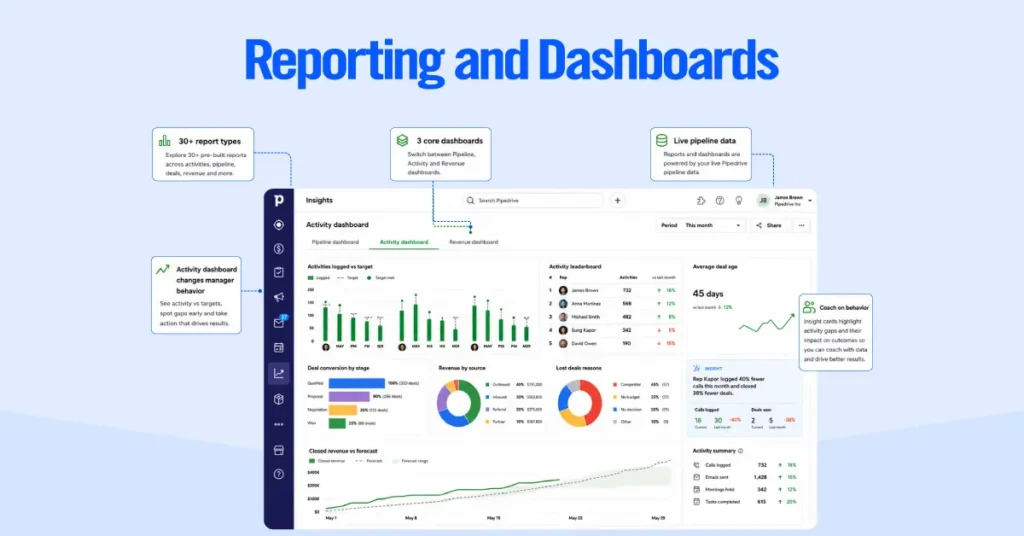
Pipedrive’s reporting suite gives sales managers something most CRM dashboards don’t: the ability to coach on behavior, not just results.
The dashboard builder is drag-and-drop and offers access to 30+ report types that cover every layer of the sales process. Some key reporting metrics include: deal conversion rates by stage, activity volume per rep, average deal age, revenue by source, reasons for lost deals, and leaderboard rankings. Reports pull data from the live pipeline, so there’s no export-and-format cycle before a Monday morning review.
In our implementations, most teams end up running 3 core dashboards:
- Pipeline dashboard: deal distribution by stage, value, and owner
- Activity dashboard: calls, emails, and meetings logged per rep against targets
- Revenue dashboard: closed revenue versus forecast, trending by week
The activity dashboard is the one that most significantly changes manager behavior. When you can see that a rep closed fewer deals last month and also logged 40% fewer calls, the coaching conversation becomes specific.
Without activity data, you’re guessing whether the gap is a skill problem, a motivation problem, or a pipeline quality problem.
10. Marketplace Integrations: Connect Every Tool Your Team Already Uses
Pipedrive is designed to sit at the center of your sales stack, not operate as a standalone tool. The Pipedrive Marketplace lists 500+ native integrations, one-click installs that connect Pipedrive to the tools your team already uses, without custom development or API work.
Coverage spans every operational layer of a modern sales team:
- Communication: Slack, Zoom, Aircall, RingCentral
- Productivity: Google Workspace, Microsoft 365
- Document management: DocuSign, PandaDoc
- Finance and accounting: QuickBooks, Xero
- Marketing: Mailchimp, ActiveCampaign, HubSpot
- Automation: Zapier, Make (for workflows beyond Pipedrive’s native builder)
The installation process is consistent across integrations: find the tool in the Marketplace, authenticate, configure data sync rules, and the connection is live in under 15 minutes.
Who Is Pipedrive Best For?
Pipedrive is purpose-built for teams where sales is the primary revenue motion. The strongest fit is with B2B sales teams, consultancies, agencies, professional service firms, SDR teams, and founders scaling a sales function from zero to ten people.
What these use cases share: a defined pipeline, a rep-driven outreach process, and a need for visibility without administrative complexity. Pipedrive delivers all three without requiring an IT team to configure it or a six-month implementation.
Use case to plan mapping:
| Use Case | Recommended Plan | Key Features |
| Solo founder | Essential | Pipeline management + AI Sales Assistant |
| 3–5 person SDR team | Advanced | Workflow automation + email sequences |
| Agency/consultancy | Advanced | Multiple pipelines + Smart Docs |
| 10–20 person sales team | Professional | Custom dashboards + revenue forecasting |
| Field sales team | Power | Mobile app + team permissions + call logging |
Where Pipedrive is not the right tool: e-commerce operations that require product catalog management; organizations whose primary growth lever is marketing automation rather than direct sales; enterprise teams with complex multi-territory hierarchies; and any business seeking a permanently free CRM. Pipedrive is a paid, sales-first product.
Does Pipedrive Actually Supercharge Your Sales Process? Our Final Verdict
Yes, with a clear qualification on what “supercharge” means in practice.
Pipedrive doesn’t add complexity to look powerful. It removes friction from the parts of sales that slow teams down: manual data entry, missed follow-ups, unclear pipeline status, and reporting that requires a spreadsheet export to be useful. For sales-first teams, that friction removal is genuinely transformative.
Where we consistently see the biggest wins across client implementations:
- Deal Rotting recovery: teams that configure threshold alerts properly recover 15–20% of stalled deals that would otherwise have gone cold with no touchpoint
- Email tracking response rates: reps who follow up within an hour of a tracked open report have meaningfully higher reply rates than those following a fixed cadence
- Automation time savings: the average rep on an Advanced plan recovers five to ten hours per week from automated follow-ups, task creation, and deal assignment
Pipedrive is the right call if you’re a sales-led team under twenty people who need pipeline visibility fast, want automation without developer support, and are willing to pay for a tool built specifically to close deals, not one that treats sales as a secondary module bolted onto a marketing platform.
Frequently Asked Questions
What is activity-based selling in Pipedrive?
Activity-based selling is Pipedrive’s core methodology. Rather than managing quota numbers reps can’t directly control, the platform structures the workday around completing specific, controllable actions like calls, emails, demos, and follow-ups. Pipedrive tracks these activities automatically against each deal, making performance measurable at the behavior level, not just the outcome level.
How does Pipedrive’s Deal Rotting feature work?
Deal Rotting monitors every active deal against a custom inactivity threshold you set per pipeline stage. When a deal exceeds that threshold with no logged activity, it turns yellow on the board as a warning, then red once significantly overdue. Reps see at a glance which deals need urgent attention before they’re lost to inaction.
Does Pipedrive have built-in workflow automation?
Yes. Pipedrive’s native workflow automation builder is distinct from Zapier and other third-party tools. It lets you trigger automatic actions when pipeline events occur. A deal moving to a new stage can automatically send an email, create a task, reassign the deal, or update a field. Available from the Growth plan and above.
What is Pipedrive’s AI Sales Assistant?
The AI Sales Assistant is a built-in feature that continuously analyzes pipeline data to surface deal health scores, flag deals showing decay, and recommend the next best action per opportunity. It works across the pipeline rather than on individual deals in isolation, prioritizing where rep attention will have the most impact. Available on all paid plans from Essential onward.
What is Pipedrive’s LeadBooster add-on?
LeadBooster is a paid add-on available on top of any base plan that includes four lead capture tools: a customizable website chatbot, embeddable web forms, live chat, and the Prospector outbound lead database. All four tools push leads directly into the Pipedrive pipeline, closing the gap between website traffic and active sales opportunities without manual import.
How many integrations does Pipedrive support?
Pipedrive’s Marketplace offers 500+ native integrations, covering communication tools (Slack, Zoom, Aircall), productivity suites (Google Workspace, Microsoft 365), document management (DocuSign, PandaDoc), accounting platforms (QuickBooks, Xero), and automation connectors including Zapier and Make. Most integrations install in under fifteen minutes.
Is Pipedrive good for remote and field sales teams?
Yes. Pipedrive’s iOS and Android mobile apps support offline mode, one-tap call logging, mobile activity reminders, and full deal management from any location. The Power plan adds team permission controls and enhanced visibility settings suited to distributed or field sales structures.