AI Summary




TL;DR
- A zombie lead is a sales opportunity that looks active in your CRM but has stopped making real progress toward a buying decision.
- Zombie leads inflate pipeline value, distort forecasts, and waste rep time on deals that never close.
- The 10 warning signs include email opens without replies, demos without follow-through, repeated delays, pricing avoidance, no access to the decision-maker, and deals stuck in the same Pipedrive stage too long.
- Use Pipedrive’s Deal Rotting feature, filters, and activity tracking to automatically surface stalled deals.
- Use Fireflies.ai to review meeting transcripts for missing commitments, vague next steps, and unresolved objections.
- Automate Slack alerts through Pipedrive’s Dealbot or Zapier so reps get notified the moment a deal goes cold.
- Every stalled deal deserves a final requalification attempt. Then decide clearly whether to re-engage, nurture, or close it.
A zombie lead is a sales lead that still appears active in your CRM but has stopped making real progress toward a buying decision. These deals can be difficult to spot because they still show signs of activity. A prospect may open your emails, attend a meeting, or say they are interested, while the deal itself goes nowhere.
Look closer, and the warning signs are usually clear. No new stakeholders, no agreed next steps, and no firm timeline. The deal stays in your pipeline because there is just enough activity to keep following up, but not enough forward motion to move it toward a close.
That creates problems beyond a messy pipeline. Zombie leads inflate your pipeline value, make sales forecasts less reliable, and keep reps spending time on deals that are unlikely to move forward. In Pipedrive, they also add stale data that makes pipeline reviews harder to act on. Knowing when a deal has stopped progressing, and having a consistent way to review, re-engage, or remove it, is what separates a healthy pipeline from a bloated one.
The Anatomy of a Zombie Lead in a B2B Sales Campaign
The warning sign is not that a prospect stops replying completely. It is when the deal stops giving the rep anything concrete to move forward with.
A meeting ends without a next step. The decision-maker is still unknown. A proposal goes out, but no date is agreed on to review it. The prospect says the project is interesting but cannot explain when or how they plan to decide. The deal may remain open for weeks while nothing actually changes.
That is how an opportunity gradually turns into a zombie lead. There is enough activity to justify keeping it open, but no evidence that the buying process is actually moving.
How Poor Qualification Creates Zombie Leads
Zombie leads often start when a rep adds a deal to the pipeline before they know enough about the opportunity. The prospect may have a potential need, but the rep has not confirmed the details needed to move the deal forward.
Common gaps include:
- No clearly defined business problem
- No confirmed decision-maker or buying group
- No understanding of how the prospect makes purchasing decisions
- No clear reason to act now
- No agreed next step
- A demo or proposal sent before the prospect has committed to evaluating the solution
These gaps make it difficult to build momentum later. Without a clear need, buying process, or next action, the rep has little to work with beyond checking in and asking whether the prospect is still interested.
Why Interested Buyers Sometimes Go Quiet

Silence does not always mean the prospect was never serious. A buyer can have a genuine need but still be unable to move forward because of internal priorities, missing stakeholders, budget discussions, or a slow approval process.
This is why reps need to look beyond general engagement. A prospect opening an email or attending a meeting tells you they are paying attention. It does not tell you whether they are moving toward a decision.
Stronger buying signals include involving other stakeholders, confirming requirements, agreeing to specific next steps, discussing implementation, or setting a decision timeline. Attention shows interest. Action shows buying progress.
When “No Decision” Becomes a Sales Problem
A delayed decision is not automatically a dead opportunity. The problem starts when delays continue without anything concrete changing.
If there is no agreed next step, decision date, new stakeholder, or event that could move the purchase forward, the rep should requalify the deal rather than keep treating it as active.
That conversation should be direct. Is this still a priority, and if so, what happens next? If the prospect cannot answer either question, keeping the opportunity in the active pipeline may only create a false picture of the sales team’s potential revenue.
How Zombie Leads Hurt Your Sales Workflow
Stalled deals do more than waste individual rep time. They undermine the accuracy of your entire sales operation.

Inflated Pipeline and Unreliable Forecasts
When inactive deals stay open in Pipedrive, they inflate total pipeline value. Sales managers commit to targets based on deals that will never close. Revenue projections miss. Hiring decisions get made on false numbers. The team loses trust in its own CRM data.
Deal Slippage and Stalled Opportunities
The expected close date gets pushed once, then again. The rep updates Pipedrive with a new date but no new evidence the deal is moving. Watch for close dates changed multiple times, no stage movement over an extended period, missing next activities, and long gaps between real conversations. If all four appear together, the deal is very likely stalled.
Deal Age as a Warning Signal
Older deals deserve closer review, but deal age alone does not make an opportunity dead. A complex enterprise sale may legitimately run for months. The right benchmark is your own sales cycle. Compare each deal’s age and time in its current stage against your team’s average. Review deals that significantly exceed those averages.
10 Brutal Signs You Are Dealing With a Zombie Lead
These are the patterns we see most often in stalled pipelines. For each sign, we cover what the signal looks like, why it matters, and what to do.
1. They Open Your Emails but Never Respond
Email opens are not buying intent. They mean the subject line worked. If a prospect consistently opens your messages but never replies, clicks a link, or takes any action, the engagement is entirely passive.
Check your email tracking in Pipedrive. If the last actual reply was weeks ago despite multiple opens, stop sending “just checking in” follow-ups and send a direct requalification message instead. Ask a specific question that requires a real answer.
2. They Attend Demos but Disappear During Follow-Up
A demo only moves a deal forward if it leads to a committed next step. When a prospect attends, says positive things, then goes silent, the demo was informational, not evaluative. Before scheduling demos, confirm what the prospect expects to happen afterward.
3. They Keep Saying “Circle Back Next Quarter”
Look for an actual future trigger rather than accepting an indefinite delay. If a prospect says “let’s revisit next quarter” but cannot name a specific event, budget cycle, or milestone, the delay is likely a polite way of avoiding a decision. Ask what will change between now and then.

4. Pricing Discussions Trigger Radio Silence
When a prospect engages enthusiastically about features but goes quiet the moment pricing comes up, there is usually a disconnect. Either they never confirmed budget, the price exceeds their expectations, or they lack authority to approve the spend.
This is a requalification moment, not a follow-up moment. Ask whether they have allocated budget and whether the pricing range fits their expectations. If that question also goes unanswered, the deal is unlikely to move forward.
5. You Cannot Reach the Real Decision-Maker
There is a real difference between an engaged contact and access to the buying process. Your champion may be responsive, but if they cannot connect you with the person who approves the purchase, the deal cannot close from your current position. Ask how purchasing decisions are made and who else needs to be involved.

6. Every Next Step Gets Rescheduled
Rescheduling once is normal. Repeated rescheduling with no measurable progress between meetings signals the deal lacks priority. After two or three reschedules, have an honest conversation about timing.
7. The Deal Is Open in Pipedrive but Has No Clear Next Activity
If a deal sits in Pipedrive with no scheduled next activity, no one is actively working it. Use Pipedrive’s activity filters to find deals without upcoming activities. Every open deal should have a defined next step.
8. The Deal Has Been Stuck in the Same Stage Too Long
The appropriate threshold depends on your company’s normal sales cycle and expected time in each pipeline stage. A deal in “Proposal Sent” for three times your average duration in that stage is worth investigating. Pipedrive’s Deal Rotting feature can flag these automatically.

9. They Stop Engaging With Proposals and Shared Materials
When a prospect asks for a proposal or pricing document and then never opens or references it, the buying process has stalled. If your proposal has gone untouched for weeks, the prospect is not actively evaluating your solution.
10. “We’re Too Busy” Never Turns Into a Real Timeline
Serious buyers make time for projects they need. When “we’re too busy” repeats without resolving into a timeline, the project likely lacks internal priority. Ask whether the initiative is still on their roadmap and when they expect to revisit it.

How to Automate Zombie Lead Detection
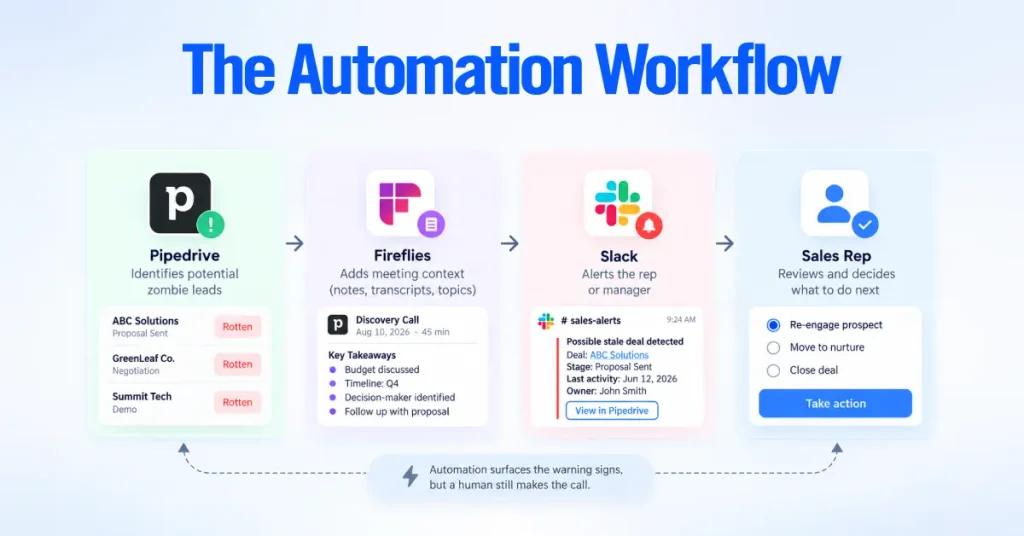
You do not need to manually inspect every deal to find zombie leads. A better approach is to let your CRM flag signs of inactivity, use meeting data to add context, and alert the right person when a deal needs attention.
A practical workflow looks like this:
Pipedrive identifies a potential problem → Fireflies adds meeting context → Slack alerts the rep or manager → the rep decides what to do next.
Automation can surface warning signs, but it should not decide a deal is dead. Someone still needs to review the opportunity.
Use Fireflies to Find Problems That CRM Data Misses
Pipedrive can tell you that a deal has been inactive. It cannot always tell you why.
Fireflies.ai connects with Pipedrive through a native integration and can log meeting notes, transcripts, and action items against the relevant contact, lead, or deal. This gives the rep more context when an opportunity starts showing signs of stalling.
A meeting transcript can help answer questions such as:
- Did the prospect agree to a specific next step?
- Were objections raised but never addressed?
- Did the prospect mention a decision timeline?
- Were other stakeholders identified but never brought into the process?
- Did the conversation establish clear buying requirements?
This information can reveal problems that email activity or CRM timestamps cannot. Fireflies provides the context, but the sales team still needs to decide what that context means for the deal.

Track Important Topics in Sales Meetings
Fireflies Topic Trackers can monitor terms such as budget, timeline, decision-maker, and competitor across meetings. These trackers can help managers spot recurring patterns and see whether important buying topics are actually being discussed.
You can combine this information with other meeting signals, such as sentiment and talk time, to compare recent conversations. If meetings keep covering the same ground without producing a clear next step, the opportunity may need to be requalified.
Use Pipedrive to Surface Stale Deals
Pipedrive already contains many of the signals you need to identify deals that may be losing momentum.
Useful signals include:
- How long the deal has been in its current stage
- How long it has been open
- When the last activity was completed
- Whether another activity is scheduled
- Whether the expected close date has passed
- How often the expected close date has been pushed back
- What recent notes, emails, or activities say
You can turn these signals into saved filters in Pipedrive. For example, create views for deals with no upcoming activity, deals past their expected close date, deals that have stayed in one stage longer than expected, or deals with no recent activity.
Custom fields can add another layer of context. A “Last Meaningful Contact” date or “Qualification Status” field can help managers distinguish between a deal that is simply inactive and one that needs requalification.
These filters can then become part of your weekly pipeline review. Instead of checking every opportunity equally, the team can focus first on deals showing clear warning signs.

Configure Pipedrive Deal Rotting
Pipedrive’s Deal Rotting feature provides another way to spot deals that have been inactive for too long. When a deal stays untouched beyond the number of days you set for its stage, Pipedrive marks it as rotten on the pipeline board.
To configure it, open your pipeline view, edit the pipeline settings, and set a “Rotting in (days)” threshold for each stage.
The right threshold depends on how quickly deals normally move through your sales process. An early qualification stage may need a shorter threshold than negotiation, where longer gaps may be normal.
A rotten deal is a reason to review the opportunity, not proof that it is dead. The rep should review recent activity and meeting context before deciding what happens next. A rotten deal is a review signal, not automatic proof the opportunity is dead.
Send Stale-Deal Alerts to Slack
Once Pipedrive can identify deals that need attention, you can notify the people responsible for them instead of relying on someone to remember to check a saved filter.
Pipedrive’s native Slack integration can send notifications for events such as new deals, stage changes, and won deals. For more specific stale-deal alerts, tools such as Zapier or Make can connect your Pipedrive filters to Slack.
A simple workflow:
- Define the warning signs. For example, no activity for 14 days or an expected close date that has already passed.
- Trigger the automation. Use the relevant Pipedrive deal update or filter-based trigger.
- Send the alert. Post a message to the assigned rep or a dedicated sales channel.
- Review the deal. The rep checks the Pipedrive record and any relevant Fireflies meeting notes.
- Take action. Re-engage the prospect, move the deal to nurture, or close it if there is no longer a realistic opportunity.

The Slack alert should give the rep enough information to act quickly. Include the deal name, current stage, owner, last activity date, and a link to the Pipedrive record.
Pipedrive’s own workflow automation can also create follow-up activities or update deal fields when specific conditions are met. Together, these tools form a simple system.
Pipedrive flags the warning signs, Fireflies explains the context, automation gets someone’s attention, and the sales team makes the final call.
How to Re-Engage a Stalled Deal
Not every stalled deal belongs in the lost column. Before closing it, give the opportunity one structured chance to show that there is still a real buying process.
The goal is not to chase the prospect indefinitely. It is to find out whether there is a real problem to solve, a reason to solve it, and a path to a decision.
Confirm the Problem Is Still a Priority
Start by checking whether the original business problem still exists and whether solving it is still important to the prospect.
Priorities change. Budgets move. Projects get delayed. A short, direct conversation can tell you whether the opportunity is still worth pursuing or whether the original reason for buying has disappeared.
Create a Clear Plan for a Real Opportunity
If the prospect still wants to move forward but the deal has lost momentum, create a simple shared plan to reach a decision.
A Mutual Action Plan (MAP) can outline:
- The remaining steps
- Who is responsible for each step
- Which stakeholders need to be involved
- Key decision milestones
- Target dates
It does not need to be complicated. A simple list of agreed actions and dates in an email can be enough. What matters is that both sides know what happens next.

Ask for a Clear Decision
If repeated attempts to requalify the deal produce no clear path forward, stop sending open-ended follow-ups.
A professional breakup email gives the prospect an easy way to confirm whether the project is still a priority, has been delayed, or is no longer moving forward. Keep it brief and respectful.
“I have not been able to connect with you on next steps, so I want to respect your time. If this is still a priority, I am happy to pick things back up. If the timing has changed, no problem. Just let me know, and I will update things on my end.”
This kind of email works because it makes responding easy. The prospect can say yes, not yet, or no, and the rep stops guessing.
Move Delayed Opportunities Into Nurture
Sometimes the opportunity is real, but the timing is not right. In that case, the deal should leave the active pipeline rather than remain open indefinitely.
You can keep the prospect engaged through a nurture process. Pipedrive Campaigns, a paid add-on, supports targeted email campaigns for segmented contacts, while Pipedrive email sequences on Growth plans and above can automate follow-up for individual contacts.
Remove the deal from your active pipeline count, but keep a clear path for the prospect to return when the timing is right.
When to Mark a Zombie Lead as Lost
Closing a dead opportunity is not a failure. It keeps your pipeline focused on deals that have a realistic chance of closing.
Mark a deal as lost when:
- The original business problem no longer exists.
- The purchase is no longer a priority.
- There is no identifiable decision process.
- The prospect cannot agree to a concrete next step.
- You cannot reach or involve key stakeholders.
- Multiple re-engagement attempts produce no progress.
- The timing remains open-ended with no clear event that could restart the deal.
When you close the deal, use Pipedrive’s lost reason field to record why. Over time, these reasons can show patterns in your sales process, such as deals being lost to competitors, budget constraints, timing, or weak qualification.
That makes lost deals useful data rather than wasted effort. It also helps your team focus its time and forecast on opportunities with a genuine path to close.
How to Prevent Zombie Leads
You can avoid most zombie leads with better habits at the front of the pipeline. These practices reduce the number of stalled deals that reach your pipeline in the first place.
- Define qualification criteria before deals enter the pipeline
- Confirm the business problem early
- Identify decision-makers and understand how purchasing decisions are made
- Document the buying process
- Require agreed next steps at the end of every meeting
- Set realistic close dates based on buying signals
- Define stage expectations for every pipeline stage
- Configure Deal Rotting with stage-specific thresholds
- Use clear lost reasons consistently
- Review stale deals in weekly pipeline meetings
- Separate active pipeline from nurture
- Keep CRM data current as a standard team practice