AI Summary




A remodeling and sauna contractor we work with in the Bay Area had a stack of signed quotes sitting in the pipeline. No deposits against them. No start dates. A few were more than six months old, and the original quotes were only good for 30 days. Material prices had moved since. The owner still had to decide whether to honor the old numbers or send new ones.
In Pipedrive, all of those deals were won. In practice, none of them could start.
That’s the gap this guide deals with. Pipedrive handles client onboarding perfectly well. You get Deals, Projects, templates, Automations, Activities, email, and integrations. What you don’t get is a decision about when onboarding starts, what Sales owes Delivery, who owns the client afterward, or what “done” means. You write that part. Then you pick the Pipedrive objects that run it.
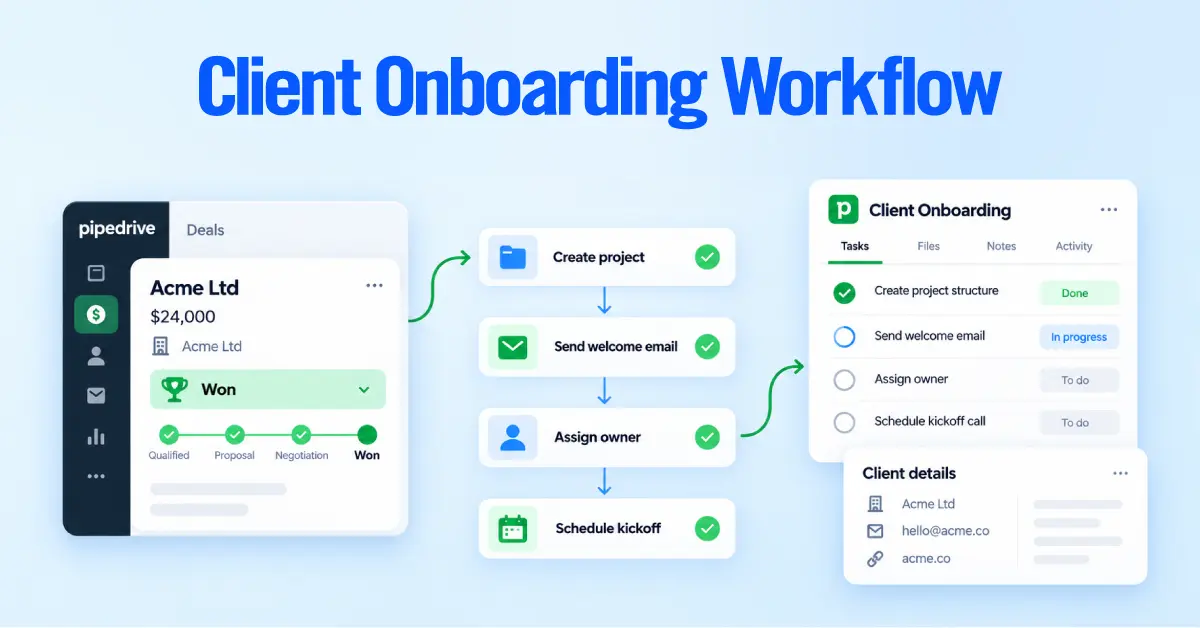
The sequence we build with clients looks like this. Sale closes, readiness check, handoff, Project created, welcome and intake, kickoff, implementation, validation and go-live, completion, then the client moves into ongoing support.
Key takeaways
- Closed Won and onboarding-ready are different states. Automate the second one.
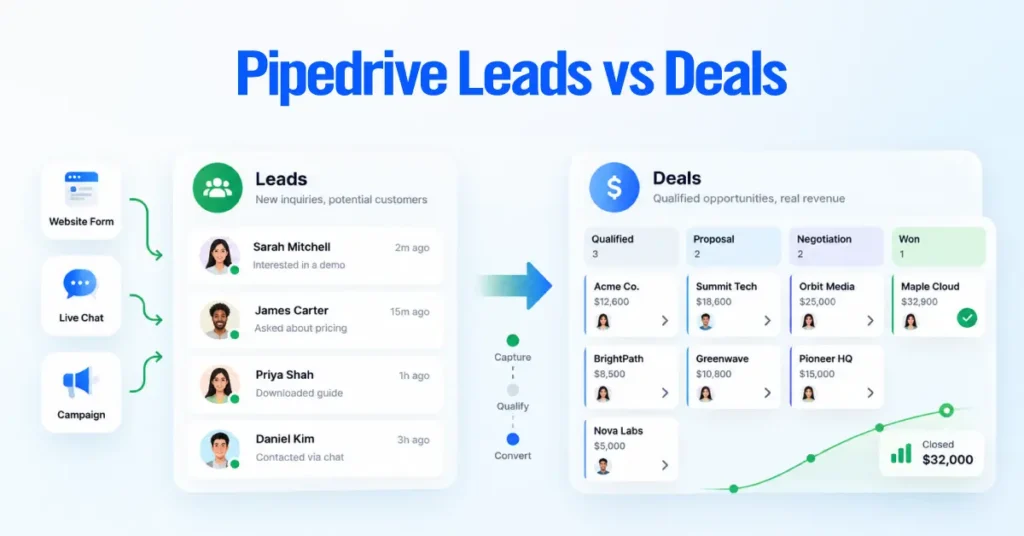
- Sales opportunities belong in Deals. Delivery work belongs in Projects. Mixing them corrupts your pipeline reporting.
- Treat the handoff as a data contract with an acceptance step, not a notification.
- Build small, single-purpose automations instead of one long one. Pipedrive caps a single automation at ten actions and 90 days of total delay.
- Duplicate projects and silent integration failures cause more damage than anything else. Design for both.
- Finished tasks do not prove onboarding worked. Exit criteria need client acceptance and a named ongoing owner.
Can you manage client onboarding in Pipedrive?
Yes. Projects is the native place for it, and Pipedrive describes it as the tool for work that continues after a deal is won, such as onboarding, implementation, and delivery. You get boards, phases, tasks, subtasks, activities, milestones, dependencies, a Gantt view, templates, and automation actions, with the Deal still attached.
The software won’t design your process, though. It has no view on when onboarding should start, what Delivery needs before it accepts a client, or what counts as finished.
| What onboarding needs | Pipedrive feature | What you still design |
| A home for delivery work | Projects, boards, phases | Boards and phase names that match how you actually work |
| Repeatable process | Templates with relative due dates | Which template goes with which service or tier |
| Automatic start | Automation actions create project and update project fields | The trigger and the conditions that make it safe |
| Work breakdown | Tasks, subtasks, activities, milestones, dependencies | Which item type each step should be |
| Client communication | Email sync, templates, automated sends | Timing, sender and fallbacks |
| Measurement | Project performance and project duration reports | KPIs and a baseline |
| External delivery | Native integrations, Zapier, Make, webhooks, API | System of record, sync direction, duplicate protection |
Automations need a Growth plan or higher, so your plan level decides how much you can do without middleware.
Define what “ready to start” means
Define the exact conditions that must be met before delivery can begin. Then automate the handoff based on those conditions, not simply on whether a deal is marked won.
The Bay Area contractor mentioned above illustrates this well. The pipeline was built during the initial June setup with stages for Quote Sent, Deposit Paid, Project Scheduled, and Project Started, plus an On Hold stage for clients who are deferring.
A signed quote with no deposit never reaches Deposit Paid, so it cannot count as ready to start. The stale-quote problem surfaced later, and the owner still had to decide whether to honor the original 30-day pricing or issue new quotes.
A South Florida engineering and testing firm uses a different trigger for the same reason. Their delivery handoff does not begin until the deal reaches Proposal Signed or Work Started.
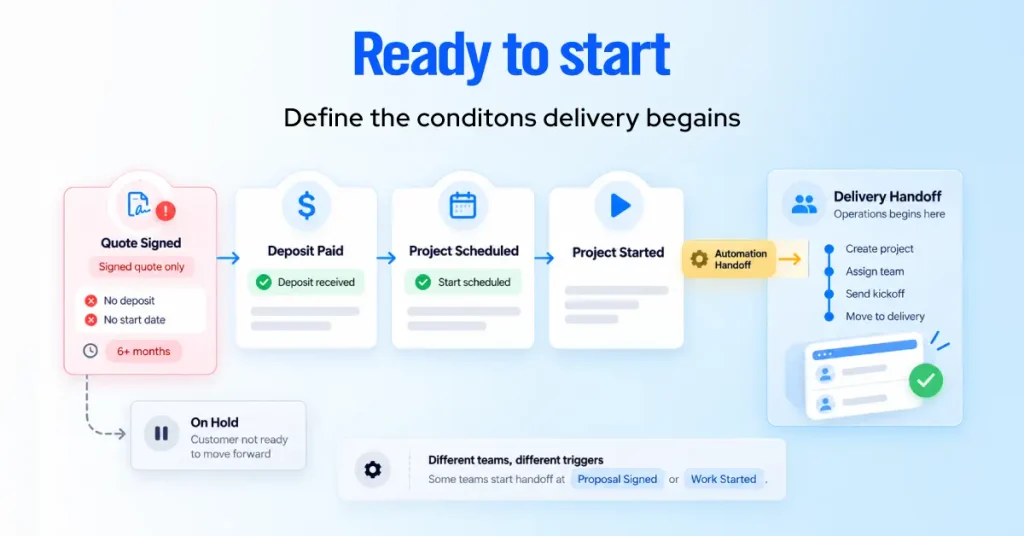
The right trigger depends on how your business confirms both commitment and readiness to begin work.
| Trigger | Use it when | Watch out for |
| Deal marked Won | Won reliably means commercial approval is complete | Reps marking Won early to hit a number |
| Contract or proposal signed | Signature is your formal start gate | Payment or compliance still outstanding |
| Deposit or payment received | Work cannot legitimately start without money | Billing sync lag pushing the start date |
| Required fields complete | Data quality is your main handoff risk | Placeholder values passing the check |
| A dedicated onboarding-ready field | Several conditions must be true at once | Someone has to maintain the rule |
The readiness gate we recommend
Before onboarding starts, confirm that:
- The agreement is signed
- Any required deposit is paid
- Scope is final
- The primary contact is confirmed
- A delivery owner is assigned and available
- The start date is realistic
- Required handoff fields are complete
- Any exception has been approved
This is a governance control we recommend, not a native Pipedrive feature. Pipedrive does provide two field rules that can support the process: required fields and important fields.
Required fields block users from saving until they enter the required information. Important fields flag missing information without blocking progress.
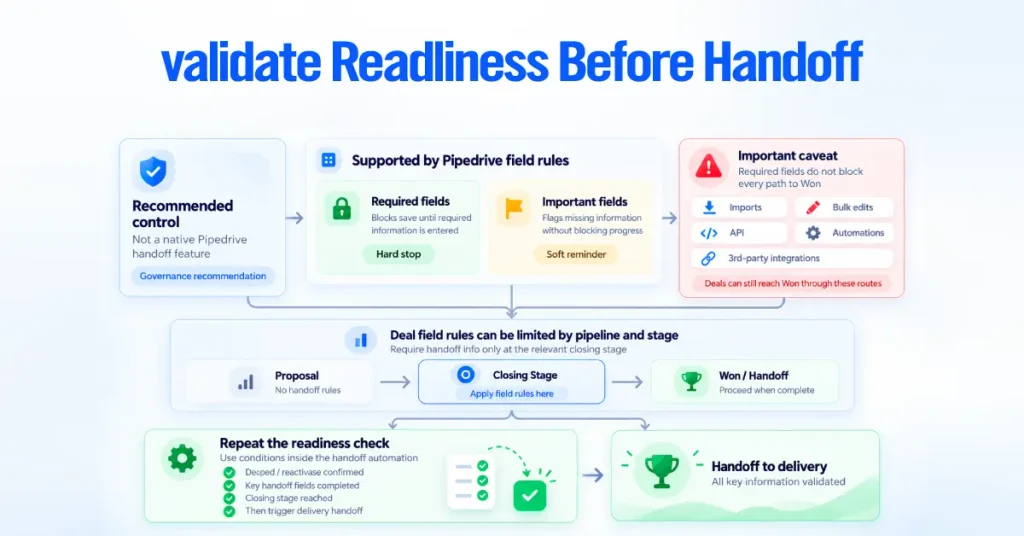
For deal fields, these rules can be limited to specific pipelines and stages. That means you can require handoff information only when a deal reaches the relevant closing stage.
Pipedrive states that required fields do not block deal progression when updates happen through imports, bulk edits, the API, automations, or third-party integrations.
If a deal can reach Won through any of those paths, repeat the readiness check as a condition inside the automation before triggering the handoff.
Decide where onboarding lives
Put the sale in a Deal and the delivery work in a Project. Pipedrive draws the same line: deals for sales opportunities and revenue, and projects for onboarding, delivery, and implementation after a sale.
The cost of getting this wrong shows up in reporting. When delivery stages sit in the sales pipeline, every implementation delay looks like a sales problem, and deal age, stage conversion, and velocity all stop meaning anything.
Ownership blurs too, because a deal has one owner while onboarding usually involves a delivery lead, an implementer, and sometimes a CSM.
| Option | Best fit | Sequencing | Effect on sales reporting |
| Won deal plus a few activities | One or two follow-up steps after signature | None | Minimal |
| Separate onboarding deal pipeline | Short, linear, status-only tracking | None | Distorts deal reporting unless filtered everywhere |
| Pipedrive Projects | Multi-step delivery with phases, owners, and dependencies | Strong | Clean separation |
| External delivery platform | Delivery team already works in another tool | Strong | Clean, if the integration is controlled |
When a separate deal pipeline still works
Onboarding takes days, the process is linear, only a few statuses matter, and Projects is not licensed. The trade-off is that those deals carry a value and will appear in revenue reports unless every dashboard filters them out, and eventually someone builds a dashboard that does not.
When delivery belongs in another system
If your team already manages delivery well in another platform, keep Pipedrive focused on the commercial process instead of forcing project delivery into the CRM.
That was the right approach for an engineering and testing firm that already ran delivery in Monday.com. We configured Pipedrive Projects during implementation, but the workflow that lasted kept sales in Pipedrive and delivery in Monday.com.
When a deal reaches Proposal Signed, an integration workflow built in a middleware platform (not a native Pipedrive automation action) handles the handoff to Monday.com:
- The integration creates the matching Monday.com job
- Work Type determines which board receives it
- Construction materials testing and geotechnical work follow different routes
- Change orders follow a separate workflow. When a PandaDoc change-order template is signed (matched by template ID), the integration creates a new Monday.com line item and a task for the admin to set up the extra line items
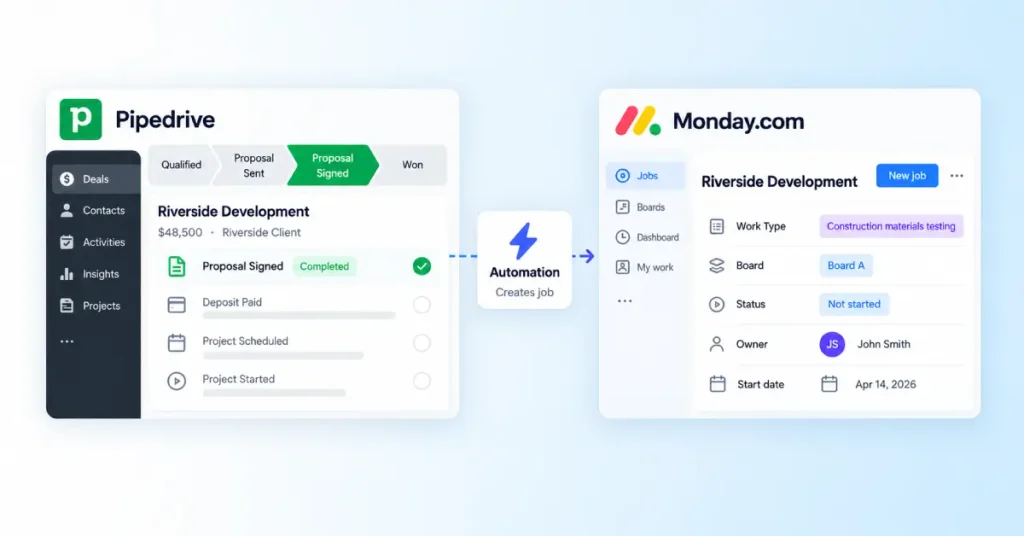
Before enabling the automation, we created sample records for the client to review and approve.
This model works best when the business already has a mature delivery system. Pipedrive remains the system of record for the commercial relationship, while a small set of delivery statuses syncs back for visibility.
The trade-off is additional complexity. An external delivery platform adds:
- A second system to maintain
- A separate permission model
- An integration that can fail without being immediately obvious
So moving delivery outside Pipedrive is not automatically an upgrade. It makes sense when the existing delivery system is already established and worth preserving.
Two Pipedrive plan requirements also matter:
- Projects is included for all users on Premium and Ultimate and is available as a per-seat add-on on Lite and Growth
- Automations require Growth or higher
That means this type of automated handoff is not available on the Lite plan.
Write the handoff as a data contract
Delivery should be able to start work without going back to Sales for missing information. Define exactly which fields must be included in every handoff.
For the engineering firm, the handoff includes:
- Project name
- Project number
- Project address
- Client name
- Contact person
- Contact email
- Work type
- Project manager
- Project file folder link
- Name of the person who completed the intake form
Some fields do more than provide context. Work Type, for example, determines which delivery board receives the job. If that field is wrong, the project can be routed to the wrong team.
Field quality matters just as much as field coverage.
During implementation, we found that the PM alert automation pointed to the Client Project Manager field instead of Project Manager, so alerts never fired. We fixed the automation to reference the correct field, limited it to Proposal Signed and Work Started, and bulk-cleared roughly 350 deals it had wrongly assigned. It is a useful reminder to check every automation that references a field before assuming the data is wrong.
The goal is simple: one reliable source for each handoff value, with every required field mapped before delivery begins.
Our minimum contract, and where each item belongs.
| Information | Record | Why Delivery needs it |
| Client company, billing entity | Organization | Account identity |
| Primary contact, executive sponsor | Person | Communication and escalation |
| Products and services sold | Deal | Commercial scope |
| Signed agreement, payment status | Deal | Evidence and start gate |
| Promised outcomes and exclusions | Handoff fields | The first dispute always starts here |
| Start date, target go-live, owner | Project | Planning and accountability |
| Technical scope, risks, success criteria | Project | Implementation and definition of done |
Then add an acceptance step, because a one-way push has no way to catch gaps.
Keep each fact on one record
Keep one source of truth for each value. Duplicating data across Deal and Project records creates stale or conflicting information.
Copy only what Delivery needs often and what is unlikely to change after the sale. Linked Projects already surface related files, notes, and emails, so you don’t need to duplicate most information.
Build the project and the template
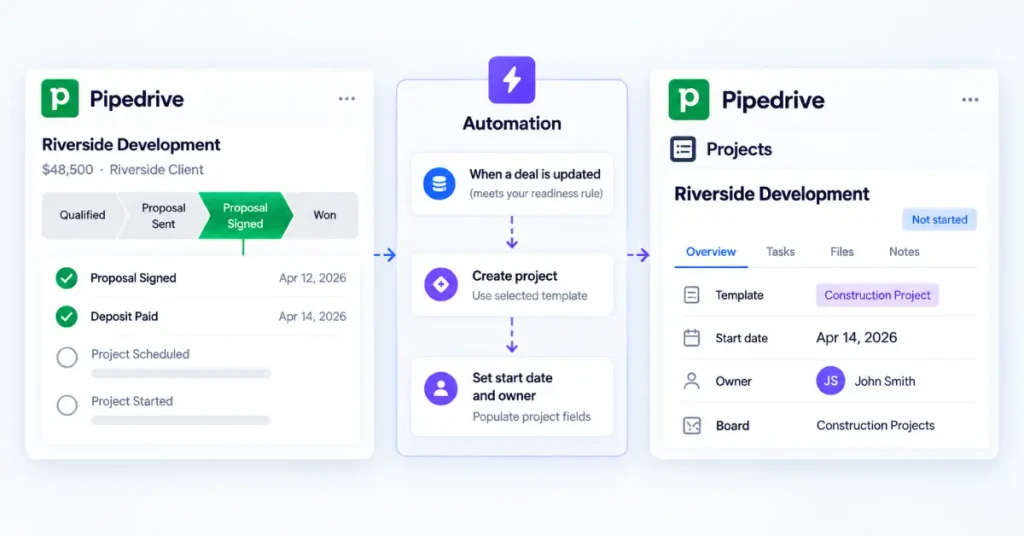
Once a deal clears the readiness rule, an automation can create the project. Pipedrive supports this natively. In the automation, add a project action, click “Add fields”, then select a template and a start date.
We build it in this order.
- Go to Tools and apps, then Automations, then “+ Automation”.
- Choose a deal updated event trigger.
- Add conditions expressing your readiness rule, not just deal status.
- Add the project action and pick the board.
- Select the template that matches the service line.
- Set the start date, since template due dates are calculated from it.
- Assign the owner explicitly.
- Populate the project fields. Delivery reads first.
- Test against controlled records, then activate.
A single generic template is the most common template mistake. A renewal, a small add-on, and a full implementation need different work. Branch by service type or contract tier and choose accordingly, or your team will learn to ignore the plan.
A seven-phase onboarding template
Templates hold tasks, activities, and milestones, organize them into phases or groups, set due dates relative to the project start date, and carry dependencies. You can also convert an existing project into a template.
Give every phase one outcome. If you cannot write the outcome, the phase is a label.
| Phase | Outcome | Example work |
| Handoff review | Delivery accepts a complete brief | Review contract and scope, confirm contacts, log risks, accept handoff |
| Welcome and intake | Client knows what happens next and supplies inputs | Welcome email, intake form, file and access requests |
| Kickoff | Both sides agree on scope, roles, timeline, success criteria | Kickoff call, stakeholder confirmation, cadence, action items |
| Setup and implementation | Agreed configuration or service work is complete | Environment setup, integrations, data prep, client approvals |
| Validation and training | Deliverables verified, users prepared | QA, UAT, stakeholder review, training, sign-off |
| Go-live | The service enters active use | Launch checklist, final validation, issue monitoring, support path |
| Transition | Ongoing ownership exists | Completion review, ongoing owner assigned, success review booked, closure |
Smaller engagements compress the same logic. When we migrated a coaching practice from Salesforce to Pipedrive, delivery ran in six phases. Access and accounts, data migration, CRM build, validation, training and client testing, then closeout.
We kept the migration deliberately conservative: we copied existing data before deciding what we could safely remove, reconciled counts for contacts, organizations, activities, and custom fields, and got written approval before deleting anything.
On a larger contractor build, the kickoff recap documented every system we needed access to, the required permission level, and the files the client had to provide. Each call ended with a written recap that separated our action items from theirs.
Use the right item type
Pipedrive gives you four, and they behave differently.
| Item | Use it for | Behavior worth knowing |
| Task | Work or a deliverable | Flexible, accepts multiple assignees, can hold subtasks |
| Subtask | A step inside a task | Cannot contain further subtasks |
| Milestone | A progress point rather than work | Tracks progress, no subtasks |
| Activity | A scheduled call or meeting | Needs a date, time, and one owner; syncs to external calendars |
Configure the client environment is a task. Map existing fields is a subtask. Kickoff call is an activity. Configuration approved is a milestone.
For sequencing, open a task or milestone, go to the dependencies tab, and set blocking or waiting on. Dependencies show as arrows in the Gantt view. Model only the real ones, especially client-owned prerequisites. A delivery lead who can see six projects waiting on client access has something to fix. A list of forty overdue tasks tells them nothing.
Automate the predictable steps
Early onboarding is where automation pays, because the steps repeat and delay is costly. A client who signs Monday and hears nothing until Thursday has already started to worry.
| Trigger | Condition | Action |
| Deal updated | Readiness rule satisfied | Set onboarding-ready status |
| Onboarding-ready set | Handoff data present | Create the linked project from the right template |
| Project added | Owner populated | Notify Delivery in Slack or Teams |
| Project added | Contact email valid | Send the welcome email |
| Project added | Intake required | Send the intake request |
| Handoff accepted | Kickoff required | Create the kickoff activity |
| Project added | Required data missing | Notify the exception owner |
Two email constraints shape this. An automation’s email action can only use an address synced to Pipedrive. The sender can be the automation owner, the item owner, the triggering user, or a Team Inbox (Team Inbox requires Premium or higher).
Decide deliberately whose name appears in the client’s inbox and configure the sender accordingly. There is also a rate limit of 40 email actions per minute across the whole account, shared by every automation.
What to keep human
Our test is whether a wrong output would embarrass you in front of the client. If it would, a person reviews it.
| Keep automated | Keep human |
| Project creation from a template | Interpreting unusual scope |
| Internal delivery notification | Accepting or escalating risk |
| Standard welcome email | Confirming kickoff timing with senior stakeholders |
| Standard intake request | Approving and repricing scope changes |
| Exception alerts | Sensitive or recovery communication |
Split the logic into small automations
Pipedrive limits each automation to 10 actions. Wait-for-condition steps run for up to 7 days, total delay is capped at 90 days, and active automation limits are 50 on Growth, 150 on Premium, and 250 on Ultimate.
That makes long, complex workflows fragile. A 120-day implementation cannot live inside one automation, and a delayed client response can cause a wait step to stop.
Keep persistent state on the Project and split the workflow into small automations for:
- Readiness
- Project creation
- Internal notifications
- Client welcome and intake
- Exceptions
- Milestones
- Closure
Each automation should have one clear purpose and be easy to test. Our guide to Pipedrive automation workflows covers the structure in more detail.
Design for failure
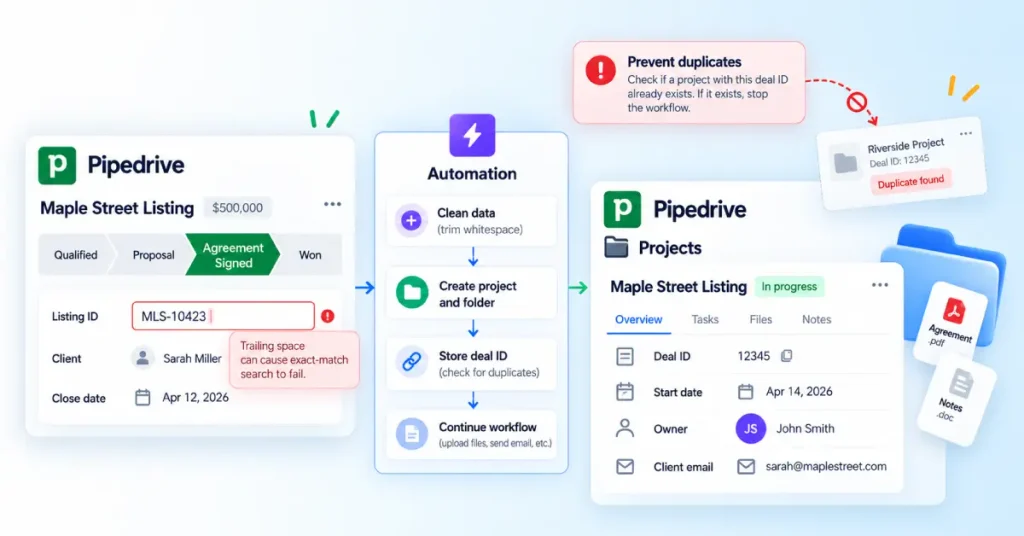
Prevent duplicate projects
Duplicates can come from retries, repeated status updates, manual creation, or downstream timeouts.
Store the originating Pipedrive deal ID on the downstream project and check for it before creating a new record. If it already exists, stop the workflow.
At the same engineering firm, the CompanyCam sync pushes the Pipedrive deal ID as the external identifier so that a won job cannot create a second project. The same principle applies to any downstream system that receives records from Pipedrive.
Monitor failures
Use Automation History to review Failed and Stopped runs. We also recommend an exception queue for:
- Missing owner
- Missing required data
- Duplicate project
- Failed integration
- Failed welcome email
- Overdue intake
- Unassigned blocker
Every exception should have an owner.
Store documents and credentials correctly
Keep:
- Client email on the linked Project
- Agreements on the Deal or Organization
- Intake answers in structured fields
- Decisions in Project notes
Never store passwords or API keys in CRM notes or email. Use a dedicated credential manager instead.
QA the whole path before launch
We do not consider an automation finished because it ran successfully once. These are the checks we run before anything goes live.
- Run the automation against a specific test record.
- Review each requirement individually instead of approving the workflow as one unit.
- Show the client sample records when the automation affects their delivery process.
- Confirm which email address automated messages are sent from.
- Check every automation affected when a field is renamed, merged, or removed.
- Review native automations before deleting fields they may depend on.
- Validate field mappings one by one.
- Test connected systems, including calendars, email, scheduling, document, and project tools.
- Reconcile record counts before and after a migration.
- Complete a final review before telling the client it is done.
Then test the failure paths deliberately. A second identical trigger should not create a duplicate project. A deal missing required data should route to the exception owner rather than fail silently. An inactive owner should raise an alert. A failed integration should be visible somewhere within a day.
A single successful run proves very little. Test whether the whole workflow produces the right result, with the right data, in the right system, under the conditions the client’s team will create.
Define done, then measure it
Finishing every task does not mean onboarding succeeded. Define clear exit criteria before a project can close:
- Client acceptance recorded
- Configuration verified
- Training completed
- Go-live achieved
- Critical blockers resolved
- Remaining issues documented and owned
- Ongoing owner assigned
- First success review scheduled
Separate implementation complete from customer success
Implementation complete means you delivered what was sold. Customer success means the client is getting value. Onboarding should complete the first and hand off clearly into the second.
Pipedrive provides two useful native reports:
- Project performance: active projects, delays, and workload
- Project duration: time spent in each phase
If you want to segment reporting by a specific value, that value should exist on the Project.
Metrics worth tracking
| Metric | What it shows |
| Handoff latency | Delay between readiness and Delivery acceptance |
| Handoff completeness | Whether required handoff data is present |
| Time to kickoff | Scheduling and ownership friction |
| Intake completion time | Client-side input delays |
| Time to go-live | Delivery speed |
| Phase duration | Where work gets stuck |
| Onboarding completion rate | How many started projects actually finish |
| Time to value | How quickly the client reaches a meaningful outcome |
Set targets from your own historical baseline, not another company’s benchmark.
Finally, verify the logic behind every metric. In one case, a phone integration created two task records per call, causing reports to double-count activity. A polished dashboard is still wrong if the underlying data is wrong.
Give the workflow an owner
Automation needs ongoing ownership. Fields change, teams evolve, and old workflows become outdated.
Assign one person to review and approve changes. We recommend a controlled process:
- Document requests clearly
- Audit before changing anything
- Get written approval for destructive changes
- Review completed work before closing the request
- Update related automations, filters, records, and mappings together
The same discipline applies to cleanup. In June 2026, we reduced our own Pipedrive setup from 91 custom fields to 65 and cut Lead Source options from 42 to 19. Review the system regularly and ask:
- Are projects being created correctly?
- Are handoffs complete?
- Where are delays occurring?
- Which automations are failing?
- Are duplicates appearing?
- Do templates still match the real process?
- Are clients repeatedly getting stuck at the same step?
A workflow stays reliable only when someone maintains it.
Common Pipedrive onboarding mistakes
| Mistake | What it causes | Fix |
| Starting at Closed Won | Projects for clients who have not paid or supplied anything | Gate on a defined onboarding-ready state |
| Running delivery in the sales pipeline | Deal age, conversion, and velocity reporting stop meaning anything | Move delivery to Projects or an external system |
| Thin handoff | Delivery reconstructs scope by interviewing Sales | Agree a minimum data contract with an acceptance step |
| One generic template | Irrelevant tasks, so the team stops trusting the plan | Branch templates by service, product, or tier |
| Copying every deal field to the project | Duplicate values drift, and someone acts on the wrong one | Keep each fact on its source record |
| No named project owner | Nothing escalates | Assign the owner at creation, never by default |
| Everything is a task | Meetings, milestones and sequence become unreportable | Use the four item types deliberately |
| One long automation | Undebuggable, and the 90-day and 7-day limits break it | Split into small workflows, keep state on the Project |
| No duplicate protection | Retries create multiple onboarding projects | Store the originating deal ID and check before creating |
| No exception queue | Failures disappear without an owner | Monitor automation history and assign remediation |
| Vague completion criteria | Projects close without proving the client can use anything | Write measurable exit criteria including acceptance |
When to use a Pipedrive implementation consultant
Most teams can build a simple onboarding workflow themselves, and should. Outside help earns its cost once the workflow crosses a complexity line.
That usually means several service lines with different delivery paths, more than one delivery team, billing or provisioning dependencies, integrations with Asana, ClickUp, Monday.com, or a client portal, custom API work, a CRM migration, regulated data, contractual SLAs, or automations that keep failing for reasons nobody can explain.
The goal is not to set up Pipedrive. It is to design an operating model across people, process, CRM, and connected systems that someone can still maintain two years from now.
That is the work we do in our Pipedrive consulting and implementation engagements.