AI Summary




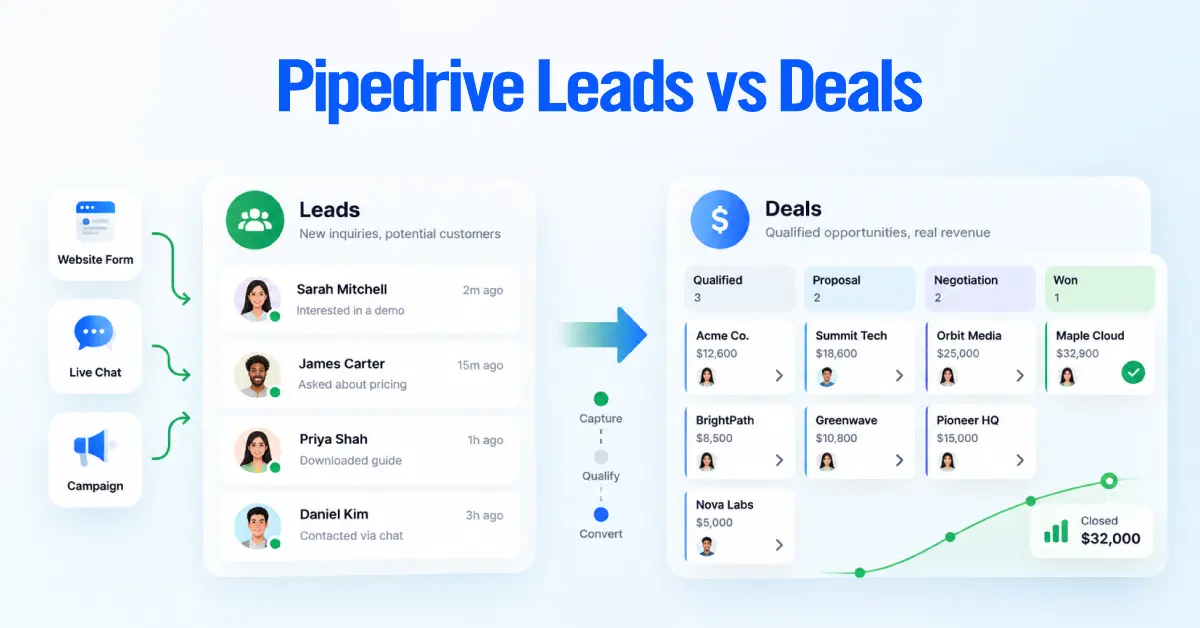
The difference between a Lead and a Deal in Pipedrive comes down to qualification.
A Lead is a potential sales opportunity that has not yet met your criteria for active pipeline management. It belongs in Pipedrive Leads Inbox.
A Deal is a qualified opportunity your team is actively pursuing through a pipeline and its stages. Pipedrive defines Leads as opportunities that haven’t been qualified yet, and Deals as qualified opportunities actively worked through the pipeline.
The practical rule is simple:
Keep an opportunity as a Lead while you are deciding whether it deserves active pipeline management. Create or convert it to a Deal once it meets your defined pipeline-entry criteria.
Not every opportunity has to become a Lead first. If an opportunity is already qualified when it enters Pipedrive, it may go directly to a Deal.
That makes Leads Inbox a qualification workspace, not a second pipeline and not a general contact database.
Quick Decision: Should This Be a Lead or a Deal?
Use this decision before creating another record:
Does the opportunity already meet your criteria for active sales pursuit?
- Yes → Deal
- No, but it is a legitimate potential opportunity → Lead
- There is no identifiable sales opportunity → Person/Organization only
- Invalid, spam, or irrelevant → Do not create an active Lead or Deal
Axis recommendation: Define the Deal-entry threshold before configuring Leads Inbox. Otherwise, different reps will create Deals for different reasons, and your pipeline will stop meaning the same thing across the team.
Pipedrive Leads vs Deals
Both Leads and Deals represent potential revenue, but they serve different purposes.
| Decision Point | Lead | Deal |
| Purpose | Evaluate a potential opportunity | Actively pursue a qualified opportunity |
| Qualification | Has not met the Deal-entry threshold | Has met the Deal-entry threshold |
| Primary workspace | Leads Inbox | Sales pipeline |
| Pipeline stage | None | Yes |
| Contact relationship | Linked to a Person, Organization or both | Linked to the relevant Person/Organization |
| Typical work | Validation, qualification, early follow-up | Active sales progression |
| Pipeline reporting | Kept outside the pipeline | Tracked through pipeline stages |
| Next decision | Convert, nurture, archive, or disqualify | Progress, win, lose, or move back to Leads if needed |
| Common misuse | Treating Leads Inbox as a prospect database | Creating Deals for every inquiry |
Pipedrive also gives Deals functionality that Leads do not have, including pipeline stages and features such as products, projects, invoicing, and other Deal-level functionality.
The most important distinction, then, is not how much data each record contains. It is the decision your team has made about the opportunity.
What Is a Lead in Pipedrive?
A Pipedrive Lead is a potential sales opportunity that still requires qualification.
Leads live in the Leads Inbox, a separate workspace Pipedrive provides for opportunities that aren’t ready to move through the sales pipeline. A Lead can hold opportunity-level information such as:
- owner
- value
- labels
- source
- Lead/Deal custom-field values
- notes
- Activities
- qualification information
But a Lead is not simply a person whose email address you have. Every Lead must be linked to a Person, Organization, or both. In the Lead detail view, Pipedrive separates Lead details from Person and Organization information.
Sarah may remain in Pipedrive for years. Miller Manufacturing may have several opportunities over time. The Lead represents this particular potential sale.
What Is a Deal in Pipedrive?
A Pipedrive Deal is a qualified sales opportunity being actively managed through the sales process.
Deals live in a pipeline and move through pipeline stages until they are won, lost, or otherwise removed from active pursuit. A Deal might include:
- linked Person
- linked Organization
- Deal owner
- pipeline
- pipeline stage
- value
- expected close date
- Activities
- notes and communication history
- opportunity-specific fields
Creating a Deal should therefore mean something operationally:
We have enough evidence to actively manage this opportunity through our defined sales process.
If the sales team is still trying to determine whether the prospect is legitimate, relevant, interested, or ready for active pursuit, the opportunity is usually better handled as a Lead.
Pipedrive Lead vs Contact: How People and Organizations Fit
A common Pipedrive mistake is treating a Lead as a lighter version of a contact. It is not. A useful way to think about the records is:
| Person | Organization | Lead | Deal | Activity |
| Who is the individual? | Which company or account are they associated with? | What potential opportunity are we evaluating? | What qualified opportunity are we actively pursuing? | What action should happen next? |
A Person can exist without any Lead or Deal. The same Person or Organization can also be connected to multiple opportunities over time.
Pipedrive centralizes contact details on the contact record. If a Person’s details are changed through a Lead, that change affects the same Person everywhere the contact is linked.
A useful rule is:
People and Organizations preserve relationships. Leads and Deals preserve opportunities.
When Should You Use Pipedrive Leads Inbox?
Use Pipedrive Leads Inbox when you have a legitimate potential opportunity but still need to decide whether it belongs in the active pipeline. Good candidates include:
- inbound inquiry requiring validation
- referral requiring qualification
- early buying interest
- prospect accepted for sales review
- opportunity with unclear fit or timing
- returning prospect with a possible new need
- existing customer exploring another service
Pipedrive specifically positions Leads Inbox as a way to keep unqualified opportunities outside the active pipeline until they are ready to move forward.
What should not go into Leads Inbox?
Leads Inbox should not become:
- your entire contact database
- a newsletter subscriber list
- a holding area for every imported prospect
- a duplicate sales pipeline
- permanent storage for dead opportunities
- a replacement for marketing nurture
A useful test is:
Is there a specific potential sale here that sales should evaluate?
If no, you may need a Person or Organization record rather than a Lead.
How long should an opportunity remain a Lead?
Pipedrive does not prescribe one universal number of days. Your business should define the rule. A Lead should remain active while qualification or meaningful sales follow-up is still happening.
Once there is enough information to make a decision, the Lead should move toward an outcome:
Convert → Nurture → Archive → Disqualify/Delete
Leads Inbox should answer:
Is this worth becoming a Deal?
It should not recreate Deal stages before the Deal exists.
Real-World Pipedrive Lead vs Deal Examples
The correct record depends on the opportunity’s state, not simply where it came from.
| Scenario | Recommended handling | Why |
| Newsletter subscriber with no buying signal | Person/contact | No specific sales opportunity exists |
| Contact-form inquiry requiring validation | Lead | Commercial potential still needs qualification |
| Demo request from an unknown company | Usually Lead | Strong signal, but fit/readiness may still be unknown |
| Discovery completed with confirmed need and next step | Deal | Opportunity is ready for active sales pursuit |
| Existing customer asks about another service | Lead or Deal linked to existing contact/account | It is a new opportunity, not a new customer record |
| Purchased prospect list | Contacts or selectively created Leads | A list of names is not automatically a list of sales opportunities |
| Referral with project, stakeholder, and timing confirmed | May go directly to Deal | Qualification may already be complete |
| Spam or irrelevant inquiry | Neither | No valid opportunity exists |
| Active Deal created too early | Consider converting back to Lead | Opportunity may still have potential but not be pipeline-ready |
Should a demo request automatically become a Deal?
No. A demo request is a buying signal, not a lifecycle stage.
For example:
- Demo request + unknown fit + no qualification yet → Lead
- Demo request + verified target account + confirmed need + agreed sales meeting → potentially Deal
The exact threshold depends on how your business defines pipeline entry.
When Should a Lead Become a Deal?
A Lead should become a Deal when your business has enough evidence to justify active pipeline management.
Pipedrive recommends converting once you are confident the Lead represents an opportunity worth pursuing and aligns that decision with how your pipeline begins.
The problem is that “qualified” means nothing unless your team defines it operationally.
Axis-Recommended Lead Qualification Framework
This is an Axis process recommendation, not a native Pipedrive qualification model.
1. Validity
Is this a genuine opportunity?
Confirm things such as:
- real Person or Organization
- usable contact information
- legitimate inquiry
- no obvious spam or invalid submission
2. Fit
Can and should your company serve the opportunity?
Consider:
- target customer profile
- geography
- requested product or service
- company characteristics
- commercial minimums
- obvious disqualifiers
3. Intent
Is there evidence of an actual business problem or buying interest?
Examples:
- specific use case
- project being discussed
- request for pricing
- request for consultation
- meaningful response to sales outreach
- existing customer exploring another service
4. Readiness
Is the opportunity mature enough for active pursuit?
Consider:
- timing
- access to relevant stakeholders
- buying process
- commercial potential
- agreed next action
The Conversion Gate
Before converting the Lead, your sales team should be able to determine:
- destination pipeline
- appropriate current stage
- opportunity owner
- next sales action
- source attribution
- value where known
- expected close date where appropriate
If those answers are unclear because basic qualification has not happened yet, the opportunity probably belongs in Leads Inbox.
Marketing Qualification Is Not the Same as Deal Qualification
A useful operating model separates three decisions:
Marketing qualification
The prospect shows enough fit or engagement to deserve sales review.
Sales acceptance
A salesperson accepts responsibility for evaluating the opportunity.
Deal qualification
The opportunity has met the company’s threshold for active pipeline management.
These are process concepts rather than required Pipedrive statuses. A marketing-qualified opportunity can therefore still remain a Pipedrive Lead.
Example: From Inquiry to Deal
Consider a company that submits a form asking about CRM implementation.
At capture:
- the company appears legitimate
- the requested service matches
- the business problem is described
- timeline is unknown
- stakeholder authority is unknown
- no next meeting is booked
Decision: Lead
The opportunity deserves sales attention, but it has not yet earned pipeline entry.
After discovery:
- implementation project is confirmed
- the relevant stakeholder is involved
- target timing is this quarter
- commercial fit is confirmed
- a solution review is booked
Decision: Deal
The record can now enter the appropriate pipeline stage based on its actual sales position.
This is the distinction Leads Inbox should enforce.
What Happens When You Convert a Lead to a Deal?
Once a Lead passes your qualification threshold, Pipedrive lets you convert it into a Deal from Leads Inbox.
For a single Lead:
- Open Leads > Leads Inbox
- Open the Lead
- Click Convert to deal
- Complete the conversion details
- Save the new Deal
After saving, the Lead is removed from the active Leads Inbox and the new Deal is tracked in the selected pipeline.
Pipedrive keeps or transfers the core connected information, including:
- Person
- Organization
- notes
- Activities
- files
- source information
Leads and Deals also share the same Lead/Deal custom-field structure, so the main question is not whether the fields are different, but when those fields should be used.
Axis recommendation: If you rely on custom fields, reporting logic, or automations, test the Lead-to-Deal conversion flow before rolling it out in production.
Which Data Should Live on Each Record?
Good CRM architecture starts with one question:
What does this piece of information describe?
Use each record type for the right kind of information:
- Person: individual contact information
- Organization: company-level information
- Lead: opportunity details during qualification
- Deal: active qualified opportunity
- Activity: the next sales action
A simple rule:
- Contact data belongs on the Person
- Company data belongs on the Organization
- Opportunity data belongs on the Lead or Deal
- Follow-up actions belong in Activities
This prevents duplicate information and keeps reporting cleaner.
Capture and Import Leads into Leads Inbox
Leads can enter Pipedrive through several routes, including:
- manual creation
- spreadsheet imports
- web forms
- chatbot or lead capture tools
The source does not determine whether something should become a Lead or a Deal.
Qualification should.
For imports, do not assume every row belongs in the sales pipeline. First decide whether the record represents:
- only a contact
- a potential opportunity that needs qualification
- an already qualified sales opportunity
Then create the appropriate record type.
A high-intent form submission still does not automatically need to become a Deal. If it has not met your qualification threshold, it should usually enter as a Lead.
Assign the Lead and Create the Next Activity
Once a Lead enters Leads Inbox, someone should own the next decision.
At minimum, define:
- who owns the Lead
- when it should be reviewed
- what the next action is
Every actively worked Lead should have a clear next step, such as:
- qualification call
- discovery meeting
- follow-up email
- proposal review
- decision checkpoint
Ownership tells you who is responsible. The Activity tells you what needs to happen next. Without clear ownership and a next action, Leads tend to sit untouched.
Use Lead Labels for Category, Not Stage
Lead labels are useful, but they should help categorize Leads, not turn Leads Inbox into a second pipeline.
Good label examples include:
- priority
- review queue
- source or channel
- qualification category
What you should avoid is using Lead labels as fake pipeline stages, such as:
- New
- Contacted
- Discovery
- Proposal
- Negotiation
If an opportunity is ready for structured stage progression, it may be ready to become a Deal.
Qualify, Nurture, Archive, Disqualify, or Delete?
Every reviewed Lead should eventually reach a clear outcome.
A practical model looks like this:
- Convert to Deal when it meets pipeline-entry criteria
- Nurture when the opportunity is real, but not ready
- Archive when it is no longer actively managed pipeline and its stages
- Disqualify when it is not a fit
- Delete when it is invalid, spam, or a test
This is important because disqualification and archiving are not the same thing.
For example:
- Disqualify is a business decision
- Archive is a record-management action
A Lead can be disqualified and then archived.
Handle Duplicate and Returning Leads
A duplicate contact and a duplicate opportunity are different problems.
Ask two separate questions:
1. Is this the same Person or Organization?
If yes, you may have a contact duplicate. Reuse the existing Person or Organization whenever possible.
2. Is this the same commercial opportunity?
If yes, you may have a duplicate Lead.
Do not merge Leads just because they involve the same Person. One contact can legitimately have multiple opportunities.
For returning prospects:
- if it is a new opportunity that still needs qualification, create a Lead
- if it is already qualified, create a Deal
- if it is the same active opportunity, update the existing record
For existing customers, link the new opportunity to the existing account instead of creating duplicate Organizations.
Measure Lead Performance
A clean Leads Inbox should be measurable separately from the active pipeline.
Two especially useful report types are:
Lead Performance
Use it to track:
- Leads created
- Leads archived
- Leads converted
Lead Conversion
Use it to measure Lead-to-Deal conversion and review results by:
- source
- owner
- team
- label
- creation date
- conversion date
Start with a few practical KPIs:
- Leads created
- Leads archived
- Leads converted
- Lead-to-Deal conversion rate
- conversion by source
- conversion by owner
- conversion by team
If source attribution is weak before conversion, the reporting after conversion will also be weak.
Common Pipedrive Leads Inbox Mistakes
Some of the most common mistakes are:
- creating a Deal for every inquiry
- treating a Lead like a contact
- having no Deal-entry criteria
- leaving Leads untouched for too long
- using labels as pipeline stages
- assigning no owner
- creating no next Activity
- duplicating contact or account records
- failing to capture source properly
- converting without checking pipeline, owner, or next action
Most Leads Inbox problems come from unclear rules, not from missing features.
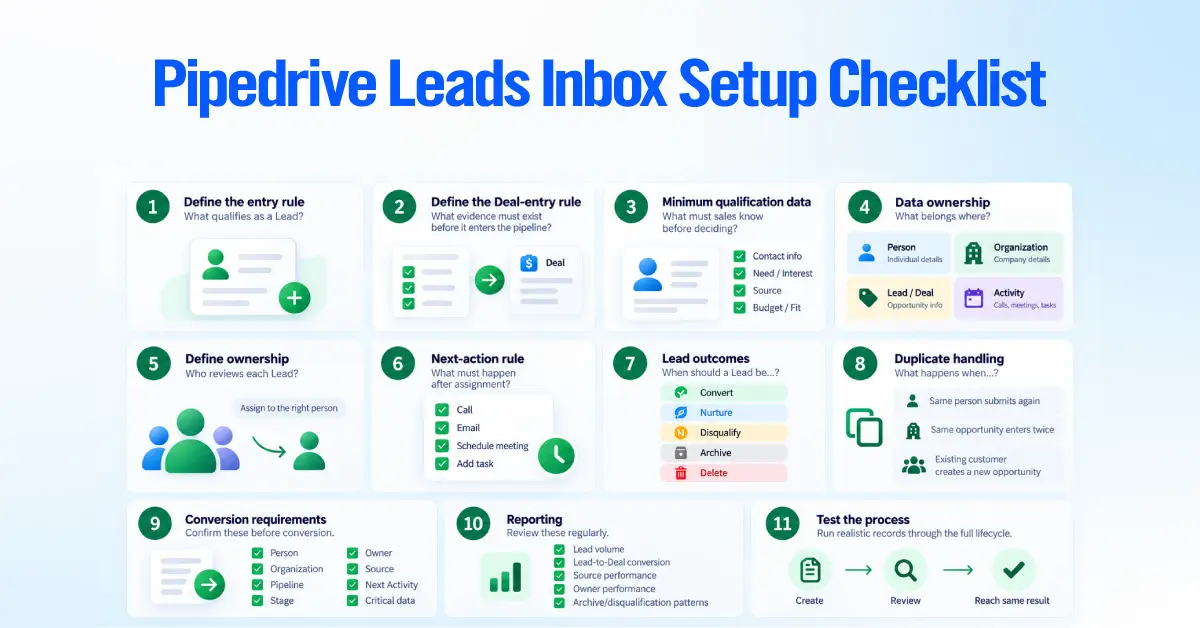
Pipedrive Leads Inbox Setup Checklist
A practical setup does not require dozens of rules. It requires a few decisions that everyone follows consistently.

Your team should define:
- what qualifies as a Lead
- what qualifies as a Deal
- the minimum qualification data needed
- what belongs on Person, Organization, Lead/Deal, and Activity
- who owns each Lead
- what the next-action rule is
- the possible Lead outcomes
- how duplicates should be handled
- what must be confirmed before conversion
- what reporting should be reviewed
- how the process will be tested
A good setup is working when two salespeople can review the same opportunity and reach the same answer.
Want a Second Look at Your Pipedrive Setup?
If your team creates Deals too early, leaves Leads untouched, or handles qualification differently across reps, your Pipedrive workflow may need more than a few quick fixes.
Axis Consulting can review how your Leads, qualification criteria, ownership, conversion process, and pipeline work together, then identify where the workflow is creating friction.