AI Summary




TL;DR
- Lead routing is more than assignment. It defines ownership, next steps, and what happens when no rule matches.
- Automatic Assignment is Pipedrive’s native routing tool, available on Premium and Ultimate plans (formerly Professional and higher). It supports three triggers, four assignee types, and up to 50 rules per entity type.
- Rule priority matters. The first matching rule wins, so broad rules can override more specific ones.
- Native round robin only distributes evenly. Weighted routing, workload limits, and PTO rules require another workflow or tool.
- Monitor exceptions daily. Assignment history lasts seven days, while Not assigned shows leads that still need an owner.
Most teams that come to us with a routing problem do not have a rule problem. They have a design problem. Leads land in Pipedrive, an owner gets assigned, and everyone assumes the job is done. A week later, a founder finds a hot inbound from three days ago sitting untouched, owned by a rep who never got a notification and never knew it existed.
We understand why this happens. Pipedrive makes the assignment step easy, so it is tempting to treat assignment as the whole routing process. The rest of the system stays invisible until it breaks.
Reliable Pipedrive lead routing requires more than assigning an owner. It starts with deciding whether an inquiry should enter as a Lead or Deal, then defining the routing model, rule priority, and account ownership. From there, you need a clear first action after assignment, a response SLA with escalation, and a way to catch and fix exceptions when something goes wrong.
Automatic Assignment can handle part of this process, but the routing design determines whether leads reach the right person and get acted on.
What Is Lead Routing in Pipedrive?
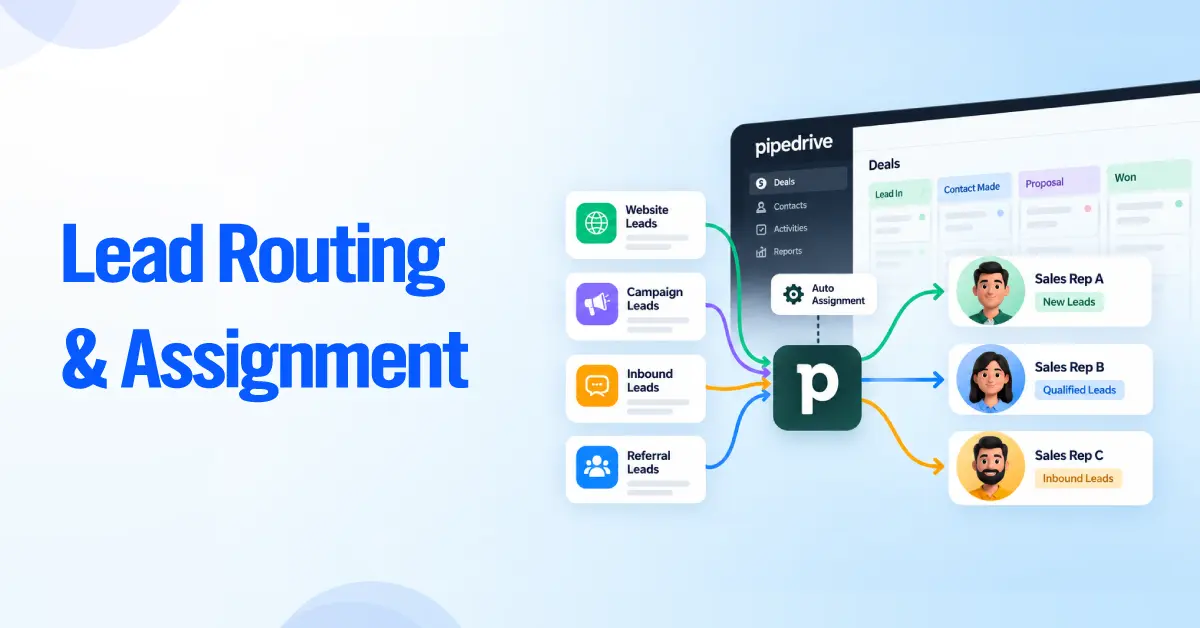
Lead routing in Pipedrive is the end-to-end process of getting every eligible Lead or Deal to the correct owner and making sure the right thing happens next. Assignment is the narrower step inside it that stamps an owner on the record.
It helps to separate three words that teams use interchangeably and then confuse in practice.
- Lead routing is the whole flow, from capture and qualification through owner selection, follow-up, and exception handling.
- Lead assignment is the single act of setting the owner. In Pipedrive, Automatic Assignment performs this step.
- Lead distribution is how volume gets spread across a group, for example, evenly across a Team through round robin.
Pipedrive’s native tool for the assignment step is Automatic Assignment. It lets you set up and prioritize distribution rules that automatically qualify and assign Leads and Deals to specific Teams or reps. A rule tests an opportunity against conditions and, when it matches, assigns an owner.
Owner assignment, routing conditions, routing pools, follow-up, and exception handling are separate layers. When people say Pipedrive routing is not working, the failure is rarely the assignment engine. It is usually a missing fallback, a missing first activity, or a condition that depended on data the record did not have yet.
Leads vs Deals: What Should You Route?
Decide whether an inquiry enters Pipedrive as a Lead or a Deal before you design a single rule, because that choice changes which routing events are available.
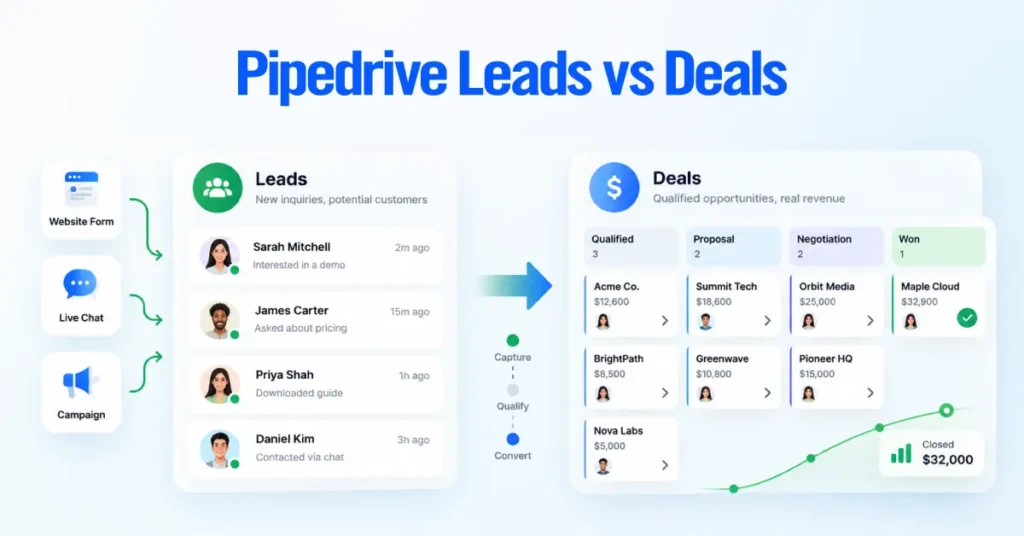
Pipedrive gives you two holding models for inbound interest. The Leads Inbox holds Leads, which are pre-qualification records that have not yet entered a sales pipeline. Deals live inside a pipeline and represent an active opportunity you are working on. A Lead becomes a Deal through lead-to-deal conversion, which is the moment it enters the pipeline.
This architectural decision matters because Automatic Assignment offers different events for each object.
- Lead added fires when a new Lead is created, so you can route inside the Leads Inbox before qualification.
- Deal added fires when a new Deal is created, whether created directly or produced by converting a Lead.
- Deal updated fires when an existing Deal changes pipeline or stage, which lets you hand a Deal to a new owner as it moves through the funnel.
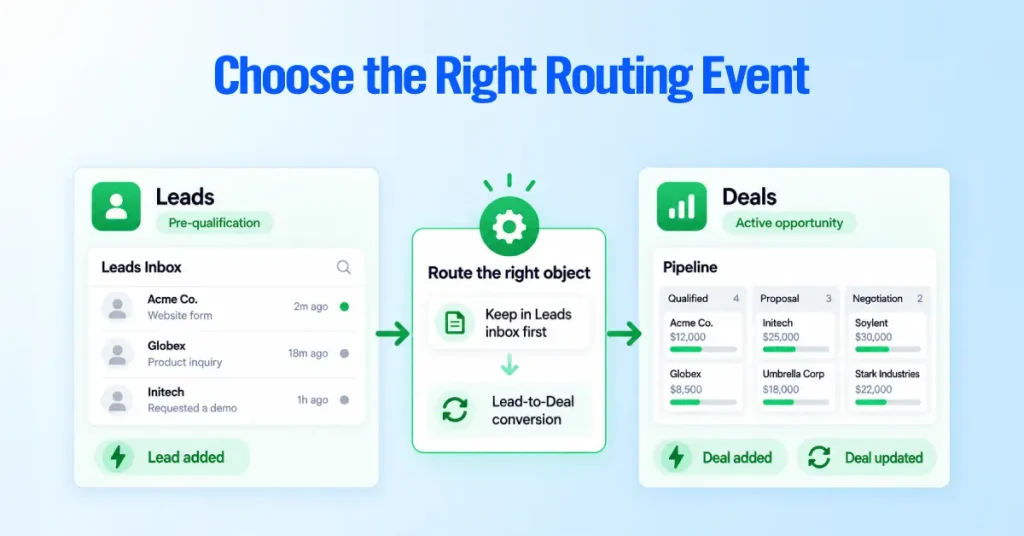
If you route unqualified volume through the Leads Inbox first, use Lead added. If you qualify before anything enters Pipedrive and every inbound becomes a Deal immediately, use Deal added. Many teams do both, and the two paths must not fight each other, a conflict we return to in the capture-source section.
One discipline we enforce on every engagement. Do not use the words Lead and Deal interchangeably in your rule names, your documentation, or your team’s language. A rule that routes Leads and a rule that routes Deals are different rules on different events. Mixing the terms is how teams build a rule on the wrong event and wonder why it never fires.
How Pipedrive Automatic Assignment Works
Pipedrive Automatic Assignment evaluates your rules in priority order and applies the first rule whose conditions match the opportunity. It is a dedicated feature, separate from general Pipedrive Automations.
The mechanics, confirmed against Pipedrive’s current documentation, work as follows.
- Supported events are Lead added, Deal added, and Deal updated on a pipeline or stage change. You can set rules for newly created Deals and Leads, and for existing Deals that move to a new stage or pipeline.
- Conditions are filters an opportunity must meet to match. Every rule needs at least one condition, and you can add up to two condition sets and 160 conditions per set.
- Supported fields include default and custom fields for the entity, plus the related Person and Organization fields.
- Rule limits allow up to 50 rules per entity type, such as Lead added or Deal updated.
- Rule priority decides evaluation order. When an opportunity is created, the feature tests it against the first rule, and if it does not match it moves down the list until a match is found. The first rule in the list is the highest priority.
- Assignment history logs whether a rule fired, who received the record, and when Pipedrive processed it. Pipedrive stores this history for seven days.
- Not assigned collects every Lead and Deal that no rule could assign, with a reason for each.
The behavior to internalize is the first-match rule. Automatic Assignment does not score all rules and pick the best one. It stops at the first matching rule. That single behavior is why hierarchy design, covered below, decides whether your routing holds up.
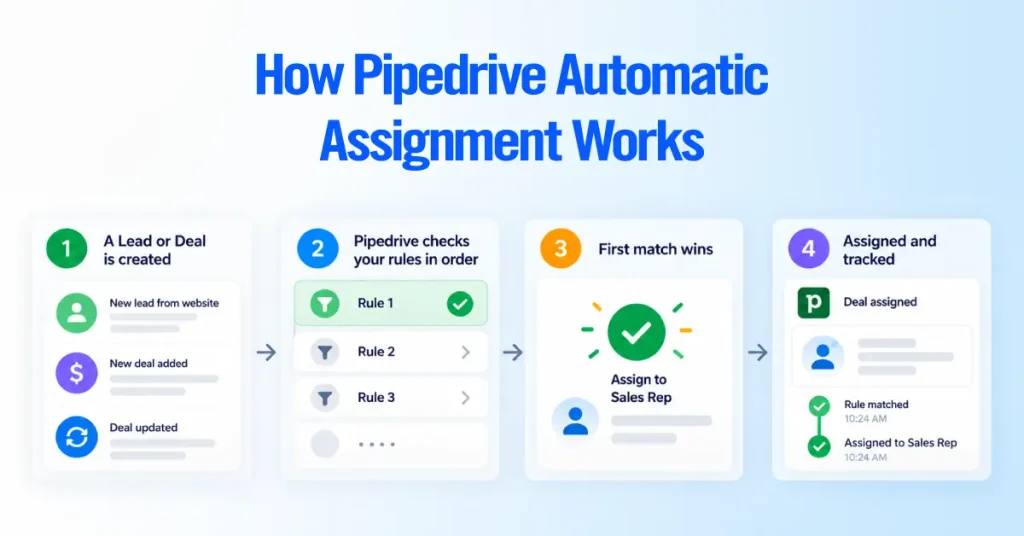
Automatic Assignment is a purpose-built routing engine with priority, round robin, and a Not assigned queue. Automations are a broader trigger-and-action tool. You will often use both, but they live in different places and solve different parts of the system.
The Four Native Assignment Methods
Pipedrive offers four native assignee types, and each fits a different routing intent. The four types are User, Team, Organization owner, and Person owner.
- Specific User. Assigns every matching opportunity to one named person. This is the right choice for a named specialist, a single territory owner, or a founder-led motion where one person triages. The consideration is continuity. If that User goes inactive, the rule fails, so a specific-User rule always needs a fallback behind it.
Organization owner and Person owner rules are strong for account continuity but fragile when link data is missing. They belong high in your hierarchy for known accounts, always with a general rule beneath them to catch records that have no link yet. - Team through round robin. Selects a Team and distributes matching records among its members on a round-robin basis. Use this when work should spread evenly across interchangeable reps. The consideration is that even counts do not equal even value, which the round robin section covers.
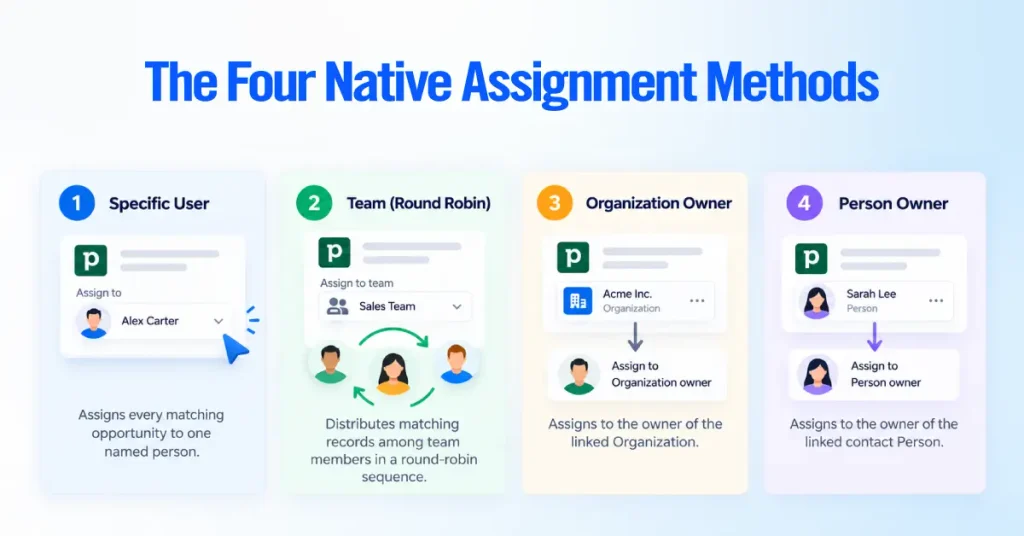
- Linked Organization owner. Assigns the opportunity to the owner of the Organization already linked to it. This is your account-continuity lever. It keeps new opportunities with the rep who already owns the account. The consideration is data dependency. If the record has no linked Organization, this rule cannot resolve an owner and the assignment fails with an Organization not found reason.
- Linked Person owner. Assigns to the owner of the linked contact Person. Useful for contact-led continuity where the relationship sits with the individual rather than the company. The same data dependency applies. No linked Person means the rule cannot fire.
Organization owner and Person owner rules are strong for account continuity but fragile when link data is missing. They belong high in your hierarchy for known accounts, always with a general rule beneath them to catch records that have no link yet.
Which Plans Include Automatic Assignment?
Automatic Assignment is available on Professional and higher plans, and Team round robin additionally requires the Teams feature on those same tiers. Pipedrive’s Knowledge Base states the feature is only available on Professional and higher plans, and that Team assignment requires the Teams feature, available on Professional and higher plans
There is a live plan-naming change to account for. Pipedrive’s current billing documentation lists four plans: Lite, Growth, Premium, and Ultimate. These replace the older Essential, Advanced, Professional, Power, and Enterprise names, where Essential became Lite, Advanced became Growth, Professional and Power consolidated into Premium, and Enterprise became Ultimate.
Because the Automatic Assignment article still references the legacy Professional tier, the practical reading is that the feature sits on Premium and Ultimate in the new lineup, and on Professional, Power, and Enterprise for accounts still on legacy plans.
| Verify plan availability on Pipedrive’s live pricing page before you commit, because Pipedrive has been actively changing plan names, limits, and inclusions. Do not rely on any third-party article, including older ones that still say only “Professional and higher” without noting the Premium and Ultimate rename. |
Two access facts matter before you build anything. Automatic Assignment setup is only available to users with the Deals app admin permission, and Team round robin only works once you have created Teams under the Teams feature.
Design the Routing Logic Before Building Rules
Design your routing on paper before you open Automatic Assignment settings, because the most common failure we fix is a rule that depends on data the record does not have at the moment of assignment.
Every rule fires on an event, and it can only see the data that exists at that instant. A Lead-added rule cannot branch on a qualification field a rep fills in later. A Deal-added rule cannot use a value that gets enriched an hour after creation.
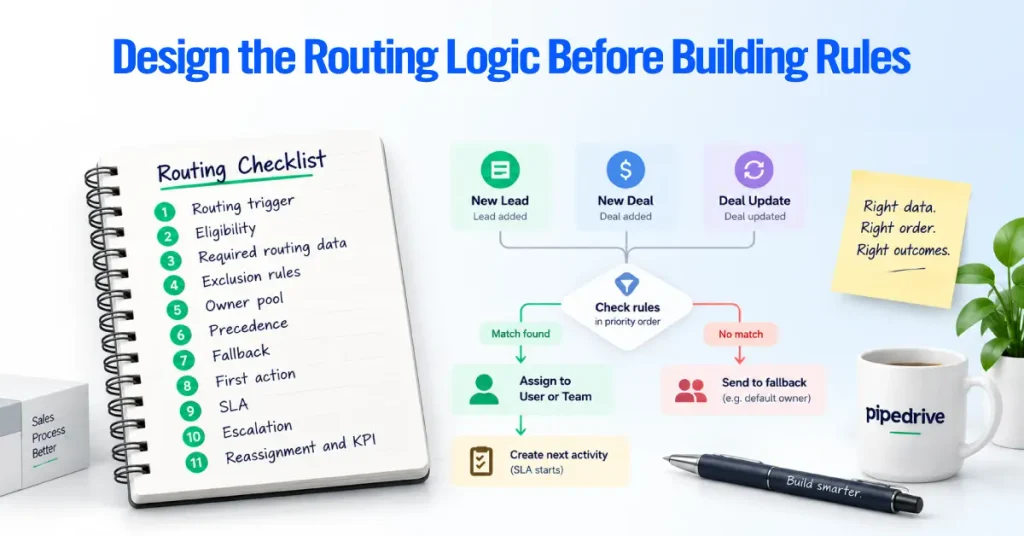
If a routing decision needs a field, that field must be populated by the capture source at creation time, not by a human downstream. Before you build, settle these eleven decisions.
- Routing trigger. Which event, Lead added, Deal added, or Deal updated.
- Eligibility. Which records should route at all, and which should be excluded.
- Required routing data. Which fields must be present at creation for the rule to resolve.
- Exclusion rules. Spam, test records, partner referrals, or existing customers that should skip normal routing.
- Owner pool. Which Users and Teams are eligible to receive.
- Precedence. The order rules are evaluated, specific before general.
- Fallback. Who catches records that match no specific rule.
- First action. The activity that becomes due the moment an owner is set.
- SLA. How fast acknowledgment and first contact must happen.
- Escalation. What happens when the SLA is missed.
- Reassignment and KPI. When ownership moves, and how you will measure the system.
Here is a compact routing-requirements worksheet we hand clients before configuration.
| Decision | Question to answer | Data available at routing time? |
| Trigger | Lead added, Deal added, or Deal updated | n/a |
| Eligibility | What routes and what is excluded | Yes or No |
| Routing field | Territory, source, product, or account link | Must be Yes |
| Owner pool | Which Users or teams receive | Yes |
| Fallback | Who owns unmatched records | Yes |
| First activity | The next due task or call | Created after assignment |
| SLA | Acknowledge and contact windows | Tracked separately |
If any routing field lands in the No column, fix the capture source first. A rule built on absent data will drop the record into Not assigned.
Choose the Right Routing Model
Pick the simplest routing model that matches how your team sells, then confirm whether Pipedrive supports it natively or whether it needs an external tool. The table below shows the practical models and where each one lives.
| Routing model | What it does | Native in Pipedrive? |
| Manual assignment | A manager sets the owner by hand | Yes, but not automated |
| Specific-User assignment | One named owner per rule | Yes, User assignee |
| Team round robin | Even rotation across a Team | Yes, Team assignee |
| Territory routing | By country, state, or region field | Yes, via conditions |
| Industry routing | By industry or segment field | Yes, via conditions |
| Product or skill routing | By product interest or specialist | Yes, via conditions plus specific User |
| Source-based routing | By lead source or channel field | Yes, via conditions |
| Existing-account-owner routing | Keep opportunity with account owner | Yes, Organization or Person owner |
| Weighted distribution | Unequal shares by rep | No, needs external tooling |
| Availability-aware routing | Route by shift, hours, or PTO | No, needs external tooling |
Territory, industry, product, source, and account-owner models are all field-driven and fully native. Round robin is native at the Team level.
The two models native Automatic Assignment does not perform are weighted distribution and availability-aware routing. Both are real reasons to consider a marketplace app or custom workflow, rather than forcing Pipedrive to do something it does not do.
Define Ownership by Object
Pipedrive tracks ownership separately on the Deal, the Person, and the Organization, and changing one does not change the others. This ownership fact breaks account continuity for teams that assume otherwise.
A Deal has an owner. The linked Person has an owner. The linked Organization has an owner. These are three independent fields. When a routing rule or a rep changes the Deal owner, the linked Person owner and Organization owner stay exactly as they were.
That independence is useful when you want a specialist to work one Deal without taking over the whole account. It is a trap to assume reassigning a Deal moves the account. Decide your account-continuity policy before you route.

If the account relationship should follow the company, key your continuity rules off the Organization owner and document a process for when Organization ownership itself is reassigned.
We keep deep data-model guidance in our dedicated Pipedrive data-model resource rather than repeating it here. For routing, remember that object ownership is not transitive, so design your continuity logic around the object that holds the relationship.
Build a Rule-Priority Hierarchy
Order your rules from most specific to most general, because Pipedrive stops at the first matching rule, and a broad rule placed too high will capture opportunities that belong to a specialist rule below it. The engine tests the first rule and moves down the list only when a rule does not match.
The specific-to-general framework below is an Axis recommendation, not a Pipedrive requirement. Pipedrive enforces first-match ordering. This particular sequence is our field-tested default; adapt it to your motion.
- Existing Organization owner, to protect account continuity first.
- Named strategic accounts, so key logos always reach the right owner.
- Regulatory, language, or product specialist, where only certain reps can serve the record.
- Geographic territory.
- High-value or high-priority pool.
- Source-specific pool, for example, event or partner leads.
- General round robin across the core Team.
- Fallback owner or exception queue, so nothing lands in Not assigned unhandled.

A few construction principles keep this hierarchy healthy
- Overlapping rules are the main danger. When two rules could both match, the higher one wins, so any overlap must be intentional.
- Broad catch-all rules belong at the bottom, never near the top. A catch-all high in the list makes every specific rule beneath it dead code.
- Mutually exclusive conditions are the cleanest design. Where you can, write conditions so only one rule can match a given record.
- Naming and documentation should encode the intent, for example “Territory US-West Round Robin” rather than “Rule 4,” so the next admin understands the order.
- Fallback rules guarantee coverage. Always end with a rule that matches anything left.
Route by Territory, Source, Product, or Lead Quality
Field-driven routing tests a field on the record and sends matching opportunities to the owner you choose. Pipedrive supports this on entity fields and on the linked Person and Organization fields.
Common routing fields include country, state, territory, industry, product interest, language, lead source, source channel, account owner, opportunity value, and qualification status. A classic pattern is routing by lead source, for example, sending every record where the source equals a trade show to a specific rep.
Routing accuracy depends on standardized, available field values. A dropdown with controlled options routes reliably. A free-text field where reps type Calif, California, and CA will fragment your rules and drop records. Wherever a value drives routing, use a single-option or multiple-option field, not free text.
Structure each rule the same way so your documentation stays scannable
Object → Field → Rule → Assignee → Fallback
Worked examples in that shape look like this.
- Deal → Country → equals United Kingdom → UK Team round robin → General round robin
- Lead → Source channel → equals Partner → Partnerships specialist User → Partner fallback owner
- Deal → Product interest → equals Enterprise Plan → Enterprise Team round robin → General round robin
- Deal → Organization link → owner exists → Organization owner → Territory rule below
What If Routing Data Is Missing?
Prevent silent routing failures by always ending your hierarchy with a fallback owner or catch-all rule, and by treating the Not assigned tab as a live queue rather than an afterthought. When no rule matches, or when the intended assignee is missing or inactive, the record lands in Not assigned with a failure reason.
The failure reasons Pipedrive reports tell you what to fix. They include User not found when the assignee is inactive or does not exist, No user in the team when nobody on the Team could receive the record, and, for owner-based rules, Organization not found, Organization ID not found, Person not found, and Person ID not found when the link is missing or inactive.

Handle missing data with layered defenses.
- Fallback owner as the last rule, so unmatched records still reach a human.
- Add a catch-all rule with a minimal condition at the bottom, feeding a correction owner or triage queue.
- Enrichment timing fixed at the source, so routing fields are present at creation rather than added later.
- Notifications on the fallback owner, so someone knows a record needs manual routing now.
- Root-cause review on recurring Not assigned reasons, because the same reason appearing repeatedly is a capture problem, not a routing problem.
Configure Automatic Assignment Step by Step
Configure Automatic Assignment in a fixed sequence so testing is built in rather than bolted on. You reach the tool from the navigation sidebar or Settings, and setup requires the deals app admin permission.
Verify the current UI labels in your own account before you follow any written path, since Pipedrive updates navigation periodically.
- Confirm you have deals app admin access, because without it the feature is not configurable.
- Choose the entity and supported event: Lead added, Deal added, or Deal updated.
- Define the routing conditions, using controlled fields and at least one condition per rule.
- Select the assignee, a specific User, a Team for round robin, or the Organization or Person owner.
- Name and document the rule so its intent and place in the order are clear.
- Activate the rule with the Set active option.
- Set its priority, remembering the first rule in the list wins.
- Test both matching and non-matching scenarios before you rely on it.
- Review Assignment History to confirm the rule fired and picked the expected owner.
- Review Not assigned to confirm your fallback caught everything else.
We do not stop at “activate.” An active but untested rule is a rule you will debug in production. Skipping steps eight through ten is how a rule that looks finished fails on live leads.
Round Robin in Pipedrive
Native round robin in Pipedrive selects a Team as the assignee and rotates new matching opportunities through its members in sequential order. Pipedrive distributes per rule and moves through team members one opportunity at a time.
Below is the behavior to understand before you trust it with revenue.
- Team assignment is the mechanism. Round robin only exists through the Team assignee type, so you must build the Team first.
- Sequential distribution means each member gets the next opportunity in turn, spreading the count evenly over time.
- Per-rule rotation means each rule keeps its own rotation. Two rules pointing at the same Team rotate independently.
- Overlapping team and rule considerations matter. If a person sits on more than one team, or is named in more than one rule, they receive more opportunities than a single-membership peer.
- Equal distribution works well when reps are interchangeable and lead value is roughly uniform.
The limitation to watch is fairness. Equal assignment counts do not guarantee equal opportunity quality. Round robin will hand one rep five small leads while another gets five enterprise deals, and the counts will look perfectly fair.

Native Automatic Assignment does not provide weighted distribution, workload caps, or schedule-aware assignment. Pipedrive confirms it is not currently possible to set a minimum or maximum number of open Leads or Deals per user, so the feature keeps assigning as long as a rep is next in line and matches the conditions.
Not every business needs to solve this. A five-person team with uniform leads may never care. Name the limitation, then decide whether it affects you before you go shopping for a tool.
When Native Routing Is Not Enough
Native Pipedrive routing is enough for most field-driven and round-robin needs. It falls short when your requirements involve capacity, availability, claim-based routing, or automated SLA escalation. Reach for external tooling only when a real requirement crosses that line.
Requirements that native Automatic Assignment does not cover include weighted distribution, rep capacity and maximum workload, shift awareness, working hours, timezone availability, PTO and out-of-office awareness, claim-based routing, automated SLA escalation, advanced reassignment, and reassignment triggered by a custom-field change.
It helps to see the options as a ladder of increasing power and increasing maintenance.
| Approach | Adds | Trade-off |
| Native Automatic Assignment | First-match rules, round robin, owner-based routing | No capacity, schedule, or SLA logic |
| Automatic Assignment plus Automations and Sequences | First activities, notifications, timed follow-up, some reassignment | Two systems to keep in sync |
| Capture-source assignment | Owner set at the Web Form or Chatbot | Can conflict with central rules |
| Marketplace routing apps | Weighted, capacity, shift-aware routing | Added cost and a second config surface |
| Zapier, Make, or n8n workflows | Custom conditions and cross-tool logic | You own the maintenance and failure modes |
| API or custom implementation | Anything your engineers can build | Highest build and upkeep burden |
For context, external tools do fill the specific gaps. Some routing apps offer balanced distribution by existing load, weighted shares, and per-rep caps that native Automatic Assignment does not provide. Others focus on assigning only to agents who are currently on shift.
We name these as categories, not endorsements. Every external layer adds cost, a second place to configure, and a new failure mode when an integration breaks at two in the morning.
Connect Assignment to Immediate Follow-Up
Treat owner assignment as the start of the workflow, not the end, because a stamped owner is not proof that anyone has looked at the lead. This is where most routing projects lose leads.
Separate the workflow into four distinct states.
- Routing. Who owns the opportunity.
- Acknowledgment. Has the rep accepted or touched it?
- Action. What is the next due activity?
- Escalation. What happens if action does not occur in time.
Automatic Assignment delivers only the first state. The other three come from Pipedrive Activities, owner notifications, Automations, and Sequences working alongside it. A pattern we deploy looks like this.
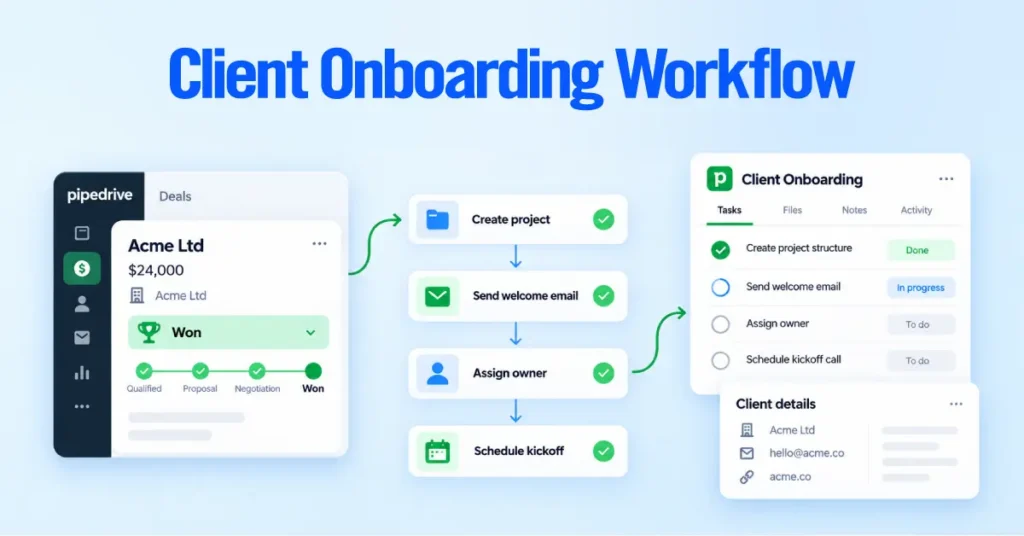
Lead created → routing rule matches → owner assigned → first Activity created and owner notified
In practice, when a rule sets an owner, an Automation creates a linked Activity such as a call or a first-touch task, and the owner receives a notification so the record does not sit invisible. Calls, meetings, and tasks are the Activities that make follow-up real. Sequences and Automations carry the qualification context forward so the rep opens the record already knowing why it was routed to them.
Keep lead routing and long-term nurture separate. Routing plus a first activity gets a human on the lead fast. Nurture is a different program for leads that are not yet ready. Blurring the two produces reps who ignore routed leads because they assume automation will handle it.
Define Acceptance, SLA, and Escalation
Define in writing what your team means by assigned, accepted, contacted, overdue, breached, escalated, and reassigned, because a response SLA you have not defined is a response SLA you cannot enforce.
Give each state a concrete meaning your tools can detect.
- Assigned means an owner is set, which Automatic Assignment records.
- Accepted means the rep has acknowledged the record, for example by completing the first Activity or a defined acceptance step.
- Contacted means a meaningful human response has gone out, a real call or email, not an auto-reply.
- Overdue means the first Activity passed its due time.
- Breached means your response window elapsed without contact.
- Escalated means a manager alert or a handoff to a backup owner fires.
- Reassigned means ownership moved because the first owner did not act.
Build urgency tiers so a high-value inbound and a low-intent form fill do not share the same clock. Then decide the escalation path, whether that is a manager alert, a backup owner, or automatic reassignment.

Be clear about where this exceeds native capability. Automatic reassignment when an SLA is breached is not something native Automatic Assignment performs on its own. You can approximate parts of it with Automations, and full claim-based or timer-based escalation is where a marketplace app or custom workflow fits.
We do not publish a universal response-time benchmark here. Speed to lead matters, but credible numbers vary by market and by source, and a benchmark copied from a blog is not a target your team validated. Set your own baseline from your Pipedrive data first, then commit to an SLA you can hold.
Route Leads from Web Forms, Chatbot, and Integrations
Different capture sources feed routing differently. The key rule is to decide where source-level ownership ends and central Automatic Assignment begins, so the two never fight over the same record. Regardless of how a record is created, whether by import, API, manual entry, or Lead-to-Deal conversion, Pipedrive will assign it as long as it matches a rule.
Here is how the common sources interact with routing.
- Web Forms create records that Automatic Assignment can route on Lead added or Deal added, provided the form captures the routing fields as controlled values.
- Chatbot, part of LeadBooster, can capture and create records that then flow into your central rules. LeadBooster and its Chatbot sit on the higher plans or as an add-on, so confirm your plan includes them.
- API created records are treated like any other record and route when they match a rule.
- Imports are the highest-risk source, because a bulk import can match active rules and trigger mass assignment.
- Marketplace integrations and manual creation follow the same principle. If they match a rule, they route.
The conflict to design out is double ownership logic. If a Web Form or integration stamps an owner at capture and a central Automatic Assignment rule also matches the record, two systems now decide ownership. Choose one source of truth. Either let capture sources set the owner and exclude those records from central rules, or let central rules own assignment and stop capture sources from setting owners.
Test Routing Before Launch
Test every branch of your routing with named scenarios before you turn it loose on live leads, because the first-match engine hides ordering mistakes until a specific record exposes them. Do not stop the project at “activate the rule.”
Build a test matrix that exercises the whole system. Cover every lead source, every routing branch, each territory, each owner pool, a missing routing field, overlapping rules, no matching rule, an existing Organization owner, an inactive or deactivated User, a duplicate account, a Lead-to-Deal conversion, a fresh Deal creation, an import, and API-created records, plus fallback handling.
For each scenario, record six things.
| Field | What to capture |
| Input | The record and its field values |
| Expected rule | Which rule should match |
| Expected owner | Who should receive it |
| Expected next activity | The first Activity that should appear |
| Fallback | What should happen if no rule matches |
| Observed result | What actually happened |
Run the deactivated-User test specifically, because it is the one teams skip. A rule pointing at an inactive User fails with User not found, and you want to find that in a test, not when a rep goes on leave. Test carefully before any bulk import or migration, since that is when a misordered rule does the most damage fastest.
Monitor Unassigned and Misrouted Leads
Monitor routing continuously after launch using Assignment History and the Not assigned tab, and give every exception type a named owner and a review cadence. History shows whether rules fired and who received each record. Not assigned lists everything no rule could place. History is retained for seven days, so anything you want to analyze over longer periods needs to be exported or captured elsewhere.
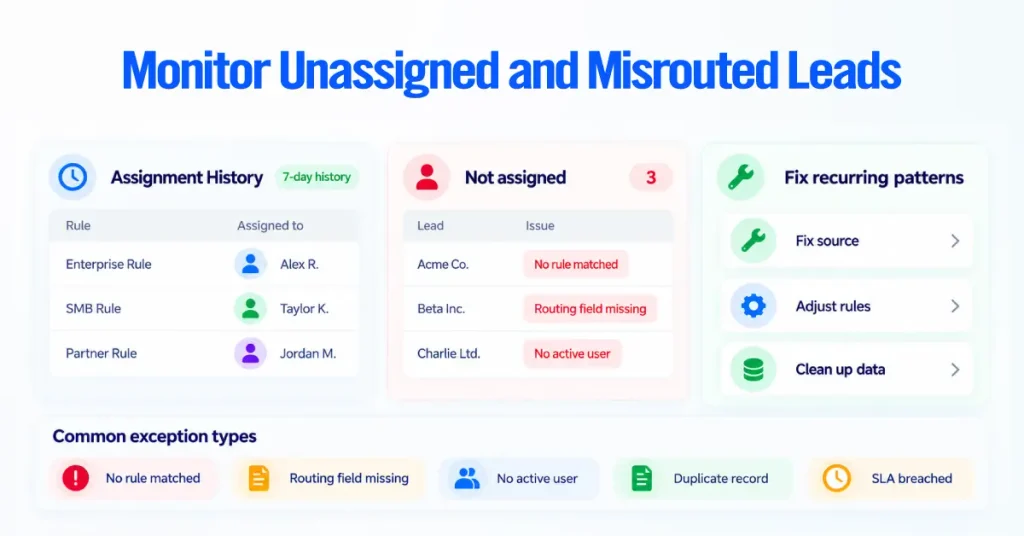
Watch for wrong-owner reports, missing routing fields, and records that are assigned but never got a first Activity. Then classify exceptions so patterns surface instead of hiding.
- No rule matched
- Routing field missing
- No eligible active User
- Ambiguous account ownership
- Duplicate Person or Organization
- Integration failure
- Assigned but no activity created
- SLA breached
- Reassignment loop
Each of these is a category, and each needs an owner and a cadence. A recurring “No rule matched” means a capture gap. A recurring “Duplicate Organization” means a data-hygiene problem upstream of routing. Exceptions are not noise to clear. They are your early warning that a capture source or a rule has drifted.
Measure Lead-Routing Performance
Measure whether routing works by tracking coverage, speed, fairness, and downstream conversion, and separate what native Pipedrive reporting gives you from what needs deliberate instrumentation. Establish a baseline before you judge any number.
The metrics that tell the real story are below.
- Automatic-assignment coverage, the share of eligible records assigned by rule rather than by hand.
- Unassigned rate, the share landing in Not assigned.
- Assignment latency, how fast an owner is set after creation.
- First-activity coverage, the share of assigned records that got a first Activity.
- First-response SLA attainment, the share contacted within your window.
- Reassignment rate, how often ownership moves after the first assignment.
- Distribution share by owner and Team, to see fairness in practice.
- Lead-to-deal conversion by owner, to connect routing to outcomes.
- Win rate by routing cohort, to test whether a routing model helps.
- Exception resolution time, how long records sit in an exception state.
Know the split between what Pipedrive reports natively and what you must build. Assignment History and Not assigned give you assignment outcomes and failure reasons for a seven-day window. Insights can report on ownership, conversion, and pipeline movement.
Metrics like true first-response SLA attainment and assignment latency usually require deliberate timestamp fields, exports, or external reporting, because the native seven-day history is not a long-term analytics store.
Maintain Routing as the Team Changes
Treat routing as a living configuration that you review on a schedule, because every hire, departure, territory change, and PTO event can break a rule that worked yesterday. Routing is not set and forget.
Events that require maintenance include new hires, Team membership changes, territory changes, role changes, PTO, deactivated Users, and offboarding. Each one can leave a rule pointing at someone who can no longer receive work.
- Rule ownership. Assign a named owner for the routing configuration itself, so changes go through one person.
- Change documentation. Record what changed and why, so the next admin is not reverse-engineering your hierarchy.
- Regression testing. Re-run your test matrix after any structural change, because a new hire added to two Teams changes round-robin fairness.
- Recurring review. Put a periodic review on the calendar to catch drift before it causes a miss.
Pay special attention to departures. When a deals app admin is deactivated, their rules are deactivated but stay visible, and another admin needs to disable or reassign anything tied to that person and remove them from Teams that carry rules. Object ownership is separate again here.
A departing rep’s open Deals and their Person and Organization ownership may all need reassigning as distinct actions, because deactivating the User does not hand their accounts to anyone. Treat a recurring review as good practice, not an official Pipedrive requirement, and size the cadence to how fast your team changes.
When to Use a Pipedrive Routing Consultant
Bring in professional help when your routing requirements outgrow field-driven rules and even round robin, not when a simple setup would do. Most teams with straightforward routing do not need a consultant, and we will tell you when you are one of them.
Situations where outside implementation help usually pays for itself include multiple inbound sources feeding one CRM, overlapping territories, multiple sales teams sharing pipelines, complex account ownership, strict response SLAs, weighted assignment, capacity-based routing, availability-aware routing, complex integrations, custom API workflows, advanced reporting beyond native history, and recurring routing failures you have not been able to root-cause.

If that list describes your environment, our Pipedrive consulting and routing integration services exist for exactly this, from designing the rule hierarchy to wiring the follow-up, SLA, and exception layers, and standing up an external routing layer only where native capability stops.
If you need a few territory rules and even round robin, keep it native and spend your budget elsewhere.