AI Summary




TL;DR
- Apollo and Pipedrive support two-way syncing for contacts and accounts.
- Pipedrive contacts and accounts are automatically pulled into Apollo after the integration is connected.
- Apollo can push contacts and accounts to Pipedrive automatically, manually, or based on selected stages.
- Deals, emails, calls, meetings, tasks, notes, and sequence activity do not sync through the native integration.
- The cleanest setup is usually to keep prospecting and engagement in Apollo and move qualified prospects into Pipedrive.
- Finalize field and stage mapping before enabling a large-scale sync.
Apollo and Pipedrive solve different parts of the sales process. Apollo helps sales teams find, enrich, and engage prospects, while Pipedrive manages qualified opportunities through a sales pipeline.
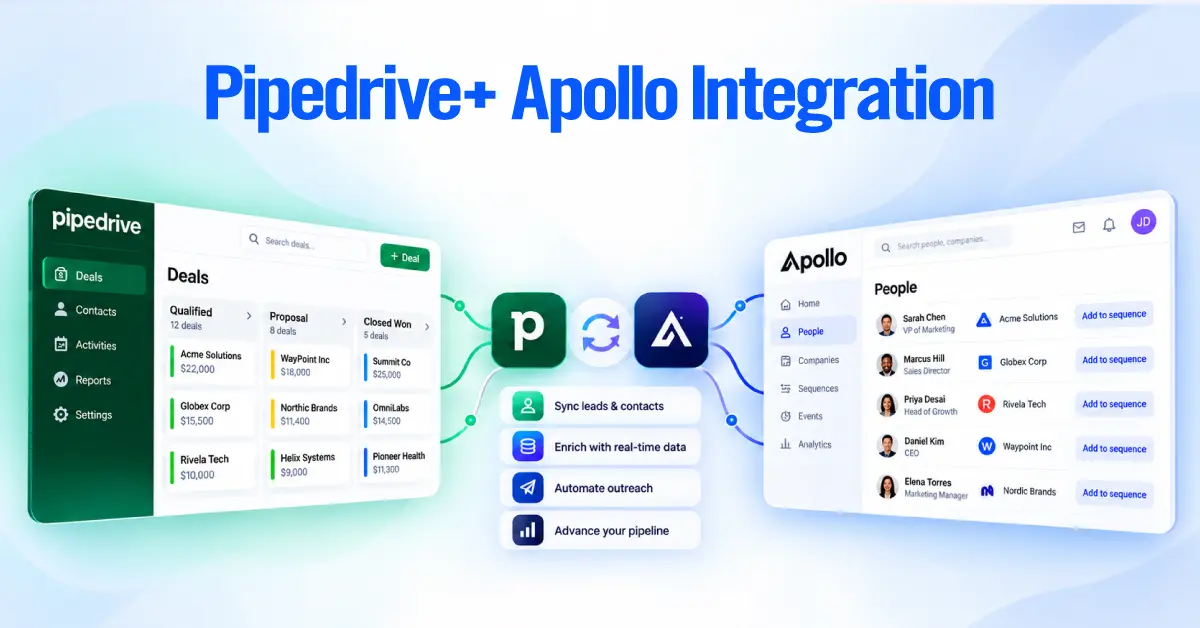
The native integration connects the two platforms by syncing contact and account data. Pipedrive records can be pulled into Apollo for prospecting and engagement, while Apollo can push selected contacts and accounts back to Pipedrive based on the sync rules you configure.
The important distinction is that this is not a full CRM activity or deal sync. The native integration doesn’t include emails, calls, meetings, tasks, notes, sequence activity, conversation summaries, or deals.
That makes the integration most useful when Apollo handles prospecting and engagement, while Pipedrive remains the system where your team manages qualified opportunities and pipeline.
How Does the Apollo Pipedrive Integration Work?
The integration connects Apollo’s prospecting environment to Pipedrive’s CRM. The basic workflow looks like this:
Pipedrive → Apollo
Apollo pulls existing contacts and accounts into Apollo, where sales reps can search, enrich, segment, and engage them.
Apollo → Pipedrive
Contacts and accounts can be pushed back to Pipedrive according to the sync settings you configure. You can push records automatically or limit automatic creation to selected stages.
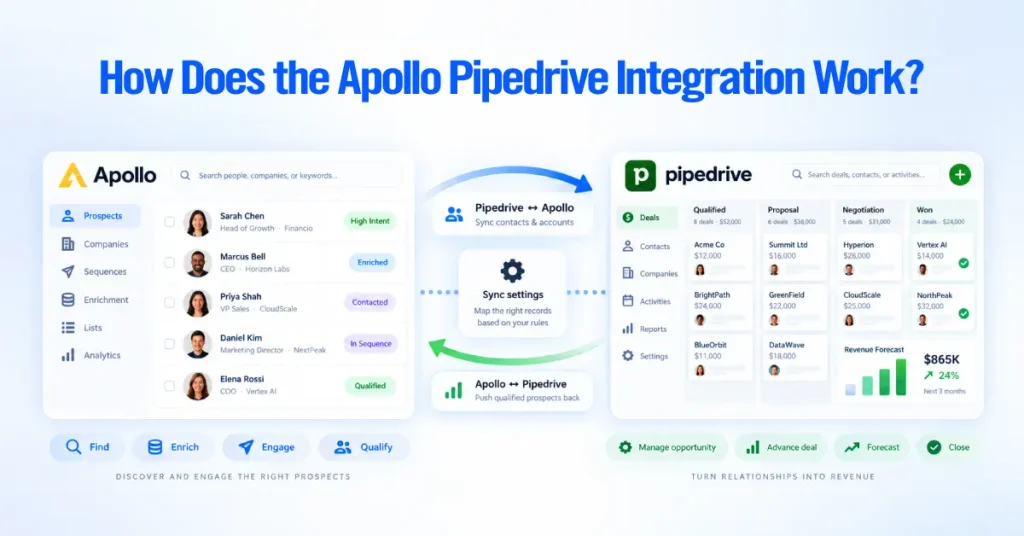
The integration therefore works best as a controlled handoff between two systems rather than as an attempt to make Apollo and Pipedrive mirror every piece of sales activity. A useful way to think about the relationship is:
Apollo: Find → Enrich → Engage → Qualify
Pipedrive: Manage opportunity → Advance deal → Forecast → Close
The native integration connects the contact and account data between those two stages.
What Data Syncs Between Apollo and Pipedrive?
The native integration supports contact and account data. Standard fields are mapped automatically where possible, and additional fields can be mapped manually.
| Data | Apollo → Pipedrive | Pipedrive → Apollo | Notes |
| Contacts | Yes | Yes | Push behavior can be configured |
| Accounts/Organizations | Yes | Yes | Push behavior can be configured |
| Name | Yes | Yes | Standard field |
| Yes | Yes | Part of contact data | |
| Phone | Yes | Yes | Apollo does not enrich a phone number during the push |
| Job title | Yes | Yes | Standard field |
| Address | Yes | Yes | Standard field |
| Owner | Yes | Yes | Depends on matching users |
| Custom fields | Yes | Yes | Requires field mapping |
| Stages/statuses | Yes | Yes | Requires stage mapping |
| Deals | No | No | Not supported by the native integration |
| Emails | No | No | Apollo activity is not synced |
| Calls | No | No | Apollo call activity is not synced |
| Meetings | No | No | Not part of the native sync |
| Tasks | No | No | Not part of the native sync |
| Notes | No | No | Not part of the native sync |
| Sequence activity | No | No | Remains in Apollo |
| Conversation summaries | No | No | Not synced |
One important distinction about two-way sync
Calling the integration “bi-directional” can be misleading if it is interpreted to mean that everything moves in both directions.
The two-way behavior applies to contact and account data.
It does not mean that a Pipedrive deal, Apollo sequence, email, call, or task automatically appears in the other system. Make that distinction clear before you design your sales workflow.
What Doesn’t Sync Through the Native Integration?
The integration’s biggest limitation is that it does not synchronize sales activity or deal records.
Deals do not sync
Apollo does not automatically create or update Pipedrive deals through the native Pipedrive integration.
If a prospect becomes qualified in Apollo, your team still needs a defined process to create or advance the opportunity in Pipedrive.
Apollo activities do not sync
Emails, calls, meetings, tasks, notes, sequence activity, and conversation summaries remain outside the native Pipedrive sync.
This matters if your sales team expects Pipedrive to contain a complete history of every Apollo interaction.
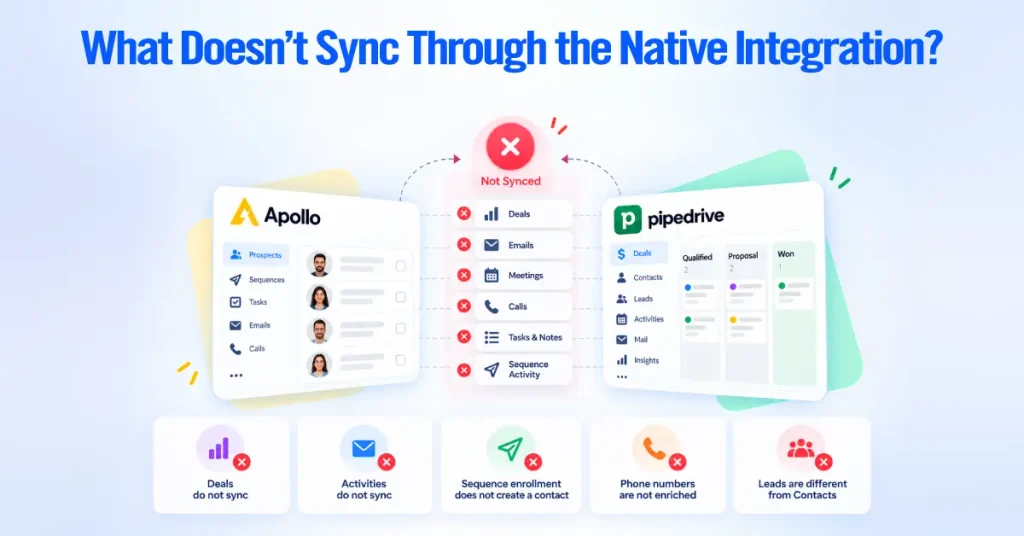
Sequence enrollment does not create a Pipedrive contact
Adding someone to an Apollo sequence does not automatically create that person in Pipedrive through the native integration.
If you want contacts to enter Pipedrive automatically, configure the appropriate push settings.
Phone numbers are not enriched during the push
If a phone number does not already exist on the Apollo contact, pushing the record to Pipedrive does not trigger phone enrichment.
Enrich the contact in Apollo first if the phone number is required in Pipedrive.
Pipedrive Leads are different from Pipedrive Contacts
Apollo pushes people to Pipedrive contacts, not the separate Leads section.
If a record has been pushed successfully but cannot be found under Pipedrive Leads, check the Contacts section instead.
How to Set Up the Apollo Pipedrive Integration
Before connecting the systems, decide what information should move between them and when a prospect should become a CRM record.
A clean implementation has four main stages:
- Connect the accounts.
- Review field and stage mappings.
- Configure push and visibility rules.
- Test the sync before rolling it out.

Step 1: Connect Pipedrive to Apollo
In Apollo:
- Open Settings.
- Go to Integrations.
- Find Pipedrive.
- Click Connect.
- Review the account access request.
- Continue to Pipedrive and authorize the connection.
Once connected, Apollo automatically pulls Pipedrive contacts and accounts into Apollo. You can only connect one CRM at a time, so deactivate any connected CRM, and you need permission to edit integration settings.
This initial pull cannot be disabled. If you do not want those records visible during prospecting, adjust the record visibility settings instead.
Step 2: Review Field Mapping
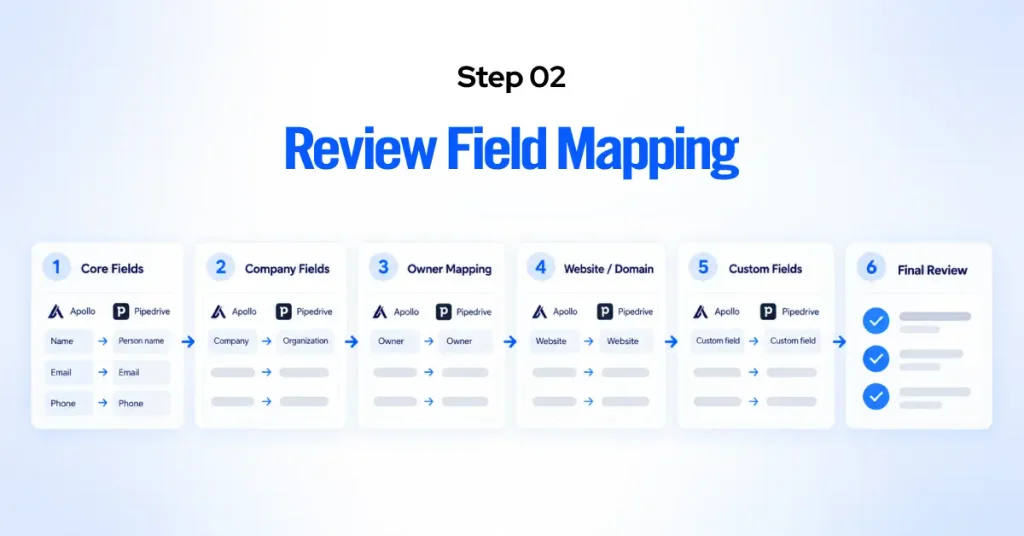
Apollo automatically maps recognized fields when the integration is connected. Review the mapping before enabling a large sync. At minimum, check:
- First and last name
- Phone
- Job title
- Company
- Owner
- Address
- Website/domain
- Custom qualification fields
If your sales process relies on custom fields, create the required fields in the appropriate systems and map them before pushing records.
The goal is not to map every possible field. Map only the fields your team uses to qualify, route, and manage prospects.
Step 3: Map Stages and Statuses
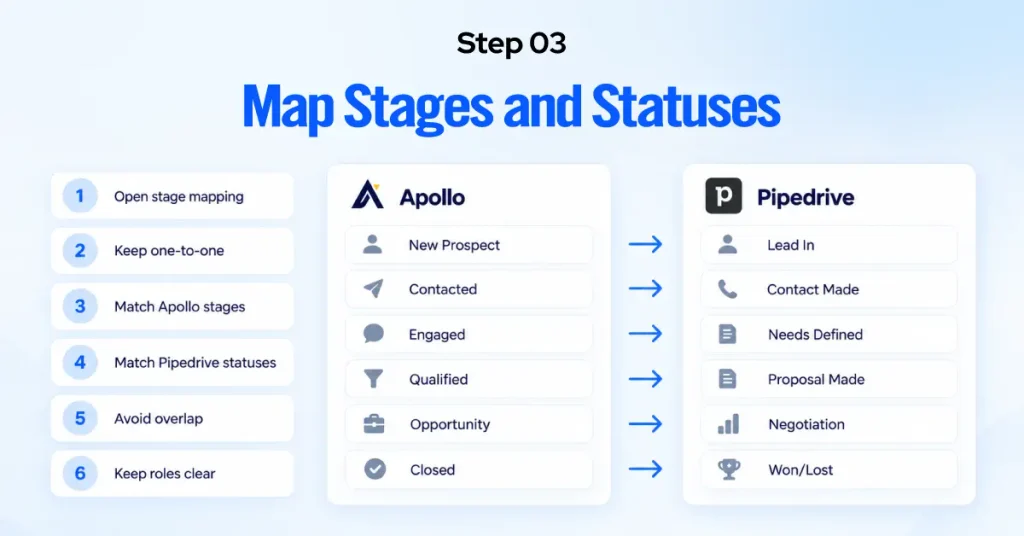
Apollo can map its stages to Pipedrive statuses so that the two systems use compatible lifecycle information.
Keep these mappings one-to-one. Avoid mapping one Apollo stage to several Pipedrive statuses or one Pipedrive status to several Apollo stages. Ambiguous mappings can produce unexpected record assignments.
More importantly, do not try to make the two platforms represent your entire sales process identically.
Apollo’s stages should support prospecting and engagement. Pipedrive’s stages should represent your actual opportunity pipeline.
Step 4: Configure Push Rules
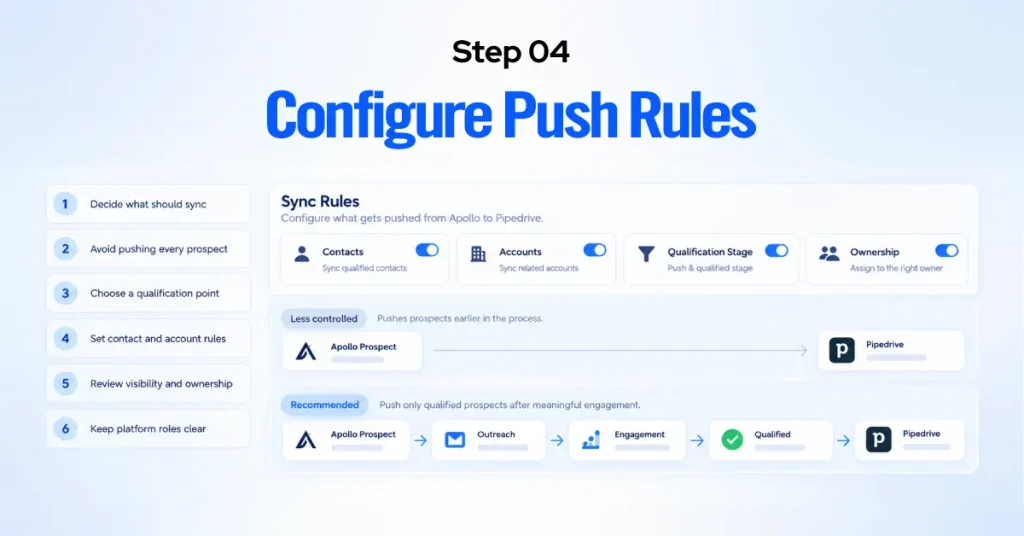
This is one of the most important decisions in the setup. Apollo can push contacts and accounts automatically, but you do not necessarily want every prospect entering Pipedrive. For example:
Less controlled
Apollo prospect → Pipedrive
This can quickly fill the CRM with contacts who have never engaged with your company.
More controlled
Apollo prospect → Outreach → Engagement → Qualification → Pipedrive
Stage-based pushing lets you keep colder prospects in Apollo while sending more relevant contacts to the CRM.
For many outbound teams, this creates a cleaner division of responsibility: Apollo manages the prospecting pool. Pipedrive manages the sales pipeline.
Step 5: Test With a Small Dataset
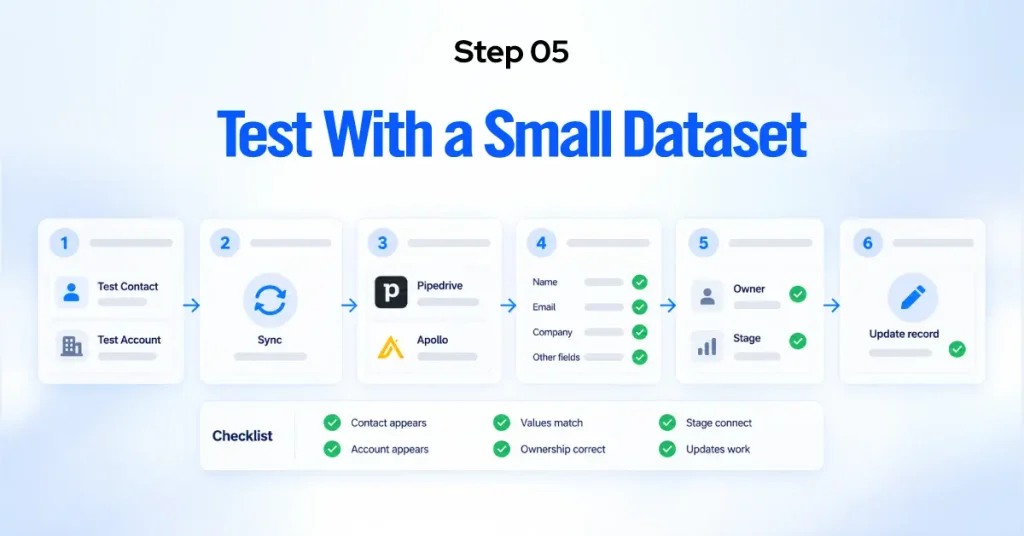
Do not enable a large-scale sync and assume everything will work as expected. Start with a small group of test records.
Check:
- whether the contact appears in the correct Pipedrive section
- whether the company is associated correctly
- whether mapped fields contain the expected values
- whether ownership is correct
- whether stage/status mapping behaves as intended
- whether updates flow in the expected direction
Test both a contact and an account before rolling the configuration out to the entire team.
How Should You Decide What Goes Into Pipedrive?
The most important integration decision is not technical. It is operational:
When does a prospect become important enough to belong in the CRM?
If you push every Apollo prospect into Pipedrive, the CRM can become a second prospecting database. That makes it harder for sales reps to distinguish between cold prospects, engaged contacts, qualified leads, and genuine opportunities.
A better model defines a clear handoff point. For example:
Apollo
- Identify the ICP
- Find contacts
- Enrich records
- Run outbound sequences
- Track engagement
- Qualify interest
Pipedrive
- Create or update the CRM record
- Assign ownership
- Create the opportunity
- Move the deal through pipeline stages
- Schedule follow-ups
- Forecast and report
The exact handoff point depends on your sales process, but document it before enabling the integration.

Recommended Apollo + Pipedrive Workflow
A practical outbound workflow can look like this:
1. Build the prospect list in Apollo
Use Apollo to identify contacts that fit your ideal customer profile based on criteria such as job title, industry, company size, geography, technology, or other relevant signals.
2. Enrich and validate the data
Complete the contact information you need before outreach.
If phone numbers or other enrichment data are important to your sales process, make sure that information exists in Apollo before pushing the record to Pipedrive.
3. Run outreach in Apollo
Use Apollo for sequences, calling, and other prospect engagement activities.
Keep this activity in Apollo rather than expecting the native integration to reproduce it inside Pipedrive.
4. Qualify the prospect
Define the signals that indicate a prospect is ready to enter the CRM.
This could be a positive reply, booked meeting, explicit buying interest, or another qualification event.
5. Push the qualified contact to Pipedrive
Use stage-based or manual push rules to move the appropriate contact and account information into Pipedrive
6. Create and manage the opportunity in Pipedrive
Once the prospect becomes a genuine sales opportunity, create the appropriate deal in Pipedrive.
Set the owner, pipeline stage, value, expected close date, and next activity according to your sales process.
7. Use each system for the reporting it is designed to support
Apollo should remain the primary source for outbound engagement and sequence performance.
Pipedrive should remain the primary source for opportunity, pipeline, and revenue management.
This division reduces the temptation to force one platform to replicate the other’s functions.
Native Integration vs. Zapier: Which Do You Need?
The native integration is enough if your main requirement is keeping contact and account data aligned between Apollo and Pipedrive.
You may need middleware such as Zapier when your workflow requires actions outside the native connector.
For example, you may want to:
- create a Pipedrive deal from a specific Apollo event
- trigger an action in Apollo when a Pipedrive deal changes stage
- copy specific activity information between systems
- connect Apollo and Pipedrive to another application
- build conditional workflows that the native integration does not support
The key distinction is:
Native integration: contact and account synchronization.
Middleware: additional workflow automation around the two systems.
Don’t add middleware just because the two platforms are connected. First determine whether the native integration already covers the business process you need.
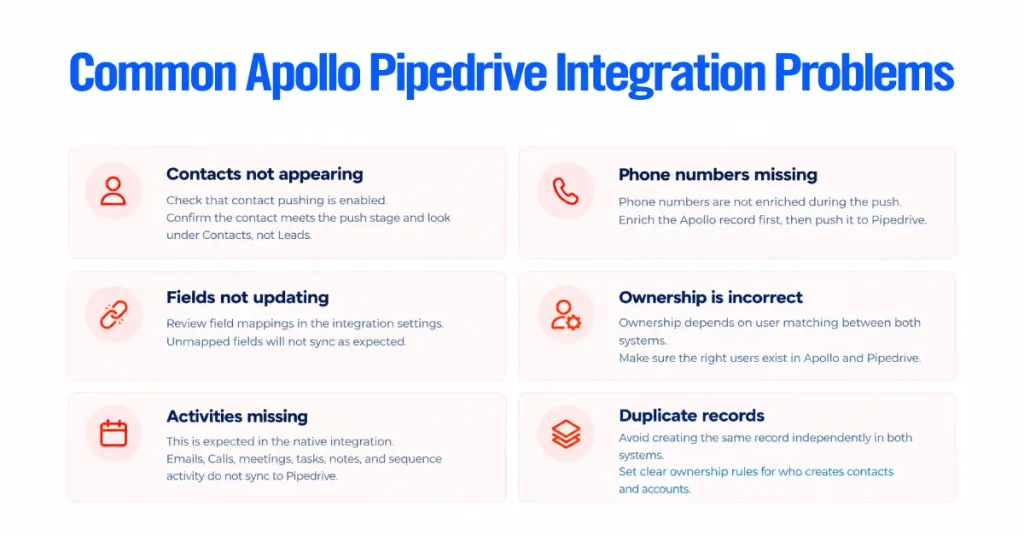
Apollo contacts are not appearing in Pipedrive
Check whether contact pushing is enabled and whether the contact meets the stage-based push criteria.
Also confirm that you are looking under Pipedrive Contacts rather than Leads.
Phone numbers are missing
Apollo does not enrich a phone number during the Pipedrive push. Enrich the Apollo record first, then push it to Pipedrive.
Fields are not updating
Review the field mappings in the integration settings.
If a field is not mapped, changes to that field may not appear as expected in the other platform.
Ownership is incorrect
Ownership depends on user matching between Apollo and Pipedrive.
Make sure the appropriate users exist in both systems and that your ownership structure is consistent.
Activities are missing from Pipedrive
This is expected behavior for the native integration.
Apollo does not sync its emails, calls, meetings, tasks, notes, sequence activity, or conversation summaries through the Pipedrive integration.
If your process requires that information in Pipedrive, you need a separate workflow.
Duplicate records are appearing
Review how records are being created in both systems.
Apollo automatically pulls and de-duplicates Pipedrive contacts and accounts when the integration is connected, but teams should still establish clear ownership of record creation and avoid creating the same records independently in both systems.
Pipedrive vs. Apollo: Do You Need Both?
Apollo and Pipedrive overlap in some areas, but they suit different parts of the sales process.
| Sales function | Apollo | Pipedrive |
| Prospect discovery | Strong | Limited |
| B2B contact data | Strong | Limited |
| Contact enrichment | Strong | Limited |
| Outbound sequences | Strong | Limited |
| Cold outreach | Strong | Limited |
| Contact/account management | Yes | Yes |
| Deal management | Basic | Strong |
| Visual pipeline | Yes | Strong |
| Opportunity management | Limited | Strong |
| Forecasting | Limited | Strong |
| Revenue pipeline reporting | Limited | Strong |
The decision is therefore less about choosing one platform over the other and more about deciding where each system belongs in your sales process.
Use Apollo when
Your team needs prospect discovery, enrichment, outbound sequencing, or multi-channel prospect engagement.
Use Pipedrive when
Your team needs structured opportunity management, pipeline visibility, deal ownership, follow-ups, and forecasting.
Use both when
You have a meaningful outbound motion and also need a dedicated CRM for managing qualified opportunities.
Best Practices for Apollo and Pipedrive
1. Define the source of truth
Decide which platform owns each type of information before connecting the systems.
A common model is Apollo for prospecting and Pipedrive for opportunities.
2. Do not push every prospect into the CRM
Use stage-based rules or manual selection to control when contacts enter Pipedrive.
3. Standardize your field mapping
Do not create slightly different versions of the same information in each platform.
Decide which fields matter to the sales process and map them consistently.
4. Keep stage definitions clear
Apollo stages and Pipedrive pipeline stages do not need to be identical.
They need to represent a clear handoff between prospecting and opportunity management.
5. Match users across both systems
Ownership problems are easier to prevent than to fix after records have already been distributed.
6. Test before a full rollout
Start with a small number of contacts and accounts.
Confirm the data, ownership, stages, and push behavior before enabling the integration for the entire team.
7. Document the handoff
Your sales team should know exactly when a prospect moves from Apollo to Pipedrive, who owns the record, and what happens next.
The integration should support that process, not define it.