AI Summary




TL;DR
- Pipedrive CRM data governance is the ongoing system of ownership, standards, access rules, lifecycle rules, and monitoring that keeps your CRM data trustworthy. It is not a one-time cleanup.
- Governance sets the rules. Data management executes them, hygiene prevents decay, cleansing repairs damage, and data quality measures the result. Different jobs, not synonyms.
- The controls that matter most in Pipedrive are object ownership, one source of truth per shared field, entry standards, required and important fields, permission sets, visibility groups, duplicate handling, and governed imports and integrations.
- Required fields block manual entry in the interface, but imports, the API, and integrations can still create incomplete records. Monitor, do not just configure.
- Merged records cannot be unmerged, so duplicate work should focus on prevention, not endless merging.
- Automation history lasts about 15 days, and the security audit log covers roughly the last two months, so neither is a permanent audit trail.
- Roll out over 30/60/90 days, set a baseline before you set targets, and review weekly, monthly, quarterly, and annually.
Most Pipedrive data problems do not start with bad data. They start with inconsistent decisions about how data gets into the CRM in the first place.
One person creates a new field. Another imports contacts without checking for existing records. An integration creates records differently from the sales team. Over time, those small inconsistencies show up as duplicate contacts, incomplete fields, unreliable reports, and pipelines that need regular cleanup.
For CRM admins and RevOps teams, that creates a frustrating cycle: clean the database, fix the reports, remind users about the rules, and then deal with the same problems again a few months later. The bigger issue is not the cleanup itself. It is the lack of controls that prevent the data from drifting again.
Pipedrive CRM data governance provides that control layer. It defines how CRM data should be structured, created, accessed, maintained, and reviewed, then uses Pipedrive’s settings and processes to keep those standards in place.
In this guide, we look at the practical side of Pipedrive data governance, including object ownership, field standards, permissions, duplicate management, integrations, data retention, and recurring audits. The aim is not simply to clean up your Pipedrive data, but to make that cleanup last.
What Is Pipedrive CRM Data Governance?
Pipedrive CRM data governance is the ongoing framework of ownership, standards, access controls, lifecycle rules, and monitoring that keeps your account data accurate, consistent, secure, and usable for reporting.
It answers a few key questions:
- who owns each type of data,
- what correct values look like,
- who can see and change them,
- how long records live, and
- how you know the rules are working.
Inside Pipedrive, those rules become configuration. The governance toolkit includes field quality rules, required and important fields, read-only fields, permission sets, visibility groups, item-level visibility, duplicate handling, import controls, automation rules, and the security dashboard.

Governance differs from a cleanup because it never ends. A cleanup has a start and a finish. Governance runs in the background and prevents the next mess. Five elements make it work.
- Ownership assigns accountability by data domain, such as Deals or Organizations.
- Standards define good data at the point of entry.
- Access controls determine who can see and do what.
- Lifecycle governs data from creation through retention or deletion.
- Monitoring measures quality and surfaces exceptions before they spread.
It affects everyone who touches the CRM. Reps live with the entry standards, managers depend on the reporting those standards produce, RevOps owns the framework, admins configure it, and connected systems follow the same source-of-truth rules, or they corrupt your data.
Governance vs. Data Management, Hygiene, and Cleanup
These terms are related but not interchangeable, and treating them as synonyms often stalls governance.
- Data governance sets the rules and decision rights. It decides that an email is required on a Person before a deal reaches Proposal, and who may change that rule.
- Data management executes those rules through day-to-day configuration and maintenance.
- Data hygiene prevents deterioration through naming conventions, controlled dropdowns, and entry standards.
- Data cleansing repairs existing problems, such as merging duplicates and filling blank critical fields.
- Data quality measures the results across completeness, validity, uniqueness, and freshness.
You need all five. Governance without management is a policy no one follows. Cleansing without governance is a treadmill you never step off.
| Treat governance as an operating system for your CRM data, not a project with an end date. The goal is an account that stays clean on its own, not one that needs rescuing every quarter. |

Why Governance Matters in Pipedrive
Poor governance breaks the things you rely on Pipedrive for, and the damage shows up far downstream. A blank or inconsistent field rarely throws an obvious error. It distorts a report, misroutes a lead, or feeds a bad number into a forecast, and by then the cause is hard to trace. The chain runs like this.
- Reporting breaks when the same concept is captured three ways, because Insights can only group what is consistent.
- Forecasting becomes a guess when close dates, values, and stages are entered inconsistently or left stale.
- Pipeline visibility fails when deals sit in the wrong stage or miss stage-critical fields.
- Routing and segmentation collapse when owner, region, source, or industry fields are blank or free-typed.
- Automations misfire or skip records when the fields they depend on are empty or malformed.
- Integrations spread errors fast, since a bad value written by one system reaches every connected system.
- Adoption and trust drop the first time a manager catches a dashboard error, and low adoption produces even worse data.
- Security weakens when permissions are broad enough that anyone can export or delete.
- AI and lead scoring degrade because they are only as good as the fields feeding them.
- Compliance gets harder when you cannot say who owns a record, who changed it, or how long to keep it.
We skip universal statistics here because generic percentages rarely match your account. The point is structural. Weak controls at entry become expensive failures at decision time.
How Pipedrive Organizes CRM Data
Pipedrive stores different types of CRM data in separate records. Knowing what each record is for makes it easier to set clear data rules.
- Leads: Potential sales opportunities
- Deals: Sales opportunities in your pipeline
- People: Individual contacts
- Organizations: Companies or businesses
- Activities: Calls, meetings, tasks, and emails
- Products: Products or services linked to deals
These records work together. You can link a person to an organization, a deal to both, and activities to people, organizations, or deals. Products can be added to deals.
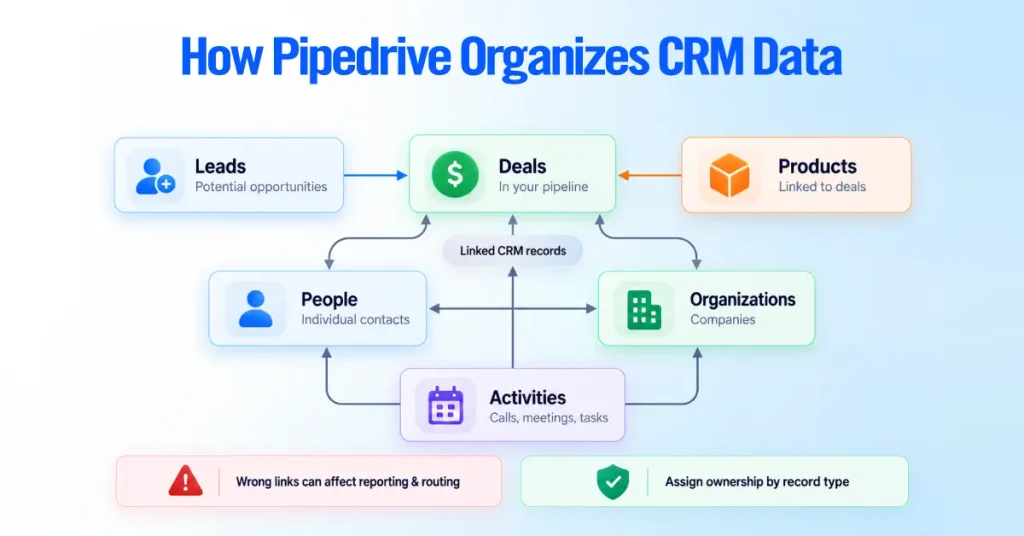
This matters because a mistake in one record can affect other parts of your CRM. For example, linking a deal to the wrong organization can lead to inaccurate reports or routing.
For governance, assign ownership by data type. The team managing sales pipelines may not be the same team responsible for organization data.
For the detailed setup of custom fields and data relationships, see our Pipedrive Custom Fields and Data Model guide.
Define the Scope and Source of Truth
Start by deciding what your Pipedrive governance framework will cover and where each important piece of data should come from.
Your scope should include Pipedrive objects, pipelines and stages, default and custom fields, integrations, and the reports that use this data.
For every shared field, define four things:
- Source of truth: Which system holds the authoritative value?
- Who can update it: Which users, roles, or systems can change the data?
- Data flow: Does data move one way or between systems?
- Conflict rules: What happens when two systems provide different values?
For example, if your CRM and marketing platform both store a contact’s industry, decide which system controls that field. This prevents different systems from overwriting each other and keeps reporting consistent.
A simple source-of-truth matrix can document these decisions, so your team knows where each piece of data comes from and who is responsible for maintaining it.
| Shared field | Authoritative system | Permitted writers | Sync direction | Conflict rule |
| Company name | Pipedrive | CRM admin, marketing form | One way into Pipedrive | Pipedrive value stands |
| Email address | Marketing platform | Marketing platform | Two way | Most recent verified value |
| Deal stage | Pipedrive | Sales reps, RevOps | Pipedrive only | Pipedrive is authoritative |
| Lifecycle status | Marketing platform | Marketing platform | Into Pipedrive | Marketing value stands |
Every important shared field needs one owner system and one conflict rule. Fields without a defined source of truth silently corrupt across integrations.
Do not assume two-way sync is always right. It is powerful, but it’s also the fastest way to spread bad value everywhere. For many fields, a one-way flow into Pipedrive is safer and easier to govern.
Assign Data Owners and Stewards
Every important CRM data set needs one person accountable for it and someone responsible for keeping it accurate day-to-day. These roles can be different.
- Data owner: Decides how the data should be managed and is accountable for its quality.
- Data steward: Handles day-to-day maintenance, such as fixing errors and merging duplicates.
- CRM administrator: Manages fields, permissions, visibility, and data rules.
- RevOps or sales operations: Defines data standards, reporting requirements, and review processes.
- Integration owner: Maintains field mappings and data flow for each integration.
- Sales managers: Make sure their teams follow data standards.
- End users: Enter and update data correctly.
- Legal and security: Advise on access, privacy, and retention requirements.
The key is to assign ownership to specific areas, not just the CRM as a whole. Each major record type, critical field group, integration, and permission control should have a named owner.
If nobody owns a field or data process, it is likely to become outdated over time.
Build a Pipedrive Data Dictionary
A Pipedrive data dictionary is a living document that defines every important field before you create, change, or retire it. It is what keeps a field meaning one thing instead of five things to five people. Document the following for each governed field.
| Attribute | What to record |
| Field label | The name users see in Pipedrive |
| API key | The identifier used by integrations and the API |
| Object | Lead, Deal, Person, Organization, Activity, or Product |
| Definition | A plain-language description of what it means |
| Business purpose | Why it exists and what decision it supports |
| Data type | Text, number, single or multiple option, date, and so on |
| Allowed values | The approved options for controlled fields |
| Creation source | Users, imports, integrations, or automations |
| Authoritative system | The source of truth for the value |
| Write authority | Which roles or systems may change it |
| Required stage | The pipeline stage where it becomes mandatory, if any |
| Responsible owner | The person accountable for the field |
| Reporting consumers | Reports and dashboards that depend on it |
| Automation consumers | Automations that read or write it |
| Sensitivity | How sensitive the data is, for access and retention |
| Retention rule | How long the value should be kept |
| Review date | When the definition was last confirmed |
| Deprecation status | Active, being retired, or removed |
This is governance documentation, not field architecture. For dropdown design and dependent fields, see our Pipedrive Custom Fields and Data Model guide.
Set Field and Data-Entry Standards
You prevent inconsistent data by controlling how it enters the system, not by cleaning it up after. The biggest driver of messy accounts is free text where a controlled option belongs, so start with standards.
Document standards for the fields you will report on and the way records are named. Use single or multiple-option fields for anything you filter or report on, such as industry, source, or region, and reserve free text for genuinely open information.
Set naming conventions for People and Organizations, formatting rules for phone and email, a consistent deal-name pattern, a short and meaningful activity-type list, clear label definitions, and written exit criteria for each pipeline stage so a deal in Stage 3 means the same thing to everyone.
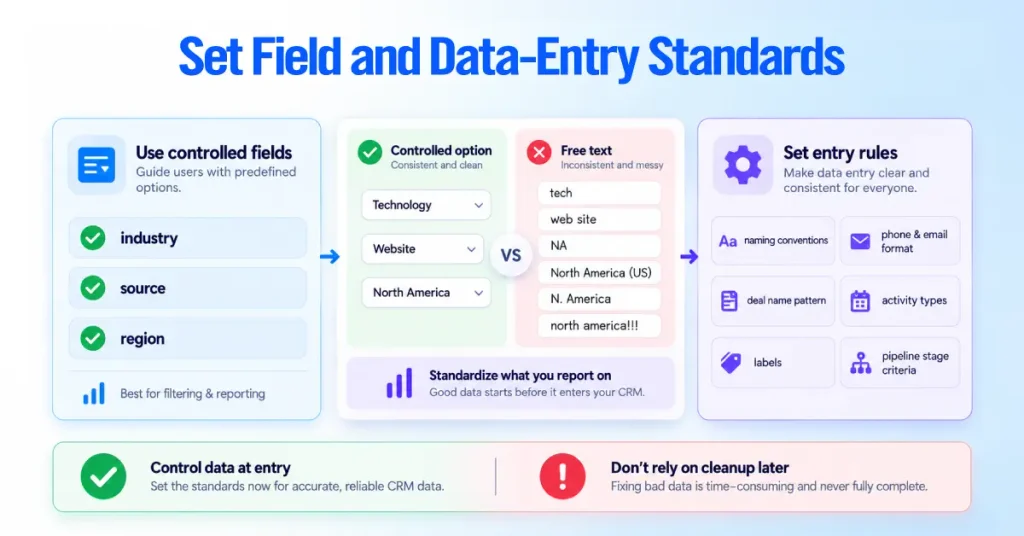
The difference is easy to see in practice.
- A good lead source is a single-option field with values like Website, Referral, Event, and Outbound. A bad one is free text producing “website,” “Web,” “our site,” and “inbound web.”
- A good deal name follows a pattern such as company plus product plus quarter. A bad one reads “new deal” or a rep’s private shorthand.
Standards need an owner and an approval process. Conventions that live in one person’s head vanish the moment that person is out, and they cannot be enforced. Written, owned standards can.
Required, Important, and Read-Only Fields
These three controls do different jobs, and picking the wrong one either frustrates reps or fails to protect the data.
- Required fields block the action. If one is empty, users cannot add or edit the item, and a deal cannot move to a stage that requires it. Admins configure them under Settings and Data fields, scoped to specific pipelines and stages for deal and lead fields, while Person, Organization, and Product field types apply account-wide. Required fields are a paid-tier feature. Current documentation lists them on Growth and higher plans, though some help articles still show older plan names, so confirm your exact plan.
- Important fields prompt rather than block. An empty one shows a reminder in the detail view but still saves, which suits fields you want filled eventually without stopping work. They are also plan-gated on higher tiers.
- Read-only fields restrict editing by permission across the lead, deal, contact, and activity list views and bulk editing, where the edit control greys out for restricted users. The restriction is available on Premium and higher plans.
One detail decides how you use read-only fields. Pipedrive built them so they do not disrupt integrations, automations, webforms, and imports. An automation, an integration, an import, or the API can still change a read-only field. It restricts people in the interface, not machines. No single field setting enforces a rule across every write channel.
The Required-Field Enforcement Gap
Required fields can be bypassed, which is why records with missing critical data still appear after you set fields as required. The rule is enforced in the interface on manual add, edit, and stage moves. It is not a database-level constraint.
- Imports enforce their own minimum fields, such as a contact name, but not your custom required-field rules, so a spreadsheet can create records the interface would have blocked.
- Bulk editing in list view does not apply the same add-time blocking.
- API and integrations write programmatically and skip interface-level checks.
- Automations can create records, and imports generally do not trigger automations, so an automation safety net will not catch imported data.
Governance therefore cannot rely on UI controls alone. Build saved filters that surface records missing critical fields, review that exception queue on a schedule, and treat post-write validation as routine.
Govern Access, Visibility, and Exports
Pipedrive separates user access into two controls:
- Permission sets: what users can do
- Visibility groups: what records users can see
Both are managed under Settings > Manage Users.
Permission sets control actions such as exporting, deleting, merging, importing, and editing custom fields. Assign each user only the permissions their role requires.
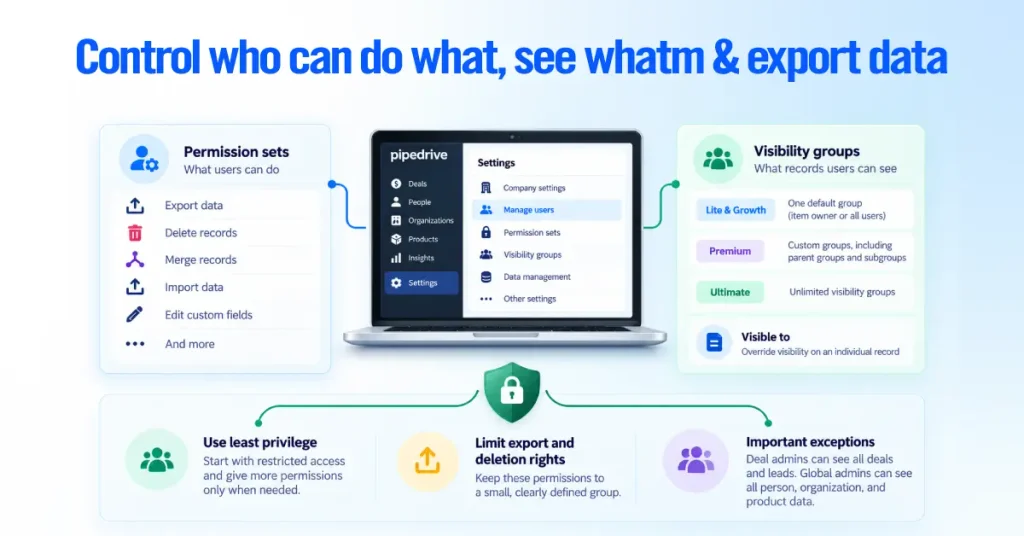
Visibility groups control which records users can view. The available options depend on your Pipedrive plan:
- Lite and Growth: One default group with visibility for the item owner or all users
- Premium: Custom groups, including parent groups and subgroups
- Ultimate: Unlimited visibility groups
You can also use the Visible to setting on an individual record to override its group-level visibility.
Pay extra attention to export and deletion rights
Use the principle of least privilege: start with restricted access and expand it only when a role needs more.
Keep export and deletion permissions limited to a small, clearly defined group. Export access is also subject to record visibility, so a user can only export data they are allowed to see. The full Export data function requires admin access.
Two exceptions are important:
- Deal admins can see all deals and leads regardless of visibility settings.
- Global admins can see all person, organization, and product data.
Prevent and Resolve Duplicate Records
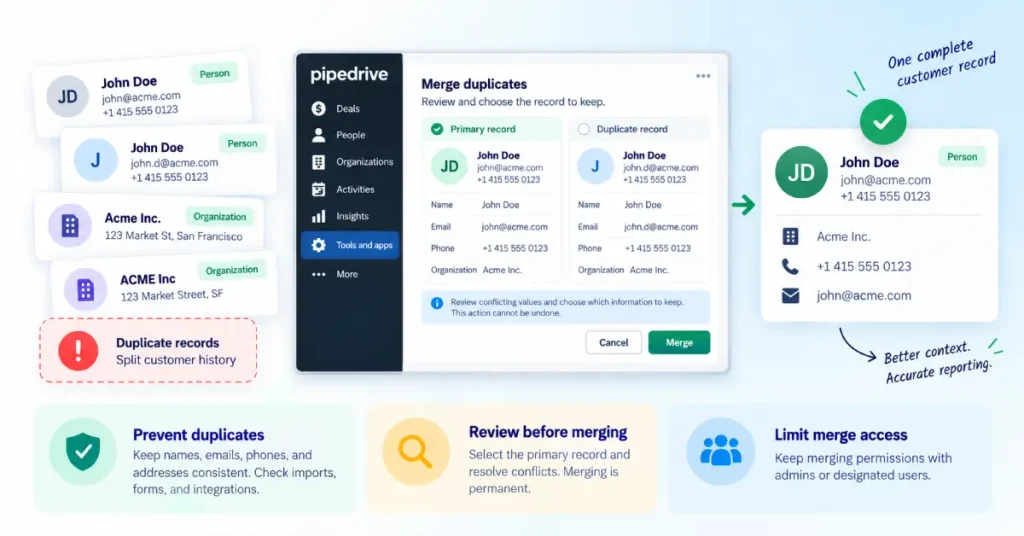
Duplicate records can split a customer’s history across multiple entries, leading to incomplete customer context and inaccurate reporting. In Pipedrive, prevention matters most because you can’t undo merges.
Pipedrive automatically identifies some potential duplicates based on specific fields:
| Record | Duplicate criteria |
| People | Same name + same phone number, email, or organization |
| Organizations | Same name + same address |
| Deals | No automatic duplicate identifier |
The organization rule accounts for companies with separate branches at different addresses. Deals are different: two deals with the same name are treated as separate records and will not be flagged automatically.
Keep source data consistent
Duplicate detection depends on the information stored in each record. Standardize how users enter names, email addresses, phone numbers, and addresses so Pipedrive has reliable data to match.
Imports include an option to identify and merge duplicates, but users can also bypass that step. If duplicate prevention matters, control when you allow that bypass.
Forms and integrations can also create records without checking for existing matches. If duplicates keep appearing, investigate the source instead of repeatedly cleaning them up.
Review every merge before confirming
When merging records, Pipedrive lets you select the primary record and resolve conflicting values in the preview. Treat this as the final checkpoint because the merge is permanent.
Keep merging permissions with admins or designated users. A regular user only sees potential duplicates within their permitted visibility, while an admin can review a broader set of records.
Important: Pipedrive merges cannot be undone. Preview every merge carefully and keep a recent data export before making large-scale changes.
You can access Merge Duplicates under Tools and apps. For a large backlog, handle duplicates in scheduled cleanup sessions, but fix the process creating them at the same time. Otherwise, the same records will keep coming back.
Govern Imports, Migrations, and Bulk Changes
High-volume changes can damage an account faster than anything else, so every large import, migration, or bulk update needs an owner, a test, and a verification step. A bad import does not create one problem; it creates thousands at once, and some of them, like unwanted merges, cannot be reversed.

- Clean the source data in the spreadsheet before it reaches Pipedrive.
- Confirm mandatory fields. Imports need at least a name for People and Organizations, and Leads, Deals, and Projects must link to another item, or the import creates nothing and returns a skip file.
- Map every column to the correct field and create custom fields deliberately, not on the fly.
- Decide duplicate behavior before importing: merge with existing records or create new ones.
- Run a small test batch and inspect the result before the full file.
- Reconcile imported counts and values against the source.
- Take a full export first, so you have a known-good state.
- Require approval for the full run from the data owner.
- Validate afterward with saved filters for missing or malformed data.
- Plan rollback in advance, knowing some actions cannot be undone, and the export is your safety net.
Assign a named owner to every migration and bulk change. Large changes without testing and verification steps are how good accounts break in an afternoon.
Govern Integrations and Automations
Integrations can affect thousands of records without anyone noticing, so they need clear rules before they go live.
For each important integration, define:
- Source of truth: Which system controls each shared field?
- Write access: Which fields can the integration update?
- Sync direction: Should data move one way or both ways?
- Conflict rules: What happens when two systems have different values?
- Duplicate checks: How will the integration identify existing records?
Document these rules in your data dictionary, including field mappings and the API keys each system uses.
Also control changes to record owners and deal stages. An integration that silently changes either can affect reporting, routing, and ownership.
Use service accounts with only the permissions they need, monitor failed writes, and remove old integrations that are no longer required. An unused connector can keep changing Pipedrive data without anyone noticing.
Two-way sync is not always the best option. For many fields, keeping one system as the source of truth and using one-way sync is easier to control and less likely to create conflicts.
Monitor Automation History and Failures
Automations can fail without immediate notice, so review their execution history regularly, especially for automations that update important CRM fields.
In Tools and apps → Automations, you can open an execution to see when it ran, which step failed, and the error reported for that step. Use this history to identify and troubleshoot failed automations.
Assign clear owners to critical automations and keep separate documentation for how they work. Pipedrive’s automation history is not a permanent audit log, so do not rely on it as your only record.
Automation history is retained for about 15 days, with a longer period for automations containing delay steps. If you need a longer audit trail, store the relevant records or logs in a separate system.
Define the Data Lifecycle and Retention Rules
Every record should have a defined lifecycle, from creation and active use through archiving, retention, or deletion. Set rules for when to update data, flag it as stale, suppress it, archive it, or remove it based on business and legal requirements.
Keep your retention policy separate from Pipedrive’s platform behavior. Your policy determines how long you keep records, while Pipedrive determines how it handles deleted data. You can recover deleted data for 30 days before it’s permanently removed.
Set these rules with input from legal or security teams, and review Pipedrive’s current retention policies before relying on its platform-specific timelines.
Measure Pipedrive Data Quality
You know the framework is working by measuring quality against a baseline you set yourself. Numbers turn governance from an opinion into a scorecard. Track a focused set, not everything at once.
| Metric | What to measure | Why it matters |
| Critical-field completeness | Percent of records with key fields filled | Blank fields break reports, routing, and forecasting |
| Validity | Percent of values in the allowed format | Malformed data fails filters and automations |
| Consistency | Whether a concept is captured the same way | Inconsistent values fragment reporting |
| Uniqueness | Rate of duplicate candidates | Duplicates split history and double-count |
| Freshness | How recently records were updated | Stale data misleads decisions |
| Ownership coverage | Percent of records with a valid owner | Unowned records fall through the cracks |
| Relationship integrity | Correct links between People, Organizations, Deals | Broken links distort account views |
| Duplicate-candidate rate | New potential duplicates over time | A rising rate points to a broken source |
| Integration errors | Failed or conflicting writes from systems | Integration errors spread fast |
| Exception resolution | How quickly flagged issues are fixed | Slow resolution lets problems compound |
Do not adopt universal benchmark percentages. A target that fits one company misleads another. Measure your baseline first, set realistic thresholds, and watch the trend, which matters more than any single number.
Recommended Review Cadence
Run quick operational checks often and heavier policy reviews rarely.
- Weekly, clear operational exceptions such as records your filters flag for missing fields or new duplicate candidates.
- Monthly, review your scorecard metrics and their trend.
- Quarterly, review permissions, fields, integrations, and automations; retire what is unused and confirm access is still right.
- Annually, review policy, ownership, retention rules, and the framework itself.
Adapt it to your business. A regulated company with millions of records needs deeper, more frequent reviews than a small team on one pipeline.
Run a Pipedrive Data-Governance Audit
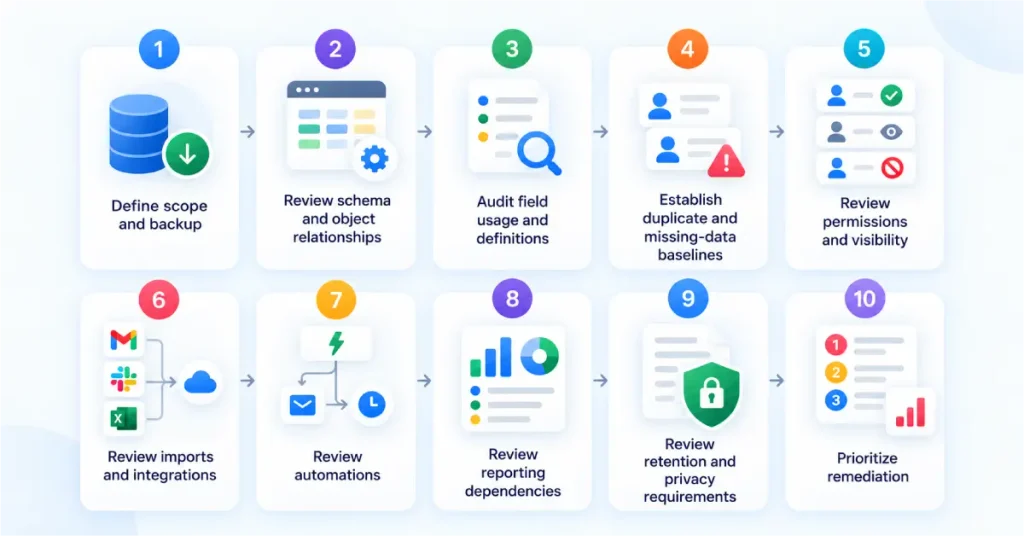
A governance audit is a structured pass that establishes where you stand and what to fix first. Run it before you build the framework, then repeat it annually.
- Define the scope and take a full backup to establish a known-good baseline.
- Review structure and schema across pipelines, stages, objects, and fields.
- Confirm object relationships so that People, Organizations, and Deals link correctly.
- Audit field usage and definitions, using field statistics to find unused or undefined fields, and reconcile against the dictionary.
- Establish duplicate and missing-data baselines.
- Review permissions and visibility against least privilege, with attention to export and deletion rights.
- Review imports and integrations, checking what each writes and whether mappings match the source-of-truth matrix.
- Review automations, confirming each is still needed, working, and owned.
- Review reporting dependencies, so you know which fields must stay clean.
- Review retention and privacy requirements.
- Prioritize remediation by business impact and risk, fixing what damages reporting, revenue, or security first.
Keep the audit tied to your actual account, not a generic checklist.
Common Governance Failures
Most problems fall into a short list of patterns, each with a clear consequence and a specific control.
| Failure | Consequence | Control |
| No clear data owner | Data drifts, no one accountable | Assign accountability and stewardship per domain |
| Excessive custom fields | Clutter and inconsistent entry | Audit field usage, retire unused fields |
| Free-text taxonomies | Unfilterable, unreportable data | Convert reporting fields to controlled options |
| Duplicate records | Split history, inflated counts | Prevent at source plus admin-owned merging |
| Incorrect object ownership | Wrong routing and visibility | Define ownership rules, fix assignments |
| Broad export or deletion rights | Data-loss and leakage risk | Restrict to a small named group |
| Untested imports | Mass errors, unwanted merges | Test batches and backups |
| Conflicting integrations | Fields flicker between values | One source of truth per shared field |
| Stale automations | Silent failures and bad writes | Scheduled review and clear ownership |
| Undefined pipeline stages | Unreliable forecasting | Written stage exit criteria |
| Undocumented config changes | No one knows why it broke | Change control with a written log |
| Missing source-of-truth rules | Integrations overwrite good data | A maintained source-of-truth matrix |
| Cleanup without prevention | The same mess returns | Pair every cleanup with an entry control |
| No recurring audit | Slow, invisible decay | The layered review cadence above |
A Practical 90-Day Governance Rollout
Roll out in three phases, so you build the framework without drowning the team in process. Treat it as a framework to adapt, not an official Pipedrive sequence.
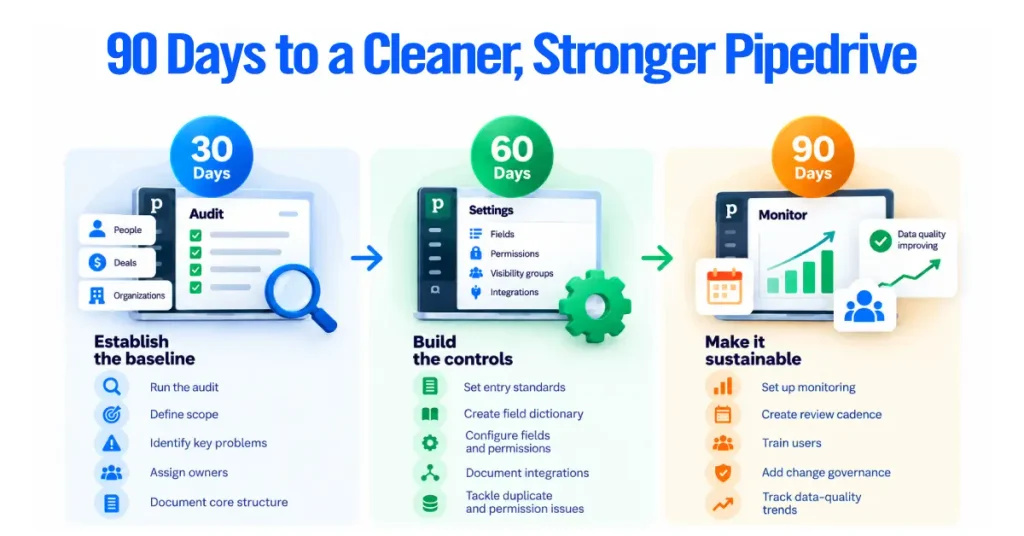
Days 1 to 30: establish the baseline. Run the audit and measure where the data stands today. Define the scope, identify the problems that hurt reporting, revenue, or security most, assign owners and stewards by domain, and document your core architecture of objects, pipelines, and critical fields.
Days 31 to 60: build the controls. Set and document entry standards, build the data dictionary for important fields, and configure the controls, required and important fields, read-only fields, permission sets, and visibility groups. Document integration ownership and mappings against the source-of-truth matrix, and address your highest-risk duplicate and permission issues.
Days 61 to 90: make it sustainable. Stand up monitoring with saved filters and an exception queue, create the recurring review cadence, train users so entry improves at the source, add change governance so config changes are approved and logged, and start tracking data-quality trends against your baseline.
Governance that adds friction without improving data gets abandoned. A small set of controls that hold the line beats a heavy process no one follows.
When to Use a Pipedrive Consultant
You don’t always need a Pipedrive consultant. Many teams can manage their CRM internally. Outside help becomes useful when the setup gets too complex or your team no longer has enough time to manage it properly.
Consider bringing in a consultant if you have:
- Multiple pipelines with different rules
- Complex data structures or unmanaged custom fields
- A Pipedrive migration to or from another CRM
- Forecasts that leadership no longer trusts
- Conflicting integrations or recurring data issues
- Complex permissions across teams
- Regulated workflows
- Rapid growth that has outpaced your CRM setup
- Low user adoption caused by poor data or a difficult setup
- Data-quality problems that keep coming back after cleanup
If several of these problems apply to your account, structured help can save significant time. At Axis Consulting, we help businesses turn CRM governance into practical Pipedrive configurations through our Pipedrive consulting service.
The goal is simple: a Pipedrive setup your team can trust, use, and maintain without constantly fixing it.