
AI Summary




TL;DR
- Housecall Pro has three published plans in 2026. On annual billing, Basic is $59 per month, Essentials is $149 per month, and MAX is $299 per month.
- Monthly billing costs more. Basic is $79, Essentials is $189, and MAX is $329 per month.
- Plans are separated mainly by user count. Basic is a single-user plan, Essentials is commonly described as covering up to 5 users, and MAX up to 8, with extra MAX seats widely reported at $35 per month each. These seat figures aren’t stated on the public pricing page, so confirm them with Housecall Pro.
- The base subscription is not your total cost. Most teams that grow past one person move to Essentials for QuickBooks Online sync and employee GPS, and payment processing plus optional add-ons sit on top of the plan.
- Card payment processing starts at 2.59 percent per transaction, and bank (ACH) payments are 1 percent, per Housecall Pro’s pricing page. These fees scale with how much money you collect, so they belong in your budget separately from the subscription.
- Housecall Pro publishes its plan prices, which makes budgeting easier than with quote-only vendors such as ServiceTitan and the current Workiz model.
- Housecall Pro offers a 14-day free trial on the MAX plan with no credit card required, and there is no permanent free plan.
Many buyers first meet Housecall Pro through its $59 headline price, then find the number grows once they add a second login, turn on QuickBooks sync, and start collecting card payments. That gap between the entry price and the working price often confuses people in contractor reviews.
The short answer is that the software subscription starts at $59 per month on annual billing, and a small team that needs QuickBooks and GPS typically pays $149 per month or more for the plan, with payment processing added on top based on the card volume you run.
Housecall Pro is field service management software designed for home service businesses in the home services industry, including HVAC, plumbing, and electrical trades, and it is marketed as an all-in-one solution for home service businesses, with features the company says will support your success from a solo operator to a larger team. It handles scheduling and dispatching, online booking, invoicing, and payments in one mobile app for businesses that need day-to-day software.
This is a pricing guide, not a full Housecall Pro review, so we focus on what it costs to use Housecall Pro and where the money goes as you grow your business, from the 14-day free trial through add-ons outside the base plan.
How Much Does Housecall Pro Cost in 2026?
Housecall Pro costs $59 to $299 per month on annual billing, or $79 to $329 per month if you pay month to month. Those figures cover the software subscription only. Your final cost depends on how many people need a login, which features your work requires, and how much you collect through the platform’s payment tools.
| Plan | Annual Billing (per month) | Monthly Billing | Included Users | Best For |
| Basic | $59 | $79 | 1 | Solo operators needing scheduling, invoicing, and payments |
| Essentials | $149 | $189 | Up to 5 (confirm) | Small teams needing QuickBooks Online sync and employee GPS |
| MAX | $299 | $329 | Up to 8 (confirm) | Growing teams needing API access, advanced tools, or more seats |
Note: Pricing verified against Housecall Pro’s official pricing page and Help Center on August 16, 2026. Software prices change often, so confirm current rates with Housecall Pro before you buy.
The starting price is a floor, not a forecast. Housecall Pro includes QuickBooks Online sync and employee GPS tracking on Essentials and above, not on Basic, so teams with more than one person usually start their budget at $149 per month.
Is Housecall Pro Priced per User?
Housecall Pro is priced by plan tier, with a set number of users (called seats) built into each tier, rather than a flat per-seat rate. A seat is one login for one person. Basic includes a single user. Essentials is commonly reported to include up to 5, and MAX up to 8, with additional MAX seats widely cited at $35 per month each.
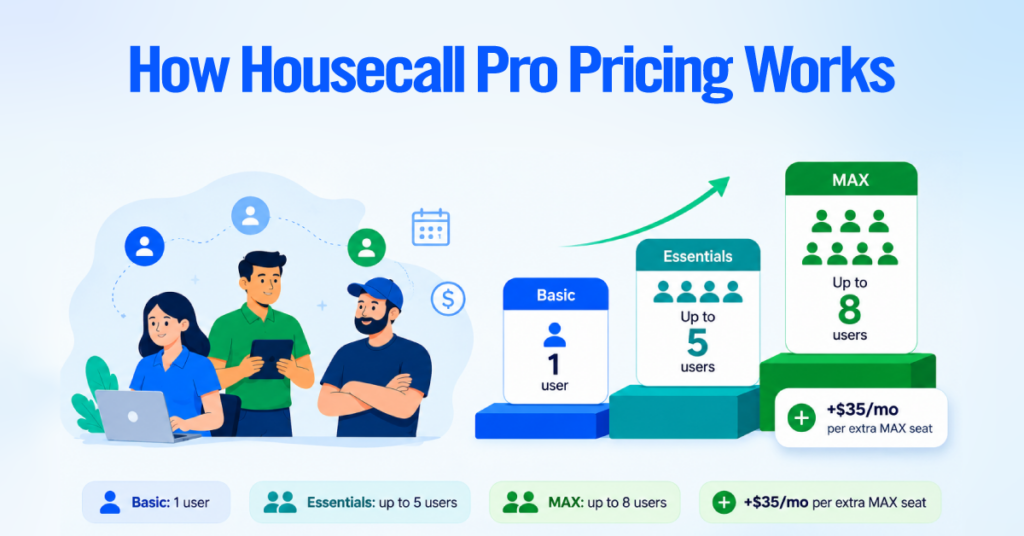
Housecall Pro’s public pricing page does not list these seat counts directly, so treat them as strong indications and confirm your exact allowance before signing up.
The practical takeaway is that your cost usually steps up when you cross a seat limit rather than climbing smoothly. Adding a second person moves you from Basic to Essentials, and growing past a plan’s included seats adds a per-user charge. Because of this, user count, not company revenue, is normally what decides which plan you need.
Housecall Pro Plans and Pricing
Housecall Pro pricing comes in three tiers that differ mainly by user allowance and available features. Below is how these Housecall Pro plans compare on the points that change the price or the plan decision.
| Feature | Basic | Essentials | MAX |
| Annual price (per month) | $59 | $149 | $299 |
| Monthly price | $79 | $189 | $329 |
| Included users | 1 | Up to 5 (confirm) | Up to 8 (confirm) |
| QuickBooks Online sync | No | Yes | Yes |
| Employee GPS tracking | No | Yes | Yes |
| Job routing | No | Yes (route grouping) | Yes, plus Optimize by Drive Time (see note) |
| Open API access | No | No | Yes |
| Best upgrade trigger | Add a second user | Need QuickBooks, GPS, or 5 seats | Need API access or more than 5 seats |
A few plan questions come up repeatedly, so here are the direct answers. QuickBooks Online sync, the QuickBooks integration that automatically pushes invoices and payments into your QuickBooks accounting software, is included on Essentials and MAX, not Basic.
Employee GPS tracking, which locates a technician through their phone, is also Essentials and up. Open API access, which lets Housecall Pro exchange data automatically with your other software, is MAX only.
Note on route optimization: Housecall Pro’s pricing page lists route optimization under MAX, but its Help Center currently describes the “Optimize by Drive Time” tool, which reorders a technician’s stops for the day to cut driving time, as being in alpha testing and available only to a limited group of users. If automatic route optimization is a deciding factor, confirm current availability with Housecall Pro before choosing MAX for that reason.
Basic, Essentials, and MAX at a Glance
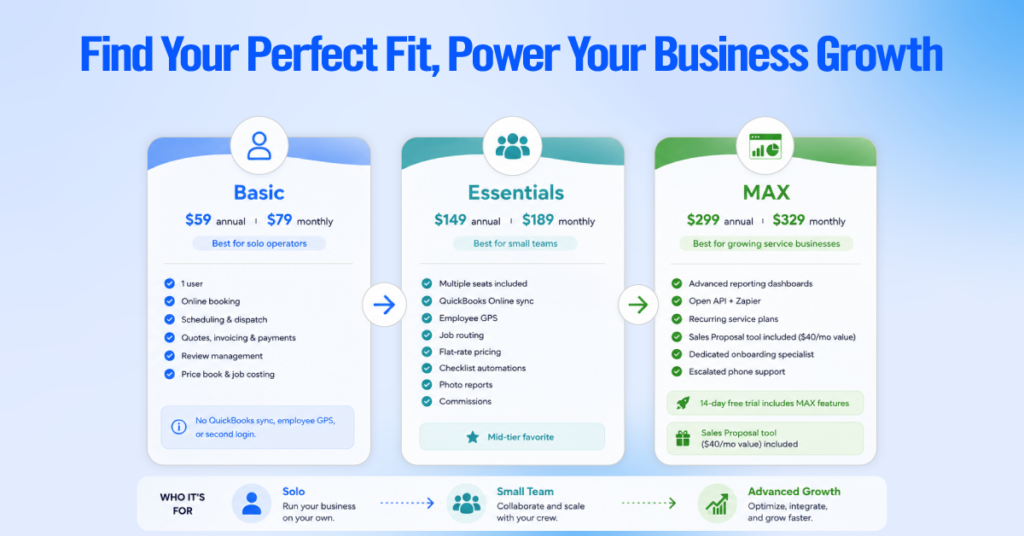
Basic ($59 annual, $79 monthly) is a single-user plan that covers online booking to turn website visitors into booked jobs, scheduling and dispatching, quotes, invoicing, payments, review management, a price book, and job costing. It suits a genuinely solo operator. It does not include QuickBooks sync, employee GPS, or a second login, so most businesses move off it once they hire.
Essentials ($149 annual, $189 monthly) adds QuickBooks Online sync, employee GPS, job routing, flat-rate pricing, checklist automations, photo reports, and commissions, and bundles multiple seats into one price. It is Housecall Pro’s mid-tier and a common fit for small teams.
MAX ($299 annual, $329 monthly) is where Housecall Pro’s reporting steps up to advanced reporting dashboards, and it adds open API access plus Zapier so you can create custom integrations with other business tools, recurring service plans, the Sales Proposal tool (a $40 per month value) bundled in, a dedicated onboarding specialist, and escalated phone support. The 14-day free trial runs on MAX, so you can access all features before you commit to a plan.
Monthly vs. Annual Housecall Pro Pricing
Housecall Pro offers monthly or annual billing on every plan. Annual billing, which means paying for a full year up front in exchange for a lower monthly rate, is cheaper on every Housecall Pro plan. Here is the actual dollar difference.
| Plan | Annual-Billing Rate | Annual Cost | Monthly-Billing Rate | Yearly Cost if Paid Monthly | Yearly Difference |
| Basic | $59/mo | $708 | $79/mo | $948 | $240 |
| Essentials | $149/mo | $1,788 | $189/mo | $2,268 | $480 |
| MAX | $299/mo | $3,588 | $329/mo | $3,948 | $360 |
Annual billing saves $240 per year on Basic, $480 on Essentials, and $360 on MAX. The Essentials difference matters most, since that is where many teams sit, and $480 is more than three months of the plan.
Monthly billing is still worth the premium in three cases. If you are still testing the software and are not sure it will stick, monthly lets you leave without a prepaid year. If you run a seasonal business such as landscaping or snow removal and scale users up and down, monthly avoids locking in off-season seats. And if you expect to change plans soon, for example, crossing a seat limit or adding a location, monthly keeps you flexible until your team size settles.
What Costs Extra With Housecall Pro?
Several costs sit outside the base subscription, so a real bill can run higher than the plan price. The clean way to think about your total is subscription, then per-user costs, then payment fees, then optional add-ons.
| Extra Cost | Reported Price | Type | Who Needs It |
| Card payment processing | From 2.59% per transaction | Usage-based, all plans | Anyone taking card payments |
| Bank / ACH payments | 1% per transaction | Usage-based | Anyone taking bank transfers |
| Additional MAX users | ~$35/mo each (confirm) | Optional | Teams above the included seats |
| Profit Rhino price book | $199/mo (Help Center) | Optional add-on | HVAC, plumbing, electrical wanting prebuilt flat-rate books |
| Sales Proposal tool | $40/mo (bundled in MAX) | Optional | Teams selling bigger-ticket jobs |
| Recurring Service Plans | Paid add-on (bundled in MAX) | Optional | Maintenance-agreement businesses |
| Vehicle GPS | ~$20 per vehicle/mo | Optional add-on | Fleets tracking trucks |
| Campaigns, Voice, HCP Assist, CSR AI | Quote-based | Optional | Marketing and call-handling needs |
Payment Processing Fees
A payment processing fee is a percentage the platform’s payment system keeps whenever you collect payments by card or bank. Housecall Pro card processing starts at 2.59 percent per transaction, and bank (ACH) payments are 1 percent, per its pricing page.
Third-party summaries report card rates ranging up to roughly 3.5 percent depending on how the card is entered, with manually keyed cards at the higher end and digitally entered cards near the low end. These fees apply to every plan.
Payment processing usually deserves more attention than the plan choice, because it scales with how much money you run through the platform. Here is a quick worked example with the assumptions stated.
- At $10,000 per month in card volume and the lowest published rate of 2.59 percent, processing fees are about $259 per month.
- At $10,000 at a higher card rate near 3.4 percent, processing fees are about $340 per month.
- $10,000 collected as bank (ACH) payments at 1 percent is about $100 per month.
For a shop running $40,000 a month in card payments at 2.59 percent, processing fees are roughly $1,036 per month, which alone exceeds the MAX subscription. Confirm your blended rate with Housecall Pro, because payment volume moves your total cost more than the plan tier does.
Additional Users
Extra users cost money once you pass a plan’s included seats. Basic is a single seat, Essentials is commonly reported at up to 5, and MAX at up to 8, with each additional MAX seat widely cited at about $35 per month. Confirm these figures with Housecall Pro, since they are not published on the pricing page.
The seat people forget is the office. Owners, dispatchers, and bookkeepers each need a login, so a five-technician business can be a seven-login business. Count everyone who will touch the system before assuming you fit inside a plan’s seat allowance.
Optional Add-Ons
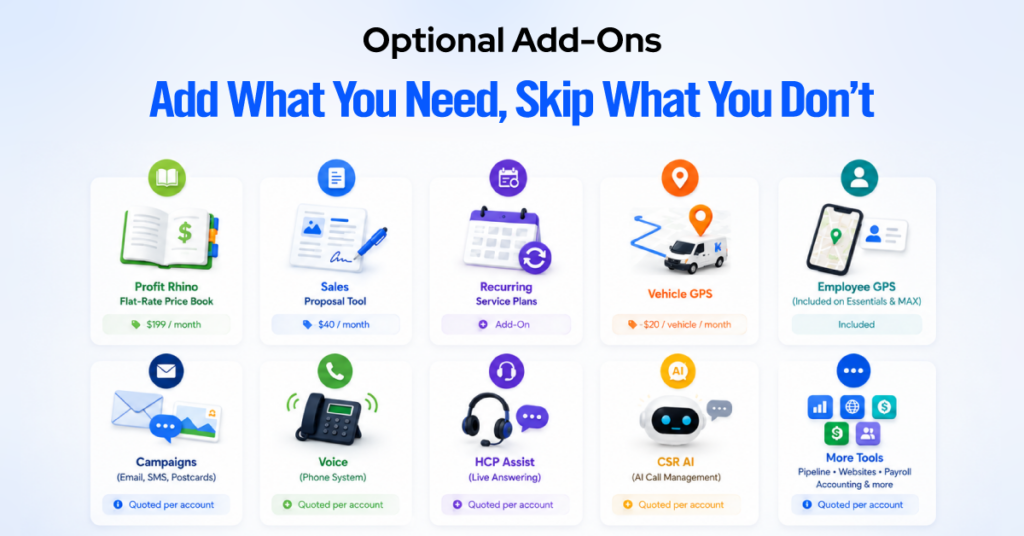
Beyond users and payments, Housecall Pro sells optional modules that are separate from the subscription. The ones most likely to change a growing team’s bill include the following.
- Profit Rhino flat-rate price book: Housecall Pro’s Help Center lists this at $199 per month. This is worth flagging, since many third-party articles still cite $149, and the current Help Center figure is higher. It provides prebuilt, professionally maintained flat-rate price books for HVAC, plumbing, drain cleaning, and electrical work. Housecall Pro’s built-in price book is included on every plan, so weigh whether you need the Profit Rhino content on top of it.
- Sales Proposal tool ($40 per month): For building visual, side-by-side proposals. It is bundled into MAX, so only lower plans pay for it separately.
- Recurring Service Plans: For maintenance agreements. Available as an add-on on lower plans and bundled into MAX. Confirm the current add-on price with Housecall Pro, as third-party figures vary.
- Vehicle GPS (about $20 per vehicle per month): Hardware-based fleet tracking, which is separate from the employee GPS included on Essentials and MAX. Employee GPS locates a technician by phone, while vehicle GPS tracks the truck itself.
- Account-specific modules: Campaigns (email, SMS, and postcard marketing for customer communication), Voice (a phone system), HCP Assist and CSR AI (a live answering service and AI call management), Pipeline, Websites, Payroll, and Accounting are quoted per account rather than published, since Housecall Pro doesn’t post prices for them. None are required to run the core platform. Add them one at a time and check that each pays for itself.
What Does Housecall Pro Cost for Your Business?
The most reliable way to estimate cost is to count every login you need, then add payment processing and any add-ons. The table below shows the subscription math by team size. Payment fees are excluded because they depend on your card volume, not your headcount.
| Business Size | Likely Plan | Base Subscription (annual billing) | Main Cost Drivers to Add |
| Solo contractor | Basic | $59/mo | QuickBooks or GPS need pushes to Essentials |
| 2 to 5 people | Essentials | $149/mo | Add-ons and payment volume |
| 6 to 8 people | MAX | $299/mo | Which add-ons are already bundled |
| 10+ people | MAX + extra seats | $299/mo plus ~$35 per extra user | Total seat count, payment volume |
| Multi-location / franchise | Custom quote | Contact sales | Per-location pricing, onboarding, terms |
Two inflection points drive most of the increase. The first is the move from one user to a small team, which shifts you from Basic at $59 to Essentials at $149, an increase driven mainly by needing a second login plus QuickBooks and GPS.
The second is growing past a plan’s seat cap. Using the widely reported MAX figures, a 10-person team would pay about $299 plus $70 for two extra seats, or roughly $369 per month; a 15-person team would pay about $299 plus $245, or roughly $544 per month, before add-ons and payment fees. Confirm the per-user rate with Housecall Pro, since it is not published.
Multi-location and franchise operations do not use the published rates. Housecall Pro handles these through custom quotes based on location count, seats, and onboarding needs, so treat $299 as a reference point rather than your cost and get per-location terms in writing.
When Does Housecall Pro Get Expensive?
Housecall Pro’s cost climbs in three predictable ways, and each one is easy to forecast if you plan for it.
The first is adding users. Because plans step up at seat limits, the jump from one user on Basic to a small team on Essentials is a $90 per month increase, and each seat past a plan’s cap adds a per-user charge. This stepped pricing is a frequently cited frustration in contractor reviews, but it is predictable rather than hidden, since you can count seats in advance.
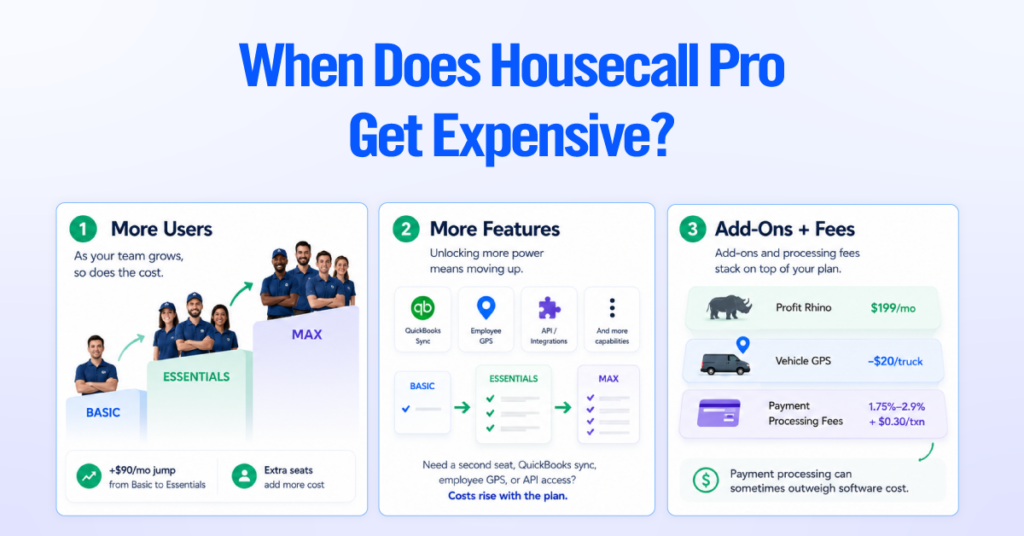
The second is needing features from a higher plan. A single-person business can stay on Basic only if it needs nothing beyond scheduling, invoicing, and payments for one login. If you need a second seat, QuickBooks Online sync, or employee GPS, you need Essentials. Needing open API access or more than five seats points to MAX.
The third is optional add-ons and payment processing stacking on top of the plan. Add-on costs are a recurring theme in Housecall Pro reviews, and the modules that move the bill most are the Profit Rhino price book at $199 per month and Vehicle GPS at about $20 per truck.
Payment processing often matters even more, since a shop with high card volume can pay more in fees than in software. In our consulting work, the practical fix is to enable add-ons one at a time and confirm each earns its cost before adding the next.
Which Housecall Pro Plan Should You Choose?
The plan that makes sense for your business depends on your company size and business needs, not on price alone. Choose based on how many logins you need and which gated features your work requires, rather than defaulting to the middle or top tier.
| Business Profile | Deciding Requirement | Recommended Plan |
| Solo operator | One login, invoicing and payments | Basic ($59/mo) |
| 2 to 5 people | Multiple logins, QuickBooks, GPS | Essentials ($149/mo) |
| 6 to 8 people | More seats, recurring plans, proposals bundled | MAX ($299/mo) |
| More than 8 users or API needs | Extra seats, open API access | MAX plus extra seats |
| Multi-location / franchise | Per-location management | Custom quote |
- Choose Basic if you are a one-person business that keeps its books elsewhere and does not need GPS or a second login.
- Choose Essentials if you have two to five people and need QuickBooks Online sync, employee GPS, or job routing. This is the practical minimum for most small teams.
- Choose MAX if you need open API access, features like recurring service plans bundled rather than billed separately, or more seats than Essentials allows. Verify the current status of any alpha feature, such as Optimize by Drive Time, if it is part of your reason for choosing MAX.
- Request a custom quote if you run multiple locations or a franchise, and pin down per-location cost, consolidated reporting, onboarding fees, and contract length in writing.
Housecall Pro vs. Competitors on Price
Housecall Pro sits in the middle of the field service software market. It costs more than Jobber at the entry level, far less than ServiceTitan, and is more transparent than vendors that only quote privately. Because several competitors change prices or quote privately, treat the notes below as direction, and for a like-for-like cost comparison, confirm current figures on each vendor’s own pricing page.
| Platform | Pricing Model | Best Fit | Cost Note vs. Housecall Pro |
| Housecall Pro | Published tiers, $59 to $299/mo annual, seats bundled per tier | Small to mid home service teams wanting built-in marketing and payments | Baseline |
| Jobber | Published tiers, lower entry price, per-user overage | Solo operators and small teams | Lower starting price, but per-user costs narrow the gap |
| ServiceTitan | Quote-only, annual contracts | Larger, more complex operations | Higher cost and longer commitment |
| Workiz | Quote-based (plan prices no longer published) | Call-driven businesses | Built-in phone system, harder to budget upfront |
| FieldPulse | Quote-based, per-seat model | Configurable trade shops | Cost tracks headcount closely |
Jobber: Jobber’s published entry plan for a single user lists below Housecall Pro’s $59, and it uses tiered plans with a set number of included users plus a per-user charge (commonly reported around $29 per seat) for anyone over the limit.
Payment processing is billed separately, similar to Housecall Pro. Reported Jobber plan prices vary noticeably across third-party sources, so check Jobber’s current pricing page for exact tiers. Housecall Pro tends to lead on built-in marketing and two-way QuickBooks sync, while Jobber leads on a lower entry price for very small teams.
ServiceTitan: ServiceTitan does not publish prices and requires a sales quote, typically with an annual contract. It is enterprise software, and in our consulting judgment, it fits larger, more complex operations rather than small shops.
For most small and mid-size home service teams, Housecall Pro is the more economical choice until you genuinely need enterprise dispatch and deep reporting.
Workiz: Workiz no longer publishes plan prices and routes buyers to a quote, which makes upfront budgeting harder than with Housecall Pro. Its signature strength is a built-in phone system with call tracking and AI answering, usually sold as an add-on to the base subscription. Confirm current pricing directly with Workiz.
FieldPulse: FieldPulse uses a per-seat model with quote-based pricing, so its cost tracks headcount more directly than Housecall Pro’s bundled tiers. It leans into configurability with custom fields and forms. Request a quote for your team size, since published figures are limited.
Is Housecall Pro Worth the Price?
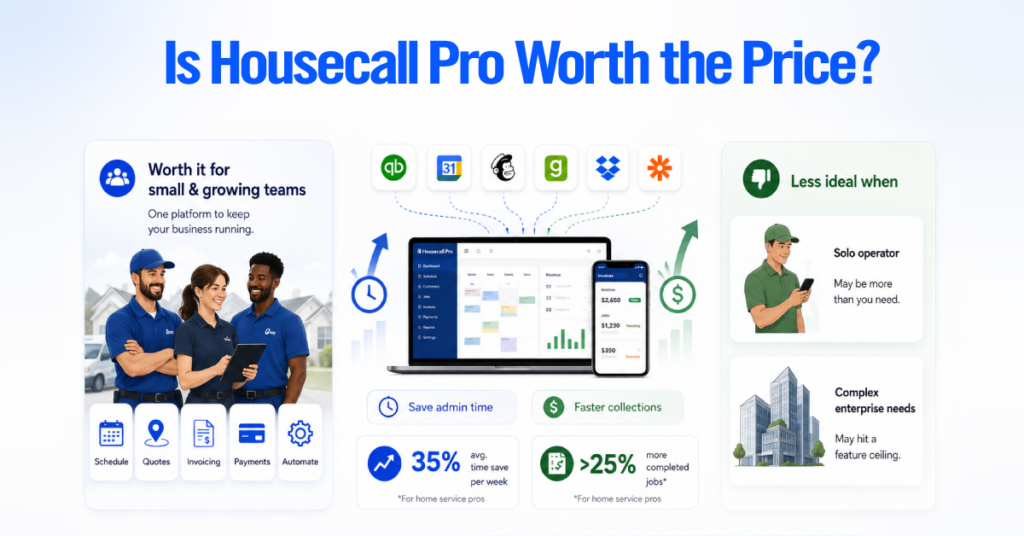
Housecall Pro is worth the price for small home service teams and growing ones that will use scheduling, dispatch, invoicing, payments, and automation daily. The value case rests on consolidation.
When the tools inside Housecall Pro replace a separate scheduler, invoicing tool, payment processor, and review-request process, the subscription can pay for itself in saved admin time and faster collection.
Housecall Pro markets gains in operational efficiency, advertising average revenue growth of about 35 percent based on average monthly revenue generated through Housecall Pro after the first year of using the platform, and it says Pros increase completed jobs by more than 25 percent in that first year. Those are vendor figures rather than independent results, so weigh them accordingly.
It is a weaker fit in two situations. A solo operator who sends only a handful of invoices a month and keeps books elsewhere may be paying for capability they will not use, and simpler tools like Jobber could serve them for less.
Businesses that need enterprise dispatch, granular job costing, and multi-department reporting can hit a feature ceiling where per-user costs and workarounds no longer make sense, and a heavier platform deserves a look.
The honest test is usage, not price. An Essentials plan a five-person team uses fully is good value. A MAX plan running like a basic scheduler is capability you paid for but didn’t use. Buy the plan your workflow will actually use.
What to Confirm Before Paying for Housecall Pro
Confirm the real cost drivers before you enter payment details, since the entry price rarely reflects your working cost. This checklist surfaces the costs not included in the base subscription, the ones sometimes called hidden costs on review sites.
| Requirement | Confirmed? | Cost Impact |
| Number of logins needed (including office staff) | ☐ | Decides Basic vs. Essentials vs. MAX |
| Monthly vs. annual commitment | ☐ | Annual saves $240 to $480 per year |
| Features your workflow requires | ☐ | QuickBooks and GPS require Essentials |
| Payment processing rate for your entry method | ☐ | Often the largest single cost |
| Additional-user pricing and seat limits | ☐ | Not published; confirm directly |
| Required add-ons (Profit Rhino, Vehicle GPS, Campaigns) | ☐ | Can add $100 or more per month |
| Route optimization status if you need it | ☐ | Listed on MAX but described as alpha |
| Setup or onboarding charges | ☐ | Standard plans have none; franchise quotes may differ |
| Multi-location or franchise terms | ☐ | Moves you to a custom quote |
| Cancellation terms | ☐ | Get written confirmation of any cancellation |
Work top to bottom and you will land on a realistic monthly figure rather than the entry number. In our consulting work, the two lines that most often exceed expectations are payment processing and the second-user upgrade, so confirm those first.