AI Summary




TL;DR
- Housecall Pro is a cloud-based field service management platform that runs scheduling, dispatch, estimates, invoicing, payments, price books, and customer follow-ups in one system for residential home service businesses.
- 2026 pricing is $59 Basic, $149 Essentials, and $299 MAX per month on annual billing, with monthly billing about 25% higher and MAX requiring a demo booking.
- Best fit for HVAC, plumbing, electrical, cleaning, garage door, appliance repair, pest control, and landscaping shops running 1 to 15 technicians.
- Weak fit for construction remodels, heavy commercial work, subcontractor-heavy trades, or shops that need custom reporting or custom fields.
- QuickBooks for Accounting Online sync unlocks on Essentials, while route optimization, sales proposals, recurring service plans, Zapier, and open API are gated to MAX.
- Their published customer data reports 35% average revenue growth and 8+ hours saved per week after the first year, though those outcomes require actually using the full platform.
Picking field service software is one of the most expensive decisions a home service business makes in its first five years. The wrong choice locks you into a data migration nightmare 12 months in.
The right one compounds every month you stay in it. So the real question is not whether Housecall Pro is a good platform. It’s whether it’s the right platform for how your shop actually runs.
Housecall Pro is the strongest fit for residential home service businesses running 1 to 15 technicians in trades like HVAC, plumbing, electrical, cleaning, and pest control, provided you’ll actually use what you pay for.
From the setups we’ve reviewed, many shops pay for MAX and run the account like it’s Basic, which is where most buyer’s remorse comes from.
Housecall Pro at a Glance
Housecall Pro is a field service management (FSM) platform built for home service businesses. It launched in San Diego in 2013, serves 200,000+ home service Pros per its own reporting, and carries a 4.7-star Capterra rating across 2,700+ reviews.
According to Stripe’s published case study, customers have delivered over $50 billion in services through the platform to 30 million+ households across more than 40 verticals.
| Attribute | Detail |
| Best For | HVAC, plumbing, electrical, cleaning, garage door, appliance repair, pest control, landscaping, handyman |
| Starting Price | $59/mo Basic, annual billing, 1 user |
| Free Trial | 14 days with full MAX access, no credit card required |
| Key Features | Scheduling, dispatch, estimates, invoicing, payments, price book, employee GPS, notifications, recurring plans (MAX), route optimization (MAX), AI Team |
| Integrations | QuickBooks Online (Essentials+), Zapier (MAX), open API (MAX), Google, Stripe, CompanyCam, Mailchimp, Gusto, CallRail, Thumbtack |
| Mobile App | iOS and Android, English and Spanish, offline viewing on all plans |
| Payment Fees | 2.59% card, 1% ACH, +1% for Instapay (roughly 30-minute payout) |
| Main Alternatives | Jobber, ServiceTitan, Workiz, FieldPulse, Service Fusion |
What Is Housecall Pro and Its Core Features?
Housecall Pro is cloud-based field service management software for residential home service contractors.
It replaces the paper schedule, whiteboard dispatch, stand-alone invoicing tool, payment processor account, and spreadsheet customer list most shops start with, and pulls every step of a service job into one workflow that runs on both the office desktop and the technician’s phone.
What Does Housecall Pro Do?
Housecall Pro takes a customer from first contact to review request and handles every operational step in between.
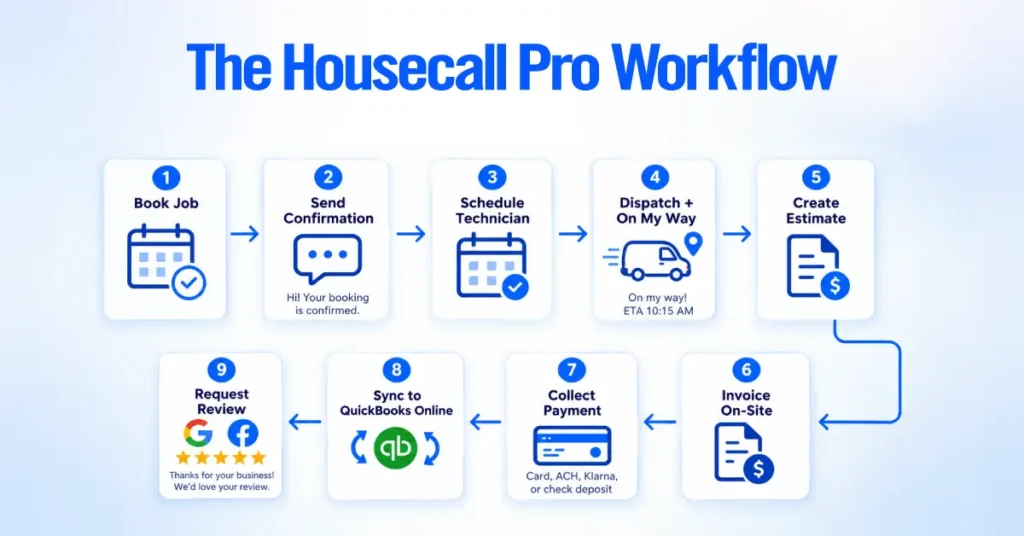
That includes taking the booking, sending the confirmation, scheduling the tech, dispatching the job with an “on my way” text, generating the estimate, invoicing on-site, collecting payment (card, ACH, Klarna financing, or check deposit through the mobile app), syncing the transaction to QuickBooks Online, and triggering a Google or Facebook review request afterward.
For a residential plumbing or HVAC shop, that means fewer missed appointments, faster payment collection (Instapay puts card and ACH funds in your account within roughly 30 minutes for an additional 1% fee), and a searchable record of every customer interaction instead of paper tickets on the truck dashboard.
Is Housecall Pro a CRM or Field Service Management Software?
Housecall Pro is field service management software with a built-in CRM, not a general-purpose CRM. It stores customer records, job history, equipment lists, estimates, invoices, payment history, notes, photos, and communication logs, but it’s structured around the service call and the recurring service relationship, not a multi-stage B2B sales pipeline.
Compared to Salesforce or HubSpot, the difference is intent. Housecall Pro is built to run the job. A traditional CRM is built to run the sale. In our consultation work, shops that try to force Housecall Pro to behave like a B2B lead pipeline typically end up storing lead data in the customer notes field, which is not searchable in any structured way.
How Does Housecall Pro Work?
Housecall Pro runs on one job workflow that connects the office and the field, and every feature hangs off that spine.
The end-to-end flow.
- Lead: A customer books online, calls in, submits a website form, or lands through a Google Local Services Ad. Their information creates a customer record.
- Booking: The office (or CSR AI, included on all plans for chat and available as a paid add-on for calls) qualifies the job and drops it on the calendar.
- Estimate: If needed, the office or the tech’s phone on-site sends a quote or a full good/better/best sales proposal (MAX only).
- Schedule: The job appears on the dispatch board and on the assigned tech’s mobile app.
- Dispatch: The tech gets the route with the customer’s address, notes, and equipment history. The customer gets an “on my way” text with the tech’s photo and ETA.
- Job: The tech logs work, takes annotated photos (Essentials+), adjusts line items from the price book, and captures a digital signature.
- Invoice: The invoice generates automatically from the completed job.
- Payment: Card, ACH, digital wallet, Tap to Pay on Mobile, Klarna financing, or check deposit runs through the platform.
- Review: An automated request goes out asking for a Google or Facebook review.
- Follow-Up: Recurring service plan reminders (MAX), marketing campaigns, or membership renewals fire on schedule.
From several consultation and setup services we’ve worked on, this loop only performs when three things are true.
The price book is genuinely complete, customer notification templates are written in the business’s own voice rather than platform defaults, and technician permissions are configured so techs can complete a job without pinging the office. When any one of those is missing, technicians end up working around the software all day.
What Types of Businesses Use Housecall Pro?
Housecall Pro is built for residential home service businesses running short-duration jobs, recurring service agreements, and same-day or next-day scheduling.
Per Housecall Pro’s own positioning, the platform serves more than 40 verticals, primarily where a technician drives to a customer’s property, does short-duration work, invoices on-site, and moves to the next call.
| Business Type | Common Workflow | Where Housecall Pro Helps Most |
| HVAC | Diagnostic call, repair or replacement, annual maintenance agreement | Price book for equipment tiers, MAX recurring service plans, sales proposals for system replacements |
| Plumbing | Emergency dispatch, flat-rate repair, drain and sewer service | Real-time dispatch, flat-rate pricing (Essentials+), Tap to Pay for on-site collection |
| Electrical | Service calls, panel upgrades, generator installs, EV chargers | Good/better/best proposals for panel work, consumer financing to close bigger tickets |
| Cleaning | Recurring residential routes, one-off deep cleans, move-outs | Recurring plans, employee GPS, online booking widget for self-scheduling |
| Landscaping & Lawn Care | Seasonal contracts, aeration, snow removal | Recurring billing, routes on Essentials, customer portal for approvals |
| General Contractors & Remodeling | Small repair jobs, punch lists, warranty work | Estimates, invoicing, photo annotations (Essentials+). Limited fit for multi-week projects |
| Garage Door Services | Emergency service, opener install, spring replacement | Flat-rate price book, dispatch, on-site payment collection |
| Appliance Repair | Diagnostic and repair calls, warranty work | Price book with parts tracking, follow-up scheduling for parts return visits |
| Pest Control | Recurring quarterly service, one-off treatments | MAX recurring service plans, route sequencing, customer notifications |
| Handyman Services | Small residential jobs, punch lists | Online booking, estimates, on-site payment |
| Other Local Service | Junk removal, window cleaning, chimney sweep, mobile detailing, pressure washing | Booking, dispatch, payments, review generation |
Fit breaks down at the edges. Long-duration construction projects with change orders, heavy commercial dispatch with dozens of recurring site accounts per customer, or trades that depend on subcontractor management sit outside Housecall Pro’s core design.
Housecall Pro Essential Features
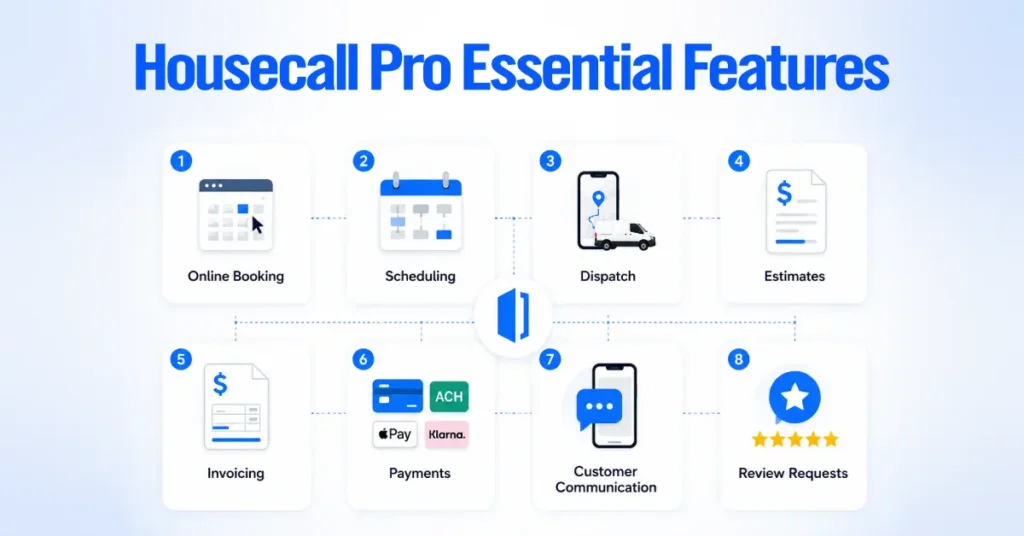
Housecall Pro’s feature stack covers the full operational surface of a home service business. We’ll walk through each feature with the business problem it solves, how the workflow runs, where it fits best, and where it commonly falls short in real accounts.
Scheduling and Dispatching
Scheduling and dispatch runs on a drag-and-drop calendar and a real-time dispatch board that syncs the office to every tech’s mobile app. When a dispatcher moves a job, the tech’s app updates instantly.
Business problem: Whiteboards, spreadsheets, and text-thread schedules cause missed appointments, double-bookings, and constant phone traffic between the office and the field.
Workflow: The office assigns jobs by drag-and-drop. The tech sees the day’s route on the mobile app. Reassignments push in real time. Customers get automated notifications when a tech is on the way, including the tech’s name, photo, and ETA.
Best fit: Small to mid-sized teams. Per Service Roundtable benchmarks cited in industry reporting, a mid-sized ($3M to $8M revenue) residential HVAC or plumbing contractor handles 30 to 100 inbound calls per day, which is well within Housecall Pro’s dispatch capabilities.
Limitation: Automatic route optimization is a MAX-plan feature per Housecall Pro’s current pricing page. Shops on the Basic or Essentials plan route manually or bounce to Google Maps.
Customer Support and CRM
Housecall Pro’s CRM stores every customer detail in one record. Full job history, estimates, invoices, payments, communication logs, notes, photos, equipment lists, service address details, and referral source all live under the customer profile.
Business problem: Customer data spread across QuickBooks, Gmail, a phone contact list, and paper folders kills your ability to run marketing to your existing base or serve repeat customers efficiently.
Best fit: Any home service business with recurring customers.
Limitation: No custom fields. Shops with non-standard data (compliance IDs, specific equipment serial number tracking beyond the built-in field, custom lead-source structures) end up storing that information in notes, where it becomes unsearchable. This is a common driver of upmarket migrations to ServiceTitan.
Estimates and Sales Proposals
Housecall Pro handles both quick single-line estimates (all plans) and full visual sales proposals with side-by-side comparisons (MAX plan, valued at $40/mo per Housecall Pro’s own pricing page). Techs present tiered options with photos on a tablet, capture a digital signature, and convert the accepted tier to a scheduled job.
Business problem: Estimates that take an hour to write in Word, look inconsistent from tech to tech, and give the customer no real option beyond yes or no on a single number.
Workflow: The tech opens a template, pulls line items from the price book, presents three tiers with photos and financing options, and the customer signs digitally on-site.
Best fit: HVAC (system replacements), electrical (panel upgrades and generators), garage door (opener replacements), and any trade with higher-ticket sales calls where customers benefit from choosing between options.
Limitation: The Sales Proposal Tool is MAX only. Shops on Essentials running high-ticket sales calls can’t present tiered options at the same professional level on-site.
Invoicing and Payments
Housecall Pro generates invoices automatically from completed jobs and processes payments through Housecall Pro Payments (built on Stripe infrastructure per Stripe’s own published case study on Housecall Pro). Techs collect on-site by card, ACH, digital wallet, Tap to Pay on Mobile, Klarna financing, or check (deposited free through the mobile app).
Processing rates confirmed on Housecall Pro’s official pricing page.
- Card processing starts at 2.59%.
- ACH bank payments cost 1%.
- Instapay adds another 1% to move card or ACH payments into your bank within roughly 30 minutes instead of the standard 2 business days.
Business problem: Waiting weeks to get paid because the invoice never left the tech’s clipboard, or losing receivables to write-offs on paper invoices.
Best fit: Any trade where the tech should collect on-site at job completion.
Limitation: At high card volume, some shops negotiate lower rates with a stand-alone processor. Housecall Pro Payments trades a slightly higher rate for tight integration.
Online Booking
Online booking gives customers a widget on your website (or through Google’s Reserve with Google) where they pick a service, select a time from your live calendar, and book without a phone call. The business case is well documented.
According to CallRail’s 2025 reporting cited across the FSM industry, roughly 14% of calls to home service businesses go unanswered, and other industry studies from IBISWorld and Invoca put the share of unanswered calls at small home service businesses considerably higher during peak season and after hours.
Best fit: Cleaning, handyman, appliance repair, window cleaning, and any trade with predictable job durations. Emergency-driven trades usually route calls to a human or AI receptionist rather than push everything to self-booking.
Housecall Pro Mobile App
The Housecall Pro mobile app is the platform’s field version. Techs see their schedule, run navigation, view customer history, take annotated photos, build estimates, run payments, capture signatures, and message dispatch from one app. Available on iOS and Android in English and Spanish.
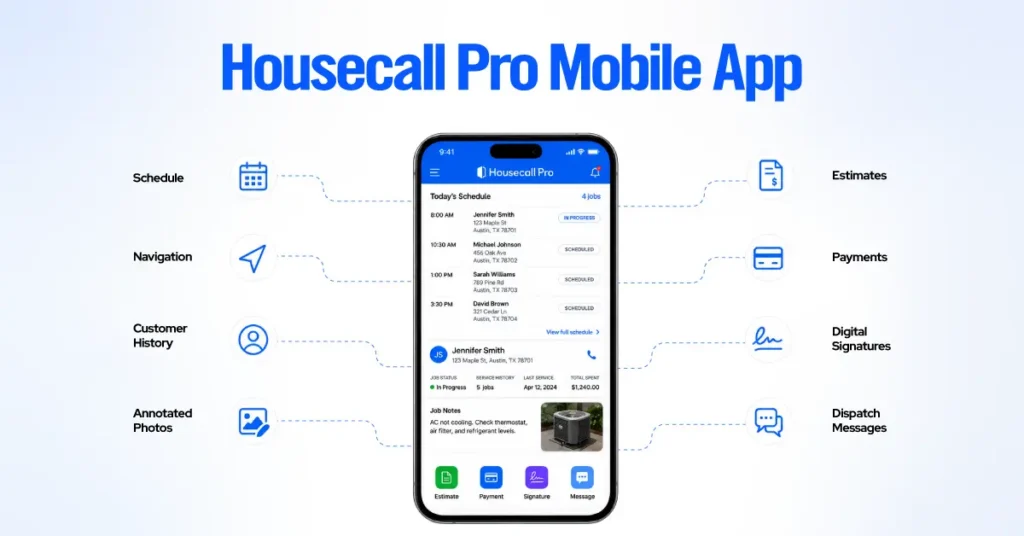
iOS App Store rating. 4.6. Android Google Play rating. Historically lower than iOS per third-party review reporting, though Housecall Pro’s February 2026 release added automatic photo upload retries in low-service areas per Housecall Pro’s official product update notes, which addressed one of the most common field complaints.
Business problem: Techs writing job details on paper, forgetting to log parts, missing payment collection, or losing photos means the office has to rebuild every job manually at the end of the day.
Limitation: In consulting engagements where the crew runs Android, we recommend a short pilot with one or two techs before full rollout. Field tolerance for glitchy apps is low.
Customer Notifications and Follow-Ups
Housecall Pro sends automated SMS and email notifications at every touchpoint. Booking confirmation, appointment reminder, “on my way” with the tech’s photo, invoice delivery, payment receipt, review request, and follow-up campaigns run without human intervention once configured correctly.
Business problem: Dispatchers manually texting “on my way” throughout the day is one of the most common workflow leaks in unoptimized accounts we review. Housecall Pro’s published customer data reports an average of 8+ hours saved per week after the first year on the platform, which aligns with what practitioners generally attribute to automating this communication pattern.
Best fit: Every home service business, without exception. This is one of the platform’s higher-ROI features.
Price Book and Flat-Rate Pricing
The price book (included on all plans, including Basic) is the master catalog of every service, material, part, and labor rate your business offers. Flat-rate pricing with built-in margins is an Essentials-and-up feature. The price book lets techs build estimates and invoices from a controlled list rather than pricing in the field.
Business problem: Techs guessing at prices in the field, undercharging inconsistently, or writing estimates that don’t match the office’s rate structure. In our consultation work, incomplete price books are the single most common driver of margin inconsistency across a crew.
Workflow: Build categories (service categories, materials, labor rates). Load each service with its retail price, cost (for margin visibility), and description. Techs pull line items from the price book on-site, so pricing stays consistent whether a first-year tech or a lead tech runs the call.
Best fit: HVAC, plumbing, electrical, garage door, and any trade using flat-rate pricing.
Limitation: Building a complete price book from scratch is time-intensive, so it often stays half-finished. Housecall Pro does not ship with pre-built, trade-specific price books, though you can import third-party price book providers (Profit Rhino, Coogan).
In the setups we review, an incomplete price book is the biggest reason techs keep writing custom line items in the field, which defeats the point of flat-rate pricing. Additional training rarely fixes it. Finishing the price book does.
Recurring Service Plans
Recurring service plans (MAX only, per Housecall Pro’s official pricing page) handle maintenance agreements, membership programs, and recurring billing. HVAC maintenance, pest control quarterly service, and cleaning contracts run here.
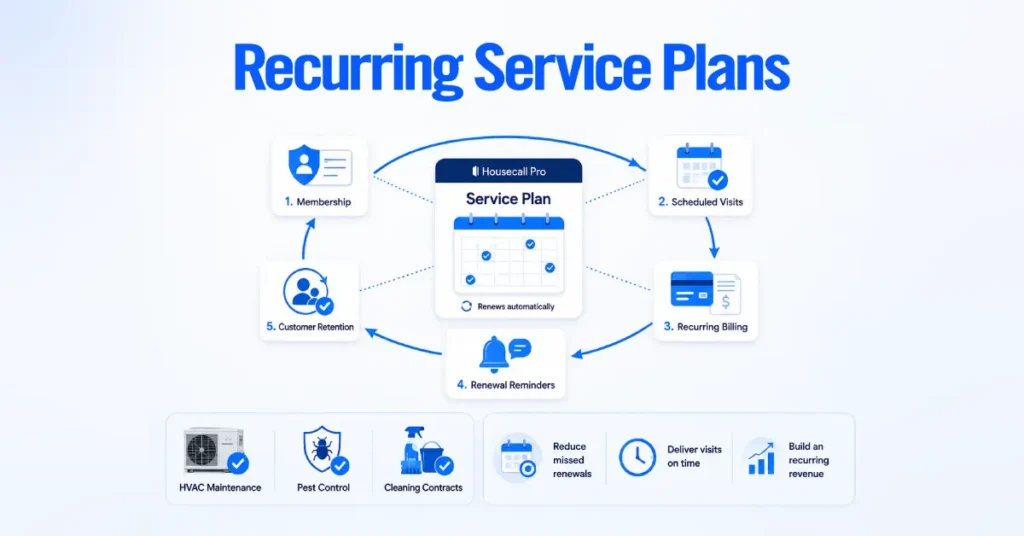
Business problem: Maintenance agreements tracked in a spreadsheet fall through the cracks. Renewals get missed, service visits go undelivered, and the recurring revenue that should stabilize the business becomes an admin burden.
Best fit: HVAC shops with ongoing maintenance agreements, pest control operators running quarterly plans, cleaning businesses with recurring residential routes.
Limitation: MAX-only gating means shops on Essentials trying to run a recurring plan program often revert to spreadsheets, which is what the platform is supposed to eliminate.
GPS Tracking and Route Management
Employee GPS tracking (Essentials and up) uses each tech’s mobile phone GPS, no hardware required. Vehicle GPS with dedicated hardware devices is a separately priced add-on. Route optimization (MAX only) reorders jobs based on real drive time and live traffic in one click.
Business problem: Not knowing where techs are means you can’t reroute the closest one to an emergency call, and you can’t verify a customer’s “he never showed up” complaint is wrong.
Limitation: Route optimization sits behind the MAX paywall. Industry reporting on FSM ROI, including analysis referenced in MarketsandMarkets research, cites 15 to 30% reductions in fuel and travel costs from optimized routing. For route-heavy trades (cleaning, pest control, lawn care), that lever alone often covers the MAX plan uplift.
Job Costing and Reporting
Job costing (included on all plans, including Basic) tracks revenue minus labor and materials per job. Standard reports on jobs, invoices, payments, and technician performance are available across all tiers. Advanced reporting is MAX only.
Business problem: Not knowing which jobs, techs, or service categories actually make money.
Best fit: Businesses that need visibility into gross margins per job and per tech.
Limitation: No custom report builder, even on MAX. Growing shops that need marketing attribution, cohort analysis, or complex financial reporting hit walls quickly. This is a common reason larger shops explore ServiceTitan.
Housecall Pro Automation and AI Features
Housecall Pro built out its AI Team suite across 2024 to 2026, with most tools included on all plans and one gated as a paid add-on. Per Housecall Pro’s official February 2026 release notes, the update added recurring discounts in the price book, custom call reasons in Voice, and automatic photo upload retries for mobile in low-service areas.
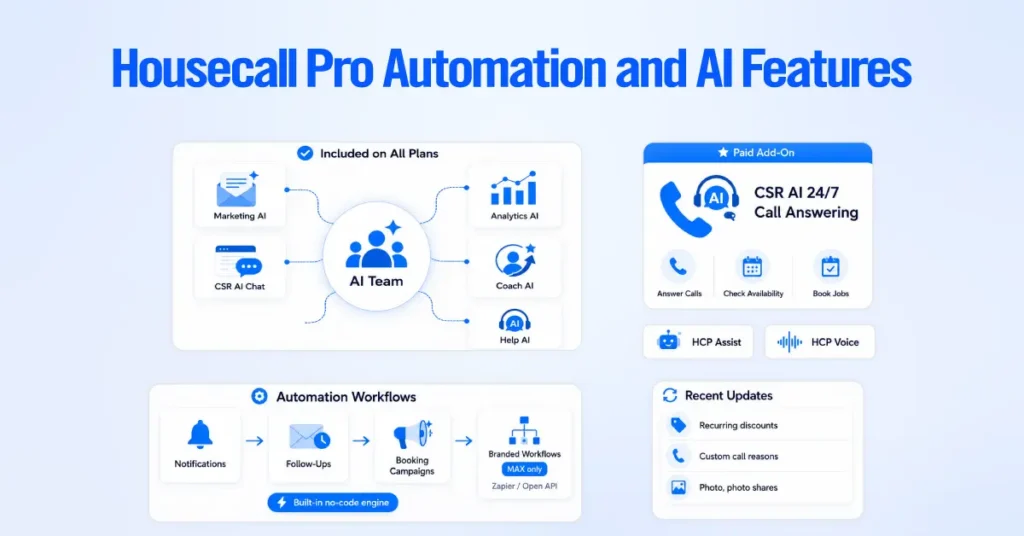
Included on all plans.
- Marketing AI. Drafts email and postcard campaign copy in your brand voice.
- CSR AI Chat Answering. Handles inbound website chat inquiries, captures job details, and alerts your team when human intervention is needed.
- Analyst AI. Answers natural-language questions about your business data.
- Coach AI. Provides growth, pricing, and hiring guidance.
- Help AI. Answers Housecall Pro platform questions in-app.
Paid add-on.
- CSR AI 24/7 Call Answering. An AI receptionist that answers phone calls, checks your live schedule, and books jobs directly into Housecall Pro using your business’s voice, hours, and pricing rules. Housecall Pro also offers HCP Assist (live human answering) and Housecall Pro Voice (business phone system on Twilio infrastructure) as separately priced add-ons.
Beyond AI, Housecall Pro supports rule-based triggers for customer notifications, follow-up sequences, and recurring campaigns. Multi-step automations that touch outside systems require Zapier (MAX only) or the open API (MAX only).
Housecall Pro Pricing in 2026
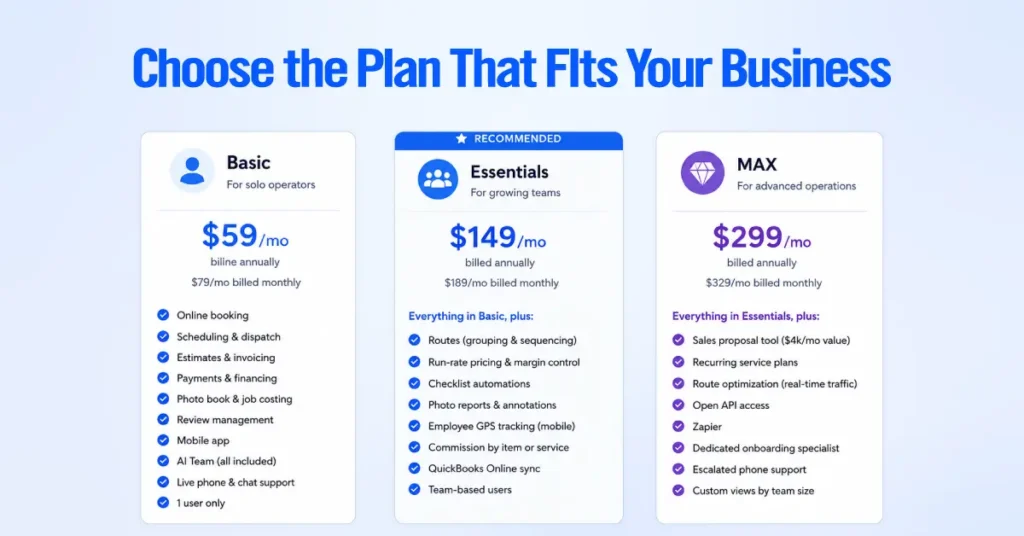
Housecall Pro has three plans in 2026, verified directly against the official pricing page at housecallpro.com/pricing as of August 2026.
Prices below are in USD and exclude sales tax. Monthly billing runs roughly 25% higher than annual across every tier.
Basic Plan
Price: $59/mo annual (Housecall Pro’s pricing page shows a $20/mo savings vs. monthly), or $79/mo monthly. Users. 1 user only.
Included: Online booking, scheduling and dispatch, estimates and invoicing, payments and consumer financing, price book, job costing, review management, mobile app, live phone and chat support, and AI Team members (Marketing AI, Analyst AI, Coach AI, Help AI, CSR AI chat).
Not included: Flat-rate pricing, routes, checklist automations, photo annotations, employee GPS, commissions, QuickBooks sync, sales proposal tool, recurring service plans, route optimization, Zapier, or open API.
Basic works for solo operators who don’t need employee GPS, QuickBooks sync, or the sales proposal tool.
Essentials Plan
Price: $149/mo annual ($40/mo savings), or $189/mo monthly. Marked as “Recommended” on Housecall Pro’s pricing page.
Users: Team-based.
Included: Everything in Basic, plus routes (grouping and sequencing), flat-rate pricing with margin control, checklist automations, photo reports and annotations, employee GPS tracking (mobile phone-based, no hardware required), commissions by item or service, and QuickBooks Online sync.
Essentials is where most 2 to 5-person residential home service teams land, largely because the QuickBooks Online sync alone often justifies the upgrade from Basic.
MAX Plan
Price: $299/mo annual ($30/mo savings), or $329/mo monthly. Requires a demo booking on Housecall Pro’s pricing page.
Users: Custom by team size.
Included: Everything in Essentials, plus sales proposal tool ($40/mo value per Housecall Pro’s pricing page), recurring service plans, route optimization (real drive time and live traffic based), open API access, dedicated onboarding specialist, and escalated phone support.
MAX is designed for shops that need multi-step automations, recurring maintenance agreements, custom integrations, or professional sales proposals at the point of sale.
| Plan | Annual Price | Monthly Price | Key Additions | Best For |
| Basic | $59/mo | $79/mo | Price book, job costing, review mgmt, AI Team chat | Solo operators |
| Essentials | $149/mo | $189/mo | QuickBooks sync, employee GPS, routes, flat-rate pricing, commissions | 2 to 5-person teams |
| MAX | $299/mo | $329/mo | Sales proposals, recurring plans, route optimization, API, Zapier | Multi-tech shops using automations |
The advertised sticker is rarely the real bill. In consulting engagements we’ve worked on, actual monthly spend typically runs higher than the base plan sticker once you factor in payment processing, Vehicle GPS hardware, additional users on MAX, and paid add-ons like HCP Assist, CSR AI call answering, Housecall Pro Voice, Pipeline, Websites, or Payroll. Modeling the true monthly cost before committing is essential.
For a full breakdown of add-on costs, per-user math at each team size, and how to model your true monthly cost, see our dedicated Housecall Pro Pricing Guide.
Housecall Pro Integrations
Housecall Pro offers a range of native integrations plus Zapier and an open API on the MAX plan. Here are the ones that matter most in the field.
Housecall Pro and QuickBooks
QuickBooks Online sync is available on the Essentials and MAX plans per Housecall Pro’s official pricing page, and it’s one of the top reasons shops upgrade from Basic. Once configured, customers, invoices, payments, and payouts sync, eliminating most manual double-entry.
It’s also one of the more common failure points we address in consulting engagements. In accounts where the sync was set up without accounting oversight, we regularly find duplicated customers (from name-matching mismatches), service items mapped to the wrong income accounts (which quietly wrecks P&L reporting), and Instapay deposits landing in a clearing account that never gets reconciled.
The February 2026 release added custom QuickBooks Online sync controls per Housecall Pro’s product update notes, which helps, but doesn’t replace the need for a proper accounting-led setup.
Housecall Pro and Zapier
Housecall Pro’s Zapier integration is MAX only. It lets you push data between Housecall Pro and thousands of other tools (Google Sheets, Slack, Mailchimp, Airtable, HubSpot) without writing code.
Common Zapier workflows include piping new leads into a Google Sheet for lead-source attribution, sending Slack alerts on high-value jobs, syncing new customers to a separate marketing platform, and building estimate follow-up sequences that go beyond the platform’s native follow-up rules.
Housecall Pro and Google Calendar
Housecall Pro syncs jobs to Google Calendar in one direction, so techs can see their Housecall Pro schedule alongside personal appointments. The reverse (pulling Google Calendar events into Housecall Pro) isn’t supported natively, and shops that book heavily through external Google workflows generally use Zapier as a workaround.
Housecall Pro API
The open API is a MAX-plan feature per Housecall Pro’s official pricing page, exposing jobs, customers, invoices, employees, and payment events in a standard REST/JSON structure, with webhooks for real-time notifications.
Shops use this to feed Housecall Pro data into a custom dashboard, data warehouse, proprietary attribution model, or AI workflow that needs live job data.
Other Housecall Pro Integrations
Native integrations also include Stripe (payment infrastructure per Stripe’s own case study on Housecall Pro), Mailchimp (email marketing), CompanyCam (field photo documentation), Gusto (payroll), CallRail (call tracking and attribution), Thumbtack (lead gen), and Meta for Business (ad account connection).
Housecall Pro Pros and Cons
The honest ledger of where Housecall Pro delivers and where it consistently frustrates users.
| Pros | Cons |
| Fast time to value for solo and small-team migrations | Add-on model inflates real monthly cost |
| Strong iOS mobile app (4.6 App Store) | Route optimization gated to MAX |
| Two-way QuickBooks Online sync (Essentials+) | No custom fields for customers or jobs |
| Built-in payments, ACH, financing, Tap to Pay | No custom report builder |
| Automated customer notifications reduce office workload | Android app performance historically trails iOS |
| AI Team included on all plans | Zapier and API gated to MAX only |
| Instapay puts card and ACH funds in your bank quickly | Recurring service plans require MAX |
| Marketing tools (postcards, review generation) built in | Cancellation friction documented on BBB and review platforms |
User Experience Reviews
Housecall Pro holds a 4.7-star average across 2,700+ Capterra reviews per Capterra’s public product page. Housecall Pro’s own published customer outcome data reports 35% average revenue growth in the first year and an average of 8+ hours saved per week (both figures published on housecallpro.com with the disclaimer that they reflect average monthly revenue generated through Housecall Pro after the first year of platform use).
Individual case studies published by Housecall Pro include Frontier Air Conditioning growing from under $1M to a $6M revenue forecast after implementation, Sonlight Services growing from $8K to $9K in annual profitability to over $1.8M, and Bayshore Plumbing growing from 13 to 42 employees. Treat these as directional case studies, not average outcomes.
What Users Like About Housecall Pro
Reviewers on Capterra and G2 repeatedly highlight ease of use for both office and field staff, fast mobile app adoption, responsive customer support on paid plans, and strong marketing and review-generation tools. Reduction in office admin work after switching from paper or a scheduling-only tool comes up consistently.
A pattern worth noting from long-term Capterra reviewers is that shops that fully adopted the platform (price book, automations, payments, QuickBooks sync) report different outcomes than shops that used it only as a scheduling app.
Common Housecall Pro Complaints
Four themes surface consistently in negative reviews across Capterra, G2, and Reddit’s r/HVAC and r/plumbing threads.
- Add-on cost creep. The base plan is affordable. Working configurations frequently bill higher than the sticker price once add-ons are stacked.
- QuickBooks sync problems. Duplicate customers, mismatched items, payments landing in wrong accounts. These issues almost always trace back to setup, not the platform itself.
- Reporting depth. Growing shops routinely note they’ve hit the ceiling of what standard reports can tell them about tech performance, marketing ROI, and job margin analysis.
- Feature rollout stability. Multiple long-term users describe feature rollouts as feeling rushed, with occasional breakage of established functionality.
Why Do Some Businesses Look for Housecall Pro Alternatives?
Shops shop for alternatives for three main reasons. They’ve outgrown Housecall Pro’s ceiling (typically past a certain revenue and technician count). Add-on cost creep has pushed total monthly spend past a competing platform’s flat-rate equivalent. Or a specific workflow (subcontractor management, commercial dispatch, custom reporting) forces the decision.
The most common switch targets are Jobber (for cost-sensitive teams that don’t need Housecall Pro’s marketing stack) and ServiceTitan (for shops that have outgrown reporting and custom-field ceilings).
Is Housecall Pro Easy to Use?
Housecall Pro is one of the easier field service platforms to learn, as its Winter 2026 G2 “Easiest to Use” and “Easiest Setup” badges (displayed on the official pricing page) reflect. But “easy to use” masks a real distinction between day-to-day operation and correct initial setup.
Housecall Pro for Office Staff
Office staff generally get productive on Housecall Pro quickly for basic scheduling, dispatch, and invoicing tasks. The interface is intuitive, and drag-and-drop dispatching is standard.
The learning curve gets steeper for advanced work. Configuring automations, managing the price book, running the QuickBooks sync correctly, and building useful reports all take real time to master. This is where most self-taught accounts plateau.
Setup vs. Day-to-Day Use
This is where most Housecall Pro accounts break down. Day-to-day use is genuinely simple. Correct setup is not.
| Housecall Pro’s own onboarding documentation frames setup as a 30-day process. In our consultation work, we regularly see shops treat it as a weekend project, then spend the next 18 months paying for a MAX subscription while running the account like it was Basic. The gap between plan cost and actual platform usage is the most expensive pattern we see in the field. |
Housecall Pro for Field Technicians
Techs who struggled with previous software generally adapt quickly to the Housecall Pro mobile app. Multiple Capterra reviewers call this out specifically. The workflow (see schedule, tap job, run navigation, complete job, collect payment, capture signature) matches how techs already think about their day.
The friction we most often see in field visits during audits is when the app wasn’t set up to match how the company actually runs jobs. If the price book is incomplete, custom job types are missing, or permissions block techs from tasks they need to do (like adjusting an estimate on-site or applying a discount), the app becomes an obstacle rather than a tool.
How to Set Up Housecall Pro Correctly
Treat Housecall Pro setup as a structured, sequenced project over several weeks, not a weekend of clicking through settings. Housecall Pro’s own onboarding framework runs 30 days. Here’s the sequence we use in our client implementations.
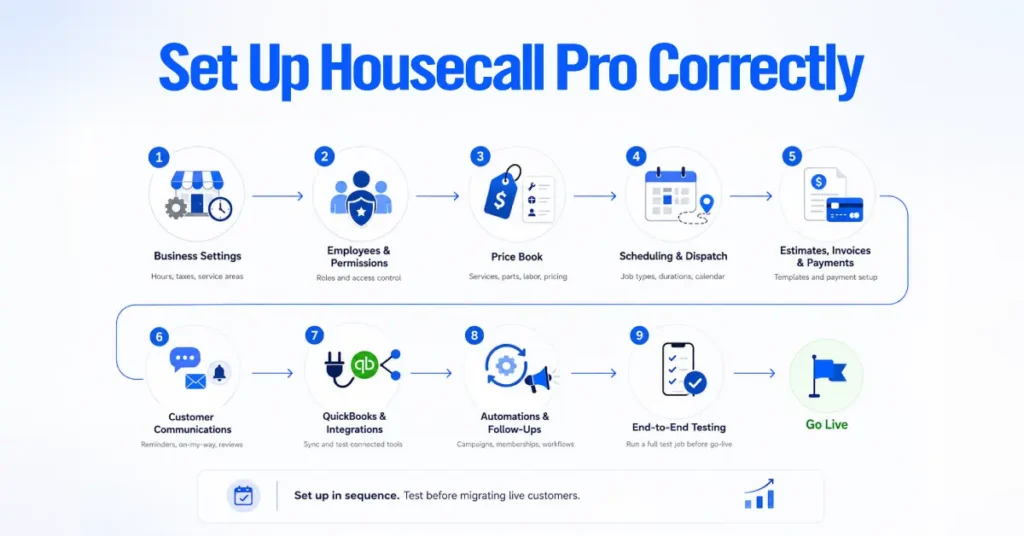
Configure Business and Account Settings
Set business hours, service areas, time zones, tax rates by jurisdiction, currency, business branding, and default invoice terms and payment terms. This foundation supports every other configuration. Setting up taxes correctly the first time avoids manual invoice corrections later.
Add Employees and Set Permissions
Add every user (office and field), assign roles, and configure permissions with care. Techs need access to do their job. They shouldn’t be able to view sensitive financial data, other techs’ commissions, or system-level settings unless the role calls for it. Housecall Pro’s permissions are more granular than most teams use out of the box.
Build Services and the Price Book
Load every service, material, part, and labor rate into the price book, organized into categories that match how your techs think about jobs. Include descriptions, retail prices, costs (for margin visibility), and warranty terms.
In our consultation experience, this is the single highest-leverage setup task and the one most consistently underdone. The hours invested here compound in downstream margin consistency across the crew.
Configure Scheduling and Dispatch
Set up job types, default arrival windows, default durations, employee schedules and availability, calendar color coding, and dispatch board views. Configure how far in advance customers can self-book online, and which services are bookable versus estimate-required.
Set Up Estimates, Invoices, and Payments
Configure default estimate and invoice templates, tipping options, financing availability, and payment methods. Connect the bank account, verify identity for Instapay, and enable ACH options. Test-send an invoice to yourself before turning it on for customers.
Configure Customer Communications
Set up every automated notification (booking confirmation, appointment reminder, on-my-way, invoice, payment receipt, review request, follow-up campaigns). Write each template in your brand voice, not the platform defaults.
Connect QuickBooks and Other Integrations
Connect QuickBooks Online with accounting oversight. Map service items to the correct income accounts, decide how customers, invoices, and payments should flow, and run test transactions before going live. Then connect Zapier (MAX), Google Calendar, CompanyCam, Mailchimp, and any other tools in your stack.
Set Up Automations and Follow-Ups
Build recurring service plan templates (MAX), membership programs, review-request automations, dormant-customer re-engagement campaigns, and estimate follow-up sequences. This is where MAX plans start earning their price gap over Essentials.
Test the Complete Workflow Before Going Live
Before migrating real customers, run one full test job end-to-end.
- Create a test lead.
- Convert to a customer.
- Send an estimate.
- Convert the estimate to a job.
- Dispatch to a real tech’s phone.
- Complete the job on the mobile app.
- Generate and send the invoice.
- Take a test payment.
- Verify the QuickBooks sync landed correctly.
- Confirm the review request fired and the follow-up sequence queued.
If any step breaks, fix it before migrating live data. In our experience, fixing broken workflows after live customers and transactions are in the system is significantly harder.
Who Is Housecall Pro Best For?
Housecall Pro is best for residential home service businesses running 1 to 15 technicians in trades like HVAC, plumbing, electrical, cleaning, garage door, pest control, and appliance repair, where jobs are short-duration and the workflow is book, dispatch, invoice, collect, review.
Solo Service Professionals
Yes, for solo pros who need real software, not just a scheduling app. Basic works if you don’t need QuickBooks sync, employee GPS, or the sales proposal tool. In our consultations, most solos migrate to Essentials once they hire their first tech or need clean QuickBooks sync for accurate bookkeeping.
Small Local Service Businesses
Yes, and this is Housecall Pro’s sweet spot, based on its positioning and pricing structure. A 2 to 5-person shop on Essentials, running standard residential service work, captures close to the platform’s full value at a defensible cost.
Growing Multi-Technician Service Companies
Yes, with a caveat. Once recurring service plans, sales proposals, route optimization, and API access matter, MAX becomes essentially required. The question shifts from whether to be on MAX to whether you’re actively using MAX-only features.
Established Service Businesses
Sometimes. Larger shops frequently start hitting Housecall Pro ceilings on custom reporting, custom fields, enterprise dispatch, and marketing attribution. This is the point where evaluating ServiceTitan (or occasionally FieldEdge or Service Fusion) starts to make sense.
| Business Size | Typical Needs | Housecall Pro Fit |
| Solo | Scheduling, invoicing, payments, basic CRM | Strong on Basic or Essentials |
| 2 to 5 techs | Above plus QuickBooks, employee GPS, dispatch | Excellent on Essentials |
| 6 to 15 techs | Above plus route optimization, recurring plans, API, automations | Good on MAX if features are actively used |
| 15+ techs, higher revenue | Above plus enterprise dispatch, custom reporting, marketing attribution | Fit weakens, evaluate ServiceTitan |
Who Might Housecall Pro Not Be Right For?
Housecall Pro is not the right fit for every service business.
- Businesses that only need basic scheduling and invoicing: If you’ll never use payments, notifications, QuickBooks sync, or automations, a cheaper appointment tool will do the job for less.
- Construction and remodeling contractors: Projects running weeks or months with change orders, subcontractor management, phased budgets, and Gantt scheduling need a construction-specific tool (Buildertrend, JobTread, Projul). Housecall Pro is designed for short-duration service, not multi-week builds.
- Commercial-focused service businesses: Housecall Pro is residentially focused. Shops running mostly commercial work with multiple site accounts per customer often outgrow it.
- Businesses needing highly custom reporting: No custom report builder means shops needing cohort analysis, marketing attribution beyond CallRail integration, or complex financial reports hit walls.
- Enterprise customization requirements: Shops that need custom fields, custom workflows, or deep configurability should look higher up-market.
Housecall Pro vs. Alternatives
The four alternatives most commonly compared to Housecall Pro in 2026 are Jobber, ServiceTitan, Workiz, and FieldPulse.
Housecall Pro vs. Jobber
Jobber typically wins on total cost, particularly for smaller teams. Per Jobber’s public pricing, plans start around $29/mo, and industry reporting indicates Jobber added automatic route optimization to lower tiers in 2025. Housecall Pro wins on QuickBooks depth (per Housecall Pro’s pricing page, two-way sync starts on Essentials), built-in marketing tools (postcards, review generation), Instapay, and iOS mobile app quality.
Choose Jobber if cost is the primary driver and you don’t need Housecall Pro’s marketing stack. Choose Housecall Pro if the marketing and customer experience layer matters, and you want deeper QuickBooks integration.
Housecall Pro vs. ServiceTitan
ServiceTitan is enterprise field service software. ServiceTitan does not publish pricing publicly, but third-party industry reporting places its pricing well above Housecall Pro on both subscription and implementation.
Choose Housecall Pro if you’re under a mid-market revenue threshold or have fewer than 15 techs. Choose ServiceTitan if you’ve outgrown Housecall Pro’s reporting and custom-field ceilings and can absorb enterprise-level cost and complexity.
Housecall Pro vs. Workiz
Workiz targets similar-sized shops but bundles a phone system and dispatcher tools into lower tiers that Housecall Pro charges extra for. Stronger fit for on-demand services (locksmith, appliance repair, junk removal, tow) where phone-in dispatch dominates.
Choose Workiz for phone-heavy dispatch operations. Choose Housecall Pro for a broader marketing and customer experience layer.
Housecall Pro vs. FieldPulse
FieldPulse is a mid-market alternative that includes flat-rate pricing and estimates in lower tiers where Housecall Pro charges extra. Smaller user base, smaller integration library.
Choose FieldPulse if you want more features included at a lower base price. Choose Housecall Pro for the more mature platform, larger integration marketplace, and stronger iOS mobile app.
| Platform | Best For | Key Difference vs. Housecall Pro |
| Housecall Pro | Residential home service, 1 to 15 techs | Strong marketing stack, Instapay, QuickBooks depth |
| Jobber | Cost-conscious 1 to 15 tech shops | Lower total cost, route optimization on lower tiers |
| ServiceTitan | Enterprise, larger multi-crew shops | Deep reporting, custom fields, enterprise price tag |
| Workiz | Phone-heavy on-demand trades | Bundled phone system, dispatcher tools |
| FieldPulse | Feature-rich lower tier | More included at base, smaller ecosystem |
Is Housecall Pro Worth It in 2026?
Yes, Housecall Pro is worth it in 2026 for residential home service businesses with 1 to 15 technicians that will actively use the full stack (scheduling, dispatch, payments, notifications, QuickBooks sync, price book, recurring plans on MAX). It’s not worth it for businesses that will only use scheduling and invoicing, run construction or heavy commercial work, or have already outgrown its reporting and custom-field limits.
When Housecall Pro Is Worth It
Housecall Pro pays for itself when the shop actually uses what it pays for. Housecall Pro’s published customer data cites an average of 35% revenue growth and 8+ hours saved per week after the first year on the platform, with the disclaimer that these figures reflect average monthly revenue generated through Housecall Pro after year one.
In our experience, those outcomes track with implementations where the price book is complete, QuickBooks sync is correctly mapped, customer notifications are configured in the business’s own voice, recurring service plans (on MAX) are actively managed, and automations are actually built out.
When You Should Consider Another Platform
Consider another platform when you’ve hit a real ceiling (custom reporting, subcontractor workflows, enterprise dispatch), when add-on costs have pushed total monthly spend past a competing platform’s flat-rate equivalent, or when the business model doesn’t match Housecall Pro’s design (construction remodeling, mostly commercial, franchise operations with unique corporate requirements).
Do You Need a Housecall Pro Consultant?
Most shops don’t need a consultant to get set up on Basic. Solo operators can generally handle it. A consultant earns their fee on Essentials and MAX accounts where the platform is underused or misconfigured.
The pattern we see most often in consulting engagements is a shop paying $299/month for MAX, running an incomplete price book, a QuickBooks sync that creates duplicate customers, no active recurring service plan program, and technicians who still write custom line items in the field. That account is paying enterprise pricing for basic functionality.
A consultant is worth considering when any of these apply.
- Your price book is materially incomplete, and techs regularly add custom line items in the field.
- QuickBooks sync creates duplicates and monthly reconciliation eats meaningful bookkeeper hours.
- You bought MAX for the automations, API, or reporting but haven’t built anything with them.
- Your dispatcher spends significant time each week on tasks the system should automate.
- You’ve been on Housecall Pro for over 12 months and haven’t audited the setup.
- You’re preparing to switch platforms and want to know whether fixing the current setup would solve the problem instead.