AI Summary




CRM problems rarely start with the platform. They begin with broken, bloated, or buried workflows. When these processes are misaligned, inconsistent, or outdated, the CRM becomes a time drain rather than a performance tool. The good news? Small workflow adjustments can yield significant results.
In this article, we break down three real CRM transformation stories. Each one shows how optimizing a single broken workflow turned a struggling process into a growth driver. These are not hypothetical best practices. These are real client wins.
Case Study #1: Automating Lead Assignment to Stop the Sales Lag
The Problem
A SaaS company offering subscription analytics was using HubSpot CRM. New leads came in through web forms, LinkedIn ads, and integrations. But the lead assignment was entirely manual. One sales manager reviewed and assigned every lead by hand. During busy weeks, new leads sat untouched for 24 to 72 hours. Reps were frustrated, prospects cooled off, and conversion rates dipped below 6 percent.
The Fix
We introduced automated lead routing based on territory and industry using HubSpot’s workflow builder. Leads were instantly assigned to the correct rep based on predefined logic, with an alert sent to Slack within 10 seconds of form submission. We also added auto-task creation for follow-up, personalized based on the lead source.
The Result
Response time dropped from 48 hours to under 30 minutes. Reps re-engaged faster, and SQL rates improved by 31 percent in the first two months. The sales manager reclaimed five hours a week that had previously been spent triaging leads. This simple fix turned a bottleneck into a competitive advantage.
Case Study #2: Fixing Deal Stage Stagnation in a High-Ticket Funnel
The Problem
A B2B services firm selling six-figure consulting packages had a clogged pipeline. Deals piled up in “Proposal Sent” with no further movement. Reps were unsure when to follow up, and managers lacked visibility into which deals were still alive. Their CRM, Salesforce, had a seven-stage pipeline. But there was no standard for what defined each stage or what needed to happen to move a deal forward.
The Fix
We rebuilt the deal stage logic from the ground up. First, we redefined every stage with crystal-clear criteria. For example, moving from “Proposal Sent” to “Decision Pending” required client feedback and internal rep review. We then built automation to flag deals with no activity for seven days. These triggered a manager alert and a “nudge task” for the assigned rep.
The Result
Pipeline accuracy improved within three weeks. Reps were no longer guessing, and managers could run clean reports. Forecasting confidence improved, and stuck deals were revived earlier. Win rates increased by 14 percent in 90 days. By fixing just one workflow, the firm turned its pipeline from a graveyard into a roadmap.
Case Study #3: Streamlining Post-Sale Handoff to Prevent Churn
The Problem
A midsize software provider with a strong sales team was losing customers within the first 90 days of onboarding. Deals closed fast, but implementation teams were often left scrambling. There was no formal post-sale handoff. Vital info like client goals, decision-maker notes, and custom promises lived in reps’ heads or scattered email chains. Customer success felt blind.
The Fix
We built a post-sale handoff workflow into their Zoho CRM. Once a deal moved to “Closed-Won,” an internal form launched. Reps had to complete a short checklist including primary contacts, promised outcomes, and key pain points.
That triggered an automatic handoff notification to the implementation team, who received a pre-filled summary and kickoff checklist. The CRM also logged the handoff date and tracked onboarding milestones.
The Result
Onboarding delays dropped by 40 percent. CSAT scores jumped by 21 points. Most importantly, early churn was reduced by 19% over the course of two quarters. The workflow fix created trust and transparency across teams, and clients noticed the difference.
Why These CRM Workflow Fixes Worked?
All three case studies share a few common threads that contributed to their success. Each fix targeted a high-friction bottleneck that affected multiple teams. They were simple, not flashy, rooted in clear rules, defined responsibilities, and automation that supported, not replaced, human work.
Most importantly, they were tied to measurable goals and faster lead follow-up. Cleaner pipeline stages. Smoother customer transitions. The result? Better data, better decisions, and better results.
How to Spot Fixable CRM Workflow Problems?
Not sure where to begin? Here are signs your CRM needs a workflow tune-up:
- Leads go untouched for hours or days
- Pipeline stages feel vague or arbitrary
- Reps rely on memory or spreadsheets to track steps
- Handoffs between sales and service feel clunky
- Managers cannot trust forecasts or activity data
Start by asking your team: “What process do you hate doing manually?” or “Where do deals slow down for no clear reason?” That is usually where your successive big wins are hiding.
Fix the Flow, Free the Team
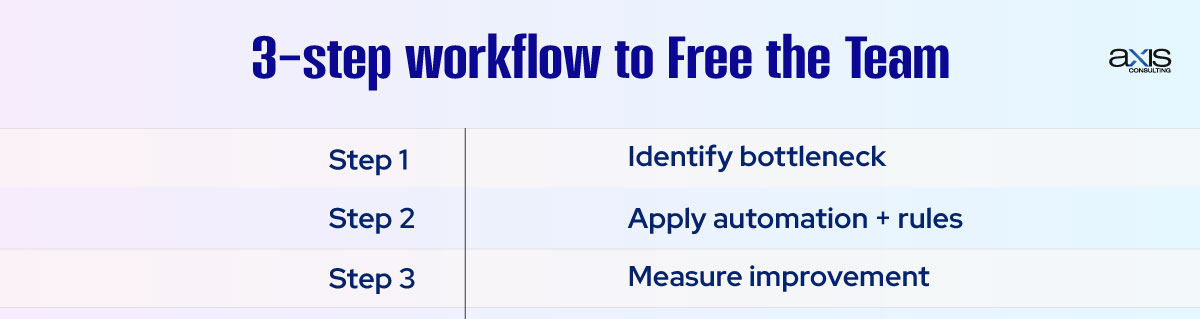
A CRM is only as good as the workflows behind it. When those workflows create friction, your team slows down. But when they support the way your team works, everything moves faster.
As these real-world CRM fixes show, you don’t need a massive overhaul. You need to target the broken pieces that waste time, hurt revenue, or create confusion and fix them with intention. Better workflows lead to better outcomes. And often, they are just one smart tweak away.