AI Summary





Most comparisons of ActiveCampaign and Pipedrive treat them as direct competitors for the same buyer. They are not. These tools were built to solve different problems.
Comparing them feature-by-feature misses the actual question: which business problem do you need to solve?
Axis Consulting has implemented both tools across dozens of client engagements spanning field service companies, B2B professional services firms, e-commerce brands, and high-touch SaaS businesses.
This article describes what each tool actually does, where each one wins, and how to decide which one belongs in your stack.
In case you are in a rush, here is the short answer: if your business runs on marketing-driven lead nurturing, ActiveCampaign wins. If your business runs on relationship-driven human sales, Pipedrive wins.
The rest of this piece provides the technical details to determine which camp you fall into, what it will actually cost, and how to execute the switch if you are currently on the wrong platform.
TL;DR
- ActiveCampaign is a marketing automation platform with a CRM bolted on. Pipedrive is a sales CRM with marketing bolted on. They solve fundamentally different problems.
- If your revenue enters through automated digital funnels (email sequences, lead magnets, web traffic), pick ActiveCampaign. If your revenue requires a human rep to answer calls, schedule meetings, and close deals, choose Pipedrive.
- ActiveCampaign charges based on contact volume. Pipedrive charges by user seat.
- Pipedrive scores 8.9/10 on G2 for ease of use vs. ActiveCampaign’s 8.2/10. Most sales teams go live on Pipedrive in a single day. ActiveCampaign takes weeks to configure properly.
What Is the Core Structural Difference Between ActiveCampaign and Pipedrive?
| Research by Johnny Grow puts the CRM failure rate at 55% when measured by deployments that failed to achieve their planned objectives. Industry-wide estimates from Gartner and Forrester range from 20% to 70%, with poor user adoption consistently cited as the leading cause. Choosing a platform that does not match your team’s actual workflow is the fastest way to land in that failure bracket. |
ActiveCampaign is a marketing automation engine that includes a CRM, whereas Pipedrive is a sales CRM that includes email marketing.
Understanding which category your business falls into eliminates the wrong choice before you even look at a pricing page.
What ActiveCampaign Was Actually Built to Do
ActiveCampaign was built to automate marketing communications at scale. Its core capability is behavioral email automation: sending the right message to the right contact at the right time based on what that contact did on your website, in your emails, or inside your product.
It uses site-tracking pixels embedded across your website to monitor which pages a contact visits, how long they stay, which links they click in your emails, and whether they return after becoming dormant.
The automation builder is genuinely best in class at this price point. You can construct multi-branch logic paths with conditional splits, if/then gates, wait timers, and goal conditions.
What ActiveCampaign CRM Can and Cannot Do

ActiveCampaign includes deal pipelines, but the interface is designed to track contact engagement patterns, not for fast, high-volume manual selling.
The pipeline UI is rigid. It lacks deep native sales features such as built-in power dialers, call logging with automatic deal association, and custom sales manager dashboards that a field sales team would need.
The CRM Pipelines feature is actually a paid add-on. Sales reps accustomed to the drag-and-drop deal card workflow in a dedicated CRM will find ActiveCampaign’s deal management clunky.
What Pipedrive Was Actually Built to Do
Pipedrive’s foundational philosophy is “activity-based selling,” which means the system is designed around a simple rule: every open deal must have a scheduled next action. The entire interface reinforces this.
Open the Pipedrive dashboard, and you’ll see a visual Kanban board where every deal is organized by its current stage.
If a deal hasn’t been updated for a while, the “deal rotting” feature changes its color, making it easy for sales reps and managers to spot opportunities that need attention.
As conversations move forward, reps simply drag deals from one stage to the next.
Every customer interaction, whether it’s a phone call, email, meeting, or follow-up task, is automatically logged under the deal, giving the entire team a complete history of the sales process.
What Pipedrive’s Email Features Can and Cannot Do
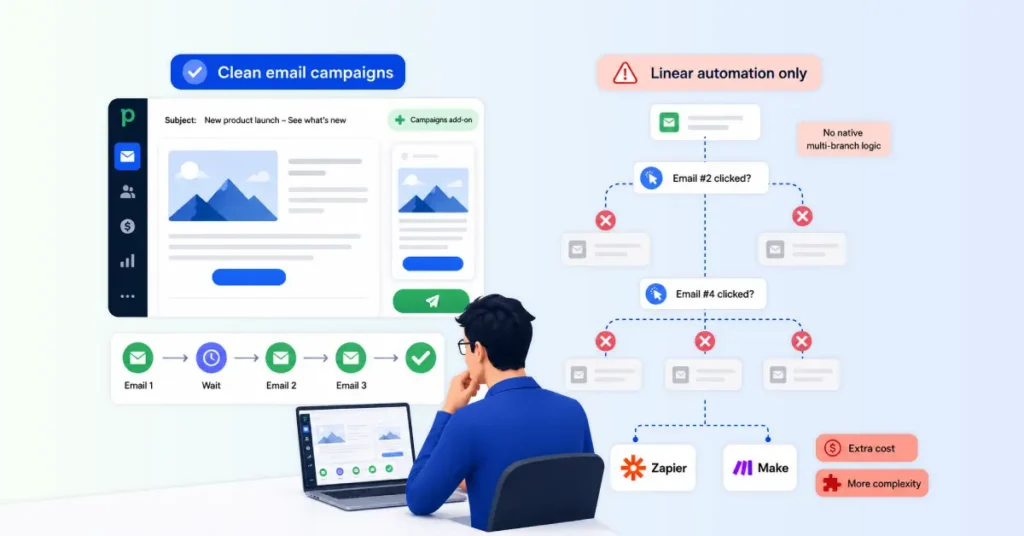
Pipedrive offers a “Campaigns” add-on that allows you to send bulk email newsletters. The editor is clean and functional. However, its automation engine is strictly linear.
You can build basic sequences, but you cannot natively construct deep multi-branch behavioral logic.
Pipedrive cannot, for example, automatically branch a sales workflow based on whether someone clicked a specific link in email #2 versus email #4.
To get that level of behavioral trigger logic, you would need a third-party middleware layer like Zapier or Make, which adds both cost and complexity.
Feature-by-Feature Comparison: What Each Tool Is Actually Good At
Here’s the high-level picture before we dig into the details.
| Category | ActiveCampaign | Pipedrive | Winner |
| Email automation | Multi-branch workflows, behavioral triggers, conditional content, predictive sending | Linear sequences only no behavior-based branching | ✅ ActiveCampaign |
| Sales pipeline | Basic CRM pipeline (paid add-on required) | Purpose-built Kanban with deal rotting, AI assistant, and forecasting | ✅ Pipedrive |
| Contact management | Optimized for marketing behavioral history, lead scoring, nurture tracking | Optimized for sales relationship history, activity logs, org mapping | Depends on use case |
| Reporting | Strong on marketing metrics and revenue attribution | Strong on sales metrics, rep performance, and pipeline velocity | Depends on use case |
| Customer support | Free 1:1 onboarding, free migration, live workshops; chat Mon–Fri (English) | 24/7 chat on higher plans, multilingual support; self-serve onboarding | Tie |
| Starting price | ~$15/mo (by contact count) | ~$14/mo per seat | Tie |
| Realistic cost (5 users, 10k contacts) | ~$537/mo | ~$267/mo | ✅ Pipedrive |
| Ease of use | Steeper learning curve powerful but complex | Intuitive most reps productive within an hour | ✅ Pipedrive |
| Best for | Marketing-led, inbound, and ecommerce teams | Sales-led and outbound teams | — |
Email Automation and Behavioral Triggers
ActiveCampaign wins this category without contest.
Its automation builder supports multi-branch conditional logic, behavioral triggers, lead scoring, site tracking, and conditional content.
You can build sequences that branch based on whether a contact opened an email, visited a specific page, made a purchase, or reached a lead score threshold.
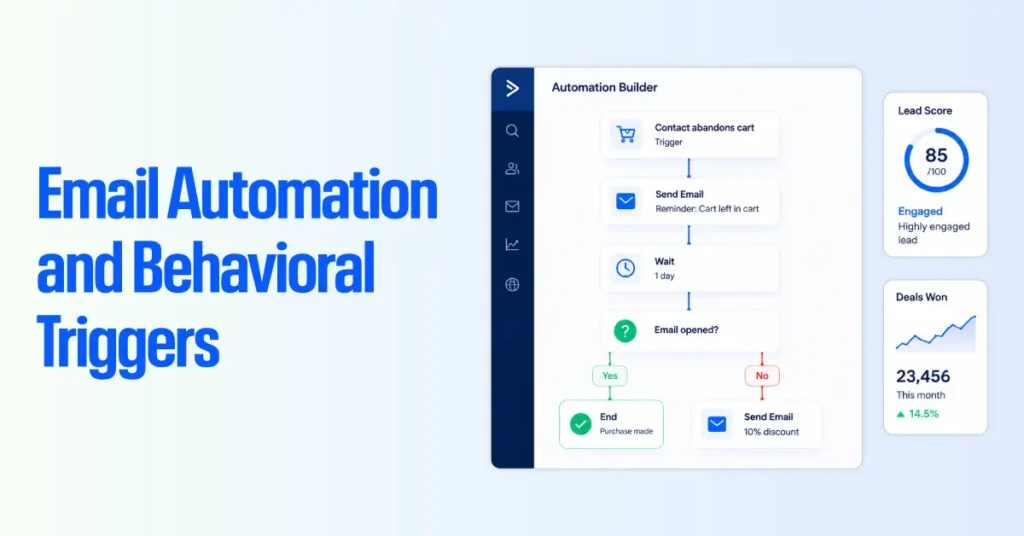
Pipedrive’s workflow automation handles linear sequences: when X happens, do Y. It can send emails, create tasks, and move deals between stages. It cannot branch based on contact behavior outside the CRM.
If behavioral email automation is the core requirement, ActiveCampaign is the clear choice.
Visual Sales Pipeline
Pipedrive wins this category without contest.
Its drag-and-drop Kanban pipeline gives reps and managers a real-time view of every deal in every stage. Deal rotting alerts, activity tracking, and the AI Sales Assistant are all built around the pipeline view.
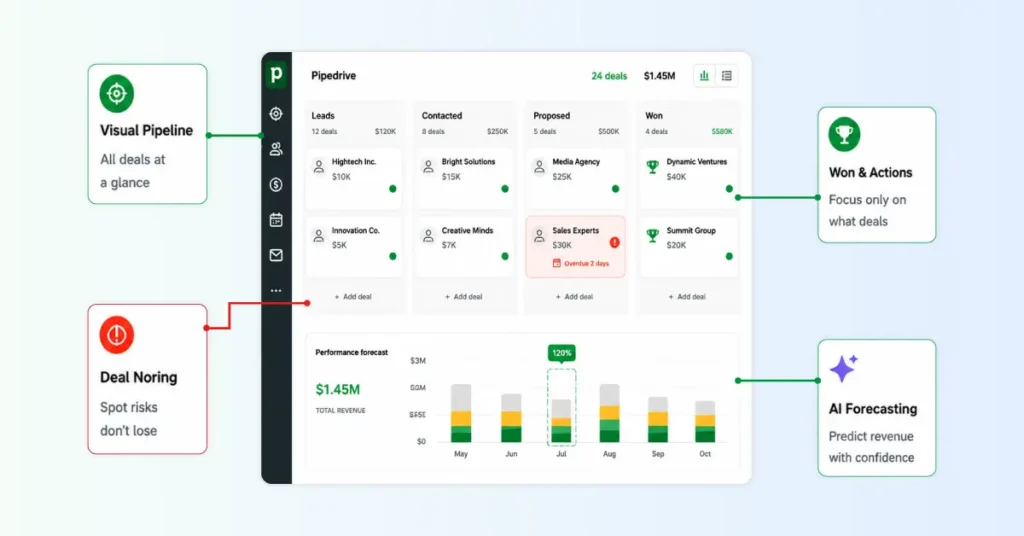
ActiveCampaign’s CRM has a deal pipeline, but it lacks the depth of Pipedrive’s reporting, the deal rotting logic, and the activity-based selling framework.
For teams managing a high-volume pipeline, the difference is significant. If sales pipeline management is the core requirement, Pipedrive is the clear choice.
Contact and Lead Management
Both tools manage contacts, but they manage them differently.
ActiveCampaign manages contacts as marketing targets. Its contact record captures behavioral history: emails sent, links clicked, pages visited, lead score, automation membership, and tags.
The record is optimized to indicate where a contact is in the nurture journey.
Pipedrive manages contacts as people attached to deals. Its contact record captures relationship history: calls logged, emails exchanged, meetings held, deals associated, and notes added. The record is optimized for understanding the sales relationship.
For marketing-heavy businesses, ActiveCampaign’s contact model is more useful. For sales-heavy businesses, Pipedrive’s contact model is more useful.
Reporting and Analytics
For sales reporting, Pipedrive wins. Its reporting layer includes deal conversion rates by stage, activity counts by rep, revenue forecasting, and pipeline velocity. These reports answer sales management questions.
For marketing reporting, ActiveCampaign wins. Its reporting includes email open rates, click rates, automation performance, revenue attribution, and list growth. These reports answer marketing management questions.
Support Quality
| According to review data from Capterra and G2, both platforms receive generally positive support ratings. ActiveCampaign has a 4.4/5 customer service rating on Capterra, based on 2,500+ reviews. Pipedrive scores comparably at 4.5/5 across 3,000+ reviews. |
User feedback on both platforms follows a consistent pattern: most interactions are positive, with agents providing clear and actionable answers.
ActiveCampaign’s support team is noted for its deep expertise in complex scenarios, particularly in automation logic, integration troubleshooting, and deliverability issues.
Pipedrive’s support team receives praise for personalized assistance, including custom video walkthroughs and step-by-step guidance tailored to specific accounts.
Both platforms provide good support with strong documentation. ActiveCampaign wins on onboarding depth, like free 1:1 sessions, free migration, and live workshops, which are meaningful advantages for teams making a platform switch.
Pipedrive wins on accessibility. 24/7 chat on higher plans and multilingual support covers more scenarios. Neither will leave you stranded if something breaks.
Where Both Fall Short
| ActiveCampaign is excellent for marketing automation, but has limited sales CRM capabilities. Pipedrive is built for sales teams but lacks advanced marketing automation and behavior-based email workflows. If your business needs both, you’ll likely need to integrate the two platforms or use additional tools. |
ActiveCampaign: Its CRM is relatively basic for sales-heavy teams. It doesn’t include a built-in power dialer, native call logging, or advanced sales reporting.
Features like the Enhanced CRM and custom reporting also require additional paid add-ons, making the CRM feel secondary to its marketing automation capabilities.
Pipedrive: While it’s an excellent sales CRM, its marketing automation is limited. For example, it can’t natively trigger workflows based on email actions, such as link clicks.
If a prospect clicks a “Book a Demo” link, you’ll typically need tools like Zapier or Make to update the sales workflow automatically, adding extra cost and complexity.
Ease of Use: Which One Is Faster to Learn?
| Pipedrive scores 8.9/10 for ease of use and 8.7/10 for ease of setup. ActiveCampaign scores 8.2/10 for ease of use and 8.0/10 for ease of setup. That 0.7-point gap may look small on paper, but it translates directly into faster adoption and reduced training costs. |
Pipedrive Setup is simple. Most Teams can get live within a day. Pipedrive’s minimal configuration barrier is one of its strongest selling points.
We have taken field sales reps who had never used a CRM and had them create deals, log activities, and navigate the pipeline in a single afternoon.
The interface is visually intuitive, the onboarding wizard is focused on getting you to your first deal fast, and there is almost no abstraction layer between the user and the work.
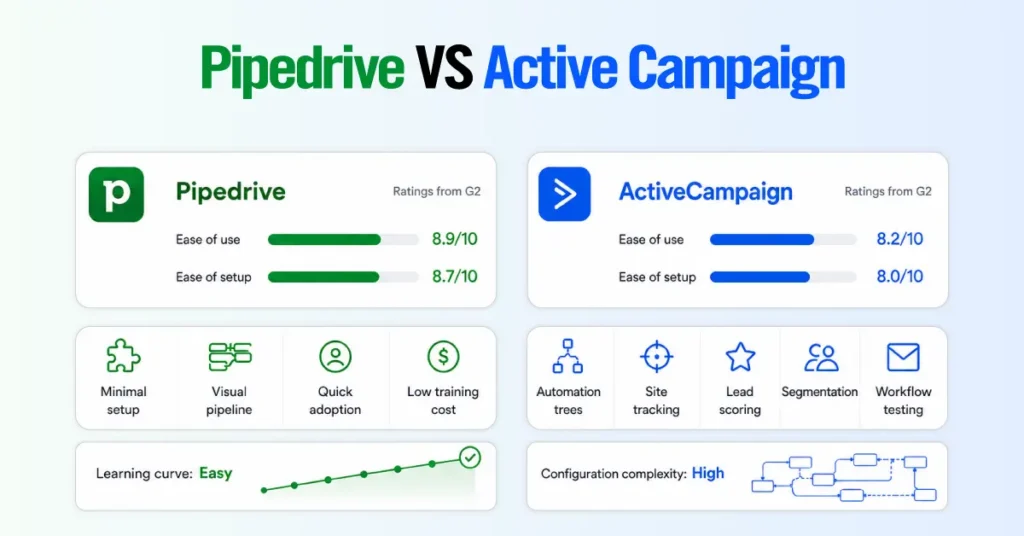
On the flip side, ActiveCampaign requires genuine technical configuration.
Mapping out automation logic trees, properly setting up site tracking, defining lead-scoring rules, building segmentation criteria, and testing email workflows to ensure you are not accidentally spamming users or triggering conflicting automations all take time.
For a non-technical marketing team, expect 2 to 4 weeks before the system reliably produces value.
Pricing Comparison: Why the Model Matters More Than the Numbers
ActiveCampaign pricing is contact-based. The more contacts in your account, the higher the monthly cost. For small contact lists under 1,000 contacts, pricing is low.
For accounts with 25,000 or more contacts, monthly costs can be substantial.
Pipedrive pricing is seat-based. You pay per user per month, and the cost does not increase with the number of contacts or deals in the system.
For businesses with large contact databases and small sales teams, Pipedrive is typically more cost-effective than ActiveCampaign at scale.
Real Scenario Comparison Table
| Scenario | Team Size | Contacts | ActiveCampaign Plus | Pipedrive Growth | Cheaper Option |
| Consulting agency | 5 users | 2,500 | ~$95/mo | $195/mo | ActiveCampaign (saves ~$100/mo) |
| B2B outbound sales | 5 users | 10,000 | ~$189/mo | $195/mo | Roughly equal |
| High-volume prospecting | 5 users | 25,000 | ~$449/mo | $195/mo | Pipedrive (saves ~$254/mo) |
| Scaled field sales | 10 users | 5,000 | ~$145/mo | $390/mo | ActiveCampaign (saves ~$245/mo) |
| Large list, lean team | 3 users | 50,000 | ~$759/mo | $117/mo | Pipedrive (saves ~$642/mo) |
Which Is Cheaper for a 5-Person Service Business?
Pipedrive is cheaper if your contact list exceeds 10,000. At 2,500 contacts, ActiveCampaign Plus costs roughly $95/mo, compared to Pipedrive Growth at $195/mo.
But at 25,000 contacts, ActiveCampaign jumps to $449/mo while Pipedrive stays fixed at $195/mo. The deciding factor is list size, not team size.
At What Point Does ActiveCampaign Become Expensive?
ActiveCampaign becomes more expensive than Pipedrive once your contact list reaches 7,500-10,000 for a typical 5-person team. Below that threshold, contact-based pricing stays competitive.
Above it, costs compound quickly. At 25,000+ contacts, a small team can pay 2x to 4x as much with ActiveCampaign as with Pipedrive’s flat, seat-based model.
Pipedrive vs ActiveCampaign: Which Business Type Should Use Which Tool?
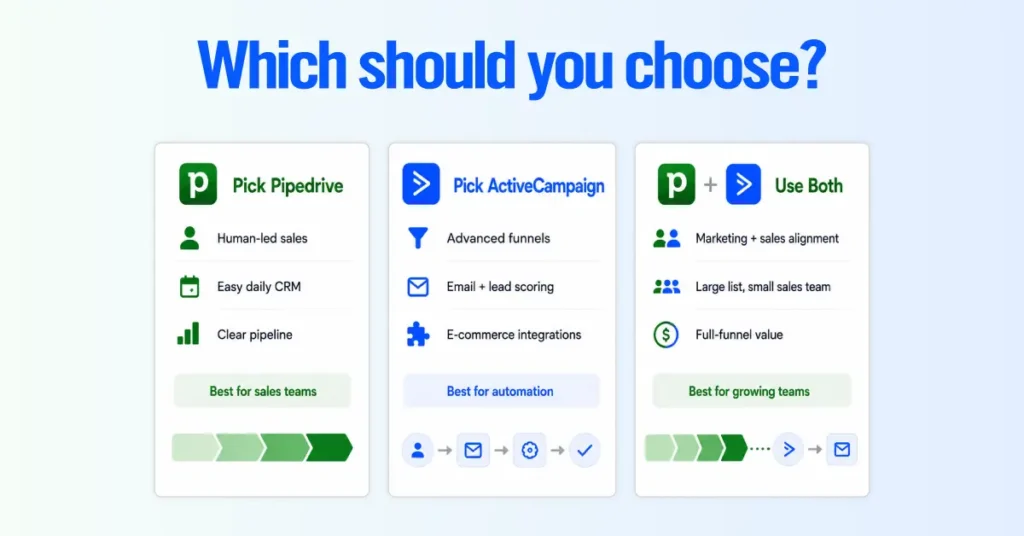
After configuring both platforms across dozens of service business engagements, the pattern is clear. The tool that fits depends entirely on how the business closes revenue, not on company size or industry label.
Business Type That Picks Pipedrive
Pipedrive works best for service businesses where human reps close deals. Think roofing, consulting, or field services. Sales happen through calls, site visits, proposals, and follow-ups.
Its visual pipeline helps reps track every deal, spot stalled opportunities, and manage follow-ups on the go.
Business Type That Needs ActiveCampaign
ActiveCampaign fits businesses driven by automated digital funnels. Think SaaS, e-commerce, or digital consulting.
Leads come from SEO, lead magnets, webinars, and nurture sequences. Revenue depends on behavior-based automation, email workflows, site tracking, and lead scoring not a traditional sales pipeline.
Business Type That Needs Both
Use both when marketing generates high-volume leads and sales reps close the best ones. ActiveCampaign nurtures and scores leads automatically.
Once a lead is qualified, it syncs into Pipedrive as a deal for the sales team to follow up and close.
Use-Case Table by Business Type
| Business Type | Primary Need | Recommended Tool | Setup Timeline |
| B2B Consulting / Agency | Deal tracking, proposal management, and relationship history | Pipedrive Growth or Premium | 1 to 3 days |
| Home Services / Field Sales | Mobile CRM, offline logging, fast activity capture | Pipedrive Growth | 1 to 2 days |
| Ecommerce / Subscription | Cart recovery, lifecycle emails, Shopify/Stripe/WooCommerce integration | ActiveCampaign Plus or Pro | 2 to 4 weeks |
| SaaS / Digital Products | Onboarding drips, trial conversion sequences, and lead scoring | ActiveCampaign Pro | 2 to 4 weeks |
| Real Estate / Hybrid Sales | High-volume lead nurture + broker pipeline management | ActiveCampaign + Pipedrive | 3 to 6 weeks |
| Recruitment / Staffing | Candidate pipeline tracking, activity-based follow-ups | Pipedrive Premium | 2 to 5 days |
| Financial Services / Insurance | Compliance-friendly contact records, manual relationship selling | Pipedrive Growth or Premium | 1 to 2 weeks |
Can You Run ActiveCampaign and Pipedrive at the Same Time?
Yes. And for the right business profile, the dual-stack setup is the highest-performing option available at this price point.
When running ActiveCampaign and Pipedrive together makes sense?
- You have separate marketing and sales teams. Marketing manages list growth and nurture sequences in ActiveCampaign. Sales works only with qualified, scored leads in Pipedrive.
- Your list is large, but your team is small. A business with 30,000 contacts and 2 closers pays for ActiveCampaign to nurture the entire database and for Pipedrive Growth for 2 seats. Only sales-ready contacts ever enter Pipedrive.
- You need behavioral automation and pipeline discipline. ActiveCampaign handles top-of-funnel triggers (site visits, email engagement, lead scoring). Pipedrive handles bottom-of-funnel execution (deal stages, activity tracking, forecasting).
- You want HubSpot-level capability at a fraction of the cost. The combined stack delivers comparable marketing automation and superior sales pipeline management at roughly one-third of HubSpot’s price.
What Syncs Between Them (via Outfunnel or Zapier)
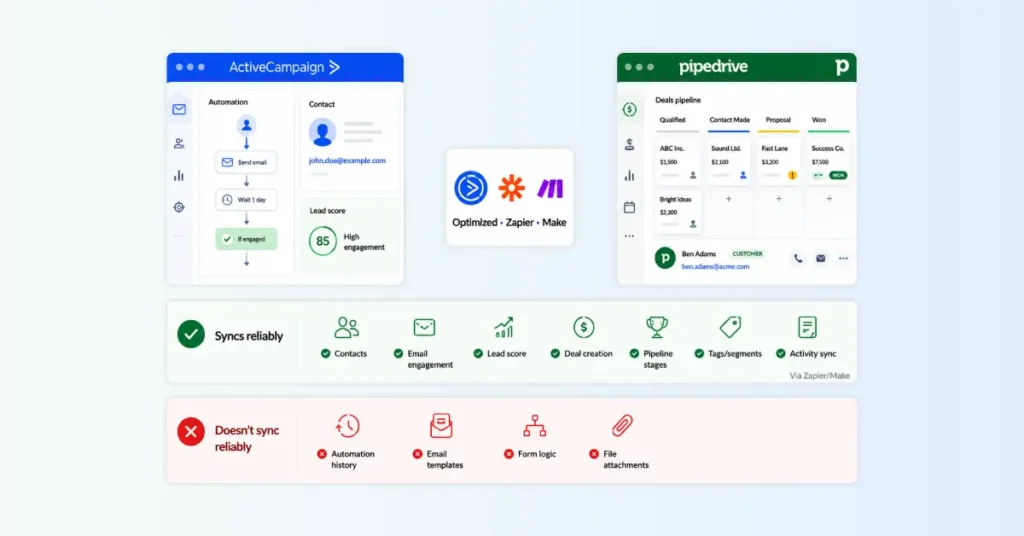
The most common integration tools for connecting ActiveCampaign and Pipedrive are Outfunnel, Zapier, and Make.
What syncs reliably:
- Contact details: Name, email, phone, company, job title, and custom fields map between both platforms. Changes in one can trigger updates in the other through two-way sync (Outfunnel handles this natively; Zapier requires separate zaps for each direction).
- Email engagement data: Opens, clicks, bounce flags, and unsubscribe status push from ActiveCampaign to Pipedrive, giving sales reps visibility into how warm a contact is before they call.
- Lead score: The numeric score at the time of sync transfers to a custom field in Pipedrive. This lets reps sort and prioritize deals by marketing engagement level directly inside their pipeline.
- Deal creation triggers: When a contact in ActiveCampaign hits a scoring threshold or enters a specific automation stage, a new deal is automatically created in Pipedrive with the correct pipeline, stage, and estimated value pre-filled.
- Deal data back to ActiveCampaign: When a deal moves to “Closed Won” or “Closed Lost” in Pipedrive, that status syncs back to ActiveCampaign. This allows post-sale automations to trigger automatically.
- Tags and segments: Custom tags applied in ActiveCampaign carry over as Pipedrive labels or filter values, preserving your segmentation logic across platforms.
- Activity logs: Phone call records and meeting notes sync via Zapier or Make, though each requires a separate Zap configuration per activity type.
What does not sync natively:
- Full automation history: The sequence of emails a contact received, the branches they traveled through, and the conditions that were met stay within ActiveCampaign. Pipedrive receives the outcome, not the journey.
- Email template designs: Newsletter layouts, dynamic content blocks, and A/B test variants are ActiveCampaign-only assets and cannot transfer.
- Branching logic configurations: Automation workflows are a platform-specific architecture. They must be built and maintained separately in each tool.
- File attachments: Documents attached to contacts or deals in one platform do not automatically appear in the other without custom configuration.
Total Cost: ActiveCampaign + Pipedrive vs HubSpot
Real Numbers for a 5-Person Team
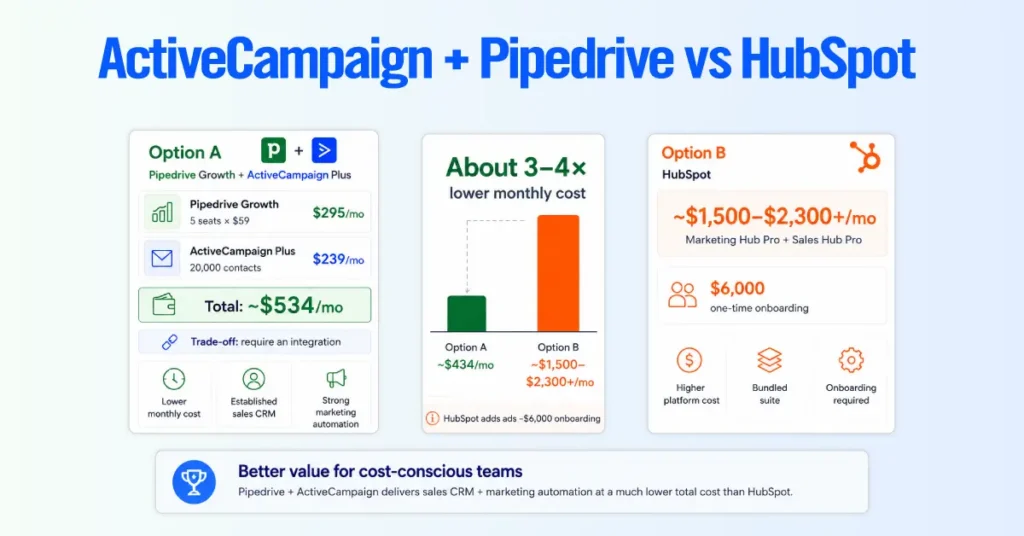
If you have a team of five managing around 20,000 contacts and need both marketing automation and a sales CRM, using ActiveCampaign and Pipedrive together is significantly more affordable than HubSpot.
Option A: Pipedrive Growth + ActiveCampaign Plus
- Pipedrive Growth (5 seats x $39): $195/mo
- ActiveCampaign Plus (20,000 contacts): ~$239/mo
- Total: ~$434/mo
Option B: HubSpot
To get similar marketing automation and sales CRM features in HubSpot, you’ll need both Marketing Hub Professional and Sales Hub Professional. For the same team and contact volume, expect to pay:
- Monthly cost: Around $1,500–$2,300+
- One-time onboarding fees: Around $6,000
If your goal is to keep costs low while getting powerful marketing automation and a dedicated sales CRM, ActiveCampaign and Pipedrive offer much better value.
Together, they cost about one-third to one-quarter of what you’d pay for a comparable HubSpot setup.
The trade-off is that you’ll need to connect the two platforms using an integration. In return, you save a significant amount each month while getting stronger sales pipeline management than HubSpot offers.
Who Should Switch From ActiveCampaign to Pipedrive?
Switch to Pipedrive if your business has outgrown ActiveCampaign’s CRM capabilities and your revenue depends on human-driven sales. Here are the clearest indicators:
| Your reps are missing follow-ups because ActiveCampaign buries next-action scheduling in sub-menus instead of surfacing it on the main screen. You cannot produce a weighted revenue forecast without exporting data to a spreadsheet. ActiveCampaign does not include native pipeline forecasting. Your bill keeps climbing, but your team has not grown. Your list scaled from 5,000 to 25,000 contacts, and your cost tripled, but you still have the same 4 sales reps. Your sales team avoids the CRM. If reps find ActiveCampaign’s interface confusing because it is built for marketers, adoption has already failed. You paid for Enhanced Pipelines, and it still feels clunky. If the $68/mo CRM add-on did not fix the experience, the platform is structurally misaligned with your sales workflow. |
What Pipedrive replaces: Contact databases, custom fields, 1-to-1 email sequences, deal pipelines, activity tracking, sales reporting, and revenue forecasting.
What Pipedrive cannot replace: Behavioral site tracking, dynamic email content blocks, multi-branch automation workflows, lead scoring, and conditional split-testing. If your revenue relies on these, you will need to keep ActiveCampaign for marketing or add a separate email tool.
Who Should Switch From Pipedrive to ActiveCampaign?
Switch to ActiveCampaign if your business has shifted toward marketing-driven revenue and Pipedrive’s email and automation capabilities are holding you back. Here are the clearest indicators:
- You are paying for third-party email tools alongside Pipedrive. If you run Mailchimp, ConvertKit, or another platform just to handle email campaigns and automations, consolidating into ActiveCampaign eliminates that extra cost and complexity.
- You need behavioral triggers that Pipedrive cannot provide. Your growth strategy depends on sending automated emails based on site visits, link clicks, or engagement scoring, and Pipedrive’s linear sequences cannot do that.
- Your sales process has become mostly automated. Fewer deals require a rep on the phone. Most revenue now comes through self-service funnels, webinars, or checkout pages.
- You need advanced segmentation for a large list. Pipedrive’s contact filtering is basic. If you need to segment 20,000+ contacts by behavior, purchase history, and engagement level for targeted campaigns, ActiveCampaign handles that natively.
- You are building an e-commerce or subscription business. Native integrations with Shopify, WooCommerce, and Stripe for cart recovery, post-purchase flows, and churn prevention are strengths of ActiveCampaign that Pipedrive does not match.
What ActiveCampaign replaces: Contact management, basic email sequences, simple deal tracking, and any third-party email marketing tool you were running alongside Pipedrive.
What ActiveCampaign cannot replace: Visual Kanban pipelines, deal rotting alerts, activity-based selling enforcement, AI-powered revenue forecasting, and deep sales manager reporting. If your business still requires a structured human sales process, keep Pipedrive for sales or run both platforms.
How Long a Migration Actually Takes
For a straightforward migration (contacts, deals, notes, basic pipeline setup):
- Small database (under 5,000 contacts): 1 to 2 weeks
- Medium database (5,000 to 25,000 contacts): 2 to 4 weeks
- Large database with complex automations to rebuild: 4 to 8 weeks
These timelines assume a dedicated project owner and include data cleansing, field mapping, test imports, user training, and go-live validation.
Automation rebuilds are the time multiplier. A business with 20+ active automation workflows in ActiveCampaign should budget 3 to 4 additional weeks just for workflow reconstruction in the new platform.
Our Recommendation: No Fence-Sitting
| Pick Pipedrive If…Revenue depends on sales reps building relationships and closing deals.Your team needs a CRM that’s easy to learn and use daily.You manage a large contact database with a small sales team.Predictable CRM pricing is a priority.Your sales process follows a clear lead-to-close pipeline. |
| Pick ActiveCampaign If…Revenue is driven by automated marketing funnels.You need advanced email automation and behavioral triggers.Lead scoring and dynamic content are essential.Your business sells e-commerce, SaaS, or digital products.You rely on deep integrations with Shopify, WooCommerce, or Stripe. |
| Use Both If…You have separate marketing and sales teams.Your database is large (10,000+ contacts), but your sales team is small (under 10 reps).You need advanced marketing automation and a structured sales pipeline.You want to combine ActiveCampaign for lead nurturing with Pipedrive for deal management.You need HubSpot-like functionality at a significantly lower cost. |
FAQs
Is ActiveCampaign a CRM or email marketing tool?
ActiveCampaign is primarily an email marketing and marketing automation platform. It includes CRM functionality (deal pipelines, contact management), but the CRM is an add-on layer built on top of the marketing engine.
Is Pipedrive better than ActiveCampaign for sales teams?
Yes. Pipedrive is the stronger choice for dedicated sales teams. Its visual Kanban pipeline, activity-based selling methodology, deal rotting alerts, and revenue forecasting are all purpose-built for sales workflows. ActiveCampaign’s CRM features exist, but they were designed to complement its marketing automation engine, not to serve as a standalone sales tool.
How does ActiveCampaign pricing compare to Pipedrive?
ActiveCampaign and Pipedrive use different pricing models, so which is cheaper depends on your business. If you have a small contact list, ActiveCampaign is often the more affordable option. But as your contact list grows, its monthly cost increases.
Can I use ActiveCampaign and Pipedrive at the same time?
Yes. The dual-stack setup is a viable and often recommended approach for businesses with both marketing and sales functions. ActiveCampaign manages list nurturing, behavioral automations, and email campaigns. Pipedrive manages the deal pipeline, activity tracking, and forecasting.
How long does it take to switch from ActiveCampaign to Pipedrive?
Most businesses can migrate from ActiveCampaign to Pipedrive in 1 to 4 weeks. The exact timeline depends on your database size and how many automations you need to recreate. Moving contacts, deals, and notes is usually straightforward. The biggest challenge is rebuilding your automations, as they can’t be transferred directly to Pipedrive. If you have more than 20 active workflows, expect to spend an additional 3 to 4 weeks rebuilding, testing, and fine-tuning them.
Does Pipedrive have marketing automation like ActiveCampaign?
Pipedrive offers a Campaigns add-on for email newsletters and basic sequences. However, its automation engine is linear and cannot natively handle multi-branch behavioral logic. It cannot trigger workflows from email link clicks, site visits, or behavioral scoring the way ActiveCampaign does.
Which is easier to set up: ActiveCampaign or Pipedrive?
Pipedrive is significantly easier and faster to set up. Most teams create deals, log activities, and use the pipeline in a single day. ActiveCampaign requires 2 to 4 weeks to configure properly, including setting up site tracking, building automation logic trees, defining lead scoring rules, and testing workflows to avoid accidental spam or conflicting triggers.
Does either tool offer a free plan?
Neither ActiveCampaign nor Pipedrive offers a permanent free plan. Both provide 14-day free trials. ActiveCampaign’s trial includes 100 contacts and 100 email sends with access to Pro-tier features.