AI Summary




TL;DR
- Calendly offers four plans, Free, Standard, Teams, and Enterprise.
- Paid plans start at $10 per seat per month on annual billing.
- Annual billing saves about 16% on Standard and 20% on Teams.
- The Free plan limits you to one active event type.
- The Teams plan is the first tier with round-robin scheduling, at $16 per seat.
- Enterprise pricing starts at $15,000 per year.
- Calendly gives you a 14-day free trial with no card required.
Calendly is the go-to tool for killing the endless back-and-forth of email scheduling, but with four distinct tiers and a complex per-seat pricing model, choosing the right plan isn’t always easy.
Whether you’re a solopreneur trying to keep costs down or a growing sales team that needs advanced routing, the difference between plans can mean the difference between seamless scheduling and wasted budget. In this guide, we break down every Calendly plan to help you find exactly what you need without paying for features you’ll never use.
| Last verified in August 2026 against Calendly’s official pricing page. Prices are published at calendly.com/pricing and change over time, so treat the figures here as a snapshot, not a contract. |
What Is Calendly Used For
Calendly is a cloud-based scheduling tool that kills the endless back-and-forth of finding a meeting time over email. You connect your calendar to Calendly, share one personalized Calendly link, and it reads your availability in real time, shows only the slots you are free, and confirms the booking on its own, which keeps double bookings off your calendar.
Sales reps, recruiters, consultants, customer success teams, educators, and freelancers lean on it for demos, interviews, client calls, and internal check-ins. You can connect Calendly to Google Calendar, Outlook, Office 365, Zoom, Google Meet, Microsoft Teams, Salesforce, HubSpot, Stripe, and PayPal, so every integration lives in one place.

Newer additions round out the picture too, with an AI Notetaker that captures recaps and action items, a Contacts layer for light relationship management, and built-in Payments. Past the basics, the paid plans unlock advanced features like round-robin distribution, lead routing, automated reminders, payment collection, and team analytics.
How Much Does Calendly Cost
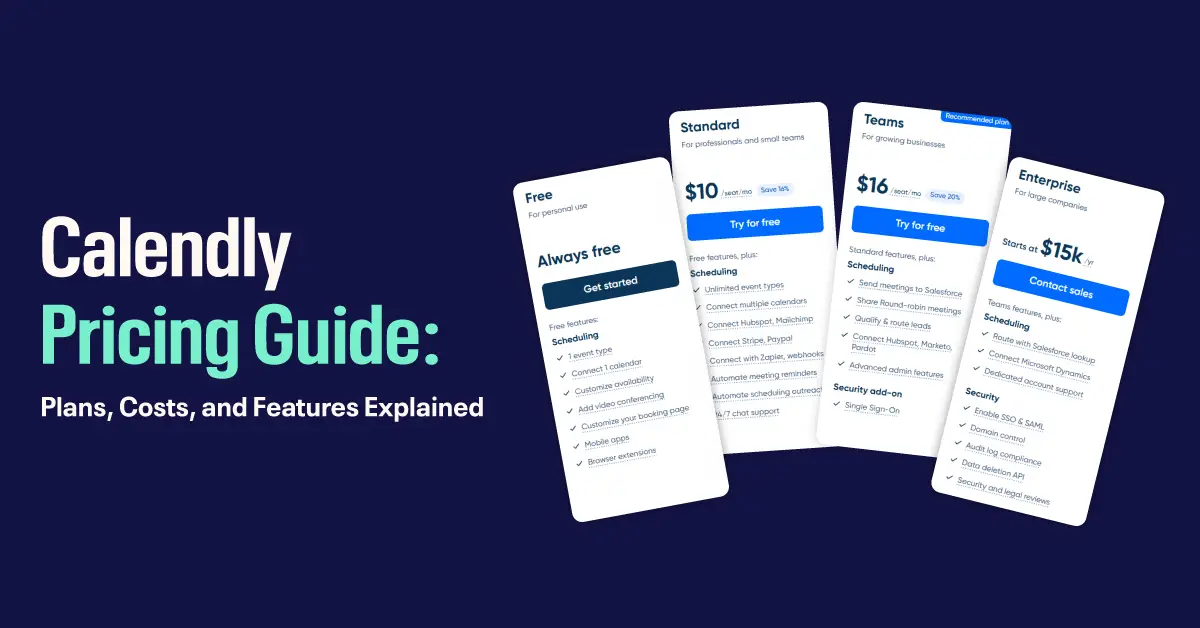
Across the three self-service tiers, Calendly runs from $0 to $20 per user per month depending on the plan and the billing cycle. Enterprise sits outside that range, is custom-quoted, and starts at $15,000 a year with no public per-seat price.
The Free plan stays free forever for a single user, while every paid plan charges per seat. Annual billing trims the per-seat price by roughly 16% on Standard and a full 20% on Teams. Here is a quick snapshot of Calendly pricing in 2026.
| Plan | Monthly Billing | Annual Billing (per seat/month) | Best For |
| Free | $0 | $0 | Individuals with basic scheduling needs |
| Standard | $12/seat | $10/seat | Professionals and small businesses |
| Teams | $20/seat | From $16/seat | Growing teams and sales organizations |
| Enterprise | Custom | From $15,000/year | Large organizations needing security and control |
Calendly bills every user as a separate seat. A five-person team on the Teams plan pays $80 a month on annual billing, or $100 a month if it pays month to month.
How Much Is Calendly Per Month
On paid plans, Calendly costs $10 to $20 per user per month, depending on the tier you pick and whether you pay yearly or monthly. The Free plan sits at $0 forever. Standard costs $12 per seat monthly or $10 per seat annually. Teams costs $20 per seat monthly or starts at $16 per seat annually, with volume discounts kicking in after 30 seats. Enterprise starts near $1,250 a month, billed as $15,000 a year.
Paying annually saves about 16% on Standard and 20% on Teams, and that gap widens as your headcount grows. A 10-person team on the Teams plan saves $480 a year by choosing annual billing over monthly.
Calendly Pricing Plans Explained
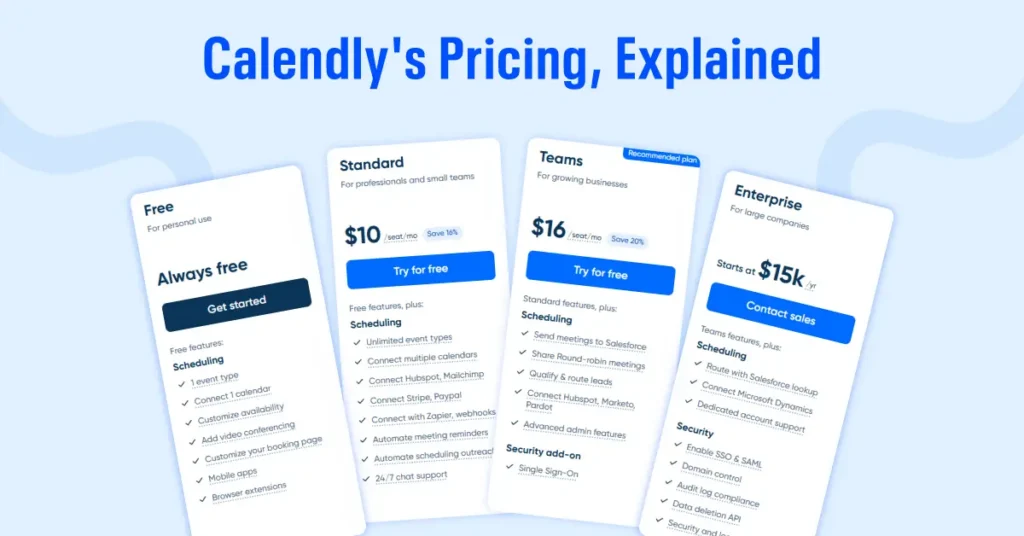
Calendly built four plans around four kinds of users: the solo professional, the small business, the sales team, and the enterprise. Each tier stacks on the one below it, adding scheduling depth, integrations, admin controls, and security. Here is what you get at every level.
Calendly Free Plan at 0 dollars per month
Calendly’s free plan is a genuine free forever plan for individuals who need straightforward appointment scheduling software. You get one active event type, one calendar connection, unlimited one-on-one meetings, and a customizable booking page. Video conferencing links through Zoom, Google Meet, and Microsoft Teams are included, along with the mobile app and browser extension.
Here is what the Free plan gives you.
- One active event type
- One calendar connection (Google, Outlook, Office 365, or iCloud)
- Unlimited one-on-one meetings
- A personalized booking link
- Video conferencing integrations
- Email support
The catch is the single-event-type cap. You cannot remove Calendly branding, automate reminders, collect payments, or plug in a CRM. That one-event limit is the most common reason people upgrade, since even a coach who offers both a 30-minute intro call and a 60-minute session already needs a paid plan.
Standard Plan at 10 dollars per seat per month
The tier once called Essentials is now Standard, and it costs $10 per seat per month on annual billing, or $12 if you pay monthly. This is the sweet spot for freelancers, solopreneurs, and small teams that have outgrown the single-event ceiling. Standard opens up multiple event types, up to six calendar connections, and integrations with HubSpot, Mailchimp, Stripe, PayPal, and Zapier, and it lets you seamlessly embed Calendly on your own scheduling page.
The Standard plan includes the free features plus everything below.
- Unlimited event types
- Six calendar connections per user
- Group events and meeting polls
- Automated email and text reminders and follow-ups (250 SMS credits per seat per month, pooled across your team)
- Custom branding, including the option to remove Calendly branding
- Payment collection through Stripe and PayPal
- HubSpot, Mailchimp, and Zapier integrations
- 24/7 chat and email support
- Scheduling analytics
Calendly’s Standard plan is the cheapest paid plan and the right call when you need flexibility without team features.
Teams Plan at 16 dollars per seat per month
The Teams plan costs $16 per seat per month annually, or $20 monthly, and it carries everything in Standard plus advanced scheduling options and admin features built for teams that share meetings across reps. Sales teams, recruiters, and customer success squads live here.
The Teams plan includes Standard features plus:
- Everything in Standard
- Round-robin meeting distribution
- Routing forms that qualify and assign invitees based on their answers
- Salesforce CRM integration
- HubSpot, Marketo, and Pardot routing
- Admin-managed event templates
- Organization-wide branding controls
- Team scheduling analytics
- SAML Single Sign-On as an optional add-on
The Teams plan offers volume pricing for annual subscribers, and Calendly publishes the exact tiered pricing ladder in its Help Center. As your team grows past 30 seats, the average per-seat price drops automatically, while the first 30 seats always stay at $16. Discounts apply on their own from your Calendly Billing page, so there is nothing to negotiate.
| Team Size | Per-Seat Cost (billed annually) |
| Seats 1 to 30 | $16/month |
| Seats 31 to 50 | $14.50/month |
| Seats 51 to 100 | $14/month |
| Seats 101 to 200 | $13.50/month |
| Seats 201 to 300 | $13/month |
| Seats 301 and up | $12/month |
A 40-seat team, for example, pays $16 for the first 30 seats and $14.50 for the remaining 10, exactly as Calendly’s documentation frames it.
Enterprise Plan from 15,000 dollars per year
Enterprise starts at $15,000 a year and targets organizations of roughly 30 or more users that need real security, compliance, and hands-on support. Pricing is custom and negotiated around user count, contract length, and the features you need.
Enterprise adds the following on top of Teams.
- SAML Single Sign-On included
- SCIM user and group provisioning
- Domain claiming and account oversight
- Salesforce routing by lookup
- Microsoft Dynamics 365 and Power Automate
- Audit logs and a Data Deletion API
- Phone support and a dedicated account manager
- Custom onboarding, implementation, and security and legal reviews
For a 30-person team, Enterprise tends to work out around $40 to $42 per user per month, and that per-seat rate falls as you add users.
Calendly Free Trial and How It Works
Calendly gives you a 14-day free trial of its paid features with no credit card required. New accounts land on a trial with full access to advanced scheduling features like round-robin scheduling, Salesforce integration, and routing forms. You can invite team members to join your trial at no extra cost.
When the 14 days end, your account downgrades to the Free plan unless you upgrade to a paid plan. Anything you create stays in your account after the downgrade, so you never lose your links or data if the trial lapses.
Compare Calendly Features by Plan
Features widen as you climb the tiers, and scheduling, integrations, customization, security, and support each scale on their own track. Here is a side-by-side view so you can compare features across all four plans at a glance.
Scheduling Features
| Feature | Free | Standard | Teams | Enterprise |
| Active event types | 1 | Unlimited | Unlimited | Unlimited |
| Calendar connections | 1 | 6 | 6 | 6 |
| Unlimited meetings | Yes | Yes | Yes | Yes |
| Meeting polls (40 slots, 40 participants) | Yes | Yes | Yes | Yes |
| Group and collective event types | No | Yes | Yes | Yes |
| Automated reminders and outreach | No | Yes | Yes | Yes |
| Round-robin scheduling | No | No | Yes | Yes |
| Routing forms | No | No | Yes | Yes |
Integrations
| Integration | Free | Standard | Teams | Enterprise |
| Zoom, Google Meet, Teams | Yes | Yes | Yes | Yes |
| Stripe, PayPal payments | No | Yes | Yes | Yes |
| HubSpot, Mailchimp, Zapier | No | Yes | Yes | Yes |
| Salesforce CRM | No | No | Yes | Yes |
| Salesforce routing by lookup | No | No | No | Yes |
| Microsoft Dynamics 365 | No | No | No | Yes |
Security and Admin
| Feature | Free | Standard | Teams | Enterprise |
| Remove Calendly branding | No | Yes | Yes | Yes |
| Team admin roles | No | No | Yes | Yes |
| SAML SSO | No | No | Add-on | Yes |
| SCIM provisioning | No | No | No | Yes |
| Data Deletion API | No | No | No | Yes |
Choosing the Right Calendly Plan for Your Team
The right Calendly plan depends on team size, your team’s scheduling needs, and which integrations you actually use. Match your situation to the notes below to land on the best Calendly plan for your team.

Pick the Free plan if you work solo, need only one type of meeting, and don’t care about payments, CRM connections, or branding removal. It is a genuinely useful no-cost way to test online scheduling.
Pick the Standard plan if you run a small business or freelance, need several event types and multiple calendars, want to collect payments and drop the Calendly branding, and rely on HubSpot, Mailchimp, or Zapier.
Pick the Teams plan if you manage a sales, recruiting, or customer success group that needs round-robin scheduling and lead routing, uses Salesforce, and wants admin controls plus organization-wide branding.
Pick the Enterprise plan if you have 30 or more users across departments, need SSO, SCIM, audit logs, and compliance reviews, want dedicated onboarding and phone support, or integrate with Microsoft Dynamics 365 and Power Automate.
Calendly Monthly vs Annual: Which Should You Choose
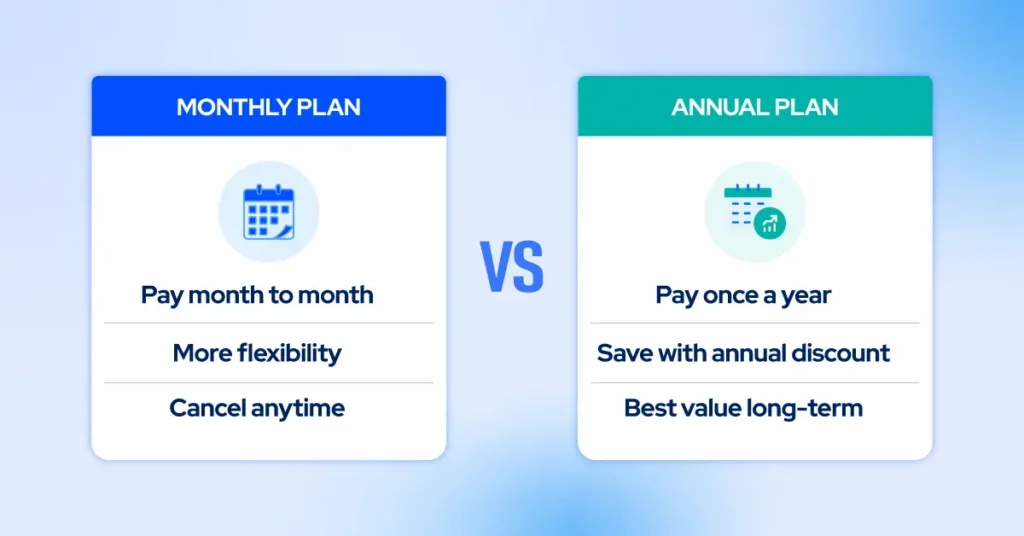
The monthly-versus-annual choice is a trade-off between flexibility and savings. Annual billing cuts your per-seat cost by about 16% on Standard and 20% on Teams, while monthly billing gives you flexible pricing you can cancel or scale down anytime without a year-long lock-in. Your call depends on how stable your team is, how your cash flow looks, and how sure you are that Calendly will earn its keep long-term.
Cost Comparison, Monthly vs Annual
| Plan | Monthly Billing | Annual Billing | Yearly Savings (per seat) |
| Standard | $12/seat/month ($144/year) | $10/seat/month ($120/year) | $24 (about 16% off) |
| Teams | $20/seat/month ($240/year) | $16/seat/month ($192/year) | $48 (20% off) |
| Enterprise | Not available | From $15,000/year | Custom |
A 10-person Teams plan saves $480 a year on annual billing. Scale that to 50 users and the annual discount saves roughly $2,400 a year before volume pricing even enters the math.
Go annual if your headcount is predictable, you plan to use Calendly for at least a year, and you want the lowest per-seat rate. Stay monthly if you run a seasonal or project-based team, bring on short-term contractors, or are still testing Calendly against rivals.
A simple rule works well here. The cash break-even lands around 10 months, since a prepaid Standard year costs $120 against $12 a month, and a Teams year costs $192 against $20 a month. If you expect to keep Calendly for roughly 10 months or longer, annual billing pays for itself. If you are unsure, run monthly for two or three months, then switch once you have confirmed the fit.
Hidden Costs to Watch For

The sticker price rarely tells the whole story, especially as a team grows. A few charges sit outside the per-seat line.
Text reminder limits: Calendly caps SMS at 250 credits per seat per month on non-Enterprise plans and 1,000 per seat per month on Enterprise, pooled across your organization and reset on the first of each month. You cannot buy more credits. Once you hit the cap, texts stop, and Calendly falls back to email, and the only way to raise the ceiling is to add seats. SMS is not available on the Free plan or during the trial.
SSO on Teams: Single Sign-On ships with Enterprise but costs extra as a Teams add-on. Many organizations that need SSO end up on Enterprise anyway.
The monthly surcharge: Measured against the annual rate, paying month to month costs about 20% more on Standard ($12 versus $10) and 25% more on Teams ($20 versus $16). Put another way, annual billing saves 16% on Standard and 20% on Teams off the monthly price.
Per-seat scaling: Calendly charges for every active user, so costs climb in a straight line as you hire. A 20-person Teams plan runs $3,840 a year on annual billing.
Invoice thresholds: Invoice-based payment is available on Standard or Teams once your bill reaches $5,000, and on Enterprise at $15,000. Below those thresholds, you pay by card. Calendly accepts Visa, Mastercard, American Express, Discover, JCB, and Diners Club, and PayPal is only available to customers outside the United States.
One more thing to plan for is renewal. Paid subscriptions renew automatically for the same period unless you downgrade before the renewal date, so set a reminder if you want to reassess.
Calendly Alternatives and How They Compare
Calendly is the polished default, but per-seat pricing pushes larger teams to shop around for a Calendly alternative, and a few names come up again and again. Comparing features and pricing side by side helps before you switch.
Cal.com is the open-source challenger. It runs a free tier and paid plans, and because you can self-host it, cost-sensitive or privacy-focused teams often start there. Zeeg positions itself as a lower-cost, GDPR-compliant option built in Germany, with an emphasis on EU data residency and added AI features. SchedulingKit tends to undercut Calendly on price for teams that want the core scheduling flow without the premium tag.
The honest read is that Calendly still wins on ecosystem depth, integration breadth, and reliability, which is what you pay the premium for. If your needs are simple or your team is large enough that per-seat math stings, one of these alternatives may deliver most of the value for less. Pricing changes on every one of these tools, so confirm current numbers on each provider’s site before you commit.
How We Verified This Pricing
We checked every figure in this guide against Calendly’s official pricing page and Help Center in August 2026, then cross-referenced it with current third-party breakdowns to catch anything the marketing page glosses over.
The Teams volume ladder comes straight from Calendly’s Help Center article on choosing a plan, and the SMS credit limits come from its published SMS documentation, so these are stated as facts, not estimates. Calendly updates its plans periodically, so the safest move before you buy is to load the live pricing page and start the 14-day trial to confirm the tier does what you need.
Is Calendly Worth the Price
Calendly earns its price when scheduling is a genuine bottleneck, and you value polish, reliability, and a deep bench of integrations. The Free plan covers basic personal use, Standard handles almost every freelancer and small-business scenario, and Teams delivers strong value for customer-facing groups that need routing and round-robin distribution.
The trade-off is the per-seat model. Costs rise in a straight line with headcount, and large teams can often find similar features for less from Cal.com, Zeeg, or SchedulingKit. Before you commit, run the math against your real team size, map the features you will actually use across Calendly’s pricing tiers, and put the 14-day trial to work.
If your needs are simple, the Free plan is more useful than most people expect. If they are complex, annual billing on the right tier is the most sensible path.