AI Summary




TL;DR
- Calendly is a standalone scheduling tool priced per seat, with Free, Standard, and Teams plans.
- HubSpot Meetings is built into HubSpot CRM, so there is no separate scheduling fee.
- If you already use HubSpot, start with HubSpot Meetings for basic scheduling and native CRM logging.
- Calendly is a better fit when you need advanced routing, routing forms, round-robin scheduling, group or collective bookings, or a more flexible booking experience.
- Both can work together: Calendly handles the booking experience while HubSpot manages contacts, ownership, and follow-up.
- Calendly Free focuses on basic booking, while HubSpot Free includes a personal booking link and automatic CRM activity logging.
- The decision mainly comes down to CRM architecture and workflow needs, not which scheduler has more features.
- Use HubSpot Meetings when it covers your needs; add Calendly when its extra scheduling capabilities justify the additional cost.
The right choice between Calendly and HubSpot Meetings often comes down to one question: where do you want your booking data to live? A scheduling tool that sits outside your CRM can create extra work later, while paying for a separate scheduler may be unnecessary if your CRM already handles the job well.
If your team runs its sales process in HubSpot, HubSpot Meetings is usually the better starting point because bookings can stay connected to your CRM records without adding another scheduling platform. Calendly makes more sense when you need broader scheduling capabilities, more flexible booking experiences, or work with a CRM other than HubSpot. You can also connect Calendly with HubSpot when you want both.
The comparison below covers the features, integration capabilities, pricing, and practical factors that should determine which option fits your sales workflow.
Calendly vs HubSpot Meetings at a Glance
Calendly is a best-in-class standalone scheduler; HubSpot Meetings is a CRM-native scheduler bundled into HubSpot. That difference drives almost everything below, including pricing, which is why a plain feature-for-feature scorecard misleads more than it helps.
| Criteria | Calendly | HubSpot Meetings |
| Best fit | Teams on a non-HubSpot CRM, or teams whose scheduling complexity affects conversion | Teams already on, or moving to, HubSpot |
| Entry price | Free, then $10 per seat monthly (Standard, billed annually) | Free on HubSpot CRM, otherwise included with a Sales Hub seat |
| Free plan | One event type, connects your calendars | One personal booking link, automatic CRM logging |
| CRM integration | Native HubSpot and Salesforce on paid plans | Built-in, no integration step |
| Team scheduling | Round robin, collective, group, routing forms | Round robin and group links on paid Sales or Service Hub |
| Automation | Reminders, follow-ups, workflows on paid plans | HubSpot workflows, which require the Professional tier |
| Calendars | Google, Outlook, Office 365, Exchange. iCloud only for pre-2024 connections | Google, Office 365, Exchange |
Pro-Tip: Start with HubSpot Meetings if HubSpot is your CRM, and reach for Calendly when scheduling quality, routing, or a non-HubSpot CRM makes the standalone tool worth its own line item.
The Fundamental Difference
Calendly sells scheduling as its whole product; HubSpot gives scheduling away to make its CRM harder to leave. That is the entire distinction, and it explains the strengths on both sides.
Calendly was founded in 2013 and is used by a very large base of individuals and teams, which shows in how polished the booking experience is. Its core object is the booking page, and the product is built to make sharing availability and getting a slot confirmed as frictionless as possible.
HubSpot Meetings, by contrast, exists to write booking activity into HubSpot CRM. When a prospect books, HubSpot creates or updates their contact record and logs the meeting on the timeline. That native link to the customer record is the reason it exists and the reason many HubSpot users never evaluate a separate scheduler at all.
| The practical takeaway is that HubSpot Meetings is a CRM feature, and Calendly is a scheduling product. Judging them purely on booking features misses that the value of HubSpot Meetings is mostly downstream, in reporting and automation, not on the booking page itself. |
The one question that resolves most decisions is whether HubSpot is, or is about to become, your system of record. If yes, the scheduler is already in the building. If not, buying HubSpot only to get its scheduler means buying a CRM for a booking page, which rarely makes sense.
Feature Comparison
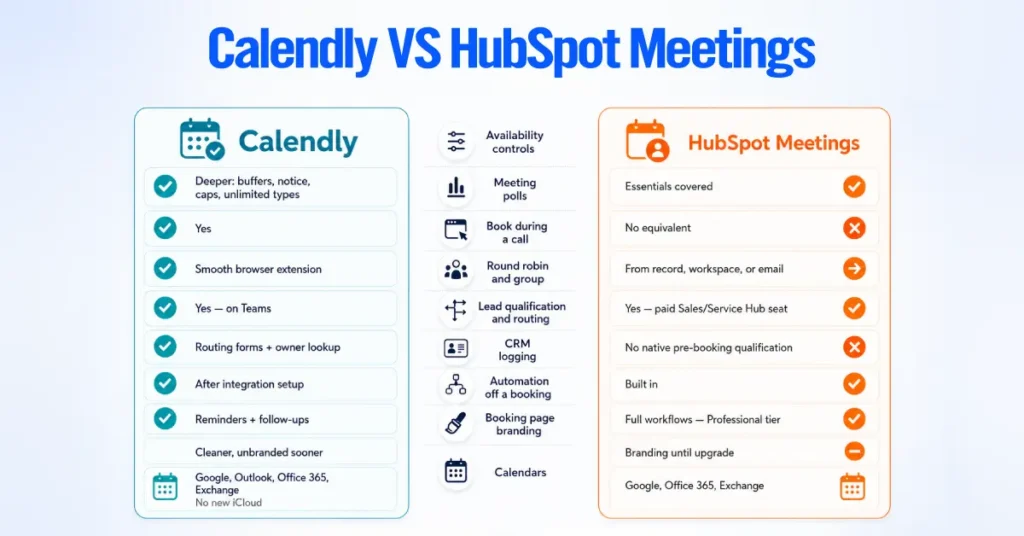
Calendly sells scheduling as its whole product; HubSpot gives scheduling away to make its CRM harder to leave. That is the entire distinction, and it explains the strengths on both sides.
Calendly was founded in 2013 and is used by a very large base of individuals and teams, which shows in how polished the booking experience is. Its core object is the booking page, and the product is built to make sharing availability and getting a slot confirmed as frictionless as possible.
HubSpot Meetings, by contrast, exists to write booking activity into HubSpot CRM. When a prospect books, HubSpot creates or updates their contact record and logs the meeting on the timeline. That native link to the customer record is the reason it exists and the reason many HubSpot users never evaluate a separate scheduler at all.
| On G2, as of August 2026, Calendly holds about 4.7 out of 5 across roughly 2,500 reviews, and HubSpot Sales Hub holds about 4.4 out of 5 across more than 13,000 reviews. |
The one question that resolves most decisions is whether HubSpot is, or is about to become, your system of record. If yes, the scheduler is already in the building. If no, buying HubSpot only to get its scheduler means buying a CRM to get a booking page, which rarely makes sense.
Calendly leads on scheduling depth, and HubSpot Meetings leads on CRM data. The table below shows the full comparison at a glance, and the notes after it cover only the points most comparisons get wrong.
Calendly Plus HubSpot: When Using Both Makes Sense
Running Calendly alongside HubSpot is a deliberate choice, not a contradiction. Evaluate HubSpot Meetings first, since it is already paid for and logs natively.
Running Calendly alongside HubSpot is a deliberate choice, not a contradiction. Evaluate HubSpot Meetings first, since it is already paid for and logs natively.
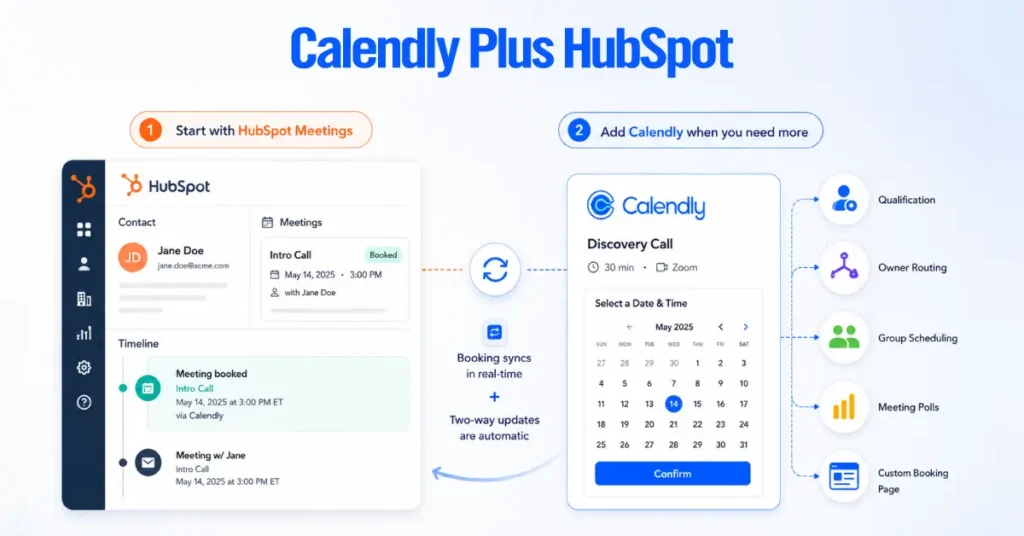
A few things to know about how the integration behaves:
- Plan:The HubSpot integration requires a paid Calendly plan; HubSpot lookup routing requires Teams; mapping form answers into HubSpot properties requires HubSpot Professional or Enterprise workflows.
- Matching: Bookings match on the invitee’s email. Existing contact: it logs activity without overwriting properties. No match, it creates one.
- Scope: Bookings log as timeline activities and do not create deals. Any deal association is a workflow or middleware job.
The one thing worth planning for is CRM noise. Duplicates usually come from a prospect booking with a different email, an existing HubSpot duplicate, or internal and test bookings syncing in, not from the match key.
A clean build limits which event types sync, sets ownership and lifecycle rules so a booking cannot reassign an owned account, and maps only the fields you want.
Pricing and Total Cost
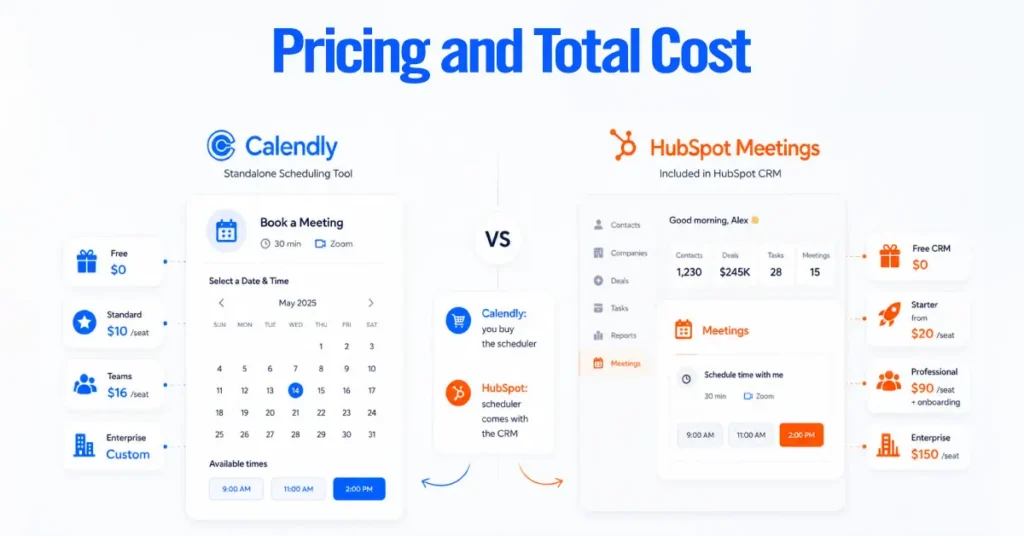
Calendly is priced per seat; HubSpot Meetings has no price of its own because it ships inside HubSpot. We checked all figures on August 24, 2026, and flagged where promotional pricing differs from list. Vendors change these often, so confirm on the official pricing pages before buying.
Calendly Pricing
Calendly pricing is based on four plans, with paid plans priced per seat.
- Free: One event type, connects your calendars, no payments or team scheduling.
- Standard: $10 per seat, billed monthly or annually, or $12 billed monthly. Adds unlimited event types, Stripe and PayPal payments, and integrations including HubSpot and Salesforce.
- Teams: $16 per seat, billed annually, or $20 billed monthly. Adds round robin, routing forms, HubSpot lookup routing, and admin controls.
- Enterprise: Custom, and Calendly’s own materials put the start around $15,000 a year, with SSO, SCIM, and governance controls.
Calendly publishes tiered volume pricing that lowers the per-seat rate on Teams once a team passes 30 seats, so we left specific volume numbers out here rather than quote a figure that shifts, since most teams evaluating this are well under that threshold anyway.
HubSpot Meetings Pricing
HubSpot Meetings has no standalone price. You pay whatever HubSpot tier you are on, and the scheduler features unlock by tier.
- Free HubSpot CRM: $0. One personal booking link, unlimited bookings, calendar sync, and automatic logging to the contact record. Round robin and group links are not included.
- Sales Hub Starter: $20 per seat monthly at least, and closer to $15 per seat on annual billing, with periodic promotions running lower. Unlocks team scheduling, round robin, group links, multiple booking links, and branding removal. No seat minimum on Sales Hub.
- Sales Hub Professional: $90 per seat on annual billing, $100 monthly, plus a one-time onboarding fee around $1,500. This is where HubSpot workflows and sequences live, which turn a logged meeting into automation.
- Sales Hub Enterprise: $150 per seat, with a higher onboarding fee, adding advanced permissions and reporting.
The honest way to read HubSpot’s pricing is that the free CRM scheduler is genuinely usable for a solo rep, Starter is the real entry point for any team that needs routing, and the jump to Professional is a decision about automation and reporting for the whole CRM, not about the scheduler.
What Scheduling Actually Costs at Four Team Sizes
The comparison is never scheduler versus scheduler on price, because HubSpot Meetings is bundled. It is a per-seat scheduler against a feature you may already own.
| Team size | Calendly, scheduling only | HubSpot Meetings, bundled |
| 1 user | Free, or $10 per month on Standard | Free on HubSpot CRM |
| 3 users | Teams, about $48 per month, needed for routing | Free for basic one-on-one links, or already included if on Sales Hub |
| 10 users | Teams, about $160 per month | Included if on Sales Hub; otherwise, Starter is roughly $150 to $200 per month for scheduling plus a full CRM |
| 25 users | Teams, about $400 per month | Included if on Sales Hub; otherwise, Starter is roughly $375 to $500 per month for scheduling plus a full CRM |
The value question resolves the same way each time. If you already pay for Sales Hub, HubSpot Meetings is the better deal because the scheduler’s marginal cost is zero. If you do not, and you would be buying HubSpot only to schedule, Calendly is the better deal because you are buying a scheduler rather than a CRM.
Calendly stops being the obvious choice the moment a team standardizes on HubSpot, since at that point you are paying twice for scheduling you already have, unless Calendly’s routing or booking experience is doing real work.
Which One Should Different Teams Choose?
The right tool depends on how a team uses scheduling, so match your situation to the row below rather than a single verdict.
| Team | Lean toward | Why |
| Sales on HubSpot | HubSpot Meetings | Native logging and meeting outcomes feed reporting and workflows without a second tool |
| Sales on another CRM | Calendly | Better routing and qualification, plus it still logs into most CRMs |
| Marketing | Calendly | Cleaner branded pages and routing forms convert campaign traffic more reliably |
| Customer success on HubSpot | HubSpot Meetings | Bookings attach to the customer record where renewal and health data already sit |
| Recruiting | Calendly | Meeting polls and collective events handle interview coordination that HubSpot cannot |
| Small business | Either free tier | Calendly free for a clean standalone link, HubSpot free if you also want a CRM |
| Growing team | Depends on CRM plan | Calendly scales scheduling per seat; HubSpot makes sense once you are paying for Sales Hub anyway |
| Enterprise on HubSpot | HubSpot Meetings | One platform with native governance beats managing a second scheduling vendor |
The pattern underneath the table is consistent. Where HubSpot is the system of record, the native scheduler almost always wins on total cost and data cleanliness.
Where scheduling is the part of the funnel that needs qualification, routing, or a polished booking experience, Calendly usually justifies its cost, whether or not HubSpot is in the picture.
A Decision Framework You Can Actually Use

Rather than reduce this to “HubSpot users pick HubSpot,” it is more useful to weigh a handful of variables, because a real buyer is usually balancing several at once.
- Existing CRM: Are you already standardized on HubSpot, or moving there? If so, start with HubSpot Meetings. If your record of truth is Salesforce, Pipedrive, or undecided, Calendly is the safer standalone bet.
- Scheduling complexity: Do you need simple personal and team links, or event polls, collective sessions, tight availability rules, and multiple event types? Complexity favors Calendly.
- Qualification and routing: Do you need to screen a lead before the booking and route them by their answers or by CRM ownership? That is Calendly’s strongest territory, especially with HubSpot lookup routing.
- CRM-native automation: How much does it matter that meeting data is instantly available to HubSpot reporting and workflows? The more it matters, the more HubSpot Meetings pays off, provided you are on the Professional tier where workflows live.
- Booking experience and branding: If a public booking page has to convert and look unbranded from the first tier, Calendly gets there sooner.
- Total cost and stack direction: Are you buying a scheduler alone, adding Calendly on top of HubSpot, or adopting a whole CRM? And will the organization consolidate around HubSpot over the next year or two? A team heading toward HubSpot should think twice before deeply embedding a separate scheduler.
If most of your answers point to HubSpot as the system of record and your scheduling is straightforward, use HubSpot Meetings. If your answers cluster around routing, qualification, booking quality, or a non-HubSpot CRM, use Calendly, and connect it back to HubSpot if that is where reporting needs to happen.
If you would rather not guess, we can map this against your actual stack, seat count, and routing rules and tell you where the money and the data actually land.