AI Summary




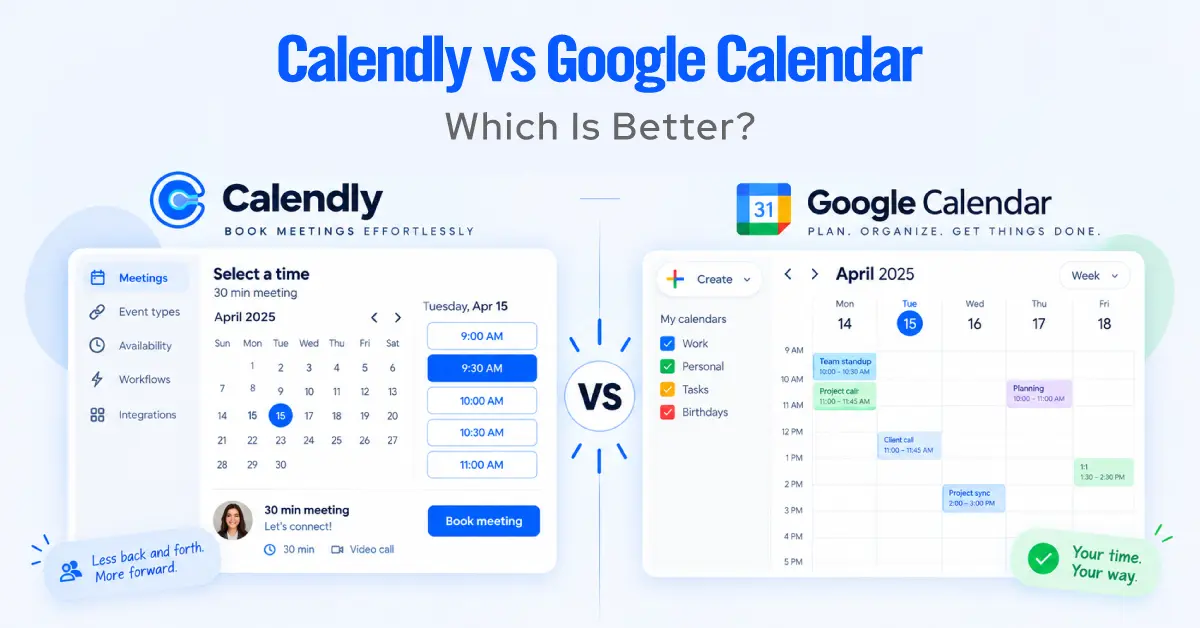
At first glance, Calendly vs Google Calendar looks like an easy comparison. Google Calendar is already on your phone, already connected to your availability, and its Appointment Schedules feature can handle far more than a simple booking link. On eligible Google Workspace plans, it can even support basic co-hosted appointments, making it enough for many individuals and small teams.
The gap appears when scheduling stops being just about finding an available time.
Calendly turns scheduling into a business workflow, with features such as round-robin distribution, lead qualification, advanced routing, CRM integrations, richer automation, and support for conferencing tools beyond Google’s ecosystem.
So which one should you use?
We’ll compare Calendly and Google Calendar on pricing, scheduling features, team capabilities, routing, integrations, automation, and real-world limitations. We checked the figures and feature details against official Calendly and Google documentation as of September 2026, so you can see where Google Calendar is genuinely enough and when paying for Calendly makes sense.
TL;DR
- Google Calendar’s built-in scheduler is called Appointment Schedules, and it lives inside Google Workspace rather than being a separate product.
- On a personal Google account or Workspace Business Starter, Appointment Schedules gives you one booking page. Business Standard and above add multiple booking pages, Stripe payments, automated reminders, verified bookings, multi-calendar conflict checking, and up to 20 co-hosts per appointment.
- Calendly’s live pricing page lists four base plans: Free at $0, Standard at $10 per seat, Teams at $16 per seat, and Enterprise from about $15,000 a year, plus AI-enhanced Standard Plus and Teams Plus configurations that add Notetaker and Callie.
- Round-robin distribution, routing forms, meeting polls, native Zoom and Microsoft Teams, and CRM sync are Calendly features. Google has none of them.
- Google supports co-hosts, but it does not check co-host availability by default. Calendly Collective is built around multi-host availability and only shows times when every required host is free.
- If you already pay for Workspace, the real question is what Calendly adds per seat. For simple solo booking, the answer is often little. For distribution, routing, and CRM, Calendly earns its cost.
Calendly vs Google Calendar at a glance
Calendly is a standalone scheduling platform built for teams and revenue workflows, and Google Calendar Appointment Schedules is a booking feature built into Google Workspace.
| Category | Calendly | Google Calendar |
| Best for | Distribution, routing, CRM, advanced multi-host | Individuals and small teams inside Google Workspace |
| Free plan | 0 dollars, one event type, one calendar | Bundled with any Google account, one booking page |
| Starting paid price | 10 dollars per seat monthly, annual billing (Standard) | Premium features from Business Standard, 14 dollars per user monthly |
| Team scheduling | Round robin and Collective | Up to 20 co-hosts, no round robin |
| Integrations | Salesforce, HubSpot, Zoom, Teams, Stripe, PayPal, API | Google Meet and Stripe |
| Automation | Workflows, routing forms, reminders, follow-ups | Up to 5 reminders, text not editable |
AXIS Consulting recommendation: Use Google Appointment Schedules if you need simple booking inside Workspace, including simple co-hosted calls. Move to Calendly when you need more advanced features like round robin distribution, lead routing, CRM workflows, or advanced multi-host availability.
What is Calendly?
Calendly is a dedicated scheduling platform that lets people book meetings through a shared link. You connect your calendar, set your availability, and let invitees choose a time that works for them.
Unlike basic calendar booking, Calendly supports more complex scheduling needs, including team scheduling, round-robin meetings, booking forms, automated workflows, and business integrations.
What is Google Calendar Appointment Scheduling?
Google Calendar Appointment Schedules is Google’s built-in scheduling feature. It lets you create a booking page directly in Google Calendar, set your availability, and let people book available time without a separate scheduling app.
It covers the core needs of individuals and small teams, including availability rules, buffers, intake questions, and automatic conflict checking. Eligible Google Workspace plans also add features such as multiple booking pages, payments, reminders, and co-hosts.
Calendly vs Google Calendar feature comparison
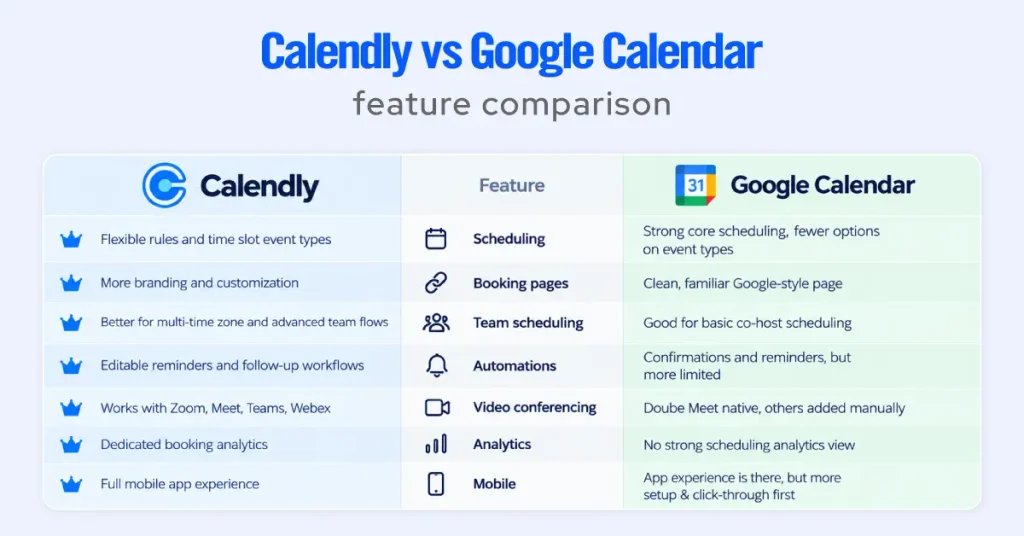
Calendly has the wider feature set, and Google Calendar excels at turning existing Workspace availability into a booking page. Here is where each line falls.
Scheduling and availability
Both tools handle the core well. Calendly and Appointment Schedules both let you set working hours, buffer time, minimum notice, a scheduling window, and a daily booking cap.
Calendly pulls ahead with unlimited event types on paid plans, so one person can run several different meetings as separate links with separate rules.
On a personal Google account or Business Starter, Appointment Schedules limits you to one booking page, which is the first wall solo users hit.
Booking pages and customization
Calendly offers deeper branding and more page control, while Appointment Schedules offers a clean, Google-styled page that most clients trust at first glance.
Calendly’s free plan carries Calendly branding, and removing it means moving up a tier. Appointment Schedules inherits Google’s look and embeds cleanly on a website or in a Gmail message.
Meeting and event types
Calendly supports many distinct meeting types per user, and Appointment Schedules supports one on the free tier and several on premium Workspace editions.
Google now allows more than one appointment schedule on Google One Premium, Workspace Individual, Business Standard and Plus, Enterprise, Education, and Nonprofits, so multiple service types alone no longer force you to Calendly.
Team scheduling with co-hosts, Collective, and Round Robin
Calendly is better for advanced team scheduling, and Google now covers basic multi-host booking through co-hosts. On Business Standard and above, a Google appointment schedule can include up to 20 co-hosts, and co-hosts can be individuals or Google Groups within your domain. The limitation matters, so we cover the three models in their own section below.
Automation and reminders
Calendly’s automation is broader, and Google’s is functional but fixed. Google sends appointment confirmations and up to 5 reminders, but you cannot edit the reminder email text. Calendly’s Workflows handle sequenced reminders, follow-up emails, and no-show handling, with editable content.
Video conferencing
Calendly has the stronger native conferencing layer. It automatically generates links for Zoom, Google Meet, Microsoft Teams, and other services like GoTo Meeting and Webex.
Google Appointment Schedules natively attaches Google Meet and offers in-person, phone, or a “None, to be specified later” option. To use a third-party service like Zoom, you select that option and add the link to the event after it is booked.
Analytics and reporting
Calendly offers booking and team analytics, and Appointment Schedules does not provide a dedicated scheduling dashboard comparable to it. Calendly Teams surfaces meeting volume and team activity. Google gives you your calendar, not a reporting view.
Mobile experience
Calendly has a full mobile app, and Google has a mobile limitation worth knowing. You cannot create an appointment schedule in the Google Calendar app for Android, iPhone, or iPad. You need a computer with a supported browser to create one, though booked appointments still appear on your phone.
Google co-hosts vs Calendly Collective vs Round Robin
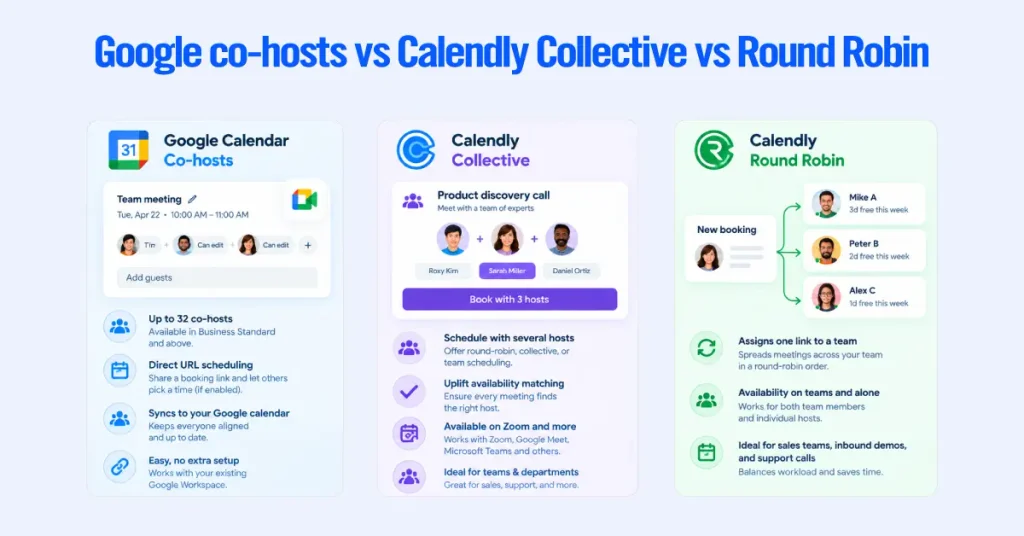
These three models sound similar but behave very differently, so choosing between them often comes down to what you actually need. Calendly is stronger for availability-aware multi-host booking and for distributing meetings across a team.
How Google Calendar co-hosts work
A Google co-host is another person attached to an appointment, available on Business Standard and above for up to 20 people. The catch is availability. By default, appointment schedules do not check co-host availability, so you have to include each co-host’s calendar in the availability checks yourself to avoid double-booking them. Co-hosts are useful for a fixed panel, but they don’t distribute or rotate bookings.
How Calendly Collective works
Calendly Collective, available on Standard and above, schedules a meeting where several hosts meet one invitee, and it only shows times when every required host is free. That all-host availability matching is the main advantage over Google co-hosts, which is why we use Collective for panel interviews, product discovery calls, and client calls that need both an account executive and an SDR present.
How Calendly Round Robin works
Round Robin, available on Teams and above, assigns one invitee to one host from a pool, rotating by availability or by distribution rules. Google has no equivalent. If you need inbound demos spread across five reps, or support calls routed to the next available agent, this feature decides the comparison.
Which fits sales, recruiting, and client meetings
Round Robin fits sales and support teams distributing inbound meetings. Collective fits recruiting panels and multi-owner client calls where everyone must attend. Google co-hosts fit a small, fixed group that is comfortable managing availability manually. When distribution or guaranteed all-host availability matters, Calendly is the better tool.
Integrations and CRM
Calendly integrates across the business stack, and Google integrates deeply with the rest of Google Workspace.
CRM integrations
Calendly connects natively to Salesforce, HubSpot, and Pipedrive, and Appointment Schedules does not offer a comparable native CRM or routing layer. A booked Calendly meeting can create or update a CRM record, trigger a sequence, and attribute a lead.
Google Calendar itself has a full REST API, so teams can build custom automations around it with developer tools, but that is separate from the Appointment Schedules product, which writes the booking to your Google Calendar and stops there.
Google Workspace integration
Appointment Schedules is native to Google Workspace, so you don’t need a separate third-party calendar connection to maintain core Google availability and booking. A booking creates a calendar event, attaches a Meet link, and can be embedded into a Gmail message. Inside the Google ecosystem, this is smoother than any third-party tool.
API and developer automation
Calendly offers a dedicated scheduling API and webhooks for booking workflows, and Google offers a general Calendar API rather than a first-party Appointment Schedules booking API. Both are real developer surfaces. The difference is that Calendly’s is built around scheduling events, while Google’s covers calendars and events more broadly and doesn’t expose Appointment Schedules booking logic the same way.
Payments and Paid Appointments
Both Calendly and Google Calendar can collect payment when someone books a paid appointment, but they suit different needs.

Google Calendar connects to Stripe to collect payments. This is available on eligible plans, including Workspace Individual, Business Standard and Plus, Enterprise, Education, and Nonprofits. Google One Premium does not include this feature. For a consultant, coach, or freelancer who simply wants clients to pay before booking a session, this may be all they need.
Calendly supports both Stripe and PayPal on Standard and higher plans. Its advantage becomes clearer when payment is part of a larger scheduling process. You can combine paid bookings with different event types, team scheduling, routing, and CRM workflows.
Use Google Calendar if you only need easy paid appointments. Choose Calendly if you need payments alongside more advanced scheduling and business workflows.
Calendly vs Google Calendar pricing
Calendly is priced per seat on top of whatever else you use, and Appointment Schedules is already inside a Workspace bill most teams pay anyway. Framing the cost as incremental is the only honest way to compare them.
Calendly pricing
Calendly’s live pricing page presents four base plans, verified on September 6, 2026.
| Plan | Annual billing | Monthly billing | What it adds |
| Free | 0 dollars | 0 dollars | One event type, one calendar, Meet, Zoom, and Teams links |
| Standard | 10 dollars per seat | 12 dollars per seat | Unlimited event types, Group and Collective, Stripe, PayPal, HubSpot, reminders |
| Teams | 16 dollars per seat | 20 dollars per seat | Round robin, routing forms, multiple host groups, Salesforce |
| Enterprise | From about 15,000 dollars per year | Not offered | SSO, SCIM provisioning, domain control, audit logs, advanced Salesforce routing, implementation support |
Alongside these, Calendly offers AI-enhanced Standard Plus and Teams Plus configurations that add Notetaker and Callie on top of the base plans.
They layer AI onto scheduling rather than changing the core booking features, so most buyers still choose between Standard and Teams. Confirm the current Plus prices on the live pricing page during editorial review, since the toggle pricing was not clearly exposed for us to publish an exact figure.
Note that SSO is available as a security add-on on Teams and is included in the broader Enterprise offering, so it does not, by itself, force an Enterprise upgrade.
Google Workspace pricing
Appointment Schedules has no separate price, because it is included with your Google Workspace or Google account. The free capability comes with any personal Google account or Workspace Business Starter and gives you one booking page.
The premium capability, meaning multiple booking pages plus Stripe payments, reminders, verified bookings, multi-calendar checks, and co-hosts, unlocks on Business Standard and above.
Google Workspace pricing, verified in September, 2026, is $7 per user per month for Business Starter, $14 for Business Standard, and $22 for Business Plus on annual billing, with flexible monthly billing at $8.40, $16.80, and $26.40.
Enterprise is a custom quote. These are US standard list prices before tax, reseller pricing, promotions, or regional differences.
If your team is already on Business Standard at 14 dollars per user, the premium Appointment Schedules features, including co-hosts and Stripe payments, are already in your bill at no extra cost. Nothing to add beyond turning the feature on.
Which offers better value
Value depends entirely on whether you need the Calendly features Google lacks, so run the incremental math rather than the headline price. If you are already on Workspace Business Standard, adding Calendly Standard costs an extra $10 per seat per month, or $120 per person per year. Adding Calendly Teams costs an extra $16 per seat, or $192 per person per year.
Based on this comparison, the buyer’s question is not which tool is cheaper. It is what Calendly adds per seat over what Workspace already gives you. For simple solo or small-team booking, the answer is often modest, and Calendly is hard to justify.
For a team that needs round-robin, routing, availability-aware Collective events, or CRM sync, Calendly Teams is the floor, because those features do not exist in Google Appointment Schedules.
What’s New in Calendly vs Google Appointment Schedules in 2026
Both Calendly and Google Calendar have expanded their scheduling capabilities in 2026, but they are moving in different directions.
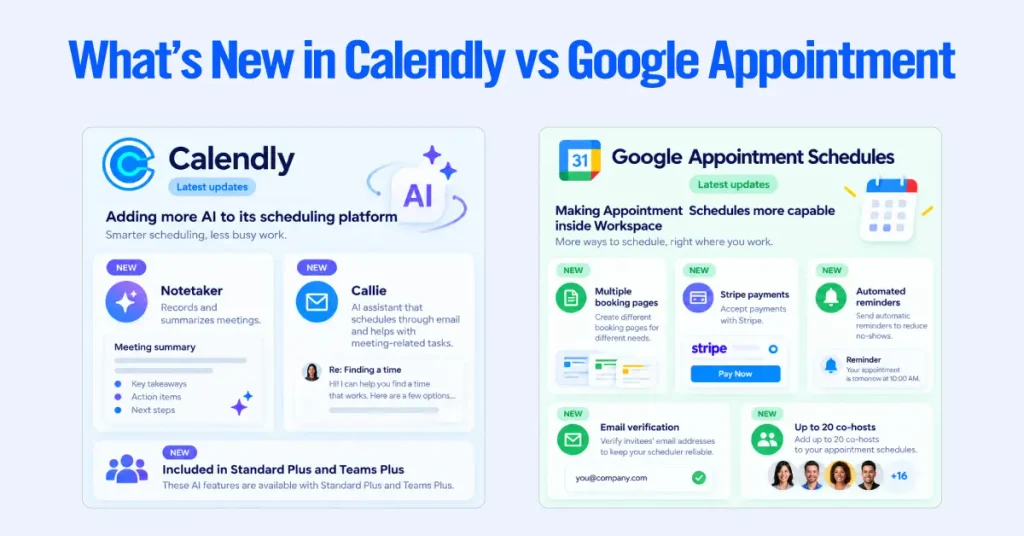
Calendly is adding more AI to its scheduling platform. Its Standard Plus and Teams Plus configurations include Notetaker, which records and summarizes meetings, and Callie, an AI assistant that can schedule meetings through email and help with meeting-related tasks. These features make Calendly more useful for teams that want scheduling and meeting assistance in one platform.
Google is making Appointment Schedules more capable within Workspace. Eligible plans now support features such as multiple booking pages, Stripe payments, automated reminders, email verification, and up to 20 co-hosts. This makes Google Appointment Schedules more practical for small teams that want to manage bookings without adding another scheduling platform.
The key difference is that Calendly is expanding around business workflows, while Google is expanding scheduling capabilities within its existing ecosystem. So the latest updates do not necessarily make one better than the other. They make each more useful for different types of users.
Calendly Pros and Cons
Calendly’s biggest advantage is scheduling depth, while its biggest drawback is cost as your team grows.
Pros
- Round-robin scheduling, Collective events, routing forms, and meeting polls.
- Native integrations with Salesforce, HubSpot, Zoom, and Microsoft Teams.
- API and webhooks for custom workflows.
- Unlimited event types and greater booking-page control.
- Strong user experience, with a 4.7/5 G2 rating across roughly 2,700 reviews.
Cons
- Per-seat pricing can become expensive for larger teams.
- Important features are restricted to higher-tier plans.
- Inactive seats still count toward billing.
- Free bookings retain Calendly branding.
- Calendly’s standard Customer Terms prohibit storing protected health information.
Google Appointment Schedules Pros and Cons
Google Appointment Schedules’ biggest advantage is simplicity and built-in Workspace integration, while its main weakness is limited team and sales functionality.
Pros
- Included with eligible Google Workspace plans.
- Works directly with Google Calendar, Gmail, and Google Meet.
- Simple booking pages with automatic availability checking.
- Stripe payment collection on eligible plans.
- Up to 20 co-hosts on qualifying plans.
- No separate scheduling platform to maintain.
Cons
- Free and Business Starter plans allow only one booking page.
- No round-robin scheduling, lead routing, or meeting polls.
- No native CRM integration.
- Co-host availability is not checked by default.
- Google Meet is the only native conferencing option.
- You can’t create Appointment Schedules from Google’s mobile apps.
Side-by-side comparison
Calendly leads on distribution, routing, and integration rows, and Google leads on core booking and native Workspace rows. We left out any row we couldn’t verify against an official page rather than guessing.
| Feature | Calendly | Google Calendar Appointment Schedules |
| Free plan | Yes, one event type | Yes, one booking page |
| Paid plans | Standard 10, Teams: 16 dollars per seat annually | Premium from Business Standard, 14 dollars per user annually |
| Booking pages | Unlimited event types on paid plans | One free, multiple on Business Standard and above |
| Calendar connections | Google, Outlook and Office 365, Exchange | Native to your Google account |
| Google Workspace | Integrates with Meet and Calendar | Native, nothing to sync |
| Basic co-host appointments | Yes, via Collective | Yes, up to 20 co-hosts on premium |
| All-host availability matching | Yes, Collective shows only times all hosts are free | No, co-host availability not checked by default |
| Round robin distribution | Yes, on Teams | No |
| Group events, multiple invitees | Yes, on Standard | No |
| Lead qualification and routing | Yes, routing forms on Teams | No |
| Meeting polls | Yes | No |
| Workflow automation | Yes, editable reminders and follow-ups | Up to 5 reminders, text not editable |
| Native CRM integration | Salesforce, HubSpot, Pipedrive | None |
| Zoom and Microsoft Teams | Yes, generated automatically | Added manually after booking |
| Google Meet | Yes | Yes, native |
| Paid bookings | Stripe and PayPal on paid plans | Stripe on Business Standard and above |
| Dedicated scheduling API | Yes, plus webhooks | No, general Calendar API only |
| Create schedules on mobile | Yes | No, desktop browser only |
| Best for | Distribution, routing, CRM | Individuals and small teams in Workspace |
Which tool for which use case
The winner turns on workflow complexity, not headcount alone. Here is how it breaks down.
- Small businesses. Google Appointment Schedules for straightforward booking already inside Workspace, including simple co-hosted calls. Calendly once bookings need to be routed or synced to a CRM.
- Sales teams. Calendly Teams, for round-robin distribution, lead routing, and native Salesforce.
- Consultants and coaches. Base the choice on payments, customization, and integrations rather than the number of session types, since Google now supports multiple schedules on premium plans. Google fits a Workspace-based solo practice, and Calendly fits routing, packages, or CRM-connected work.
- Recruiters. Calendly, for routing candidates and running Collective panel interviews with guaranteed all-host availability.
- Customer success teams. Calendly, for shared queues, round robin, and reporting.
- Google Workspace users. Start with Appointment Schedules, since it is already paid for, and add Calendly when a specific feature is missing.
- Enterprise organizations. Calendly Enterprise for SSO, SCIM provisioning, domain control, audit logs, and advanced Salesforce routing, or Appointment Schedules for individual Workspace users who only self-book.
Which Scheduling Tool should you choose?
Choose Calendly when scheduling becomes a business workflow, and choose Google Appointment Schedules when you need a clean booking page inside Workspace.
- Choose Calendly if you need round robin distribution, routing forms that qualify bookers, availability-aware Collective events, native Salesforce, HubSpot, or Pipedrive sync, automatic Zoom or Microsoft Teams links, or editable multi-step Workflows. In our experience, the strongest single signal is a CRM. If revenue depends on what happens after a lead books, Calendly is the tool.
- Choose Google Appointment Schedules if you book inside Google Workspace, run calls on Google Meet, are comfortable with one or a few booking pages, want Stripe payments without a second subscription, and only need simple co-hosts rather than routing or distribution. If Appointment Schedules covers you, buying Calendly is spending money to solve a problem you do not have.
Can Calendly and Google Calendar work together?
Yes. Calendly connects directly to Google Calendar, using your calendar availability to prevent conflicts and writing booked meetings back to it. This stays conceptual here; the mechanics live in our dedicated integration guide.
In a combined setup, the two split the work. Google Calendar is the source of truth for your real availability and every event you already hold. Calendly sits on top as the booking and routing layer, checking Google for conflicts and writing new meetings back. You gain Calendly’s routing, team features, and CRM sync without leaving the Google Calendar your day already runs on.
Calendly is the stronger scheduling platform, and Google Appointment Schedules is the smarter choice for a common situation.
- Best overall. Calendly, for range, integrations, and team features.
- Best free option. Google Appointment Schedules, since it rides on an account you already have.
- Best for Google Workspace users. Google Appointment Schedules first, Calendly only when a feature is missing.
- Best for sales teams. Calendly Teams, for round robin and CRM.
- Best for growing businesses. Calendly, because it scales past the routing and distribution gaps in Appointment Schedules.
- Best for enterprise teams. Calendly Enterprise, for SSO, provisioning, and admin control.
If you are staring at two subscriptions and cannot tell which your team needs, that is a call we take often. We map your booking flows, your CRM, and your Workspace edition, then tell you whether Calendly earns its seats or whether Appointment Schedules already covers you. Talk to AXIS Consulting before you renew either one.