AI Summary




TL;DR
- Pipedrive’s four plans, per seat monthly on annual billing, are Lite ($14), Growth ($39), Premium ($59), and Ultimate ($79). Monthly billing runs $24, $49, $79, and $99.
- There is no permanent free plan. Every plan includes a 14-day free trial, no credit card required.
- Growth is the entry point for most active sales teams, since Lite lacks two-way email sync, sequences, and automation entirely.
- Premium bundles LeadBooster, Smart Docs, and Projects at no extra add-on charge.
- Leads and deals carry a per-seat allowance capped by an absolute 300,000 per-company ceiling on every plan. Pipedrive places no usage limit on contacts at all.
- A commonly overlooked cost is a deactivated user whose seat was never removed from billing; deactivation alone does not stop the charge.
Choosing the right CRM tools starts with understanding the real cost, and Pipedriv pricing isn’t as straightforward as it first appears.
The monthly subscription is only part of the equation. The plan you choose determines which sales features you can access, while optional add-ons, billing frequency, and future team growth can all affect what you end up paying.
At Axis Consulting, we’ve helped businesses evaluate, implement, migrate, and optimize CRM platforms for different sales activities and budgets.
One of the most common mistakes we see is choosing a plan based on price alone, only to discover later that essential features require an upgrade or additional subscriptions. Understanding how Pipedrive CRM pricing is structured before you buy can save both time and money.
Below, you’ll see exactly what each pricing structure includes, how much it costs, which features are locked behind higher tiers, and where additional charges may apply.
By the end, you’ll have a clear picture of which plan delivers the best value for your business, not just the lowest monthly price.
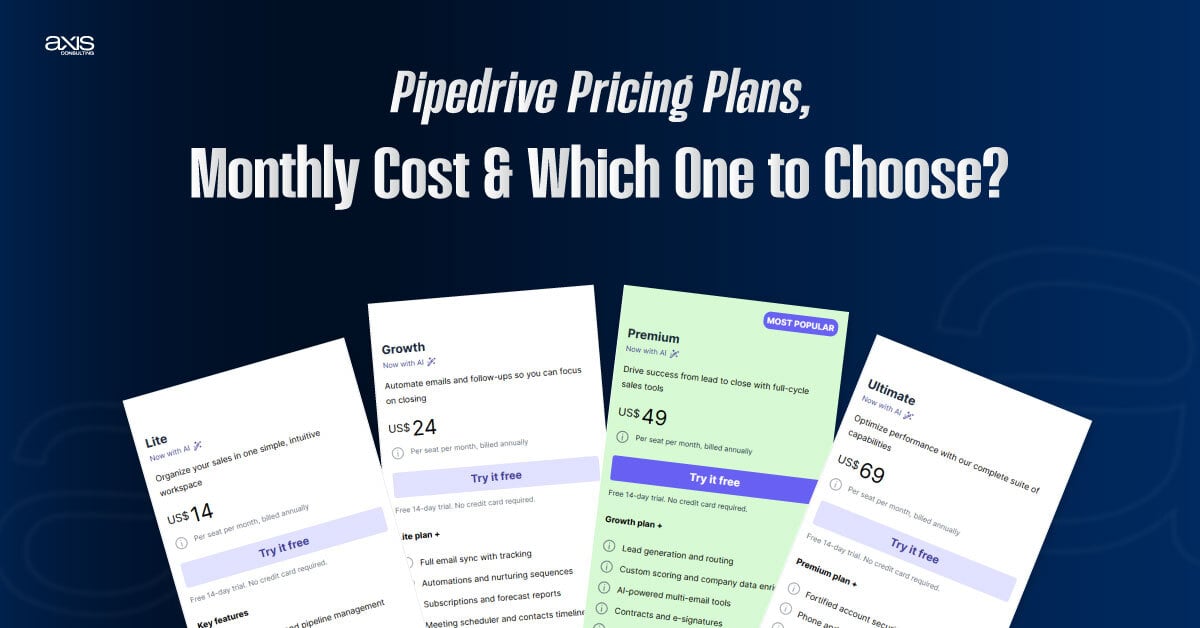
Pipedrive currently offers four plans priced from $14 to $79 per user/month with annual billing, or $24 to $99 per user/month on month-to-month billing.
There is no permanent free plan, but every plan includes a 14-day free trial. All pricing in this article reflects the official US pricing published by Pipedrive and was verified on August 3, 2026.
Pipedrive Pricing Plans At a Glance
Pipedrive’s starting price is $14 per seat monthly on the Lite plan, billed annually. The table below summarizes the four current plans as published on Pipedrive’s official pricing page.
| Question | Answer |
|---|---|
| Starting price | $14 per seat monthly (Lite, annual billing) |
| Free plan | None. 14-day free trial, no credit card required |
| Entry point for most active sales management teams | Growth, at $39 per seat monthly (annual), for two-way email sync and automation |
| Plan that adds lead capture, documents and project handoff at no extra add-on cost | Premium, at $59 per seat monthly (annual) |
| Governance-focused top tier | Ultimate, at $79 per seat monthly (annual) |
| Retired plan names still appearing on some invoices | Essential, Advanced, Professional, Power and Enterprise, replaced in 2025 |
| Verification date | August 3, 2026, against pipedrive.com/en/pricing and Pipedrive’s knowledge base |
Every plan bills per seat, per month, on either a monthly or annual cycle. Every plan includes the same 14-day free trial with no credit card required.
All prices exclude VAT and are shown in US dollars for the US pricing view; Pipedrive’s pricing page renders in local currency depending on region, so confirm your own checkout total before budgeting.
How Much Does Pipedrive Cost? (Monthly Cost vs Annual Cost)
Pipedrive’s annual billing rate is lower than its monthly rate on every plan, but the dollar amount saved is not the same across tiers. The table below is the complete pricing grid as published on Pipedrive’s official pricing page.
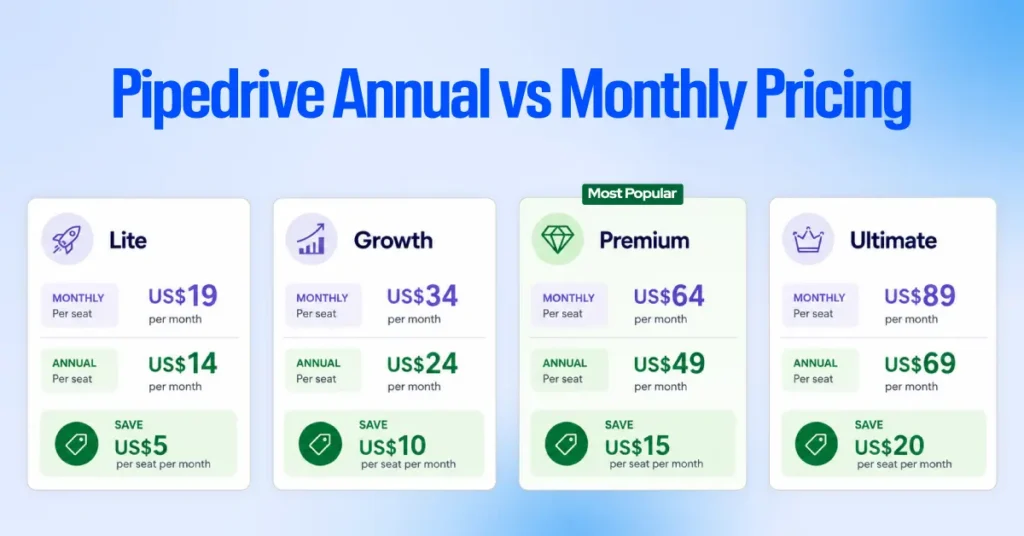
Annual billing saves a flat $10 per seat monthly on Lite and Growth, and a flat $20 per seat monthly on Premium and Ultimate.
Because that flat saving is measured against different starting prices, the percentage saved is not uniform across the lineup.
Pipedrive’s own marketing line, “save up to 42%,” reflects the Lite calculation specifically, not an average across all four plans.
| Our recommendation. Validate your tier on monthly billing first, since a downgrade only takes effect at your next renewal (covered later in this guide), which makes a prepaid annual commitment on the wrong tier harder to unwind than a monthly one. |
|---|
What Each Plan of Pipedrive Offers
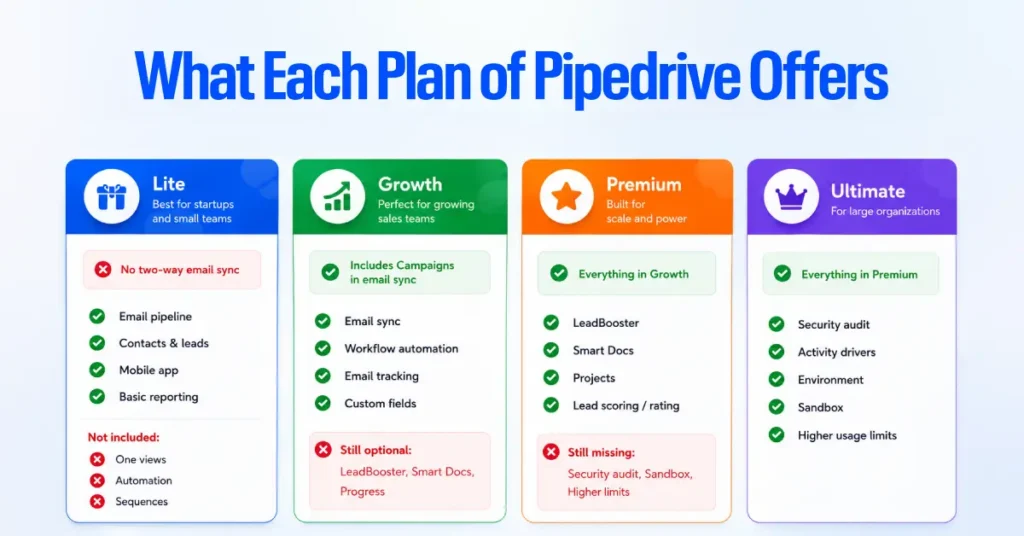
The feature that decides most tier decisions is two-way email sync. Lite does not include it. Every plan above Lite does.
Lite
Lite includes the core visual pipeline, contact and deal management, mobile apps, basic reporting, and marketplace integrations. It does not include two-way email sync, sequences, or workflow automation. It fits a solo operator or founder running small businesses, with a manually managed pipeline and no need for automated follow-up.
Growth
Growth introduces the features most growing sales teams need. It adds two-way email sync with Gmail, Outlook, or your company email, along with email open and click tracking.
You also get email templates, workflow automations, nurture sequences, a built-in meeting scheduler, and subscription and sales forecasting reports.
For many businesses, this is the first plan worth considering because it includes the core tools needed to manage and automate an active sales pipeline management system.
However, add-ons like LeadBooster (for lead generation), Smart Docs (for document management), and Projects are not included. They remain separate paid add-ons.
Premium
Premium includes everything in Growth, plus LeadBooster, Smart Docs, and Projects bundled in at no additional add-on charge. It also adds lead routing and custom scoring, company-level data enrichment, AI-assisted email tools, a shared team inbox with multiple synced email accounts per user, and built-in contracts with e-signatures.
Ultimate
Ultimate includes everything in Premium and adds advanced tools for larger sales teams. These include account security rules, activity alerts, contact-level phone and email enrichment, and a sandbox account for testing changes before rolling them out.
The plan also provides extended phone support hours and discounted partner pricing for PandaDoc, CloudTalk, and Surfe.
Ultimate offers the highest usage limits of all four Pipedrive plans. However, Pipedrive does not describe these limits as unlimited. The next section breaks down those limits, so you know exactly what each plan includes.
Pipedrive CRM Usage Limits
Pipedrive is a sales-focused crm and every plan Pipedrive provides has a published ceiling on leads and deals, custom fields, reports, and automations. The table below is drawn directly from Pipedrive’s usage-limits knowledge base article.
| Feature | Lite | Growth | Premium | Ultimate |
|---|---|---|---|---|
| Leads and deals (per seat; absolute company cap of 300,000 on every plan) | 2,500 × seats | 5,000 × seats | 15,000 × seats | 20,000 × seats |
| Custom fields (per company) | 30 | 100 | 300 | 500 |
| Insights reports (per user) | 15 | 50 | 250 | 500 |
| Automations (per company) | Not available | 50 | 150 | 250 |
| If/else conditions (per automation) | Not available | 3 | 10 | 20 |
| Sequences (per company) | Not available | 5 | 25 | 50 |
| Synced email accounts (per user) | Not available | 1 | 3 | 5 |
| Shared team inboxes (per company) | Not available | Not available | 1 | 5 |
| Teams, visibility groups, permission sets (per company, each) | Not available | Not available | 15 | 25 |
| Data enrichment credits (per company) | Not available | Not available | 100 | 500 |
| Custom scoring models (per company) | Not available | Not available | 5 | 10 |
| API tokens (per seat; absolute company cap of 100 million on every plan) | 30,000 × seats | 60,000 × seats | 150,000 × seats | 210,000 × seats |
Source: Usage limits in Pipedrive, Pipedrive Knowledge Base, last updated May 12, 2026, checked August 3, 2026.
Per-Seat vs. Per-Company Limits
Not every Pipedrive limit increases when you add more users. Some scale with your team size, while others stay fixed for the entire company.
Limits that scale with seat count
- Leads and deals (up to a company-wide maximum of 300,000)
- API tokens (up to a company-wide maximum of 100 million)
Limits that stay fixed per company
- Custom fields
- Workflow automations
- Sequences
- Shared inboxes
- Teams
- Visibility groups
- Permission sets
- Data enrichment credits
- Lead scoring models
Limits issued per user
- Insights reports
- Synced email accounts
One important exception: Contacts are unlimited. Pipedrive only limits leads and deals, not contact records.
Workflow Automation Limits
Every workflow automation has built-in limits, regardless of your plan.
According to Pipedrive’s documentation:
- Maximum of 10 actions per automation path
- Maximum workflow duration of 90 days
- Maximum 7-day wait for a single condition step
However, Pipedrive’s knowledge base also mentions an exception for the retired Advanced plan, allowing only three delay steps. Because Advanced no longer exists, the documentation doesn’t clearly explain whether that restriction applies to the current Growth plan.
We recommend checking your account directly instead of relying on the documentation for this specific limit.
What Happens When You Reach a Limit?
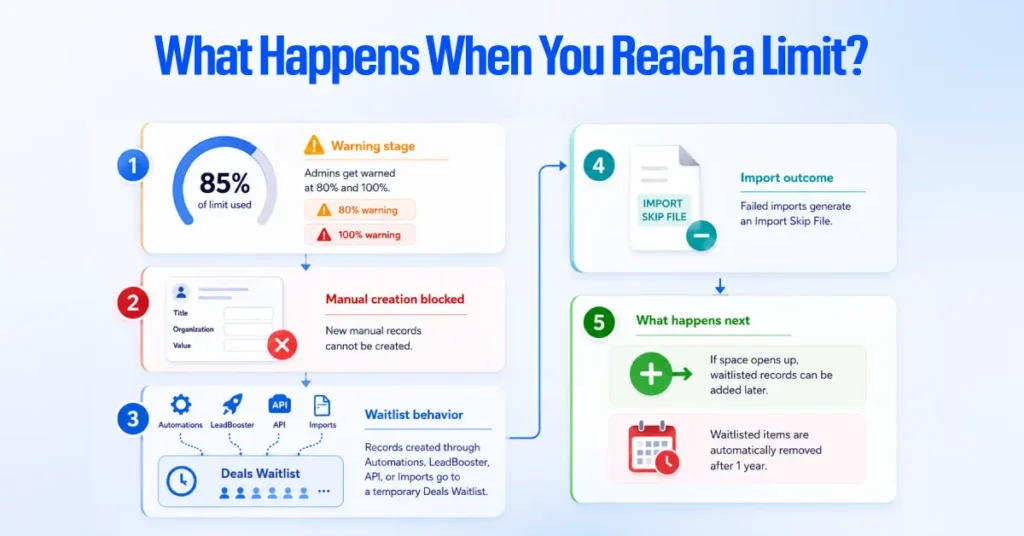
Hitting a usage limit doesn’t delete your existing data.
Instead, Pipedrive:
- Warns admins when usage reaches 80% and 100%
- Prevents new manual records from being created
- Places records created through automations, LeadBooster, the API, or imports into a temporary Deals Waitlist
- Creates an Import Skip File for records that couldn’t be imported
If space becomes available, those records can be added later. Items left on the waitlist for one year are automatically removed.
Before You Upgrade Your Plan
A usage warning doesn’t always mean you need a more expensive subscription. Pipedrive recommends archiving inactive leads and deals first. Archived records no longer count toward your active usage limits, making this one of the easiest ways to free up capacity without changing plans.
Need More Capacity?
If you’re only hitting one specific limit, a full plan upgrade may not be necessary. Pipedrive offers capacity top-ups for:
- Leads and deals
- Workflow automations
- API tokens
- Insights reports
Top-up pricing isn’t published on Pipedrive’s website. You’ll only see the current price inside your account, so check there or contact Pipedrive before making a decision.
Pipedrive Add-ons, Integration, and Their Billing Units
Pipedrive sells five add-ons: LeadBooster, Projects, Smart Docs, Campaigns, and Web Visitors. They do not all use the same billing unit, so the published starting price must be interpreted together with the relevant billing documentation.
| Add-on | Published starting price | Billing unit | Included at no extra charge on |
|---|---|---|---|
| LeadBooster | $32.50/month | Per company | Premium, Ultimate |
| Projects | From $6.67/month on the annual pricing view | Per assigned Projects seat on Lite and Growth | Premium, Ultimate |
| Smart Docs | $32.50/month | Per company | Premium, Ultimate |
| Campaigns | $13.33/month on annual billing | Per company; scales with marketing-contact volume | Not included on any plan |
| Web Visitors | $41/month | Per company; scales with identified organizations | Not included on any plan |
Source: Pipedrive pricing and Projects: billing and subscription, checked August 3, 2026.
LeadBooster and Smart Docs are listed as company-level add-ons and are included in Premium and Ultimate without a separate add-on charge.
Projects is the exception to the general company-level add-on model. Pipedrive’s pricing page currently displays Projects from $6.67 per month, while its Projects billing article confirms that Lite and Growth customers purchase and assign individual Projects seats.
Premium and Ultimate include Projects for all users. Because the public price is presented as a starting price rather than a guaranteed checkout total, confirm the exact amount in your billing screen before using it for a final budget.
Campaigns and Web Visitors are excluded from every plan, including Ultimate. Campaigns scale with marketing-contact volume, while Web Visitors scale with the number of organizations identified on the website. Their displayed prices are entry points, not guaranteed final totals.
Add-on trial conversion. Pipedrive documents a 14-day Projects trial that converts to a paid subscription unless canceled before it ends.
Campaigns has a separate 21-day trial and its own conversion rules. Confirm the specific trial terms for each add-on rather than assuming one policy applies to all five.
Approximate value of the Premium bundle
At the starting prices displayed on Pipedrive’s annual pricing view, LeadBooster and Smart Docs total $65 per month. Adding Projects produces this approximate formula, where p is the number of assigned Projects seats:
- Approximate monthly add-on cost on Growth = $65 + ($6.67 × p)
- Approximate annual add-on cost on Growth = $780 + ($80.04 × p)
| Projects seats needed | Approximate monthly cost to replicate the bundle on Growth | Approximate annual total cost |
|---|---|---|
| 1 | $71.67 | $860.04 |
| 3 | $85.01 | $1,020.12 |
| 5 | $98.35 | $1,180.20 |
| 10 | $131.70 | $1,580.40 |
These are planning estimates based on the displayed starting price of $6.67. Pipedrive may calculate the annual Projects charge from an unrounded underlying figure, so use the checkout total for contract-level comparisons.
What is no longer part of the current lineup. Some older guides reference a Caller add-on or a separate paid storage add-on. Neither appears among the five add-ons on Pipedrive’s current pricing page.
Growth + Add-ons vs. Premium: Which Offers Better Value?
If you’re deciding between Growth with add-ons and Premium, the answer mainly depends on two things:
- How many customer relationship management (CRM) users you have.
- How many of those users need the project management add-on.
For this comparison, we used Pipedrive’s published annual starting prices:
| Item | Annual Price |
|---|---|
| Growth | $468 per user |
| Premium | $708 per user |
| LeadBooster | $390 per company |
| Smart Docs | $390 per company |
| Projects | From $80.04 per assigned user |
What the Numbers Show
After comparing the costs, a clear pattern emerges.
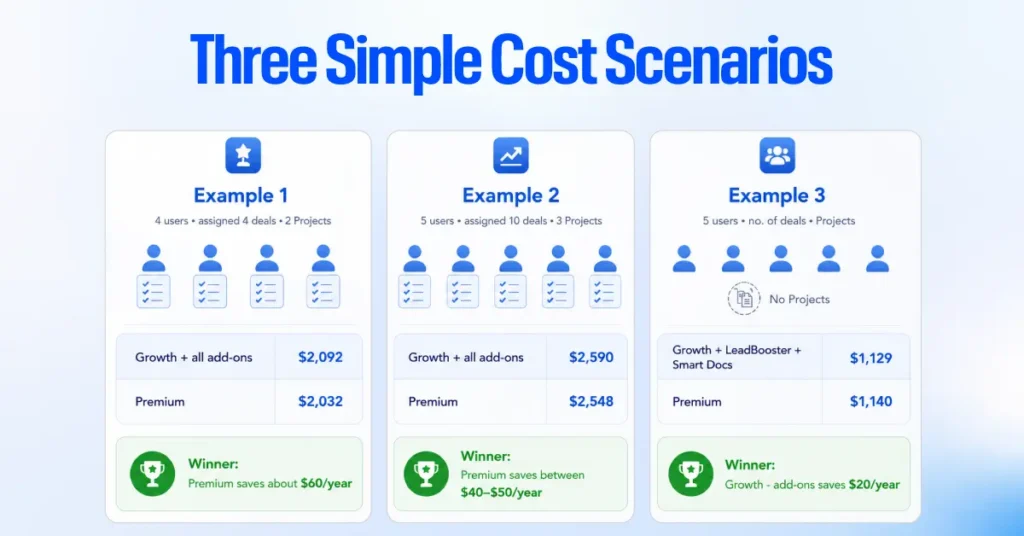
- Teams with four or fewer users that need LeadBooster, Smart Docs, and Projects for everyone will usually spend less with Premium.
- Teams with five or more users generally pay less with Growth plus add-ons, even if every user needs Projects.
- If your team doesn’t need Projects, Growth becomes the more affordable option even sooner.
Bottom Line
If your team is very small and everyone needs the bundled add-ons, Premium can actually cost less than buying Growth and adding those features separately.
As your team grows, Growth plus add-ons usually becomes the better value, especially if only some users need Projects.
Keep in mind that Premium isn’t only about price. It also includes higher usage limits, shared inboxes, data enrichment, lead scoring, advanced team controls, and other Pipedrive key features and integrations that may justify the higher subscription cost.
See How Pipedrive Costs by Team Size
The figures below are license cost only, annual billing, before tax and before any add-ons.
| Seats | Lite | Growth | Premium | Ultimate |
|---|---|---|---|---|
| 1 | $168 | $468 | $708 | $948 |
| 5 | $840 | $2,340 | $3,540 | $4,740 |
| 10 | $1,680 | $4,680 | $7,080 | $9,480 |
| 25 | $4,200 | $11,700 | $17,700 | $23,700 |
| 50 | $8,400 | $23,400 | $35,400 | $47,400 |
The gap between Growth and Premium at a given headcount (for example, $2,400 a year at 10 seats) is the number most budgets turn on, and whether it is worth paying depends on the add-on calculation above rather than on headcount alone.
Pricing Model and Commonly Overlooked Costs
The following billing mechanics are documented in Pipedrive’s knowledge base and affect the real amount a team pays regardless of which plan it selects.
Deactivated users and paid seats
Deactivating a user in Pipedrive frees that person’s access but does not, by itself, remove their seat from your subscription, since Pipedrive bills by active seat count rather than by active user count.
Pipedrive’s own guidance states that if the seat is not explicitly removed, billing remains unchanged, and that a seat removal takes effect at the start of the next billing cycle rather than immediately.
Keeping the seat allows a replacement hire to be added without a billing change; if no replacement is planned, removing the seat at deactivation avoids paying for an unused seat until the next renewal.
Upgrades and downgrades
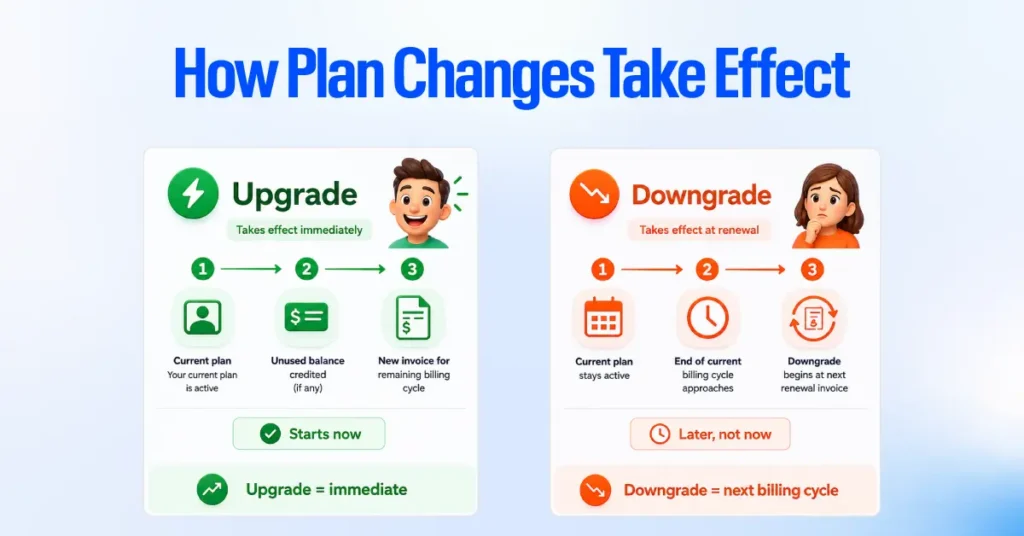
Per Pipedrive’s knowledge base, upgrading a plan takes effect immediately: the account receives a credit memo for the unused balance of the current plan, applied against a new invoice for the new plan covering the remainder of the billing cycle.
Downgrading works on the opposite timeline: the current plan remains active for the rest of the billing cycle already in progress, and the downgrade takes effect only when the next renewal invoice is issued.
Taxes and currencies
Pipedrive’s published prices exclude VAT. Per Pipedrive’s pricing page, VAT is charged to EU customers at their member state’s applicable rate unless a valid VAT number is provided at checkout. The pricing page itself renders in local currency depending on region, so the US dollar figures in this article should be confirmed against your own localized checkout before finalizing a budget.
Trials
Pipedrive’s standard product trial runs 14 days and does not require a credit card to begin. Add-on trials vary: Projects offers a 14-day trial, and Campaigns offers a 21-day trial, both of which Pipedrive’s documentation confirms convert automatically to a paid subscription unless canceled before the trial ends.
| In our experience working on Pipedrive implementations, the most common source of wasted spend is not the wrong plan tier but a configuration that was set up once and never revisited: unused seats still being billed, duplicate records, automations nobody trusts, and reps who quietly return to spreadsheets because the pipeline stages never matched their actual sales process. Based on this cost comparison, use pipedrive at a certain team size, dedicated Pipedrive administration or RevOps support can cost less than the combination of tier upgrades and add-ons a team buys to compensate for poor configuration; we do not have a single verified seat count at which this becomes true for every team, since it depends on internal admin rates and the complexity of the sales process, so we present it as a judgment worth testing against your own numbers rather than a fixed threshold. |
|---|
Cancellation and data export
Per Pipedrive’s knowledge base, access continues through the end of whatever billing cycle has already been paid for, and data access ends when that cycle ends, so exporting data before cancellation is necessary if the account will not be reopened.
Pipedrive’s documentation states that prorated refunds are not issued for unused time on either a monthly or annual plan. Under GDPR, Pipedrive’s cancellation guidance states that a canceled account is permanently deleted after six months.
Implementation and administration costs
Pipedrive includes free implementation support once a subscription’s annual spend passes $400, confirmed directly on Pipedrive’s own pricing FAQ. That support covers technical account setup. It does not cover redesigning a sales automation process, migrating and deduplicating existing data, or building custom automation and reporting tailored to a specific team, and those are the elements that most often determine whether a CRM software rollout is adopted or abandoned.
Which Pipedrive Plan Should You Choose?
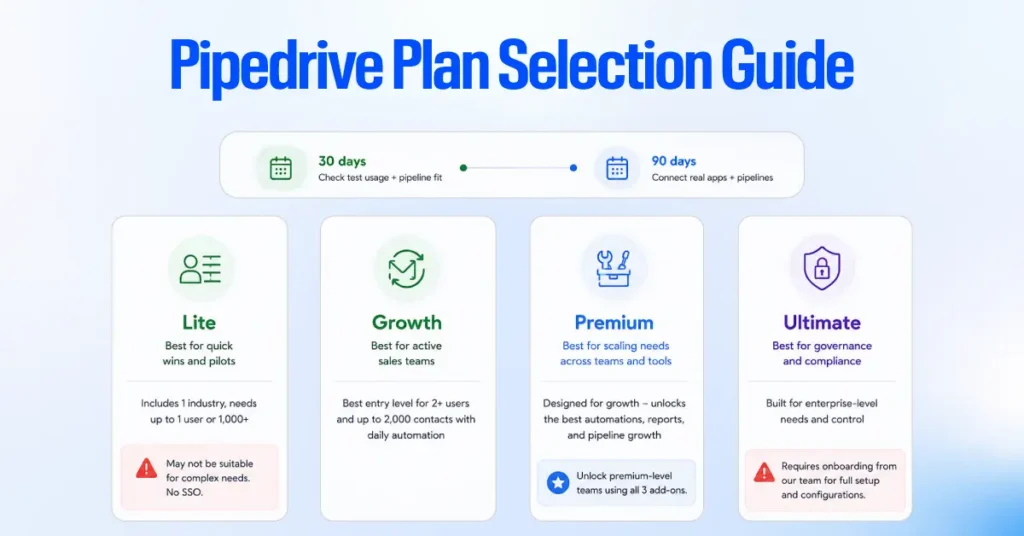
| Our recommendation is to reassess the choice at 30 and 90 days after go-live: at 30 days, confirm every purchased seat is actually assigned and in use, and that pipeline stages reflect how the team actually sells; at 90 days, compare real usage against the plan’s published limits to see whether the account is near a ceiling or well under it. |
|---|
The right plan follows workflow requirements rather than headcount alone.
- Solo operator or manually managed pipeline. Lite is workable as long as no one on the team needs to send prospecting or follow-up emails from inside the CRM.
- Active outbound or inbound sales team. Growth is the entry point once the team relies on two-way email sync, sequences, or workflow automation on a daily basis.
- Team needing lead capture, proposal documents, or post-sale project handoff. Compare Premium with Growth plus the exact add-ons required. At the currently displayed starting prices, Premium can be cheaper for very small teams using all three bundled add-ons, while Growth plus add-ons usually become cheaper as seat count rises. Premium may still justify its price through its higher limits and Premium-only capabilities.
- Multi-team organization with governance or compliance requirements. Ultimate is built for account security rules, a sandbox environment, and extended support, not simply for a larger number on the usage-limits table.
Two disqualifications worth stating plainly. Lite is a poor fit for any team where someone emails prospects from the sales-first CRM, since it lacks two-way email sync entirely.
Ultimate purchased solely for higher usage ceilings, rather than for its governance and security features, is often unnecessary; Pipedrive’s own usage-limits table (above) and its top-up option can frequently resolve a specific ceiling for less than a full tier upgrade.
Retired Pipedrive Plans in 2026
Pipedrive replaced its previous five-tier lineup with the current four-plan structure in 2025. The table below maps the retired plan names to their current equivalents, based on matching feature and usage-limit parity in Pipedrive’s own knowledge base.
| Retired plan | Current equivalent |
|---|---|
| Essential | Lite |
| Advanced | Growth |
| Professional | Premium |
| Power | Premium |
| Enterprise | Ultimate |
Professional and Power both consolidated into Premium, which is the most likely reason conflicting Premium prices continue to circulate online: a page still quoting either retired plan’s rate is describing a plan that no longer exists as a separate tier.
Pipedrive vs Competitors (Top Pipedrive Alternatives)
The comparison below uses current publicly displayed US annual-billing prices from official vendor pages where available. It compares entry prices, not equivalent feature packages. Current promotions, minimum-seat rules, and region-specific pricing can change the amount paid.
| Customer Relationship Management Software | Verified public starting price | Free plan | Important qualification |
|---|---|---|---|
| Pipedrive | 14 per user per month, billed annually (Lite) | No; 14-day trial | Pipeline-focused entry plan; email sync begins on Growth |
| HubSpot CRM | Starts at $7/seat/month on the current annual pricing view; regular monthly Starter rate shown as $20 | Yes; up to 2 users | The $7 rate is the current displayed annual offer and may change; Professional starts at $90/seat/month annually plus required $1,500 onboarding |
| Zoho CRM | $14/user/month, billed annually (Standard) | Yes; up to 3 users | Official US pricing calculator and edition selector show $14 |
| Freshsales | $9/user/month, billed annually (Growth) | Yes; up to 3 users | Pro is $39, and Enterprise is $59 on annual billing |
| monday CRM | $12/seat/month, billed annually (Basic) | No permanent CRM free plan shown; trial available | Paid plans have a 3-seat minimum; Standard is $17, and Pro is $28 |
| Salesforce | $25/user/month (Starter Suite), billed monthly or annually | Yes; up to 2 users | Salesforce lists the same $25 starting price for monthly and annual billing |
| Copper | $23/seat/month, billed annually (Basic) on the canonical pricing page | No; trial available | An official campaign-linked pricing variant also shows a limited Starter tier at $9; because availability is inconsistent, $23 is the conservative public comparison point |
Final Verdict: Is Pipedrive The Best CRM Solution for You?
Pipedrive is the best CRM software for sales-led teams that want a fast, ease of use visual pipeline management and are willing to pay separately for marketing and lead-generation tools that some competitors bundle into their core product.
Its entry price is competitive against Salesforce and roughly comparable to Zoho CRM’s Standard tier, though it lacks a permanent free plan, unlike Salesforce, Zoho CRM, and Freshsales.
Pipedrive is a weaker fit for organizations whose growth depends heavily on marketing automation, where HubSpot’s bundled marketing tools may offer more built-in capability, or for organizations needing extensive customization from day one, where Salesforce’s Pro Suite and above offer deeper configurability at a higher price. Before renewing, the most useful question to answer is whether the team is actually using the tier it is paying for, rather than a tier it has outgrown or never fully adopted.
Frequently asked questions
How much does Pipedrive cost per user?
Pipedrive pricing tiers start from $14 to $79 per user, per month on annual billing, or $24 to $99 on monthly billing, across its four current plans (Lite, Growth, Premium, Ultimate), based on Pipedrive’s official pricing page checked August 3, 2026.
Does Pipedrive offer a free plan?
No. Pipedrive does not offer a free plan. Pipedrive offers a 14-day free trial with no credit card required.
What is the cheapest Pipedrive plan with two-way email sync?
Growth, at $39 per seat monthly on annual billing, is the least expensive plan that includes two-way email sync. Lite does not include this feature at any price.
Which Pipedrive plan includes LeadBooster?
Premium and Ultimate include LeadBooster at no additional charge. On Lite and Growth, LeadBooster is a separate add-on starting at $32.50 per month, billed per company rather than per seat.
Can I pay for Pipedrive monthly instead of annually?
Yes. Every Pipedrive plan is available on monthly billing at a higher per-seat rate than annual billing, and Pipedrive’s knowledge base confirms the billing cycle can be changed at any time.
What are Pipedrive’s most commonly overlooked costs?
The most frequent examples are a deactivated user whose seat was never removed from billing, add-ons priced separately from the base plan, add-on trials that convert automatically to paid subscriptions, and implementation or data-migration work that falls outside Pipedrive’s free setup support threshold.
How many automations does each Pipedrive plan include?
Lite includes none. Growth includes 50 per company, Premium 150, and Ultimate 250, according to Pipedrive’s usage-limits documentation. These are shared company-wide totals, not allowances issued per individual seat.
What happens when a Pipedrive account reaches a usage limit?
Pipedrive blocks manual creation of whatever has been exceeded without deleting existing data, and diverts new records from automations, LeadBooster, or imports to a waitlist until the account frees space, purchases a top-up, or upgrades plans.
Is Pipedrive Ultimate an unlimited plan?
No. Pipedrive’s documentation does not describe any plan as unlimited. Ultimate carries the highest published limits among the four plans; for example, a 20,000-per-seat leads-and-deals allowance, still capped at 300,000 combined leads and deals company-wide.
What happened to Pipedrive’s Essential, Advanced, Professional, and Power plans?
Pipedrive retired all five of its previous plan names in 2025 in favor of the current four-plan lineup. Essential became Lite, Advanced became Growth, Professional and Power both consolidated into Premium, and Enterprise became Ultimate.
Why might I still be billed for a user I deactivated?
Deactivating a user frees the seat for reassignment but does not remove it from your bill on its own. The seat must be removed separately in Billing, and per Pipedrive’s documentation, that removal takes effect at the start of the next billing cycle.
Is Pipedrive cheaper than HubSpot?
It depends on the tier. HubSpot’s current annual pricing view starts Sales Hub Starter at $7 per seat monthly, below Pipedrive Lite at $14, while HubSpot’s regular monthly Starter rate is shown as $20. HubSpot Professional starts at $90 per seat monthly on an annual commitment and carries a required $1,500 onboarding fee, so the two products should be compared by required features rather than entry price alone.