AI Summary




PandaDoc pricing starts with the Free eSign plan and ranges up to custom Enterprise pricing across five plans: Free eSign, Launch ($9/user/month), Starter ($19/user/month), Business ($49/user/month), and Enterprise. While the published pricing looks straightforward, the actual cost can be much higher once you factor in optional add-ons such as Salesforce integration, API access, bulk send, HIPAA compliance, advanced recipient verification, and premium support.
Choosing the wrong plan can mean paying for features you never use or discovering later that essential capabilities require additional fees. That’s why comparing the sticker price alone rarely gives you the full picture.
What Makes This PandaDoc Pricing Guide Different
We don’t evaluate PandaDoc from a product demo; we evaluate it during real deployments. Every price and feature in this guide was verified against PandaDoc’s official pricing, then cross-checked with anonymized client invoices from our implementation projects to uncover the add-ons and licensing costs that appear after rollout.
We also benchmarked Enterprise contracts against market pricing and compared equivalent workflows across DocuSign, Proposify, Dropbox Sign, and Adobe Acrobat Sign. That gives you a clearer view of what PandaDoc is likely to cost in practice, not just on paper.
What Is PandaDoc Document Management?
PandaDoc is a document automation and eSignature platform that combines proposal creation, contract management, quoting (CPQ), payment collection, and legally binding electronic signatures into a single workflow. It is used by more than 50,000 customers, carries a 4.7/5 rating on G2 from over 3,250 reviews (as of April 2026), and holds SOC 2 Type II, GDPR, eIDAS, and U.S. ESIGN Act compliance across all plans.
The platform is built primarily for revenue teams: sales reps sending proposals, customer success managers handling renewals, HR teams processing offer letters, and legal teams managing contracts. If you need only a basic eSignature button, PandaDoc is likely overbuilt. If you need proposals with pricing tables, embedded video, CRM data, and collected payments inside the same document, the per-seat cost starts to justify itself.
PandaDoc Pricing Plan Breakdown
Here is the current pricing structure directly from PandaDoc’s official pricing page:
| Plan | Price (Annual Billing) | Best For | Document Limit |
| Free eSign | $0 / unlimited seats | Solo users needing basic eSign | 5 per month |
| Launch | $9 / user / month | Pay-as-you-go, low-volume teams | 60 per year, then $3 per additional doc |
| Starter | $19 / user / month | Forms and quick agreements | Unlimited |
| Business | $49 / user / month | Sales proposals + CRM workflows | Unlimited |
| Enterprise | Custom (per-seat or per-doc) | End-to-end document operations | Unlimited |
Monthly billing is available on Starter and Business but costs significantly more. PandaDoc advertises that an annual commitment saves up to 46%. Every paid plan includes unlimited legally binding eSignatures, unlimited storage, 24/7 email and chat support, the mobile app, and SOC 2 Type II security.
1. PandaDoc Free Plan
PandaDoc’s free plan works as an entry point for sole proprietors, freelancers, and very small teams that need compliant eSignatures but have no proposal or quoting workflow. PandaDoc’s free plan that allows 5 documents per month, the mobile app, real-time notifications, an audit trail, two-factor authentication, and SOC 2 Type II compliance.
What you don’t get: templates are capped at 5, there is no document editor (only uploads), no custom branding, no CRM integrations, no approval workflows, no pricing tables, and no payment collection. For any team that sends more than a handful of agreements per month, you will run into the 5-document cap within the first week.
Best for: one-person businesses, contractors testing the platform, or anyone who only needs occasional eSign.
2. Launch Plan (9 per user per month, pay-as-you-go)
Launched in September 2025, the Launch plan is PandaDoc’s answer to outcome-based pricing. It gives you unlimited seats but charges per document. 60 documents per year are included, and every additional document costs $3. This plan directly challenges DocuSign’s envelope-based model and makes sense for organizations with many occasional users (approvers, viewers, managers) and a low document volume.
The math: At roughly 60 documents per year with, say, 10 users, you’d pay $ 9/user/month ($1,080/year) instead of $19/user/month on Starter ($2,280/year). But cross the 60-doc threshold and the $3 overage stacks fast. 200 docs/year would add $420 in overages on top of the base seat cost.
Best for: teams with many non-senders who need visibility (legal, ops, approvers) but send infrequently.
3. Starter Plan (19 per user per month if annually)

The Starter plan (previously called Essentials, renamed in 2024) is for small teams that need unlimited eSignatures, basic templates, and simple agreement workflows. The plan starts at $19. It includes unlimited document uploads, the rich-media drag-and-drop editor, themes, embedded videos, inline comments, signing order, in-person signing, organization with folders and tags, real-time notifications, and audit trails.
What it does not include: CRM integrations, pricing tables, payment collection, content library, custom branding (your documents still carry PandaDoc branding), approval workflows, deal rooms, bulk send, recipient analytics, auto reminders, web forms, or the content library. Templates remain capped at 5.
Best for: small teams sending basic forms, contractor agreements, NDAs, or simple service agreements who do not need sales proposal features.
4. PandaDoc Business Plan (49 per user per month)
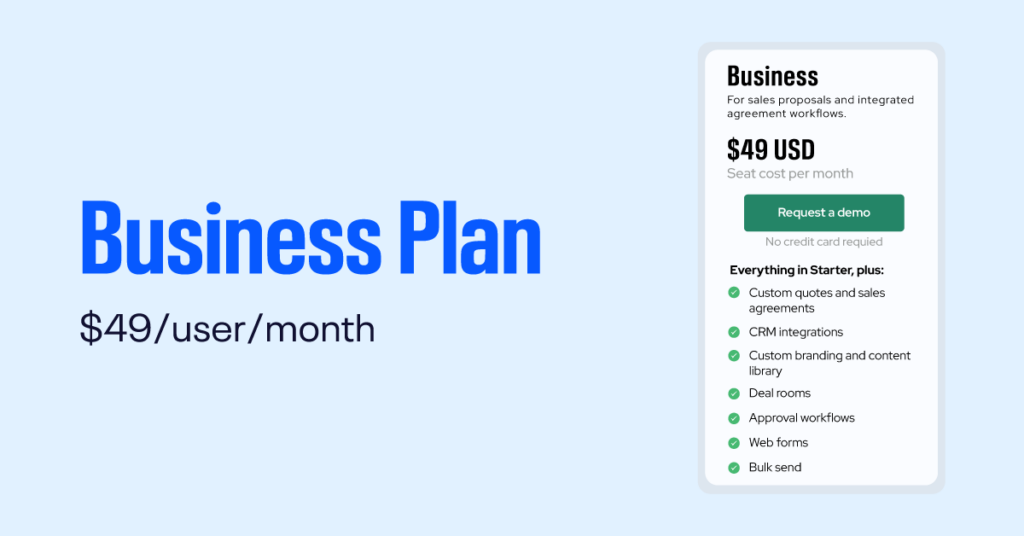
PandaDoc’s Business plan becomes a true proposal and agreement platform, and it is the tier most sales and revenue teams actually need. It unlocks everything in Starter plus:
- CRM integrations with HubSpot, Pipedrive, and Monday.com (Salesforce is an optional add-on)
- Custom branding to remove PandaDoc branding and apply your own logo, colors, and themes
- Content library for reusable document blocks
- Deal rooms (up to 3) for collaborative buyer spaces
- Approval workflows for internal sign-off before sending
- Pricing tables (interactive, editable by recipients)
- Product catalog and payment collection via Stripe, PayPal, Square, QuickBooks, Authorize.net, and FreshBooks
- Recipient analytics so you can see who viewed which page, for how long
- Auto reminders, auto expirations, and automated reports
- Suggest edits and richer collaboration
- Unlimited templates (lifted from the 5-template cap on Starter)
What remains optional (add-on cost): Salesforce integration, Zapier, HIPAA compliance, QES (Qualified Electronic Signature), recipient verification, web forms, bulk send, content locking, SSO, team workspaces, renewal notifications, and internal/external automations.
Best for: growing sales teams that need proposals with pricing, CRM-driven workflows, custom branding, and payment-enabled documents. This is the most popular tier.
5. PandaDoc Enterprise Plan (Custom Pricing Options)
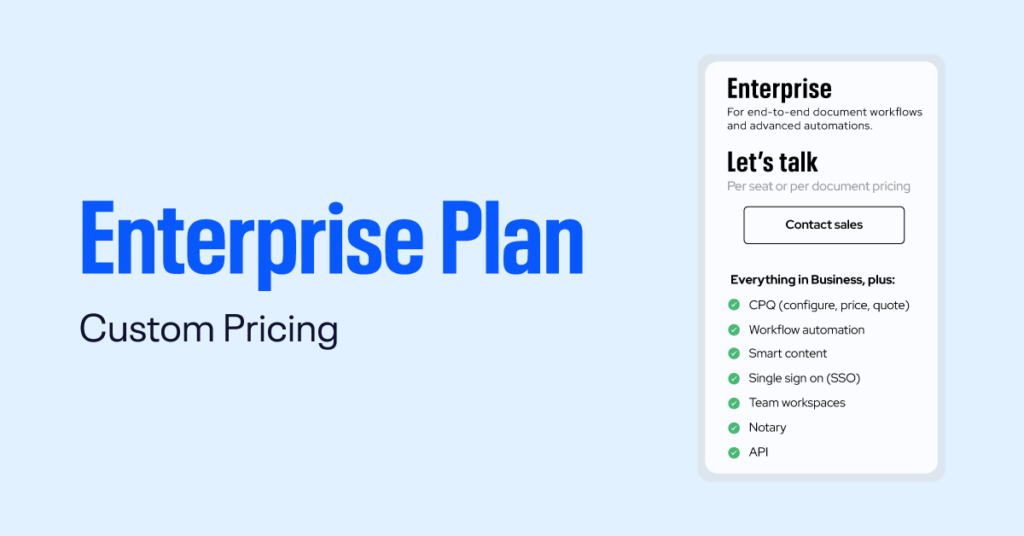
The Enterprise plan is quote-based with two structural options: per-seat pricing or per-document pricing (the latter with unlimited seats). It adds everything in Business plus:
- CPQ (Configure, Price, Quote) for advanced quoting logic with rules, discounts, and bundles
- Workflow automation (external and internal)
- Smart content for conditional sections that adapt per recipient
- Single Sign-On (SSO)
- Unlimited team workspaces with role separation
- Notary services (add-on)
- API access and webhooks for custom integrations
- Custom user roles and granular permissions
- Data residency in US or EU
- Renewal notifications and content locking included
- HIPAA compliance (annual plan only, still listed as optional)
Per data from industry transaction databases, the median PandaDoc Enterprise buyer pays around $16,447/year, and buyers who actively evaluate alternatives or commit to multi-year terms commonly negotiate discounts of 26%. Some outliers reach 70% by leveraging competitive DocuSign or Ironclad quotes.
Best for: mid-market and enterprise organizations that need API integration, full governance, SSO, dedicated workspaces per team, advanced compliance (HIPAA, data residency), and CPQ-level quoting complexity.
PandaDoc structures pricing by plan level and optional add-ons. While exact numbers may change, the common tiers include:
- Free eSign: Basic e-signature functionality at no cost. Good for individuals who only need legally binding signatures and simple document sending.
- Essentials / Team: Entry paid plan that adds templates, branding, analytics, and more document creation features. Ideal for small teams that want consistent proposals and quotes.
- Business: Adds advanced workflow automation, CRM integrations, document analytics, content library, and conditional content. Suited for sales teams and growing businesses.
- Enterprise: Custom pricing with enhanced security (SSO, audit logs), advanced integrations, dedicated support, and onboarding. Best for large organizations with compliance needs.
Key Features of Each Plan
Understanding which features come with each plan helps match capabilities to budget:
- E-signatures: Available even on free plans; included as a core capability across tiers.
- Templates & Content Library: Save reusable proposal templates and content blocks to speed document creation.
- Workflow Automation: Automate approvals, reminders, and routing in Business and Enterprise plans.
- CRM & Payment Integrations: Connect to HubSpot, Salesforce, Stripe, PayPal, and other platforms to streamline sales and payment processes.
- Analytics & Reporting: Track document opens, time spent, and recipient interactions to optimize proposals.
- Security & Compliance: Enterprise plans include SSO, custom access controls, audit logs, and greater compliance support.
What Affects the Final Cost
Several factors influence the total PandaDoc pricing you’ll pay:
- Number of users/seats: Many paid plans price per user or per seat. Adding more users increases monthly or annual subscription cost.
- Billing frequency: Annual billing usually reduces monthly cost versus month-to-month billing.
- Add-ons: Features like electronic payments, advanced analytics, or extra storage can be add-ons with separate fees.
- Integrations: Native integrations with CRMs like Salesforce, HubSpot, or Microsoft Dynamics may be available only on higher plans.
- Implementation & support: Enterprise customers often pay for onboarding, training, and dedicated support.
Hidden Costs & Add-On Fees of PandaDoc Pricing Structure
The biggest difference between PandaDoc’s advertised pricing and your actual cost usually comes from optional add-ons. Many advanced features are not included in the base subscription, so your total cost can increase significantly depending on your business needs.
CRM, Integrations & Automation
These features are commonly required as businesses grow but often cost extra.
- Salesforce integration – Available as an optional add-on for Business and Enterprise plans rather than being included. This is a notable extra cost for Salesforce-based sales teams.
- API access – Enterprise only and priced separately. If you need to generate documents programmatically, expect a custom quote based on API usage.
- Zapier integration – Optional on Business and Enterprise plans. It is treated as an iPaaS connector and consumes Usage Credits.
- Bulk Send – Optional add-on for Business and Enterprise.
- Web Forms – Optional on Business and Enterprise.
- Internal and external automations – Optional on Business and Enterprise. These also consume Usage Credits, with one credit typically used for each document created through the API, web forms, bulk send, automations, or iPaaS connectors.
Security & Compliance
Organizations in regulated industries may need additional paid security features.
- HIPAA compliance – Optional Enterprise add-on available on annual plans only. Essential for healthcare organizations handling protected health information.
- Qualified Electronic Signature (QES) – Available on annual Business plans and above.
- Advanced recipient verification (Knowledge-Based Authentication and ID verification beyond SMS) – Available only on annual Business and Enterprise plans.
- Notary services – Optional Enterprise add-on.
- Single Sign-On (SSO) – Optional on Business but included with Enterprise.
Team & Collaboration Features
Some collaboration tools require additional licensing.
- Team workspaces – Optional on Business plans but unlimited on Enterprise.
- Premium Support – Available as a paid add-on across all plans.
- Email white-labeling – Available as an optional add-on.
- CPQ (Configure, Price, Quote) – Enterprise-only feature available as an optional add-on.
Other Costs to Budget For
Subscription pricing is only part of the overall investment. Businesses should also consider:
- Implementation and onboarding – Professional services for template creation, workflow design, and CRM integration are available at an additional cost. Some companies hire certified implementation partners to speed up deployment.
- Team training – Larger organizations often require dedicated training for users and administrators.
- Annual price increases – Like many SaaS platforms, renewal pricing may increase by around 5–8% each year.
- Seat growth – Teams frequently add users during the contract term, and additional seats are typically billed at current list prices rather than negotiated rates.
- Taxes – Published PandaDoc pricing excludes applicable taxes.
PandaDoc vs DocuSign (Best PandaDoc Alternative)

DocuSign vs PandaDoc pricing is one of the most common questions from buyers, because the two platforms overlap on eSignature but diverge sharply on what else is bundled. Here is how they compare head-to-head on list prices as of 2026:
| Tier | PandaDoc (Annual) | DocuSign eSignature (Annual) | Key Difference |
| Entry paid | Starter: $19/user/month, unlimited docs | Personal: $10/month, 5 envelopes/month, 1 user | PandaDoc has no per-document cap; DocuSign restricts volume |
| Mid-tier | Business: $49/user/month, unlimited docs + proposals, pricing tables, payments | Standard: $25/user/month, 100 envelopes/year | PandaDoc includes proposals, quotes, payments; DocuSign is pure eSign |
| Premium | Enterprise: custom, CPQ, API, SSO, automation | Business Pro: $40/user/month, PowerForms, bulk send, SMS auth | PandaDoc includes proposal workflow; DocuSign adds identity auth |
| Enterprise | Custom quote | Advanced Solutions / IAM: custom | Both quote-based; DocuSign IAM includes AI agreement management |
When to use PandaDoc
- You send high volumes of documents. PandaDoc’s unlimited-document model beats DocuSign’s 100-envelope-per-year cap.
- You need proposals with pricing tables and collected payments. DocuSign charges extra or requires enterprise tiers to match this.
- You want CRM-native document creation (HubSpot, Pipedrive) without surcharges at the mid-tier.
When to use DocuSign
- You only need basic eSignature for 1 to 5 users. DocuSign Personal at $10/month beats PandaDoc’s $19 Starter (though PandaDoc has a free tier DocuSign doesn’t match for unlimited seats).
- You have low per-user document volume and don’t need proposal tools.
- Your compliance team already requires DocuSign as the “industry standard” (avoiding vendor review costs).
The real cost-driver: envelope caps vs unlimited docs
DocuSign charges per “envelope” (each send counts once, signed or not) and caps most plans at 100 envelopes per user per year. Once you exceed that, you pay overage fees. PandaDoc’s paid plans include unlimited documents across Starter, Business, and Enterprise. For a 20-person sales team sending 300 proposals per year, PandaDoc’s pricing model is substantially more predictable.
How to Estimate Your Costs
Steps to estimate PandaDoc pricing for your organization:
- Count active users who will build or send documents (not just sign).
- Decide whether you need annual billing to lower per-user rates.
- List required integrations (CRM, payment gateways) and check which plan includes them.
- Factor onboarding, templates migration, and any required training or support.
- Request a custom quote for enterprise needs that include advanced security or high-volume usage.
Tips to Reduce Cost
- Start with a free or trial plan to test workflows before upgrading.
- Choose annual billing for discounts where available.
- Limit paid seats to users who create/send documents; use free signer access for recipients.
- Use built-in templates and content libraries to reduce time spent creating documents.
- Negotiate bundled pricing or multi-year agreements for large teams.
Red Flags: When PandaDoc Is NOT the Right Choice
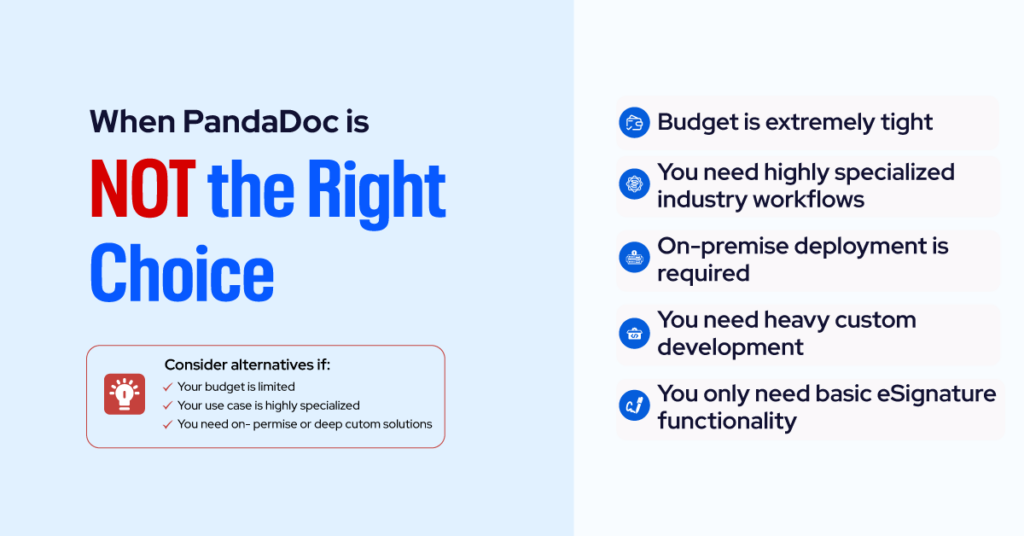
Be honest about your use case before buying. PandaDoc is a poor fit if:
- You only need eSignature and nothing else. Tools like Dropbox Sign ($15/user), SignNow ($8/user), and Xodo Sign are cheaper for pure signing workflows.
- You are a high-volume transactional signer without proposal needs. DocuSign’s Business Pro or envelope-pack pricing may be cheaper.
- You need a full Contract Lifecycle Management (CLM) platform. PandaDoc does contracts well but is not a true CLM like Ironclad, Conga, or DocuSign CLM. If you need obligation tracking, AI redlining, or complex approval matrices across thousands of active contracts, budget for a dedicated CLM.
- You need offline signing. PandaDoc requires internet connectivity to sign most document types.
- You send documents exclusively in non-Latin languages with heavy compliance requirements. Verify regional eIDAS or local equivalents first.
How to Optimize PandaDoc Pricing and Streamline Your Document Workflow

Getting the best PandaDoc deal is not about finding a coupon. It’s about structuring the purchase, usage, and renewal intelligently. These are the same tactics we apply when we manage PandaDoc contracts for our clients.
1. Always commit annually
Annual billing saves up to 46% versus monthly. This is the single biggest and simplest lever. If cash flow is a concern, negotiate quarterly billing on an annual commitment instead of switching to monthly.
2. Buy the plan one tier below what “sounds right”
Most teams default to Business when Starter would cover their actual workflow, or jump to Enterprise when Business plus a couple of add-ons would cost half as much. Audit your real document flow first:
- Do you actually use pricing tables, or do you attach PDFs?
- Do you actually need the CRM integration, or does Zapier at $20/month solve it?
- Do you actually need SSO across every team, or just finance and legal?
3. Negotiate Enterprise, don’t just accept the quote
For Business and Enterprise tiers, published rates are starting points. Industry data shows typical negotiated discounts of around 26%, with some buyers landing 40 to 70% off by bringing a DocuSign or Proposify counter-quote to the table. Ask for:
- Multi-year rate lock (2 or 3 years at the same per-seat price)
- Free seats for admins, approvers, and legal reviewers who don’t send
- Bundled add-ons (Salesforce integration, Premium Support, bulk send) at no extra cost
- Waived implementation fees if you work with a certified partner
- A pre-approved seat expansion rate to protect against mid-contract creep
4. Consolidate to justify the price
PandaDoc Business at $49/user is expensive as a standalone eSignature. It is cheap when it replaces Proposify ($49/user), DocuSign ($25/user), and a payment tool. Before buying, list every document-adjacent tool you pay for today. If PandaDoc consolidates three or more, the math usually works.
5. Control seat creep with workspaces
The number one reason PandaDoc bills balloon after year one is seat creep. Approvers, ops leads, and managers “just need view access” and suddenly a 10-seat plan is a 22-seat plan. Two fixes:
- On Enterprise, use team workspaces to restrict who gets a licensed seat.
- Consider the Launch plan’s unlimited-seat model if most users are viewers, not senders.
6. Use the ROI calculator before renewal
PandaDoc’s own ROI calculator on their pricing page uses Bureau of Labor Statistics data to estimate time savings. Run it for your actual document volume. If the calculated savings are less than 2x your annual PandaDoc cost, you are either under-using the platform or paying for the wrong tier.
7. Review annually, not every three years
Plan structures change. PandaDoc renamed Essentials to Starter in 2024, capped templates at 5, removed pricing tables from the lower tier, and launched a per-document Launch plan in September 2025. Loyal customers on auto-renewal often pay the same price for fewer features. Every 12 months, re-map your actual usage against the current published plans to catch downgrades or better-fitting tiers.
8. Work with an implementation partner for Business and Enterprise
Self-implementation on Business and Enterprise typically adds 6 to 10 weeks of setup time and leaves 30 to 40% of features unused. A certified implementation partner (this is what we do at Axis) accelerates time-to-value and often pays for itself by helping you buy the right tier the first time and negotiate the contract before you sign.
How to Negotiate PandaDoc Pricing
Because Business and Enterprise tiers are commonly discounted, buyers who prepare before the sales call land materially better deals. Three tactics that consistently move the needle:
- Commit annually, not monthly. The 46% annual discount is the single largest lever. No negotiation required.
- Benchmark against DocuSign, Proposify, or Dropbox Sign. PandaDoc sales teams are more responsive to discount requests when buyers demonstrate active evaluation of alternatives.
- Forecast seat growth carefully. Mid-contract seat additions are priced at list, not the negotiated rate. Lock in a higher seat count upfront if you expect growth, or negotiate a pre-approved expansion rate.
For Enterprise quotes, request a breakdown of the per-seat rate versus the per-document rate. Teams with many viewers and few senders almost always come out ahead on per-document pricing. Teams where everyone sends regularly do better per-seat.
Is PandaDoc Worth the Price?
PandaDoc is priced in line with the rest of the commercial eSignature and proposal market. Its value proposition is concentrated in the Business tier. Everything below it is matched or beaten by simpler eSign tools (Dropbox Sign, SignNow, Xodo Sign, eSignGlobal), and everything above it competes with full CLM platforms (Ironclad, Conga, DocuSign CLM) at higher price points.
The platform’s strongest case is consolidation. If you replace a proposal tool (Proposify, Qwilr), an eSignature tool (DocuSign, HelloSign), and a payment link (Stripe Checkout) with a single PandaDoc Business subscription, the $49/user/month is often cheaper than the three standalone tools combined. The weakest case is using PandaDoc purely as eSignature software. At $19/user/month for Starter, you’re paying a proposal-platform premium for features you won’t use.
Your Next Step
If you’ve made it this far, you probably fall into one of three decision zones:
- You know which plan you want. Start the 14-day free trial or book the Business/Enterprise demo directly from pandadoc.com/pricing.
- You’re between two tiers. Run your actual document volume, integration list, and compliance needs through the decision matrix above. The answer usually becomes obvious once you list your non-negotiable features.
- You’re buying for a regulated or enterprise use case. Enterprise contracts are negotiable, and the wrong configuration can cost you 30 to 50% more over three years. This is where we help. Our team has implemented PandaDoc across sales, legal, HR, and operations functions for businesses ranging from 10-seat startups to 2,000-seat enterprises. We can scope your actual needs, benchmark your quote against comparable deals, and run the implementation so you start getting ROI in weeks, not quarters.