AI Summary




TL;DR
- Pipedrive Smart Contact Data was Pipedrive’s original built-in contact enrichment tool. Pipedrive discontinued it for new customers on August 22, 2025, and replaced it with the Data Enrichment feature in the Pulse toolkit.
- If you are setting up Pipedrive in 2026, you will not find Smart Contact Data in your account. You will use Data Enrichment instead, which does the same job with better data sources and more structured output.
- Data Enrichment is powered by Surfe (Growster SAS) and runs on a monthly credit system. Organization enrichment costs 1 credit. Email lookups cost 2 credits. Phone lookups cost 5.
- The feature is available on the Premium and Ultimate plans. Plan availability matters when evaluating Pipedrive as management software. Premium covers organization enrichment by default. Person enrichment on Premium needs a separate add-on. Ultimate includes both.
- Enrichment is manual, not automatic. You click a button, review the results, and confirm. Only empty fields get populated. Nothing in your CRM gets overwritten.
Smart Contact Data was Pipedrive’s built-in contact enrichment feature that helped sales teams find publicly available information about people and companies without leaving the CRM. Users could enter an email address or domain to retrieve professional details, company information, and social profile data, reducing the need to research prospects manually.
Pipedrive launched Smart Contact Data in 2018, powered by APIHub, Inc. (Clearbit). Users could open a Person or Organization record and enrich it with a single click. For small businesses, it made Pipedrive a more useful combination of CRM, contact management, and sales workflow software.
Pipedrive retired that version of Smart Contact Data for new customers on August 22, 2025. Pipedrive replaced it with Data Enrichment, a rebuilt feature within the Pulse toolkit. Data Enrichment keeps the same basic purpose of enriching CRM records, but uses Surfe as its data provider and adds structured data, bulk enrichment, and credit-based usage.
If you joined Pipedrive before August 2025, you may still have access to the legacy Smart Contact Data feature. For everyone else, Data Enrichment is the current option.
Important Note: Many third-party articles about Pipedrive still describe Smart Contact Data as if it is the current feature. If you see references to unlimited lookups, Clearbit as the data provider, or the old Advanced/Professional plan names, that information is outdated. Verify against Pipedrive’s own Knowledge Base before making decisions based on those details.
Throughout this article, “Smart Contact Data” refers to Pipedrive’s legacy native contact enrichment feature. When discussing the current functionality, we use “Data Enrichment” unless the distinction between the two is relevant.
What Contact Data Does Pipedrive Smart Contact Data Provide?
The information you get back depends on whether you enrich an organization or a person, and which version of the feature you use.
Organization enrichment
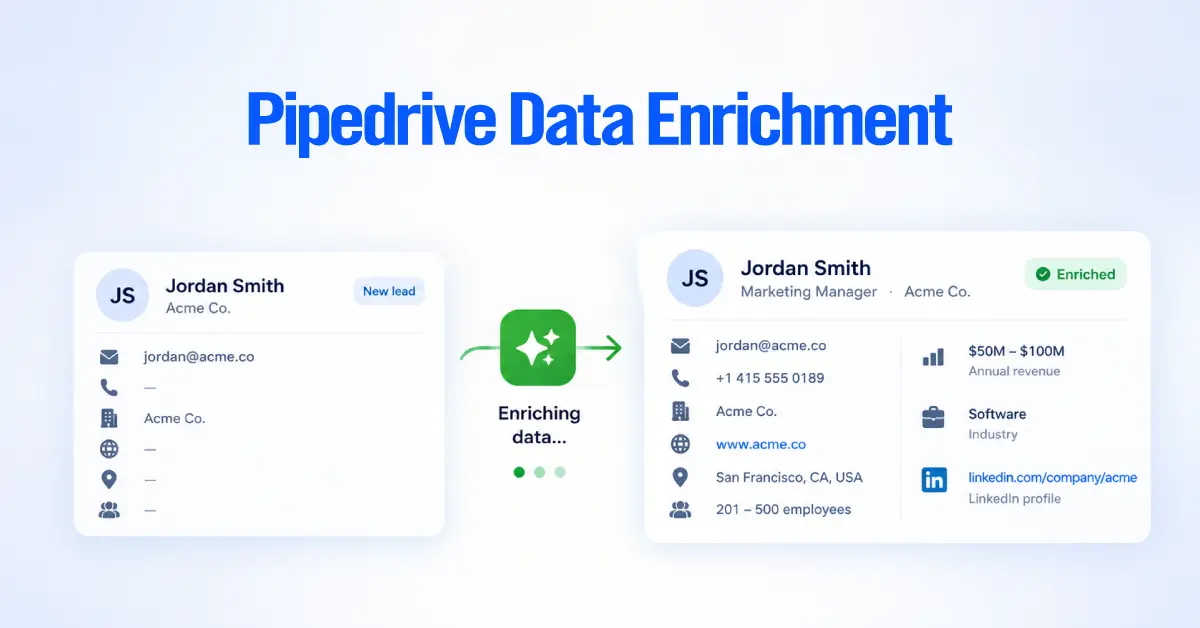
When you enrich an Organization record, the current Data Enrichment feature can return the following.
- Address (including city and country, useful for filtering and territory assignment)
- Industry
- Employee count
- Annual revenue
- LinkedIn profile
- Website
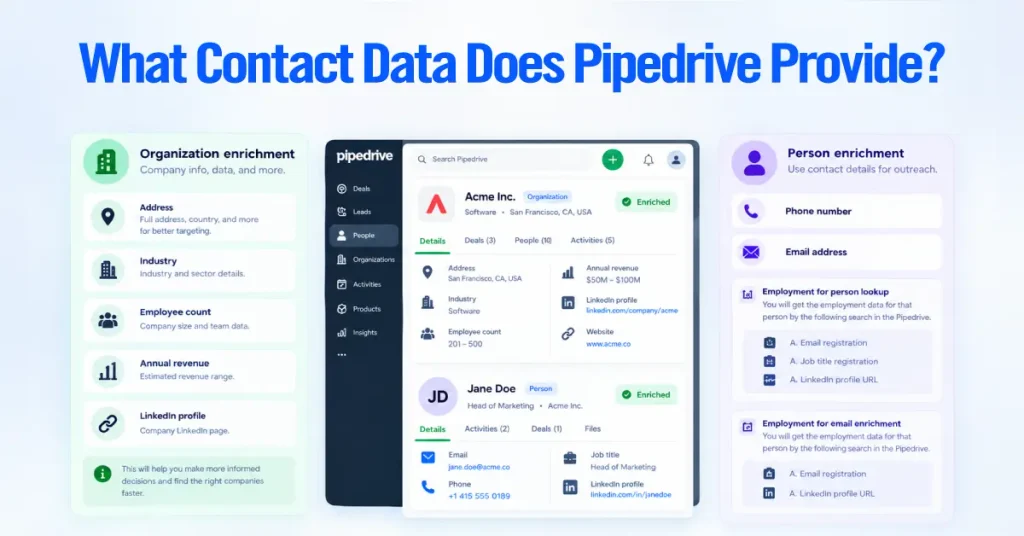
This is firmographic data. It tells you a company’s shape and size so your reps can evaluate fit before picking up the phone.
Person enrichment
Person-level enrichment is narrower in scope but hits the fields that matter most for outreach.
- Phone number
- Email address
To run a phone lookup, you need the person’s name plus at least one of the following already in the record. A linked organization, an email address, or a LinkedIn profile URL. For email enrichment, you need the person’s name plus either a linked organization or their LinkedIn profile.
How this compares to the original Smart Contact Data
The legacy feature pulled a broader but less structured collection of details. You might get social media profile links, job titles, a company description, location details, and whatever else was publicly available and tied to the email address. It was useful, but the output was unpredictable. Some lookups returned a goldmine. Others returned almost nothing.
The current Data Enrichment feature trades that breadth for precision. You get a defined set of fields sourced through Surfe‘s combination of public data and commercial data providers, which generally means better accuracy and more consistent results.
| What you will not get from either version. Neither Smart Contact Data nor Data Enrichment provides technographic data (like what software a company uses), buying intent signals, or website visitor tracking. If your team needs those data points, you will need a third-party enrichment tool from the Pipedrive Marketplace. |
How to Use Data Enrichment in Pipedrive
The walkthrough below follows the current Data Enrichment feature inside Pulse. If you are on a legacy account still using the original Smart Contact Data, the general flow is similar, but the button labels and navigation paths will differ slightly.
Step 1. Open a Contact in Pipedrive CRM
Start by navigating to the detail view of a Person or Organization record. You can also reach enrichment from a Deal’s detail view, where the linked contact and organization records are accessible in the sidebar.
Before you click anything, make sure the record has enough input data for the lookup to work.
For an organization, you need the correct company name and at least one of the following:
- A linked Person with a work email address
- A website URL in the website field
- A LinkedIn profile URL
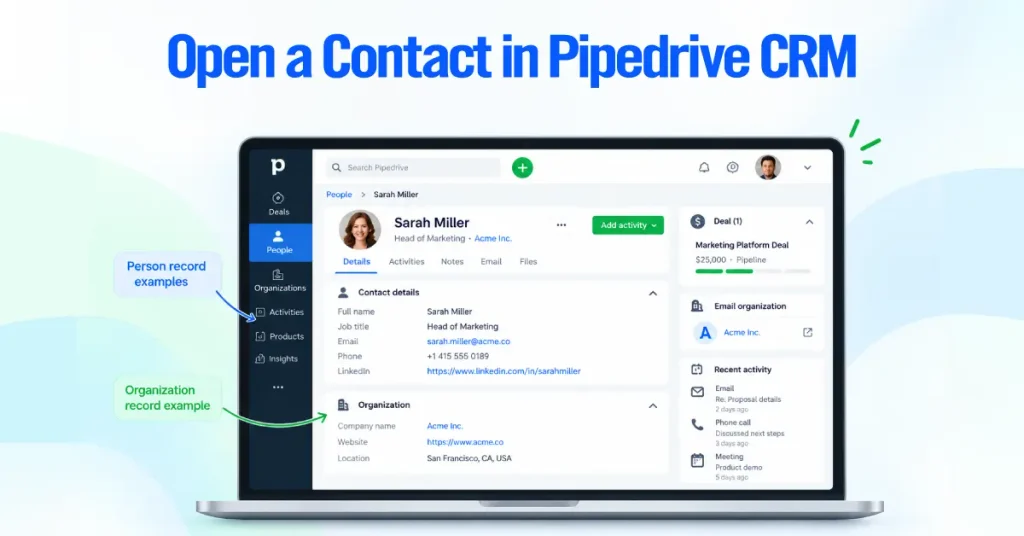
For a person (phone or email lookup), you need the contact’s full name plus at least one of these.
- A link to the correct Organization record
- An email address
- A LinkedIn profile URL
If these fields are empty, the system will prompt you to fill them in before enrichment can proceed. This is where having clean, well-maintained records pays off. If you enable smart contact data through the current enrichment workflow, those inputs determine what Pipedrive can find.
Step 2. Find the Smart Contact Data Section in Pipedrive
Look for the “Enrich data” option in the detail view. It shows up in the sidebar or inline next to individual fields that can be enriched.
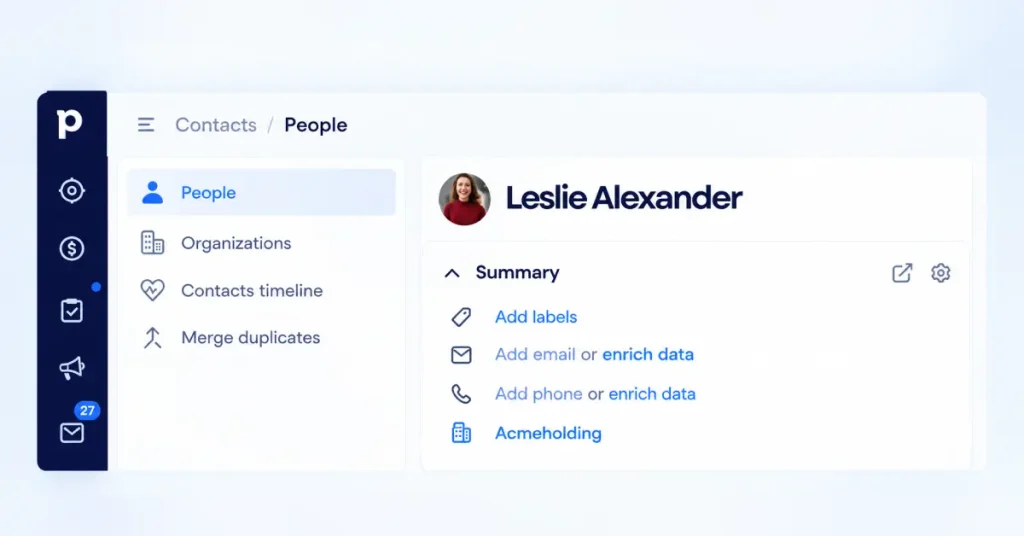
In the current Data Enrichment feature, this button appears whenever empty fields can be populated through enrichment. On legacy accounts with the original Smart Contact Data, the enrichment section appears in the sidebar under “Smart Contact Data.” You may need to click “show more” to see it if the sidebar is collapsed.
Admin users should also confirm that the Pulse toolkit is active on the account, since Data Enrichment lives under Pulse.
Step 3. Retrieve Smart Contact Data
Click “Enrich data” (or “Smart Data Search” on legacy accounts). The system sends your input data to Surfe, which runs the lookup and returns whatever it finds.
Before anything gets saved, you will see a summary screen showing exactly which fields were found and what values will be written to the record. This is your chance to review everything before committing.
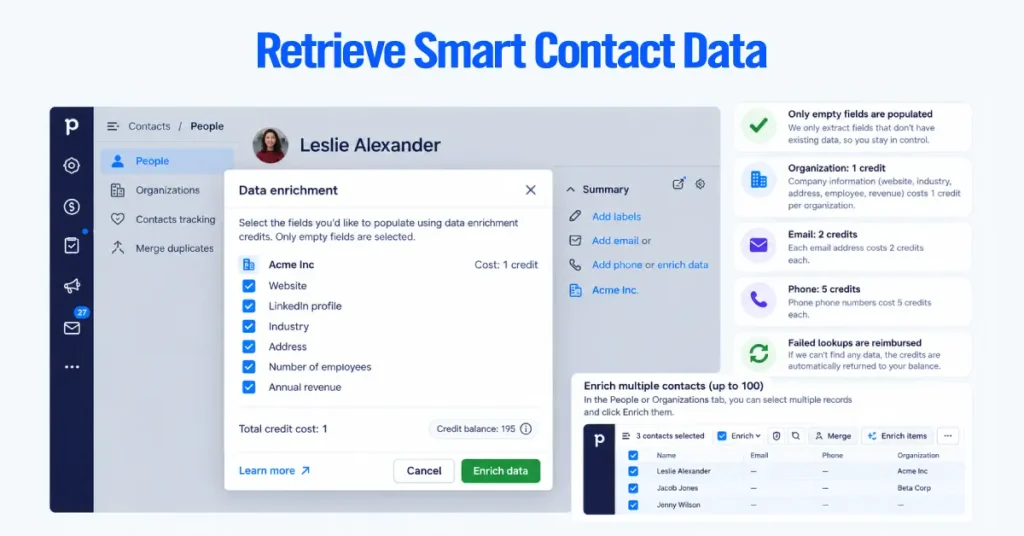
A few things to know about how this step works.
- Only empty fields get populated. If a field already has a value, enrichment skips it entirely, and you don’t spend credits on that field.
- Each enrichment type costs a different number of credits. Organization enrichment uses 1 credit. Email enrichment uses 2 credits. Phone enrichment uses 5.
- Failed lookups get reimbursed. If the system cannot find data for a field, it returns the credits for that field to your account.
For bulk enrichment, go to Contacts, select People or Organizations from the list view, check up to 100 records, and click “Enrich items.” This is the fastest way to fill in missing data across a large batch of contacts without clicking through each record individually.
Step 4. Review and Use the Enriched Contact Information
Once enrichment is complete, the data is written directly into the corresponding Pipedrive fields. A summary screen shows what was added, what was skipped (because the field already had data), and how many credits were used or reimbursed.
From here, the enriched data becomes immediately useful across your workflow.
For lead generation and prospect research, the company’s industry, size, revenue, and location give your reps a snapshot of who they are about to call. That context turns a cold outreach attempt into a more informed conversation and can help a sales rep close more deals when the opportunity is a good fit.
For lead qualification, your team can compare enriched customer data and firmographic data against your ideal customer profile. A 200-person company in your target industry and geography is a very different lead than a 3-person startup in an unrelated vertical. The result is more relevant prospect data for the sales process.
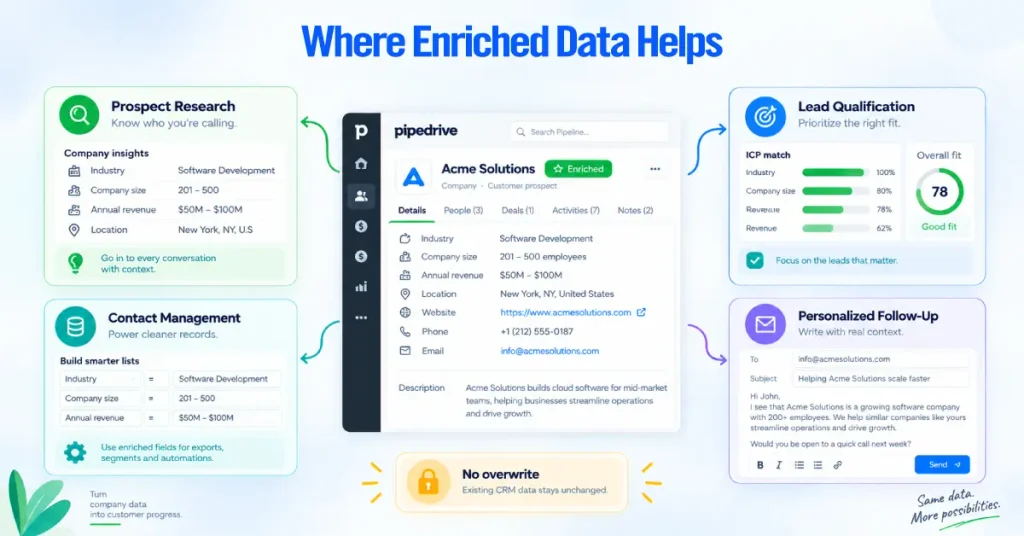
For contact management, enriched fields feed into Pipedrive’s filters, reports, and automations. A report that segments deals by industry or company size only works when those fields are actually populated. This also gives contact managers a clearer view of contact records and supports driving business growth with cleaner data. This supports data management and keeps contact information in one place.
For personalized follow-up, referencing specific details about a prospect’s company (industry, LinkedIn presence, location) in outreach emails shows you have done your homework. Enrichment gives reps that context without requiring 15 minutes of manual research per contact.
Enriched data does not automatically overwrite anything in your CRM. If a rep has already entered a phone number manually, the enrichment will leave that field untouched. This protects human-entered data and avoids accidental overwrites.
Pipedrive Smart Contact Data and Contact Management Software for Small Businesses
Enrichment fills in the data. Pipedrive’s contact management structure gives that data a place to live, helping teams store and manage contact information alongside deals and activities, and a way to act on it. Understanding how these two pieces fit together separates teams that get value from enrichment from teams that just burn through credits.
Pipedrive organizes contact data across several interconnected record types in its contact management system. This CRM platform brings company and contact records into the same workspace, and enrichment touches most of them.
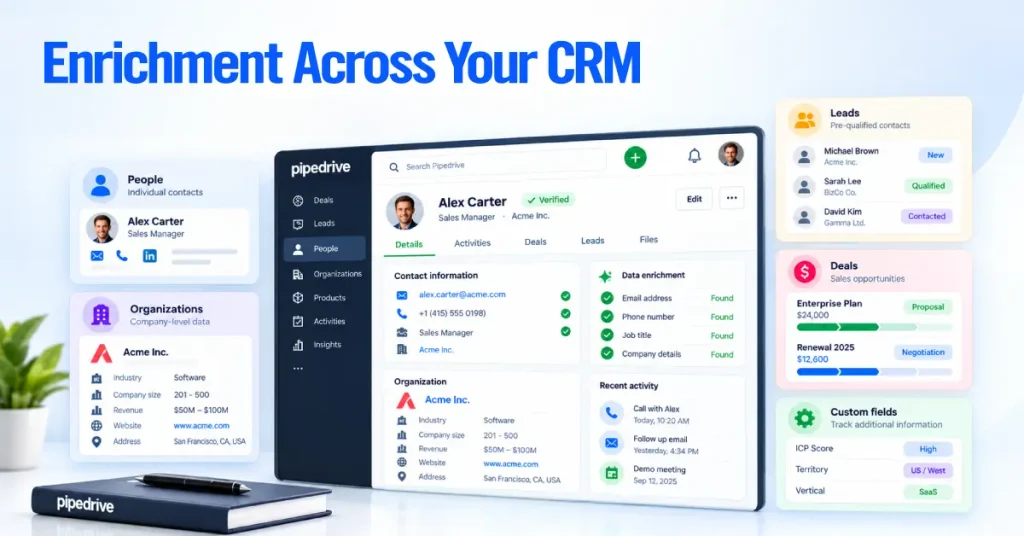
People hold individual contact details like names, emails, phone numbers, job titles, and custom fields. When you enrich a Person record, Data Enrichment fills in missing phone numbers or email addresses. This contact information is central to relationship management. These are the records your reps interact with directly when making calls or sending emails.
Organizations hold company-level data. Industry, employee count, revenue, website, address. This is where organization enrichment writes its output. A well-enriched Organization record gives every rep on the team instant context about the company and helps them manage your sales pipeline without anyone needing to look it up separately.
Leads sit in the Leads Inbox as pre-qualified contacts before they become Deals. You cannot run enrichment directly on a Lead record, but you can enrich the Person or Organization linked to it. This means enrichment still feeds into your lead qualification process, just through the associated contact records. The same contact and deal management structure also supports a broader sales funnel.
Deals represent active sales opportunities. Enrichment can be triggered from a Deal’s detail view, which enriches the linked Person or Organization without requiring you to navigate away from the deal you are working on.
Custom fields let you track anything Pipedrive’s default fields do not cover. Enrichment only populates standard Pipedrive fields (industry, employee count, revenue, etc.). If your team uses custom fields for things like ICP score, territory assignment, or vertical classification, you still need to maintain those through manual entry or automation workflows.
Pipedrive Data Enrichment for Lead Qualification and the Sales Process
Enrichment is most valuable when a new lead enters your sales pipeline, and your team needs to decide how much attention it deserves.
Here is what a realistic qualification workflow looks like when Data Enrichment is part of the process.
1. A new lead arrives: It may come from a web form, a LeadBooster chatbot, an import, or manual entry. At this stage, you might have only a name and email address. That is not enough to know whether this lead is worth a phone call.
2. A rep runs enrichment: From the linked Person or Organization record, the rep clicks “Enrich data.” Within seconds, the system returns the company’s industry, employee count, annual revenue, location, and website. If the rep is on the Ultimate plan (or has the personal enrichment add-on on Premium), they can also pull a phone number to call.
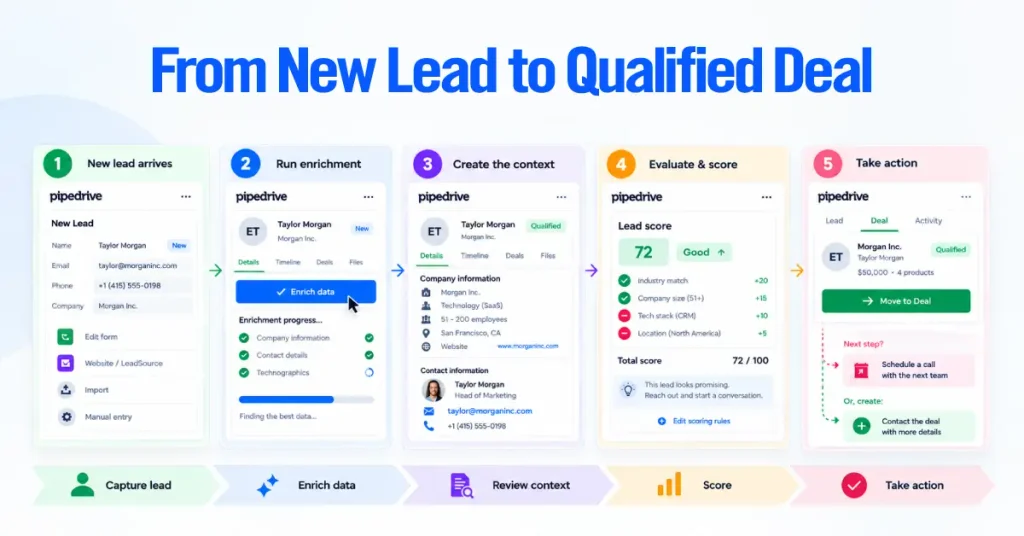
3. The rep checks company and contact context: With firmographic data now visible in the CRM, the rep can see at a glance whether this lead fits the profile of a customer they can actually serve. A B2B software company targeting mid-market firms in North America can instantly tell whether a new lead from a 15-person agency in Southeast Asia is a realistic opportunity or a dead end.
4. The lead is evaluated against qualification criteria: This is where Pipedrive’s Custom Scoring feature (also part of the Pulse toolkit) can work alongside enrichment. You build scoring rules based on enriched fields. Employee count above 50 adds points. Revenue above a certain threshold adds more. An industry match adds more. The score gives reps a quick, standardized way to prioritize.
5. Qualified leads move forward: High-scoring leads convert from the Leads Inbox into Deals and land in the right pipeline stage. Low-fit leads get deprioritized, archived, or routed to a nurture sequence.
| An important distinction. Data Enrichment does not automatically qualify or score leads. It provides the raw data. Custom Scoring applies the logic. And a human rep makes the final call. Enrichment feeds the process, but it does not replace judgment. |
This workflow is one of the strongest reasons to use Pipedrive’s Pulse toolkit as an integrated CRM system rather than treating each feature in isolation. Enrichment, scoring, and sequences were designed to work together. Enrichment fills in the data.
Scoring prioritizes based on that data. Sequences automate the follow-up based on the priority. This is one way Pipedrive integrates sales and marketing activity without making the CRM system responsible for every task.
Smart Contact Data vs. Pipedrive Data Enrichment
If you have searched for “Pipedrive data enrichment” or “Pipedrive contact enrichment features” and landed on articles that mention Smart Contact Data, you are looking at two different versions of the same concept. They are not interchangeable, and the differences matter.
Smart Contact Data (legacy, discontinued August 2025)
- Powered by APIHub, Inc. (Clearbit)
- Available on the old Advanced, Professional, and Enterprise plans
- Used a contact’s email address or email domain for lookups
- Returned a loosely structured mix of publicly available information (social profiles, job titles, company background)
- Found under Tools and apps in the old Pipedrive navigation
- No bulk enrichment capability
- No formal credit system
- Did not provide verified phone numbers or email addresses as a primary function
Data Enrichment (current, part of Pulse toolkit)
- Powered by Surfe (Growster SAS), which replaced Rightbound Inc. as of March 2026
- Available on the Premium, Ultimate, and Enterprise plans under Pipedrive’s current plan structure
- Uses email domain, company website, or LinkedIn profile for lookups
- Returns a defined set of fields. Organization fields include address, industry, employee count, annual revenue, LinkedIn, and website. Person fields include phone number and email.
- Found in the contact, deal, and organization detail views under Pulse
- Supports bulk enrichment of up to 100 records at once
- Runs on a monthly credit system (1 credit per organization, 2 per email, 5 per phone)
- Sources data from public and commercial providers through Surfe
The key shift is not just the provider change. It is the move from an unstructured “whatever we can find” approach to a credit-based system that returns specific, verified data points. The current version is more predictable, but it is also more constrained. If you are comparing CRM software, this distinction matters when choosing the best CRM or the best tool for your team. You know exactly what you’ll get and what it costs.
Pipedrive Smart Contact Data Limitations for Small Businesses
Every enrichment tool has boundaries. This matters when evaluating Pipedrive as management software for small businesses. Knowing them upfront prevents frustration and helps you plan around the gaps.
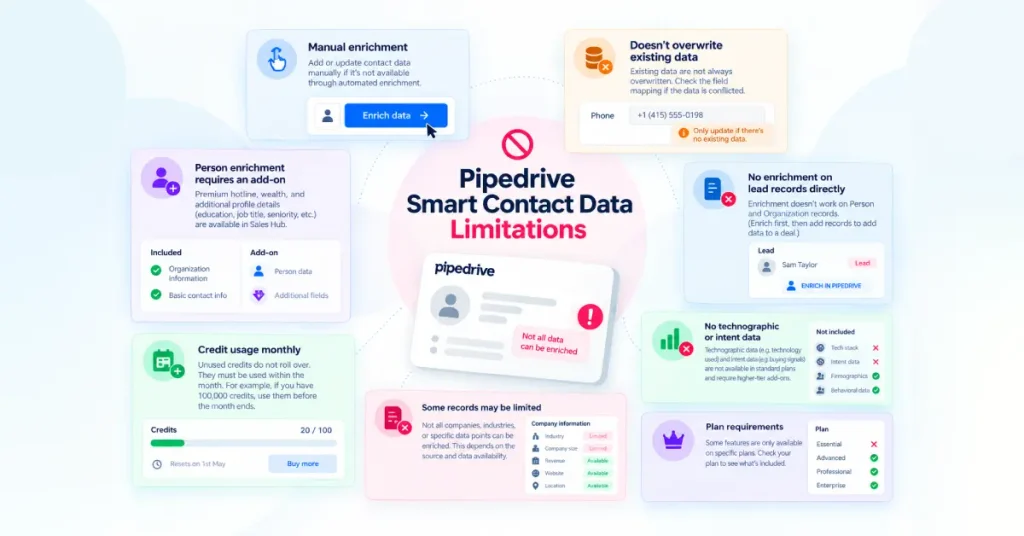
Enrichment is manual, not automatic. No toggle enriches every new contact as it enters Pipedrive. A rep or admin must click “Enrich data” for each record (or select a batch for bulk enrichment). If your team processes high volumes of inbound leads and needs zero-touch enrichment, you will need to build that through a third-party tool and an automation platform like Zapier or Make.
Existing data is never overwritten. This is a safeguard, but it can also be a limitation. If a phone number in your CRM is outdated, enrichment will skip that field because it already has a value. You need to clear the field manually before re-enriching.
Person enrichment on Premium requires an add-on. The Premium plan includes organization enrichment by default. If you want phone and email lookups for individual people on that plan, you need to purchase a separate add-on. The Ultimate plan includes both types without an add-on.
Credits expire monthly. Unused credits do not roll over to the next billing cycle. They reset on the first day of each cycle. If you consistently use all your credits before the month ends, you can purchase top-up credits in increments of 100, up to a default maximum of 10,000 per cycle. Top-up purchases are non-refundable.
Results vary by contact. Not every lookup returns complete data. If Surfe’s sources do not have information for a given contact or company, some fields will come back empty. Credits for unsuccessful enrichments are reimbursed, so you are not charged for blank results.
No enrichment on Lead records directly. Enrichment works on Person and Organization records. To enrich data for a lead, you enrich the Person or Organization linked to that lead. This gives contact managers relevant data without rebuilding the CRM record.
No technographic or intent data. Data Enrichment tells you who a company is (industry, size, revenue) but not what technology they use or whether they are actively shopping for a solution. Those signals require dedicated tools. You may need a third-party management tool for those use cases.
Plan requirements. Data Enrichment is not available on the Lite or Growth plans. You need Premium ($59/user/month on annual billing, though pricing varies by region) or Ultimate ($79/user/month on annual billing).
Smart Contact Data, Contact Data Privacy, and GDPR
Pipedrive’s contact enrichment involves personal data and customer data, so privacy responsibilities matter.
- Data source: Pipedrive’s current Data Enrichment feature is powered by Surfe (Growster SAS), which sources data from public information, commercial providers, and other platforms. Pipedrive provides the technical interface but does not own or source the enriched data.
- Surfe’s GDPR role: Surfe acts as an independent data controller for its data sourcing and provides a published Legitimate Interest Assessment and an opt-out process.
- Your GDPR role: As a Pipedrive user, you remain the data controller for personal data processed in your CRM. You are responsible for having a valid legal basis, providing required privacy information, and honoring deletion or opt-out requests.
- Previous Smart Contact Data: The older feature used an opt-in model, with Pipedrive acting as the data processor and the user as the data controller. The current setup adds Surfe as an independent controller for data sourcing.
| We are not providing legal guidance here. GDPR compliance depends on your specific use case, the types of contacts you enrich, the jurisdictions you operate in, and your internal data handling policies. If you have questions about whether your use of Pipedrive’s enrichment features is compliant, work with a qualified legal professional. Pipedrive publishes its privacy documentation and customer support resources at trustcenter.pipedrive.com.* |
Pipedrive Smart Contact Data Best Practices for a CRM System
For teams using Pipedrive as a management tool, these practices help keep contact records useful while controlling enrichment costs.
- Clean inputs first: Verify email domains and Person-Organization links before enriching.
- Review enriched data: Treat third-party data as a starting point and verify critical details.
- Keep records linked: Incorrect or missing Person-Organization links can cause inaccurate or failed enrichment.
- Merge duplicates: Clean duplicate records before enrichment to avoid wasted credits and inconsistent data.
- Use data for qualification: Map enriched fields such as industry, revenue, and employee count to your qualification criteria.
- Keep human judgment: Enrichment supports research, but fit, timing, budget, and decision-making authority still require human review.
- Re-enrich key accounts: Refresh important records periodically as people, companies, and contact details change.
- Monitor credits: Check the Usage page and compare higher plans or top-ups if credits run out regularly. For current plan details, check Pipedrive’s pricing page and Knowledge Base; Pipedrive Academy can also help with product training.