AI Summary




Jobber includes route optimization on Connect, which starts at $99 a month for one user on annual billing. Housecall Pro puts one-click route optimization on MAX, at $299 a month for eight users. Both numbers come from the vendors’ own pricing pages (Jobber, Housecall Pro), checked October 11, 2026.
For a five-seat lawn crew that needs sequencing, the comparison is Jobber Connect at $149 a month against Housecall Pro MAX at $299, so routing alone accounts for a $150 monthly difference. For a four-truck HVAC company that never sequences a route, that difference is irrelevant.
In our assessment, they are organized around different operating assumptions. Jobber is designed as though the work is knowable in advance. Housecall Pro is designed as though the day will be rebuilt by lunch. That reading is ours, not a vendor claim, and the rest of this article shows the evidence.
What follows compares both on the things that actually decide the answer, with verified prices and real monthly totals at three team sizes. Axis Consulting implements Housecall Pro for clients and has no affiliate relationship with either vendor.
We verified pricing, plan inclusions, and processing rates against Jobber’s and Housecall Pro’s official pricing pages and help documentation on October 11, 2026.
Housecall Pro figures come from its general pricing page unless labelled as the HVAC package. Both vendors change pricing and packaging often. Monthly prices are annual-billing rates in USD unless stated otherwise. Confirm current figures for your own trade before buying. For our own line-by-line breakdowns, see our Housecall Pro pricing guide and Jobber pricing guide.
TL;DR
- Routing is the biggest price gap. Jobber includes route optimization from Connect at $99 a month. Housecall Pro gates it to MAX at $299.
- Housecall Pro sells trade-specific packages that change prices and move features between tiers. Price your own trade, not the general plan list.
- On the general package, five users cost $149 a month on both. On Housecall Pro’s HVAC package, five users cost $299.
- The HVAC package puts the Sales Proposal Tool on Essentials. The general package puts it on MAX.
- At ten users, Jobber Grow is $299 a month; Housecall Pro MAX is $369 on the general package and $799 on the HVAC package.
- Consumer financing is not parity. Jobber’s Wisetack offer excludes cleaning, window washing, pool and spa, and snow removal, and requires revenue and review thresholds.
- QuickBooks Desktop runs natively only on Housecall Pro. Jobber syncs to QuickBooks Online and Xero.
- Records migrate, configuration does not. Budget to rebuild your price book, recurring schedules, and automations by hand.
Jobber vs Housecall Pro at a Glance
Jobber puts routing and recurring-work structure into its cheaper tiers. Housecall Pro’s general package puts proposal selling, service agreements, and route optimization into its top tier, while including a price book and job costing in its $59 entry plan. Both ship a customer portal.
Housecall Pro sells industry-specific packages alongside its general plans, and those packages change both the prices and which tier a feature sits in. Every Housecall Pro figure below is from the general pricing page unless stated. The industry-package section explains what changes.
| If this describes you | Start with | Because |
|---|---|---|
| Route-dense, recurring work | Jobber | Routing starts at Connect, not at the top tier |
| Reactive residential service | Housecall Pro | Dispatch board built for a schedule that moves |
| High-ticket in-home selling | Housecall Pro, trade package | Proposal tool arrives on Essentials in HVAC |
| Wanting a customer portal on the cheapest plan | Jobber | Client Hub is published as available on every plan |
| Running QuickBooks Desktop | Housecall Pro | Jobber syncs only to QuickBooks Online and Xero |
| Solo and price-sensitive | Either, carefully | $29 versus $59, but they include different things |
The Jobber Model, Operational Structure and Route Efficiency
Jobber treats work as something you can see coming. A quote becomes a job, the job generates visits, visits repeat, and the route gets sequenced so the crew drives less.
You can see that in what Jobber charges for. Route optimization runs on Connect, Grow, and Plus, so a solo window cleaner at $99 a month sequences a day the same way a fifteen-person landscaping company does. The newer version works from the actual visits on the days you pick, rather than a fixed master route, so one cancellation doesn’t break the sequence. You run it from jobber.com, and the order then appears on the crew’s phones.
Client Hub is the second structural piece. It is available on all plans, and clients always have access. They approve quotes, check appointments, pay invoices, print receipts, and request more work without calling you. Across a few hundred recurring accounts, that removes a meaningful share of routine inbound calls from the office.
The Housecall Pro Model, Sales Velocity and Dynamic Dispatch
Housecall Pro assumes the day will change. A no-heat call lands at nine, a diagnostic turns into a $9,000 replacement, and somebody has to move three jobs to fit it.

Its general pricing reflects that. The Basic plan at $59 already includes a price book and job costing, which is unusual at that price, and Jobber holds job costing until Grow. Flat-rate pricing lands on Essentials.
The sales proposal tool, which builds visual proposals with side-by-side options, lands on MAX in the general package, where Housecall Pro values it at $40 a month on its own.
In the trade packages, the placement moves. Housecall Pro’s HVAC Package documentation puts the Sales Proposal Tool and Membership Plans on Essentials, not MAX. Check your own trade before assuming where anything sits.
On My Way texts, review management, and consumer financing run across the plan line. That matters when most jobs come from a stranger who needs to trust the person at their door. If you are weighing whether the platform is worth the spend, our Is Housecall Pro worth it? breakdown covers the cost side in more detail.
Jobber vs Housecall Pro Feature Comparison
Jobber’s comparison page says Housecall Pro needs a third-party integration for route optimization. Housecall Pro’s current pricing page lists native route optimization on MAX that reorders jobs using real drive time and live traffic, and it published a route optimization page.
| Capability | Jobber | Housecall Pro | Why it decides anything |
|---|---|---|---|
| Route optimization | Connect and up, from $99/mo | MAX only, from $299/mo | The biggest price gap between the two |
| Recurring work | Recurring visits and batch invoicing in the core workflow | Recurring Service Plans on MAX | Jobber treats repeat work as standard; Housecall Pro treats agreements as a growth feature |
| Quoting | Line items, e-signature, optional add-ons on Grow | Estimates on Basic, flat-rate pricing on Essentials | Jobber’s upsell mechanism costs a tier jump |
| Multi-option proposals | No equivalent product published | Sales proposal tool, MAX on the general package, Essentials on the HVAC package | The clearest functional gap for replacement selling |
| Customer portal | Client Hub on all plans, covering quote approval, appointments, invoices, receipts, and new requests | Customer Portal covering past and upcoming appointments, invoice payment, and appointment-change requests by message | Both have one, so compare the actions each allows rather than assuming only one vendor offers self-service |
| Two-way texting | Grow and up | Not listed as tier-gated on the pricing page | Where quotes diverge most often, confirm it in writing |
| Job costing | Grow and up | Basic and up on the general package, Essentials on the HVAC package | Margin visibility costs less on Housecall Pro’s general plans, not necessarily on a trade package |
| Commissions | Not published as a plan feature | Essentials and up, including price book commissions on the HVAC package | Decisive if you pay techs per item or job type |
| Marketing | Marketing Suite add-on at $99/mo, included on Plus | Campaigns across text, email, and postcard | Only Housecall Pro does direct mail |
| Card rates | 2.9% + 30¢ online, 2.7% + 30¢ Tap to Pay, 1% ACH | 2.59% card present, 2.99% customer-entered, 3.49% keyed or card on file, 1% ACH | Entry method moves the rate far more on Housecall Pro |
| Instant payout | +1% | Instapay, +1% | Equivalent |
| Consumer financing | Wisetack at 3.9%, with industry and revenue eligibility rules | From 3.9% | Not the parity most articles claim; see below |
| Accounting | QuickBooks Online and Xero, Connect and up | QuickBooks Online and Desktop, Essentials and up | Desktop shops have one native option, with platform requirements worth confirming |
| GPS | Team activity in-app, real-time through fleet partners | Employee GPS on Essentials, Vehicle GPS through Force Fleet hardware | Phone-based and vehicle-based are different purchases |
Both platforms have native routing today. They price it very differently, and the two offerings aren’t identical. Housecall Pro Essentials groups and sequences jobs into routes, which handles a planned day.
MAX adds one-click reordering against real drive time and live traffic, which handles a day that moves. Several third-party reviews still repeat the older claim, so check the date on anything you read.
Quoting, Estimating, and Closing Sales
Housecall Pro is better when a tech needs to present choices in somebody’s kitchen. Jobber is better when a quote needs to go out, get approved online, and turn into scheduled work without a phone call. Both send estimates. They solve different problems.

Housecall Pro’s Proposal Workflow
Housecall Pro’s proposal tool builds visual proposals with custom images and side-by-side comparisons. It sits on MAX in the general package and on Essentials in the HVAC package. In the field, it supports a specific sequence.
The tech diagnoses the failure, builds two or three options at different prices, hands over the tablet, and the homeowner compares instead of reacting to one number. That matters most on discretionary work with a wide price range, like system replacement, a repipe, or a panel upgrade.
You will see claims that option-based proposals lift average ticket by some precise percentage. We could not find primary evidence for any of those figures, so treat them as marketing. The case for presenting options rests on sales practice, not on published research.
Jobber’s Quotes, Optional Items, and Client Hub
Jobber builds around the document and the approval loop instead. Quotes carry line items, markups, e-signature approval, and optional add-ons the customer selects. Grow adds those optional line items plus images and reviews on the quote.
Approval happens in Client Hub, where the customer can also pay a deposit, and the quote converts straight to a scheduled job.
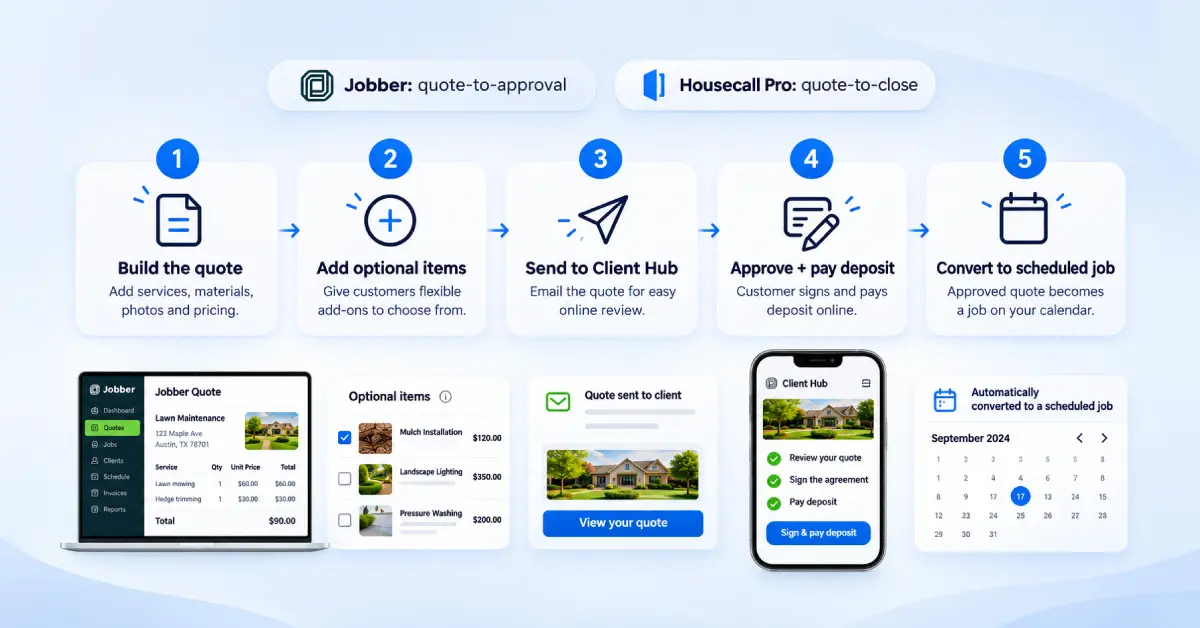
That workflow wins when the customer is not standing next to you. A landscape quote emailed Thursday and approved Sunday night. A cleaning bid sent to a property manager. Jobber optimizes quote-to-approval. Housecall Pro optimizes quote-to-close. Buy based on where your deals actually get decided.
Scheduling, Routing, and Dispatching
Jobber is better when the problem is drive time across many known stops. Housecall Pro is better when the problem is reassigning work that is already in motion. Those are different problems, and most comparisons collapse them into one.
Jobber Route Optimization and Multi-Stop Scheduling
Sequencing only earns its cost above a certain stop density. As a working rule of thumb we use roughly eight to ten stops per tech per day, which is our own heuristic rather than a published benchmark.
Below that, sequencing saves minutes. Above it, a badly ordered day can add serious drive time per truck.
Take a three-truck lawn company and assume optimization saves 35 minutes per truck per day. That is 105 minutes a day, or close to nine hours a week spread across three trucks rather than recovered by any one of them.
At a $90 average mow, filling even part of that time covers the subscription several times over. Those numbers illustrate assumed inputs, not a benchmark, but the shape holds for any route-dense business.
Jobber’s price point is the real story. Connect at $99 a month for one user, or $149 for five on annual billing, puts routing inside a two-truck budget.
Housecall Pro’s Visual Dispatch Workflow
Change the business. A plumbing company with five techs has twelve scheduled jobs. At ten in the morning, a supply line bursts. The dispatcher needs to know who is closest, who is nearly done, and who can absorb two hours without blowing somebody’s arrival window.
That is a visibility problem, not a sequencing problem. Housecall Pro’s dispatch calendar is built for moving jobs between techs quickly. Employee GPS on Essentials feeds tech location from phones with no hardware, and On My Way texts fire when a tech is dispatched, so the displaced customer finds out without calling you.
The test takes five minutes. Pull up last month’s schedule. If most days finished roughly as planned and your techs still cover a lot of ground, routing inefficiency is the likelier cost, and Jobber addresses it at a lower price.
If most days were rebuilt by noon, dispatch visibility is the likelier cost, and Housecall Pro is built around it.
Invoicing, Payments, and Financing
Subscription price gets the attention, but processing fees can cost more for businesses handling significant card volume.
Jobber Payments vs. Housecall Pro Payments and Instapay
The main difference is how each platform charges for different payment methods.
Jobber Payments
- Online card payments: 2.9% + 30¢ per transaction
- Tap to Pay: 2.7% + 30¢
- Bank payments: 1%
- Instant payouts: An additional 1%
Housecall Pro Payments
- In-person card payments: 2.59% for swiped, tapped, or chipped cards. Tap to Pay also costs $5 per month for each user who takes at least one Tap to Pay payment in the billing cycle.
- Digital invoices: 2.99% when customers enter their card details.
- Keyed-in, app-scanned, or stored cards: 3.49%
- Amex and commercial cards: 3.49%, regardless of how the card is entered.
- ACH payments: 1%
- Instapay: An additional 1% to receive funds in minutes instead of the standard two business days.
- Mobile check deposit: Free. Jobber has no equivalent listed.
How processing fees affect your costs
Your payment mix can matter more than the subscription price. Consider two examples based on the published rates.
Example 1: $500,000 in annual payments through stored cards
A recurring-service business processing $500,000 annually through stored cards would pay approximately $17,450 in Housecall Pro processing fees at 3.49%.
At Jobber’s 2.9% + 30¢ rate, the same volume would cost roughly $15,750, assuming a $120 average visit and about 4,167 transactions.
That’s an estimated $1,700 annual difference in Jobber’s favor.
Example 2: $400 in-person payments
For a business collecting payments in person using a card reader:
- Housecall Pro at 2.59%: $10.36 per $400 transaction
- Jobber at 2.7% + 30¢: $11.10 per $400 transaction
Housecall Pro costs 74¢ less per transaction in this scenario.
These are illustrations based on published rates and stated assumptions, not quotes. Both vendors note that rates can vary by account.
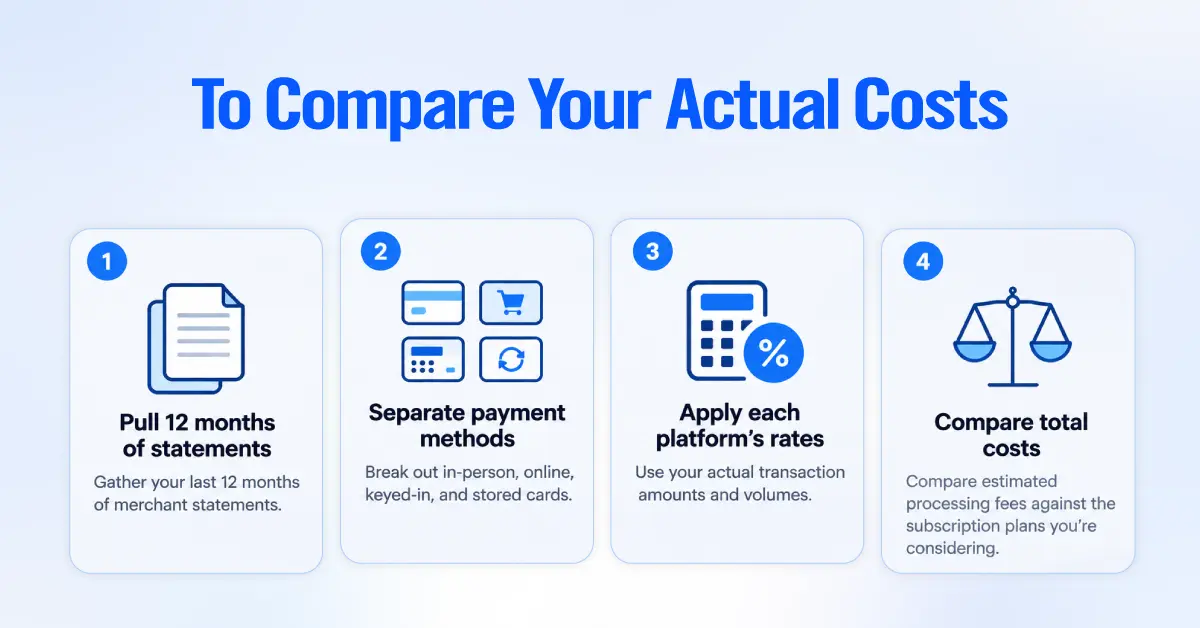
To compare your actual costs:
- Pull your last 12 months of merchant statements.
- Separate payment volume by method, including in-person, online, keyed-in, and stored cards.
- Apply each platform’s rates to your actual transaction amounts and volumes.
- Compare the estimated processing costs with the subscription plans you’re considering.
No universal threshold exists where processing fees outweigh subscription costs. The result depends on your average transaction, payment methods, volume, and chosen plans.
Consumer Financing
Both Jobber and Housecall Pro use Wisetack, with advertised financing starting at 3.9%. But the starting rate doesn’t tell you whether your business qualifies.
Jobber Financing: Eligibility and Limits
According to Jobber’s financing documentation, its financing terms include:
- Fee: A flat 3.9% on every plan except Lite.
- Availability: US businesses only.
- Eligible work: One-off jobs.
- Ineligible industries: Pool and spa, residential cleaning, commercial cleaning, window washing, and snow removal.
- Customer reviews: At least 10 online reviews averaging about 4.5 stars.
- Revenue: More than $12,500 per month or $150,000 annually.
- Eligible quote amounts: $500 to $65,000 for qualifying residential, one-off work completed within 90 days.
- Payout timing: One to three business days after the customer confirms the job is complete.
The $65,000 maximum is a ceiling, not a guaranteed limit. Jobber notes that many merchants start with lower limits.
What this means for your business: If you provide recurring cleaning or pool services, Jobber’s financing isn’t available under its published eligibility rules.
What About Housecall Pro?
Housecall Pro publishes a starting financing rate of 3.9% on its financing help page, but it doesn’t provide the same detailed public eligibility list as the information above.
During your demo, ask about industry restrictions, revenue and review requirements, eligible job types, financing limits, and payout timing. Don’t assume your business qualifies based on the advertised rate alone.
Customer Communication and Marketing Automation
Both Jobber and Housecall Pro automate routine customer communication, including reminders, On My Way notifications, and review requests. The main differences are in their marketing tools, plan packaging, and what customers can do through each platform’s portal without contacting your office. If you want that communication tied into a wider sales and follow-up process, our guide to CRM for service businesses shows how the pieces connect.
Housecall Pro Marketing and Follow-Up
Housecall Pro Campaigns supports text, email, and postcard marketing. Direct mail is a notable difference from Jobber’s offering.
Housecall Pro also highlights several other capabilities on its comparison page:
- Built-in VoIP
- Mobile check deposit
- Vendor bill pay
When postcard marketing helps: Consider an HVAC company that completes 400 spring tune-ups. Eleven months later, those customers are a valuable list for promoting fall maintenance. A postcard can reach homeowners who ignore email or have opted out of text messages.

Before comparing costs, confirm which campaign features your plan includes and which require separate paid products. The plan pages don’t clearly break out every marketing feature.
Jobber Client Hub vs. Housecall Pro Customer Portal
Both platforms let customers manage parts of the service process themselves, but the available actions differ.
Jobber Client Hub lets customers:
- Approve quotes
- View appointment details
- Check balances and receipts
- Submit new service requests
- Make payments
Client Hub is available on every Jobber plan.
Housecall Pro Customer Portal lets customers:
- View past and upcoming appointments
- View and pay invoices
- Refer others to the business
Housecall Pro’s help documentation describes appointment changes as requests sent through a message button, rather than direct self-rescheduling. New bookings are handled through online booking.
Neither portal is a clear winner for every business. Compare the specific actions you want customers to complete without staff assistance.
Two-Way SMS and Marketing Add-On Costs
Two-way SMS is an important plan difference if your office wants to manage customer conversations inside the platform rather than through employees’ personal phones.
- Jobber: Two-way SMS requires the Grow plan.
- Housecall Pro: Compare the relevant plan’s messaging capabilities and pricing before choosing an equivalent tier.
Housecall Pro doesn’t publish which plan includes two-way texting, so get that in writing before you compare tiers.
Jobber also sells these tools separately:
- Marketing Suite: $99 per month
- Receptionist: $29 per month
- Pipeline: $49 per month
These add-ons are bundled into Jobber Plus. Factor them into your comparison if you need those capabilities, rather than comparing subscription prices alone.
Jobber vs Housecall Pro Pricing and Total Cost
Starting prices can be misleading because the two products include different user counts and features at every step. All figures below are annual-billing rates verified in October 2026. Month-to-month costs more on both.
Housecall Pro’s Industry Packages Change the Baseline
Housecall Pro sells trade-specific packages alongside its general plans, and they aren’t just cosmetic. They change the price, and they move features between tiers. Jobber publishes one price list for every industry.
The two Housecall Pro team price lists diverge sharply.
| Plan | General package | HVAC package |
|---|---|---|
| Basic, 1 user | $59/mo annual, $79 monthly | $79/mo |
| Essentials, 5 users | $149/mo annual, $189 monthly | $299/mo, extra users $100/mo |
| MAX, 8 users | $299/mo annual, $329 monthly | $649/mo, extra users $75/mo |
Housecall Pro’s HVAC page states that, as of July 2026, individual HVAC pricing starts at $79 on Basic, $229 on Essentials, and $399 on MAX, while team pricing is $79 for one user on Basic, $299 with five users on Essentials, and $649 with eight users on MAX.
Feature placement varies by trade. On Housecall Pro’s HVAC package, Essentials includes
- the Sales Proposal Tool,
- Membership Plans,
- equipment tracking,
- price book commissions, and
- job costing,
whereas MAX includes Pipeline, route optimization, AI Pricing Insights, and an open API.
Housecall Pro publishes equivalent Electrical and Plumbing package articles, so expect the same pattern in those trades.
Every Housecall Pro figure in the three tables below comes from the general pricing page. If you are in HVAC, plumbing, or electrical, treat those tables as a floor and price your trade package directly. The gap is large enough to reverse a purchasing decision.
Solo Operator
| Setup | Per month, billed annually | What you get |
|---|---|---|
| Jobber Core, 1 user | $29 | Scheduling, quotes, invoices, online payments, website, reporting |
| Housecall Pro Basic, 1 user (general package) | $59 | The above plus price book, job costing, review management, financing access |
| Jobber Connect, 1 user | $99 | Adds reminders, automated follow-ups, QuickBooks Online sync, route optimization |
Jobber Core has the lowest entry price and the narrowest feature set. It includes no QuickBooks sync, automated reminders, routing, or job costing.
Housecall Pro Basic costs $30 more and includes a price book and job costing, which Jobber holds until Grow at $149.
For a solo appliance tech on the general package who prices from a book and wants job-level margin, Basic is the better-fitted $59. A solo HVAC business is a different calculation, because the HVAC package starts at $79 for Basic and does not list job costing until Essentials at $229.
A solo operator who runs routes has only one option under $299 across both platforms: Jobber Connect at $99.
Small Crew of 3 to 5 Technicians
| Setup | Per month, billed annually | Notable inclusions |
|---|---|---|
| Jobber Connect, 5 users | $149 | Route optimization, QuickBooks Online, reminders, checklists, follow-ups |
| Housecall Pro Essentials, 5 users (general package) | $149 | Flat-rate pricing, employee GPS, commissions, checklists, photo reports, QuickBooks Online and Desktop |
| Housecall Pro Essentials, 5 users (HVAC package) | $299 | The above plus sales proposal tool, membership plans, equipment tracking, price book commissions |
| Jobber Grow, 5 users | $229 | Adds two-way SMS, job costing, optional line items, custom automations |
On the general package, the two tie exactly at $149, so price decides nothing and features decide everything. On the HVAC package, the tie disappears.
On the HVAC package, Essentials is $299 for five users and adds the proposal tool and membership plans. Connect gives you route optimization. Essentials gives you flat-rate pricing, phone-based GPS, and commission tracking by item or job type.
If you pay commission, Essentials solves a payroll problem Jobber does not address at this tier. If your crews cover many stops, Connect solves a drive-time problem Essentials does not.
Two-way SMS is the other variable at this size. On Jobber it means Grow at $229 for five users. Housecall Pro doesn’t publish which plan includes two-way texting, so get that in writing before you compare tiers.
Growing Team of Around 10 Technicians
| Setup | Per month, billed annually | Math |
|---|---|---|
| Jobber Connect, 10 users | $229 | Flat plan rate |
| Jobber Grow, 10 users | $299 | Flat plan rate |
| Housecall Pro MAX, 10 users (general package) | $369 | $299 for 8 users, plus 2 at $35 |
| Housecall Pro MAX, 10 users (HVAC package) | $799 | $649 for 8 users, plus 2 at $75 |
| Jobber Plus, 10 users | $449 | Bundles Marketing Suite, Receptionist, Pipeline |
| Jobber Grow plus all three add-ons | $476 | $299 + $99 + $29 + $49 |
Two pricing mechanics become important at this team size.
Housecall Pro’s user caps bite first. Essentials stops at five, so a ten-person shop is pushed to MAX, which charges $35 for every user past eight on the general package. Jobber steps its plan rate up by team-size bracket instead, so ten users on Grow is a flat $299.
Extra-user rates are also package-specific. The HVAC package lists $100 a month per additional Essentials user and $75 per additional MAX user, which is where ten-user comparisons drift furthest from the headline numbers.
There is also a crossover inside Jobber’s own line. At ten users, Grow with all three add-ons costs $476 while Plus costs $449 and includes them. Plenty of businesses buy Grow and then add on past the point where Plus would have been cheaper.
On the general package, the subscription gap between Jobber Grow and Housecall Pro MAX at this size is $840 a year, which is less than the processing gap we calculated above for a card-on-file business.
On the HVAC package, the same comparison is roughly $6,000 a year, which is no longer a rounding error. Price your own package before weighting either.
Which Platform Fits Your Trade?
Trade labels are a weak proxy. A commercial HVAC maintenance contractor and a residential replacement company share a trade and need different software. Four things decide it. Stop density, how much the schedule moves, ticket size, and who does the selling. For a wider look at how Axis supports these businesses, see our home and field services hub.
HVAC and Plumbing
Residential work usually tilts to Housecall Pro. The day changes constantly, techs sell in the home, tickets run from a $220 diagnostic to a $12,000 system, and financing often closes the job.
The dispatch board handles volatility, the sales proposal tool handles option selling, and flat-rate pricing keeps techs consistent. Price the HVAC or plumbing package rather than the general plans, because the proposal tool arrives a tier earlier and the plan costs more. Our plumbing industry page shows how we set this up for plumbing companies.
Jobber still fits best when revenue is mostly scheduled maintenance, commercial contracts, or quotes emailed rather than presented.
Lawn Care and Landscaping
Jobber fits most cases here. The work is route-dense, the schedule is known a week out, visits repeat, and billing batches. Routing at Connect pricing means you are not paying top-tier rates for the one feature driving the economics.
Design-build is the exception. If most revenue comes from $40,000 installs sold through presented proposals, you belong with the high-ticket group.
Electrical and Appliance Repair
This one is genuinely mixed, and we will not invent a winner. Electrical runs service calls that look like plumbing and project work that looks like construction. Decide on your real mix. See how this plays out for electricians and for appliance repair companies, including our appliance repair case study.
As an editorial rule of thumb (not a benchmark), we lean Housecall Pro when most revenue comes from same-day calls and in-home quotes, and Jobber when most comes from scheduled work or emailed proposals. If it is close to even, run both trials against the same week.
Cleaning, Pressure Washing, Pest Control, and Similar Route-Based Services
Jobber fits here for the lawn-care reasons plus one more. Customers in these trades tend to want self-service more than conversation, and a client who approves a quote and pays an invoice in Client Hub is one fewer call to the office.
Note the financing exclusion, though, because residential and commercial cleaning, window washing, and pool and spa cannot use Jobber’s Wisetack offer. Pest control splits. Quarterly territory routes suit Jobber, while a high share of same-day callbacks and door-sold annual agreements may justify Housecall Pro MAX and its Recurring Service Plans. Our pest control industry page and the On Guard Pest Control case study show the Housecall Pro side of that split in practice.
Jobber vs Housecall Pro by Business Model
| Business Model | Evaluate First | Main Reason |
|---|---|---|
| Solo operator, no routing needed | Jobber Core or Housecall Pro Basic | Cost against the entry features you will actually use |
| Solo or small crew running routes | Jobber Connect | Routing at $99 to $149 rather than $299 |
| Route-dense recurring service | Jobber | Routing, recurring visits, batch invoicing, Client Hub |
| Emergency residential service | Housecall Pro | A dispatch board built for a day that moves |
| High-ticket in-home sales | Housecall Pro, trade package | Proposal tool arrives on Essentials in HVAC |
| Commission-paid technicians | Housecall Pro Essentials | Commission rates by item, service, or job type |
| Customer-self-service-heavy operation | Jobber | Client Hub is published on every plan |
| QuickBooks Desktop shop | Housecall Pro | The only native Desktop integration of the two |
| High stored-card recurring billing | Jobber | Lower published card-on-file rate |
| Cleaning, pool, or window washing wanting financing | Housecall Pro | Those industries cannot use Jobber’s Wisetack offer |
| Mixed service and project business | Both, in parallel trials | One real week settles it |
Mobile App and Technician Adoption
Both apps cover the field workflow. A tech on either can:
- Open a job and review history
- Clock in and navigate
- Take photos and run a checklist
- Build an estimate and capture a signature
- Take payment and close out the job
Both mobile apps run in Spanish, with limits. Jobber’s Spanish app is for non-admin users only, and Housecall Pro’s Spanish app needs Android 13 or later on Android.
App store ratings get quoted constantly in these comparisons and prove very little. They aggregate years of versions across users on different plans with different configurations.
What predicts adoption, in our implementation work, is configuration rather than product. Techs abandon the app when the job record does not match how the company runs the job.
- An incomplete price book sends estimates back to paper.
- Missing required fields mean techs never take photos.
- A schedule in the app that contradicts what dispatch said on the phone teaches the tech to call the office instead.
If you are heading toward Housecall Pro, our Housecall Pro setup guide walks through the configuration choices that drive adoption.
Two practical notes for your trial:
- Check which features are included. Jobber’s pricing FAQ says the 14-day trial gives full access to Jobber’s features on the Grow plan, and Housecall Pro says its 14-day trial gives full access to MAX. In both cases, you may be testing features your target plan will not include, and neither trial covers paid add-ons. Write down which features belong to the plan you intend to buy before you start.
- Involve a skeptical tech. Run the trial with a skeptical tech, not your best one.
QuickBooks and Accounting Integration
Platform support is the clearest difference.

- Jobber: Syncs with QuickBooks Online and Xero.
- Housecall Pro: Supports QuickBooks Online and QuickBooks Desktop.
Jobber offers a one-time client import from QuickBooks Desktop, but importing contacts once isn’t the same as an ongoing sync. A Desktop shop that wants live accounting data has one native option.
Before committing to Housecall Pro, confirm two details, because Desktop integrations carry constraints that cloud ones do not:
- Which direction do records flow? (Housecall Pro’s Desktop sync article describes a one-way sync from Housecall Pro.)
- Which Desktop versions and operating systems are supported?
The sync requires Connect or above on Jobber and Essentials or above on Housecall Pro. Neither entry plan includes it, which is a common surprise on the first invoice.
Worth more than any feature row here is this: software does not fix an accounting problem. If your chart of accounts is wrong, services are not mapped to income accounts, payments pile up in undeposited funds, or customers exist twice under slightly different names, the sync will reproduce the mess faster and more reliably than you did by hand.
Decide your account mapping and item list before the first sync runs, no matter which platform you pick.
Switching Between Jobber and Housecall Pro
Migration is harder than vendors imply, and the reason is consistent: records move more easily than configuration.
Both vendors help with inbound migration.
- Jobber: Its onboarding specialists move clients, jobs, and open invoices.
- Housecall Pro: Its team helps transfer customer data, jobs, and price book, with dedicated onboarding on select plans. Its import preparation guide shows what the file needs to look like.
Those are vendor claims about their own process, and both are fair starting points for a conversation.
Customer records, service addresses, and some job and invoice history generally transfer in some form. What usually gets rebuilt by hand includes:
- Price book structure and pricing logic
- Recurring schedules and visit frequencies
- Automation rules and message templates
- Custom checklists and job forms
- Historical job photos
- User permissions
That is a pattern we see, not a published product limitation, and both vendors keep changing their import tooling. Export a sample and test the import during your free trial rather than taking anyone’s word for it.
Three things reduce the pain:
- Rebuild the price book first. Every estimate, invoice, and report depends on it, and a bad import compounds across every job afterward.
- Run both systems in parallel for one full billing cycle instead of cutting over on a date.
- Set automation rules last, after the team is settled. Automations built on a half-configured account send wrong messages to real customers.
Ignore any claim that migration takes a fixed number of weeks. The variable is not the platform. It is how much configuration you have accumulated.
A two-year-old company with 300 customers and a simple price book moves fast. A twelve-year-old company with 9,000 customers, 200 price book items, and eight live automations does not.
Jobber vs. Housecall Pro: Which Should You Choose?
Start from the business-model matrix above, then apply three filters that decide most of the remaining cases:
- Price your actual trade package, not the general plans.
- Check feature availability on the tier you intend to buy.
- Run your real card volume through both fee structures.
Compare both carefully if your work splits evenly between recurring and emergency, your accounting setup is complicated, you expect to double headcount within a year, or you are migrating a large and heavily configured account.
Then do the thing no comparison article can do for you: run both 14-day trials against the same real week.
- Have your dispatcher schedule a real Tuesday in both.
- Have a tech complete three real jobs in both.
- Send three real estimates from both.
Budget about four hours for that exercise. It is a better use of the trial than working through a feature list.